VOOZH about

URL: https://marketplace.visualstudio.com/items?itemName=johnpapa.vscode-peacock&wt.mc_id=vscodepeacock-github-jopapa

⇱ Peacock - Visual Studio Marketplace


Skip to content
👁 Image
Sign in
Visual Studio Code>Other>PeacockNew to Visual Studio Code? Get it now.
👁 Peacock

Peacock

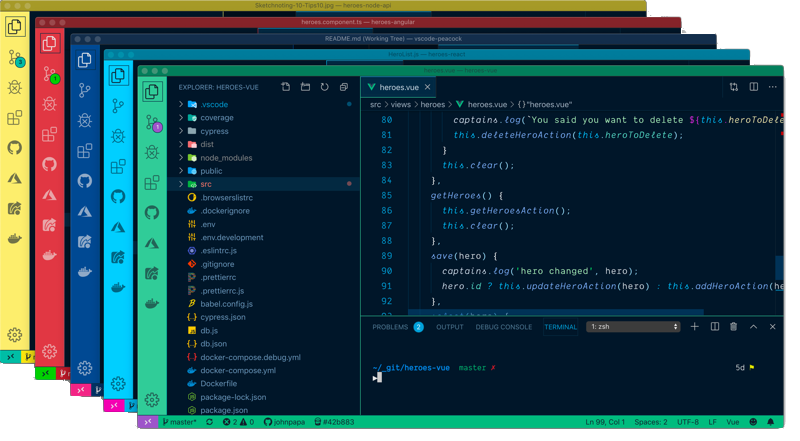
Subtly change the workspace color of your workspace. Ideal when you have multiple VS Code instances and you want to quickly identify which is which.
Installation
Launch VS Code Quick Open (Ctrl+P), paste the following command, and press enter.
Copied to clipboard
More Info

Peacock for Visual Studio Code

👁 Peacock

Subtly change the color of your Visual Studio Code workspace. Ideal when you have multiple VS Code instances, use VS Live Share, or use VS Code's Remote features, and you want to quickly identify your editor.

Read the extensive documentation here which includes a guide on how to use Peacock and a changelog

👁 Badge for version for Visual Studio Code extension johnpapa.vscode-peacock
👁 Installs
👁 Downloads
👁 Rating
👁 Live Share

👁 The MIT License
👁 All Contributors

👁 Build Status

Install

  1. Open Extensions sideBar panel in Visual Studio Code and choose the menu options for View → Extensions
  2. Search for Peacock
  3. Click Install
  4. Click Reload, if required

Documentation

Read the extensive documentation here which includes a guide on how to use Peacock and a changelog

Quick Usage

Let's see Peacock in action!

  1. Create/Open a VSCode Workspace (Peacock only works in a Workspace)
  2. Press F1 to open the command palette
  3. Type Peacock
  4. Choose Peacock: Change to a favorite color
  5. Choose one of the pre-defined colors and see how it changes your editor

Now enjoy exploring the rest of the features explained in the docs!

👁 Peacock windows

Resources

Credits

Inspiration comes in many forms. These folks and teams have contributed either through ideas, issues, pull requests, or guidance. Thank you!

Code of Conduct

Code of Conduct.

Problems or Suggestions

Open an issue here

Contributors

Contribution guidelines are located here

Thanks goes to these wonderful people (emoji key):

👁 Image

James Newell
⚠️
👁 Image

Julian
🤔
👁 Image

Oleg Solomka
💻 ⚠️
👁 Image

Joseph Rex
🎨
👁 Image

Sam Julien
🤔
👁 Image

Shayne Boyer
💻
👁 Image

Burke Holland
🤔
👁 Image

Jonathan Carter
💻
👁 Image

Ricardo Souza
💻
👁 Image

Kushal Pandya
💻
👁 Image

Erich Gamma
⚠️
👁 Image

Christian Nwamba
🤔
👁 Image

Matt Bierner
💻
👁 Image

Raymond Camden
🤔
👁 Image

Aaron Powell
🤔
👁 Image

tanhakabir
💻
👁 Image

Nate Drake
💻

This project follows the all-contributors specification. Contributions of any kind welcome!