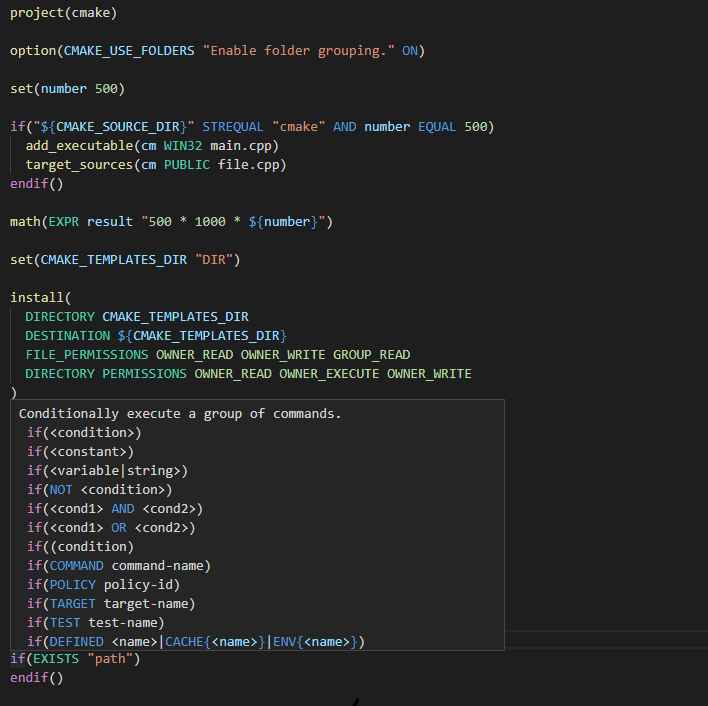
CMake Language Support
CMake Language Support implements all of your favorite code editor features and is currently available for Visual Studio Code. An interactive preview is available at https://josetr.github.io/cmake-language-support.
Please note that we do our best to get most of the command signatures and parameters by scanning the whole CMake Documentation but it's currently impossible to be 100% accurate due to the nature of the documentation.
👁 CI
Features
- Syntax Highlighting
- Auto Completion
- Quick Info
- Signature Help
- Syntax Errors / Warnings
- Format Document
- Format Selection
- Rename Symbol
- Comment Line / Block
- Document Symbols
- Document Highlights
- Folding Ranges
- Go to Definition
- Go to References
- Find All References
- Brace Completion
- Brace Matching
- Brace Surrounding
- Smart Indentation
Installing .NET 6 Runtime (required)
Automatic
Microsoft's .NET Install Tool for Extension Authors will be used to acquire a .NET Runtime automagically once the extension runs for the first time. If it fails, as seems to be the case for some users, please follow the manual installation instructions.
Manual
- Install .NET Runtime
- Set
cmake.languageSupport.dotnetPath to your dotnet executable path (usually C:/Program Files/dotnet/dotnet.exe on Windows)
Configuration
Format Options
| cmake.format.[option] |
false (default) |
true |
| spaceAfterCommandName |
message() |
message () |
| spaceInParentheses |
message(arg) |
message( arg ) |
FileAPI (Experimental)
Enables experimental use of https://cmake.org/cmake/help/git-stage/manual/cmake-file-api.7.html in order to provide more accurate results.
- Install Microsoft's CMake Tools extension
- Set
cmake.languageSupport.enableFileAPI to true.
Every time CMake Tools configures the active cmake project (usually when you save a CMakeLists.txt file), our cmake-file-api query will be executed and we will be able to:
Provide accurate results for:
- Targets
- Configurations
- Toolchains
Get the exact cmake files used by the cmake project and parse them all in order to:
- Search user-declared functions, macros, and variables in all files
- Enable the following features to work across all of the available files
- Find All References
- Go to Definition
- Workspace Symbols
- Auto Completion
- Signature Help
- Quick Info