
Azure Service Bus Configuration

Azure Service Bus is a messaging service from Microsoft Azure that allows for communication between decoupled systems. It offers a reliable and secure platform for asynchronous transfer of data and state. It supports a variety of messaging patterns, including queuing, publish/subscribe, and request/response.
With Service Bus, you can create messaging entities such as queues, topics, and subscriptions. Queues provide one-to-one messaging, where each message is consumed by a single receiver. Topics and subscriptions provide one-to-many messaging, where a message is delivered to multiple subscribers.
Service Bus also provides advanced features such as partitioning and auto-scaling, which allow for high availability and scalability. Additionally, it offers a dead letter queue, which is a special queue that stores undelivered or expired messages.
Configure Azure Service Bus
Section titled “Configure Azure Service Bus”To configure the Azure Service Bus transport, use the UsingAzureServiceBus method.
usingMassTransit;string connectionString ="Endpoint=sb://my-namespace.servicebus.windows.net/;SharedAccessKeyName=RootManageSharedAccessKey;SharedAccessKey=;services.AddMassTransit(x =>{x.AddServiceBusMessageScheduler();x.AddConsumer<AuditOrderCreatedConsumer>();x.UsingAzureServiceBus((context, cfg) =>{cfg.Host(connectionString);cfg.UseServiceBusMessageScheduler();cfg.ConfigureEndpoints(context));});});Service Bus host settings
Section titled “Service Bus host settings”| Property | Description |
|---|---|
| TokenCredential | Use a specific token-based credential, such as a managed identity token, to access the namespace. You can use the DefaultAzureCredential to automatically apply any one of several credential types. |
| TransportType | Change the transport type from the default (AMQP) to use WebSockets |
For example, to configure the transport type to use AMQP over Web Sockets:
cfg.Host(connectionString, h =>{h.TransportType=ServiceBusTransportType.AmqpWebSockets;});Service Bus transport options
Section titled “Service Bus transport options”All Azure Service Bus transport options can be configured using the .Host() method. The most commonly used settings can be configured via transport options.
services.AddOptions<AzureServiceBusTransportOptions>().Configure(options =>{// configure options manually, but usually bind them to a configuration section});| Property | Description |
|---|---|
| ConnectionString | The connection string |
Azure Managed Identity
Section titled “Azure Managed Identity”If you are using Azure Managed Identity, you can omit the credentials from the connection string and MassTransit will use the DefaultAzureCredential to
authenticate.
services.AddMassTransit(x =>{x.AddServiceBusMessageScheduler();x.UsingAzureServiceBus((context, cfg) =>{cfg.Host(new Uri("sb://my-namespace.servicebus.windows.net"));cfg.UseServiceBusMessageScheduler();cfg.ConfigureEndpoints(context));});});Using Service Bus Dead-letter Queues
Section titled “Using Service Bus Dead-letter Queues”MassTransit can be configured to use the built-in dead-letter queue instead moving messages to the _skipped or _error queues. Each can be configured independently.
To use the built-in dead-letter queue for all skipped and faulted messages on all receive endpoints:
services.AddMassTransit(x =>{x.AddConfigureEndpointsCallback((_, cfg) =>{if (cfg is IServiceBusReceiveEndpointConfigurator sb){sb.ConfigureDeadLetterQueueDeadLetterTransport();sb.ConfigureDeadLetterQueueErrorTransport();}});x.UsingAzureServiceBus((context, cfg) =>{cfg.Host(new Uri("sb://your-service-bus-namespace.servicebus.windows.net"));cfg.ConfigureEndpoints(context);});});Service Bus Emulator
Section titled “Service Bus Emulator”The Azure Service Bus Emulator can be used for local development. To use the emulator, specify the EmulatorHost method when configuring the bus.
services.AddMassTransit(x =>{x.UsingAzureServiceBus((context,cfg) =>{cfg.EmulatorHost();cfg.UseServiceBusMessageScheduler();});});Additional host configuration can be specified by passing a callback to the EmulatorHost method.
services.AddMassTransit(x =>{x.UsingAzureServiceBus((context,cfg) =>{cfg.EmulatorHost(h =>h.RetryLimit=3);cfg.UseServiceBusMessageScheduler();});});Configure Receive Endpoint Settings
Section titled “Configure Receive Endpoint Settings”| Property | Description |
|---|---|
| PrefetchCount | The number of unacknowledged messages that can be processed concurrently (default based on CPU count) |
| MaxConcurrentCalls | How many concurrent messages to dispatch (transport-throttled) |
| LockDuration | How long to hold message locks (max is 5 minutes) |
| MaxAutoRenewDuration | How long to renew message locks (maximum consumer duration) |
| MaxDeliveryCount | How many times the transport will redeliver the message on negative acknowledgment. This is different from retry, this is the transport redelivering the message to a receive endpoint before moving it to the dead letter queue. |
| RequiresSession | If true, a message SessionId must be specified when sending messages to the queue (see sessions) |
Using Service Bus Sessions
Section titled “Using Service Bus Sessions”Azure Service Bus supports sessions, which allow for guaranteed ordering of messages, and the ability to send and receive messages in a stateful manner.
Configure Session Settings
Section titled “Configure Session Settings”Session settings can be configured on receive endpoints and subscription endpoints.
| Property | Description |
|---|---|
| RequiresSession | Set to true |
| MaxConcurrentSessions | How many concurrent sessions to receive messages from (transport-throttled) |
| MaxConcurrentCallsPerSession | How many concurrent messages to dispatch from each session (transport-throttled) |
| SessionIdleTimeout | How long to wait to receive a message before abandoning the session for another |
Configure Batch Consumer Options
Section titled “Configure Batch Consumer Options”When using sessions with batch consumers, an Azure Service Bus specific method is available to configure the BatchOptions that ensures the batch options and
receive endpoint settings are applied consistently for in-order processing of sessions.
AddConsumer<MyBatchConsumer>(cfg =>{cfg.SetServiceBusSessionBatchOptions(o =>o.SetMessageLimitPerSession(8).SetMaxConcurrentSessions(4).SetSessionIdleTimeout(TimeSpan.FromSeconds(30)).SetTimeLimit(TimeSpan.FromSeconds(5)));});Batches will be grouped by SessionId
Configure Topic Options
Section titled “Configure Topic Options”An Azure Service Bus Topic is a messaging entity that allows for one-to-many messaging, where a message is delivered to multiple subscribers. Topics are built on top of Azure Service Bus Queues and provide additional functionality for publish/subscribe messaging patterns.
When a message is sent to a topic, it is automatically broadcast to all subscribers that have a subscription to that topic. Subscriptions are used to filter messages that are delivered to the subscribers. Subscribers can create multiple subscriptions to a topic, each with its own filter, to receive only the messages that are of interest to them.
Topics also provide a feature called Session-based messaging, which allows for guaranteed ordering of messages, and the ability to send and receive messages in a stateful manner.
Topics provide a robust and scalable messaging infrastructure for building distributed systems, where multiple services or systems can subscribe to a topic and receive messages that are relevant to them. Topics also support advanced features such as partitioning and auto-scaling, which allow for high availability and scalability.
To specify properties used when a topic is created, the publish topology can be configured during bus creation:
cfg.Publish<OrderSubmitted>(x =>{x.EnablePartitioning=true;});Configure topology conventions
Section titled “Configure topology conventions”PartitionKey
Section titled “PartitionKey”When publishing messages to an Azure Service Bus topic, you can use the PartitionKey property to specify a value that will be used to partition the messages across multiple topic partitions. This can be useful in situations where you want to ensure that related messages are always delivered to the same partition, and thus will be guaranteed to be processed in the order they were sent.
By setting a PartitionKey, all messages with the same key will be sent to the same partition, and thus will be received by consumers in the order they were sent. This is particularly useful when building distributed systems that require strict ordering of messages, such as event sourcing or stream processing.
Another use case for the PartitionKey is when you have a large number of messages and want to distribute them evenly across multiple partitions for better performance, this way the messages are load balanced across all the partitions.
It’s important to note that when you use a PartitionKey, it’s important to choose a key that will result in an even distribution of messages across partitions, to avoid overloading a single partition.
The PartitionKey on published/sent messages can be configured by convention, allowing the same method to be used for messages which implement a common interface type. If no common type is shared, each message type may be configured individually using various conventional selectors. Alternatively, developers may create their own convention to fit their needs.
When configuring a bus, the send topology can be used to specify a routing key formatter for a particular message type.
publicrecordSubmitOrder{publicstring CustomerId { get; init; }public Guid TransactionId { get; init; }}cfg.Send<SubmitOrder>(x =>{x.UsePartitionKeyFormatter(context =>context.Message.CustomerId);});SessionId
Section titled “SessionId”When publishing messages to an Azure Service Bus Topic, you can use the SessionId property to specify a value that will be used to group messages together in a session. This can be useful in situations where you want to ensure that related messages are always delivered together, and thus will be guaranteed to be processed in the order they were sent.
A session is a logical container for messages, and all messages within a session have a guaranteed order of delivery. This means that messages with the same SessionId will be delivered in the order they were sent, regardless of the order they were received by the topic.
A common use case for sessions is when you have a set of related messages that need to be processed together. For example, if you are sending a series of commands to control a device, you would want to ensure that the commands are delivered in the order they were sent and that all related commands are delivered together.
Another use case for sessions is when you have a large number of messages and want to ensure that each consumer processes the messages in a specific order.
It’s important to note that when you use sessions, the consumers must be able to process the messages in the order they were sent, otherwise messages might get stuck in the session and cause delays.
The SessionId on published/sent messages can be configured by convention, allowing the same method to be used for messages which implement a common interface type. If no common type is shared, each message type may be configured individually using various conventional selectors. Alternatively, developers may create their own convention to fit their needs.
When configuring a bus, the send topology can be used to specify a routing key formatter for a particular message type.
publicrecordUpdateUserStatus{public Guid UserId { get; init; }publicstring Status { get; init; }}cfg.Send<UpdateUserStatus>(x =>{x.UseSessionIdFormatter(context =>context.Message.UserId);});Global Topology
Section titled “Global Topology”To configure transport-specific topology conventions at a global level using GlobalTopology, the appropriate conventions must be added. For example, to
globally configure a SessionId formatter for a base interface on a message contract:
GlobalTopology.Send.TryAddConvention(new SessionIdSendTopologyConvention());GlobalTopology.Send.TryAddConvention(new PartitionKeySendTopologyConvention());GlobalTopology.Send.UseSessionIdFormatter<ICanHasSessionId>(x =>x.Message.SessionId.ToString());Configure a Subscription Endpoint
Section titled “Configure a Subscription Endpoint”In Azure, topics and topic subscriptions provide a mechanism for one-to-many communication (versus queues that are designed for one-to-one). A topic
subscription acts as a virtual queue. To subscribe to a topic subscription directly the SubscriptionEndpoint should be used:
cfg.SubscriptionEndpoint<MessageType>("subscription-name", e =>{e.ConfigureConsumer<MyConsumer>(provider);})Note that a topic subscription’s messages can be forwarded to a receive endpoint (an Azure Service Bus queue), in the following way. Behind the scenes MassTransit is setting up Service Bus Auto-forwarding between a topic subscription and a queue.
cfg.ReceiveEndpoint("input-queue", e =>{e.Subscribe("topic-name");e.Subscribe<MessageType>();})The properties of the topic subscription may also be configured:
cfg.ReceiveEndpoint("input-queue", e =>{e.Subscribe("topic-name", x =>{x.AutoDeleteOnIdle=TimeSpan.FromMinutes(60);});})Subscription Filters
Section titled “Subscription Filters”MassTransit supports the configuration of subscription rules and filters, which can be used to filter messages as they are delivered to either the subscription endpoint or forwarded to the receive endpoint.
To specify a subscription filter:
cfg.ReceiveEndpoint("input-queue", e =>{e.Subscribe("topic-name", x =>{x.Filter=new SqlRuleFilter("1 = 1");});})Saga State Machine Event Filter
Section titled “Saga State Machine Event Filter”This is an advanced scenario in which a saga state machine has an event that needs to filter messages from the topic via the subscription.
First, configure the event, which is defined in the saga state machine, so that it does not configure the consume topology.
publicclassFilteredSagaStateMachine :MassTransitStateMachine<FilteredSaga>{publicFilteredSagaStateMachine(){Event(() => FilteredEvent, x =>x.ConfigureConsumeTopology=false);}public Event<Filtered> FilteredEvent { get; }}Note that this may cause the saga state machine to be difficult to unit test, since events will no longer be automatically routed to the saga’s receive endpoint.
Next, add a saga definition for the saga and explicitly subscribe to the event type
publicclassFilteredSagaDefinition :SagaDefinition<FilteredSaga>{protectedvirtualvoidConfigureSaga(IReceiveEndpointConfigurator endpointConfigurator,ISagaConfigurator<FilteredSaga> sagaConfigurator){if(endpointConfigurator is IServiceBusReceiveEndpointConfigurator sb){sb.Subscribe<Filtered>("subscription-name", x =>{x.Rule=new CreateRuleOptions("Only47", new SqlRuleFilter("ClientId = 47"));});}}}Finally, add the saga state machine and the definition when configuring MassTransit.
services.AddMassTransit(x =>{x.AddSagaStateMachine<FilteredSagaStateMachine, FilteredSaga, FilteredSagaDefinition>();});Default Broker Topology
Section titled “Default Broker Topology”Two commands and events are used in this example.
These are the event contracts for a consumer that receives files from a customer:
namespaceAcme;publicinterface FileReceived{Guid FileId { get; }DateTime Timestamp { get; }Uri Location { get; }}publicinterface CustomerDataReceived{DateTime Timestamp { get; }string CustomerId { get; }string SourceAddress { get; }Uri Location { get; }}Here is the command contract for processing a file that was received.
namespaceAcme;publicinterface ProcessFile{Guid FileId { get; }Uri Location { get; }}The above contracts are used by the consumers to receive messages. From a publishing or sending perspective, two classes are created by the event producer and the command sender which implement these interfaces.
namespaceAcme;publicrecordFileReceivedEvent :FileReceived,CustomerDataReceived{public Guid FileId { get; init; }public DateTime Timestamp { get; init; }public Uri Location { get; init; }publicstring CustomerId { get; init; }publicstring SourceAddress { get; init; }}And the command class:
namespaceAcme;publicrecordProcessFileCommand :ProcessFile{public Guid FileId { get; init; }public Uri Location { get; init; }}The consumers for these message contracts are shown below:
namespaceAcme;classFileReceivedConsumer :IConsumer<FileReceived>{}classCustomerAuditConsumer :IConsumer<CustomerDataReceived>{}classProcessFileConsumer :IConsumer<ProcessFile>{}These are the topics and queues for the example above when Sending a message:
👁 Send topology for Azure Service Bus

Publish
Section titled “Publish”These are the topics and queues for the example above when Publishing a polymorphic message that uses inheritance:
👁 Publish topology for Azure Service Bus

These are the topics and queues used when messages fail. The failing message gets forwarded to an _error queue by default. The following diagram shows which
topics and queues are used when a message fails to be processed and is deadlettered for the example above.
👁 Fault topology for Azure Service Bus

Go to Exceptions to learn more on exception and faults
Retry messages
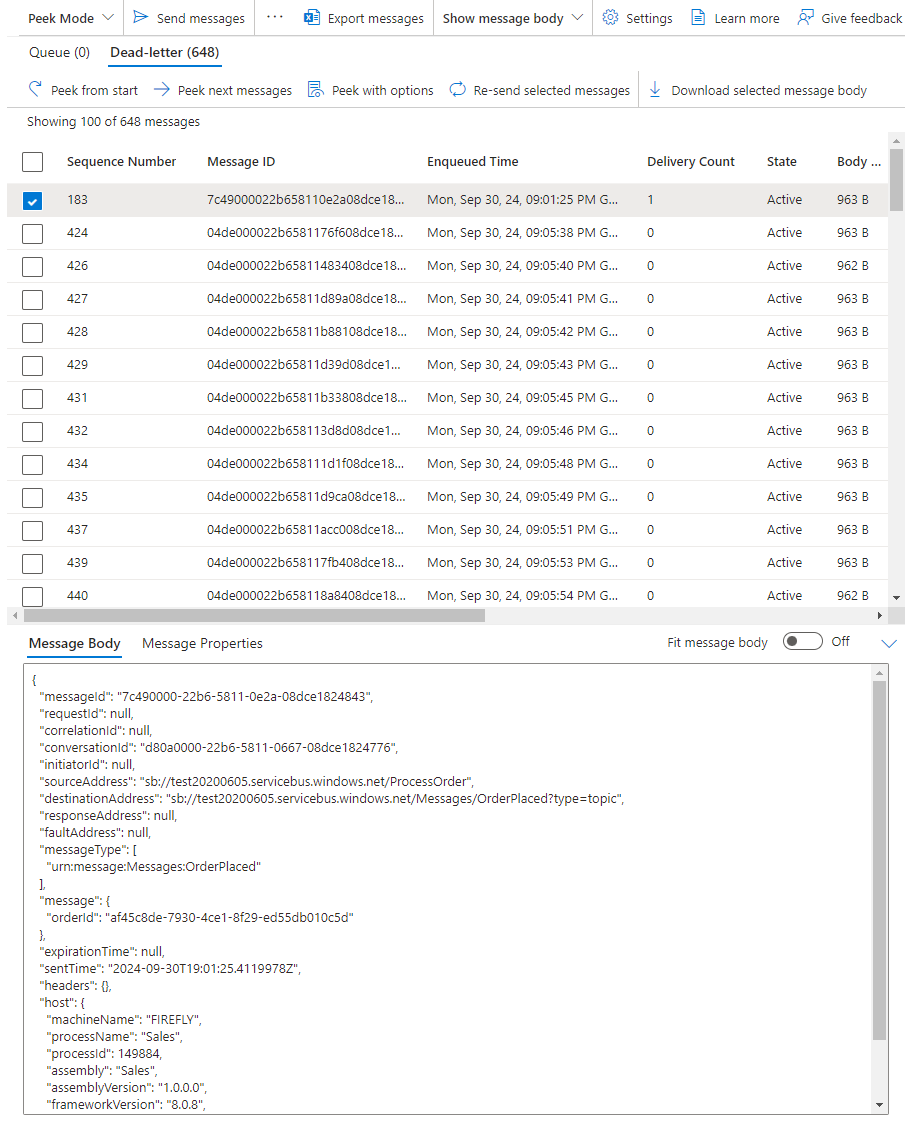
Section titled “Retry messages”The Azure Service Bus Portal provides a method to retry faulted messages by doing the following:
- Open the Service Bus namespace
- Select the queue that has failed messages
- Select ‘Service Bus Explorer’
- Select the ‘Dead-letter’ tab
This will open a view of the dead-letter queue and provides an option to select one or more messages. The selected messages can be retried by selecting
Re-send selected messages
Microsoft References
Section titled “Microsoft References”There are several useful links to Microsoft documentation for Azure Service Bus related to how MassTransit integrates with it.
MassTransit configures topic subscriptions using the ForwardTo property to route messages a queue and/or other topics. There are aspects related to
AutoDeleteOnIdle that should be understood to avoid reaching the quota limit.
MassTransit can be configured to use a dead-letter queue for failed messages (instead of the default _error queue).