
Vector search
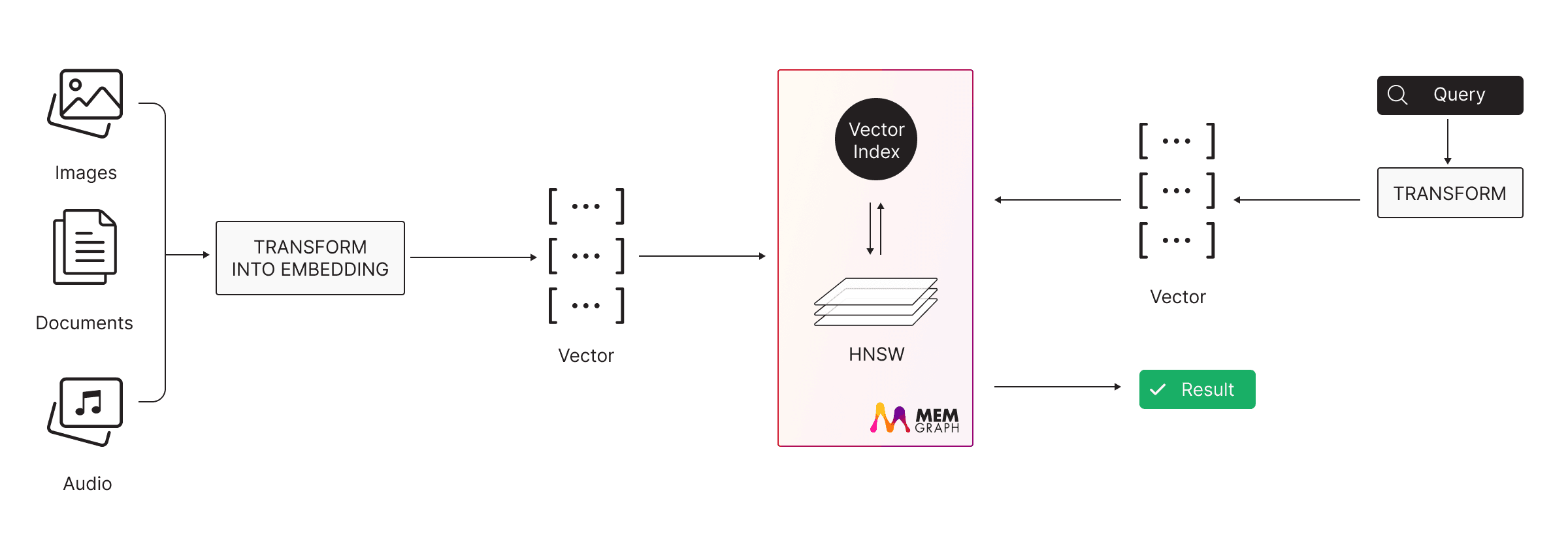
Vector search, also known as vector similarity search or nearest neighbor
search, is a technique used to find the most similar items in a collection of
data based on their vector representations. Memgraph
implements a READ_UNCOMMITTED isolation level specifically for vector indices.
While the main database can operate at any isolation level, the vector index
specifically operates at READ_UNCOMMITTED. This design maintains all
transactional guarantees at the database level. Only the vector index
operations use this relaxed isolation level, ensuring the database’s ACID
properties remain intact for all other operations.
Memgraph supports vector indexes on both nodes and edges. Both use the same single-store pattern: the vector value is stored only in the vector index backend (USearch), and the property store keeps only a reference (a vector index ID). This avoids duplicating vector data between the property store and the index. The creation syntax (CREATE VECTOR INDEX vs. CREATE VECTOR EDGE INDEX) and the search procedure (vector_search.search() vs. vector_search.search_edges()) differ between the node and the edge variant; DROP VECTOR INDEX and SHOW VECTOR INDEX INFO work for both.
To configure vector search as described in the example, please use the latest Memgraph version.
Vector search is commonly used as a retrieval technique in RAG systems to find entities based on semantic similarity rather than exact matches.
Create vector index
To run vector search, first create a vector index.
Vector index on nodes
Vector indexes on nodes are created with the CREATE VECTOR INDEX command. You need to:
- Provide the index name
- Specify the label and property it applies to
- Define the vector index configuration
Example:
CREATE VECTOR INDEX vector_index_name ON :Label(embedding) WITH CONFIG {"dimension": 256, "capacity": 1000};dimension and capacity are mandatory.
Vector index on edges
To create a vector index on edges, use:
CREATE VECTOR EDGE INDEX vector_index_name ON :EDGE_TYPE(embedding) WITH CONFIG {"dimension": 256, "capacity": 1000};Index on multiple labels or edge types
By default, a vector index targets a single label (for nodes) or a single edge
type (for edges). You can also index a combination of labels or edge types, or
every entity that has the property regardless of its labels. The matching mode is
determined by the shape of the ON clause:
| Syntax | Mode | Applies to | Semantics |
|---|---|---|---|
:Label(property) | single | nodes and edges | The default. Indexes entities that have exactly that one label or edge type. |
:Label1|Label2(property) | any | nodes and edges | Indexes entities that have any of the listed labels or edge types. |
:Label1&Label2(property) | all | nodes only | Indexes nodes that have all of the listed labels. Not supported for edges (see below). |
(property) | wildcard | nodes and edges | Indexes every entity that has the property, with no label or edge-type filter. |
The colon before each name after the first one is optional, so :Label1|Label2
and :Label1|:Label2 are equivalent.
For nodes, all four shapes are available:
// any of the listed labels
CREATE VECTOR INDEX or_index ON :Article|Blog(embedding) WITH CONFIG {"dimension": 256, "capacity": 1000};

// all of the listed labels
CREATE VECTOR INDEX and_index ON :Article&Published(embedding) WITH CONFIG {"dimension": 256, "capacity": 1000};

// every node that has the property
CREATE VECTOR INDEX wildcard_index ON (embedding) WITH CONFIG {"dimension": 256, "capacity": 1000};
For edges, the single, any (|) and wildcard shapes work the same way, but the
all (&) shape is rejected with an error, because an edge always has exactly one
type and could never match more than one:
CREATE VECTOR EDGE INDEX or_edge_index ON :KNOWS|LIKES(embedding) WITH CONFIG {"dimension": 256, "capacity": 1000};
CREATE VECTOR EDGE INDEX wildcard_edge_index ON (embedding) WITH CONFIG {"dimension": 256, "capacity": 1000};
A node or edge can match several overlapping indexes at once (for example, a
wildcard index and a label-specific index on the same property). Such an entity is
kept in every matching index, and inserts, updates and deletes are propagated to
all of them. When a node loses one of several labels that qualified it for an
any index, it remains in the index as long as it still has another matching
label.
In the output of SHOW INDEX INFO and SHOW VECTOR INDEX INFO,
the label column shows the index filter: * for a wildcard index, :Label for
a single label or edge type, :Label1|Label2 for an any index, and
:Label1&Label2 for an all index.
Configuration parameters
The following options apply to vector indexes on both nodes and edges:
dimension: int➡ The dimension of vectors in the index.capacity: int➡ Minimum capacity for the vector index, which prefers powers of two and is adjusted internally for optimal performance but will be at least the given value.metric: string (default=l2sq)➡ The similarity metric used for the vector search. The default value isl2sq(squared Euclidean distance).resize_coefficient: int (default=2)➡ When the index reaches its capacity, it resizes by multiplying the current capacity by this coefficient, if sufficient memory is available. If resizing fails due to memory limitations, an exception will be thrown. Default value is2.scalar_kind: string (default=f32)➡ The scalar kind used to store each vector component. Smaller types reduce memory usage but may decrease precision.
Using parameters for configuration
The WITH CONFIG map accepts query parameters, both for the whole map and for individual values. This lets a client supply the configuration at query time without rebuilding the Cypher string.
Pass the entire config as a parameter:
CREATE VECTOR INDEX idx ON :Label(embedding) WITH CONFIG $config;with $config bound by the client to a map such as {dimension: 128, capacity: 1000, metric: "cos"}.
Or parameterize individual values:
CREATE VECTOR INDEX idx ON :Label(embedding) WITH CONFIG {"dimension": $dim, "capacity": $cap};Both forms work for CREATE VECTOR INDEX and CREATE VECTOR EDGE INDEX.
Using a function for configuration
Instead of a static map literal, you can pass a query module function that returns the configuration map. This lets you centralize index configurations and reuse them across queries.
Any @mgp.function that returns a map containing at least the mandatory dimension and capacity fields can be used.
For example, given a query module vector_index_config defined as:
import mgp

@mgp.function
def default_config() -> mgp.Map:
 return {"dimension": 128, "capacity": 1000}

@mgp.function
def config(dimension: int, capacity: int, metric: str = "l2sq", scalar_kind: str = "f32") -> mgp.Map:
 return {"dimension": dimension, "capacity": capacity, "metric": metric, "scalar_kind": scalar_kind}
You can use these functions when creating vector indexes:
CREATE VECTOR INDEX idx ON :Label(embedding) WITH CONFIG vector_index_config.default_config();CREATE VECTOR INDEX idx ON :Label(embedding) WITH CONFIG vector_index_config.config(128, 1000, "cos");The function is evaluated at index-creation time. Both the node and edge index variants support this syntax.
Run vector search
To run vector search, call the vector_search query module: use vector_search.search() for a vector index on nodes and vector_search.search_edges() for a vector index on edges.
Unlike other index types, the query planner currently does not utilize vector indices.
Show vector indices
To retrieve information about vector indices, use vector_search.show_index_info() procedure.
Additionally, the same information can be retrieved with the SHOW VECTOR INDEX INFO query.
Output:
index_name: string➡ The name of the vector index.label: string➡ The label (or edge type) filter the vector index is defined on. For multi-label, edge-type or wildcard indexes this shows the filter shape:*(wildcard),:Label(single),:Label1|Label2(any), or:Label1&Label2(all).property: string➡ The name of the property on which the vector index is indexed.dimension: int➡ The dimension of vectors in the index.capacity: int➡ The capacity of the vector index.metric: string➡ Similarity metric used for vector search.size: int➡ The number of entries in the vector index.scalar_kind: string➡ The scalar kind used for each vector element.index_type: string➡ The type of the index. For a vector index on nodes, the output islabel+property_vector; for a vector index on edges, it isedge-type+property_vector.
Usage:
CALL vector_search.show_index_info() YIELD * RETURN *;or
SHOW VECTOR INDEX INFO;Query vector index
Use vector_search.search() for a vector index on nodes and vector_search.search_edges() for a vector index on edges. These procedures return the closest vectors to a query vector based on the index’s similarity metric.
Input:
index_name: string➡ The vector index to search.limit: int➡ The number of nearest neighbors to return.search_query: List[float|int]➡ The vector to query in the index. Providing a different type will result in an exception.
Output:
Vector index on nodes:
distance: double➡ The distance from the node to the query.node: Vertex➡ A node in the vector index matching the given query.similarity: double➡ The similarity of the node and the query.
Vector index on edges:
distance: double➡ The distance from the edge to the query.edges: Relationship➡ An edge in the vector index matching the given query.similarity: double➡ The similarity of the edge and the query.
Usage:
Vector index on nodes:
CALL vector_search.search("index_name", 1, [2.0, 2.0]) YIELD * RETURN *;Vector index on edges:
CALL vector_search.search_edges("index_name", 1, [2.0, 2.0]) YIELD * RETURN *;Similarity metrics
The following table lists the supported similarity metrics for vector search. These
metrics determine how similarities between vectors are calculated. Default type
for the metric is l2sq (squared Euclidean distance).
| Metric | Description |
|---|---|
ip | Inner product (dot product) |
cos | Cosine similarity |
l2sq | Squared Euclidean distance |
pearson | Pearson correlation coefficient |
haversine | Haversine distance (suitable for geographic data) |
divergence | A divergence-based metric |
hamming | Hamming distance |
tanimoto | Tanimoto coefficient |
sorensen | Sørensen-Dice coefficient |
jaccard | Jaccard index |
Cosine similarity
You can calculate cosine similarity directly in queries using the vector_search.cosine_similarity() function. This is useful when you need to compute similarity between vectors without creating a vector index.
Usage:
RETURN vector_search.cosine_similarity([1.0, 2.0], [1.0, 3.0]) AS similarity;Scalar kind
The scalar_kind setting determines the data type used for each vector element in the index (USearch). By default, the scalar kind is set to f32 (32-bit floating point), which provides a good balance between precision and memory usage.
Alternative options, such as f16 for lower memory usage, allow you to fine-tune this tradeoff based on your specific needs.
| Scalar | Description |
|---|---|
b1x8 | Binary format (1 bit per element, stored in 8-bit chunks). |
u40 | Unsigned 40-bit integer. |
uuid | Universally unique identifier (UUID). |
bf16 | 16-bit floating point (bfloat16). |
f64 | 64-bit floating point (double). |
f32 | 32-bit floating point (float). |
f16 | 16-bit floating point. |
f8 | 8-bit floating point. |
u64 | 64-bit unsigned integer. |
u32 | 32-bit unsigned integer. |
u16 | 16-bit unsigned integer. |
u8 | 8-bit unsigned integer. |
i64 | 64-bit signed integer. |
i32 | 32-bit signed integer. |
i16 | 16-bit signed integer. |
i8 | 8-bit signed integer. |
Monitor vector index memory
Memgraph tracks vector index memory separately from the rest of the graph data. You can inspect both from SHOW STORAGE INFO:
SHOW STORAGE INFO;Two instance-level fields are relevant:
query+graph_memory_tracked— process-wide memory used by graph structures (vertices, edges, properties) and query execution.vector_index_memory_tracked— process-wide memory used by vector index embeddings stored in the index backend.
Together, these two fields sum to memory_tracked (the total tracked allocation). The instance-level --memory-limit applies to the combined total: if inserting a vector would exceed the limit, Memgraph throws a Memory limit exceeded error.
To inspect the same split for a single database, use SHOW STORAGE INFO ON CURRENT DATABASE (or ON DATABASE <name>) and read its per-database graph_memory_tracked, query_memory_tracked and vector_index_memory_tracked fields.
With the AI Platform license, the license-imposed memory limit gates only graph and query memory (query+graph_memory_tracked). Vector index memory grows up to the system --memory-limit, so embedding storage does not consume the licensed graph capacity.
Deleting vertices or removing a vector property from nodes does not free vector_index_memory_tracked. However, that memory is reused when new vectors are inserted into the same index, so the reserved capacity is not wasted. Memory is fully released only when the entire index is dropped with DROP VECTOR INDEX.
Drop vector index
Vector indices are dropped with the DROP VECTOR INDEX command. You need to give the name of the index to be deleted.
DROP VECTOR INDEX vector_index_name;Drop cost: When you drop a vector index, Memgraph must move all vector data from USearch back into the property store. Every affected node’s or edge’s property is rewritten from a vector index ID to the full vector. This can be slow (one write per indexed entry) and memory costly (float components are stored in the property store at the precision set by --storage-floating-point-resolution-bits, default 64-bit, increasing property store size).
The same effect occurs when you remove a label from a node that had a vector index on that label: if no other vector index references that property, the vector is restored from USearch to the property store. Plan accordingly when dropping indexes or changing labels on large datasets.
Example
Here is a simple example of vector search usage.
Run Memgraph and Lab
First run Memgraph MAGE with the vector search enabled and configured with the following Docker command:
docker run -p 7687:7687 -p 7444:7444 memgraph/memgraph-mage:latestThen, run Memgraph Lab, a visual user interface:
docker run -p 3000:3000 memgraph/lab:latest You can also run Memgraph’s CLI, mgclient, directly from the Memgraph MAGE Docker container.
Create vector index
After Memgraph MAGE and Lab have been started, head over to the Query execution tab in Memgraph Lab and run the following query to create a vector index on nodes:
CREATE VECTOR INDEX index_name ON :Node(vector) WITH CONFIG {"dimension": 2, "capacity": 1000, "metric": "cos", "resize_coefficient": 2, "scalar_kind": "f16"};Here metric and scalar_kind use values from the similarity metrics and scalar kind tables.
Then, run the following query to inspect vector index:
CALL vector_search.show_index_info() YIELD * RETURN *;We can get the same information with the following command:
SHOW VECTOR INDEX INFO;The above query will result with:
+----------+-----------+-------------+---------+----------+------+-------------+-------------------------+
| capacity | dimension | index_name | label | property | size | scalar_kind | index_type |
+----------+-----------+-------------+---------+----------+------+-------------+-------------------------+
| 2048 | 2 | "index_name"| ":Node" | "vector" | 0 | "f16" | "label+property_vector" |
+----------+-----------+-------------+---------+----------+------+-------------+-------------------------+
Create a node
The next step is to create a node, with Node label and vector property, so it’s
properly added to the vector index.
CREATE (n:Node {vector: [2, 2]});To confirm that the above node has been indexed, let’s check the vector index info again:
CALL vector_search.show_index_info() YIELD * RETURN *;The above query results in:
+----------+-----------+-------------+---------+----------+------+-------------+-------------------------+
| capacity | dimension | index_name | label | property | size | scalar_kind | index_type |
+----------+-----------+-------------+---------+----------+------+-------------+-------------------------+
| 2048 | 2 | "index_name"| ":Node" | "vector" | 1 | "f16" | "label+property_vector" |
+----------+-----------+-------------+---------+----------+------+-------------+-------------------------+
We can see the size of the index changed, due to one new node.
Query vector index
Let’s search for the similar nodes. Here is an example query to do that:
CALL vector_search.search("index_name", 1, [2.0, 2.0]) YIELD * RETURN *;We expect to get the most similar node to vector [2.0, 2.0]:
+--------------------------+--------------------------+--------------------------+
| distance | node | similarity |
+--------------------------+--------------------------+--------------------------+
| -1.19209e-07 | (:Node {vector: [2, 2]}) | 1 |
+--------------------------+--------------------------+--------------------------+
The distance is 0 because the two vectors that are being compared with Cosine similarity are the same, leading to the similarity value of 1.
Add more nodes and expand search
Let’s add a couple of more nodes:
CREATE (n:Node {vector: [1, 2]});
CREATE (n:Node {vector: [1, 1]});
CREATE (n:Node {vector: [0, 1]});
CREATE (n:Node {vector: [0, 0]});
Let’s see the status of the index now:
CALL vector_search.show_index_info() YIELD * RETURN *;The size is now 5, due to 4 additional nodes:
+----------+-----------+-------------+---------+----------+------+-------------+-------------------------+
| capacity | dimension | index_name | label | property | size | scalar_kind | index_type |
+----------+-----------+-------------+---------+----------+------+-------------+-------------------------+
| 2048 | 2 | "index_name"| ":Node" | "vector" | 5 | "f16" | "label+property_vector" |
+----------+-----------+-------------+---------+----------+------+-------------+-------------------------+
Let’s again search for the top five similar nodes to the vector [2.0, 2.0] (to compare it to all nodes we have):
CALL vector_search.search("index_name", 5, [2.0, 2.0]) YIELD * RETURN *;Notice how we changed the limit to get the top five nearest neighbors. Here are the results:
+--------------------------+--------------------------+--------------------------+
| distance | node | similarity |
+--------------------------+--------------------------+--------------------------+
| -1.19209e-07 | (:Node {vector: [1, 1]}) | 1 |
| -1.19209e-07 | (:Node {vector: [2, 2]}) | 1 |
| 0.0513167 | (:Node {vector: [1, 2]}) | 0.948683 |
| 0.292893 | (:Node {vector: [0, 1]}) | 0.707107 |
| 1 | (:Node {vector: [0, 0]}) | 0 |
+--------------------------+--------------------------+--------------------------+
Since cosine similarity was used as a metric, we have two nodes with the same similarity to the query vector: [1, 1] and [2, 2].