|
VOOZH | about |
|
VOOZH | about |
23 August 2021
Excel is the most successful programming environment in the world. No other program has had more people write code in it than Excel (or more generally spreadsheet software). It’s deceptive, because you can write all sorts of things, but even =SUM(A1:A10) is code!
This also means that it’s a real wild west of both visual design and coding style. As a result, whenever someone sends me an Excel model, I load it up in Google Sheets and then click around to figure out how they put it together, what’s a function, and what’s an input (i.e., the values I’m meant to change). A really thoughtfully built model will have all the inputs styled in the same way, so you can quickly see which numbers are for changing and which get computed for you, but in my own experience this is not super common.
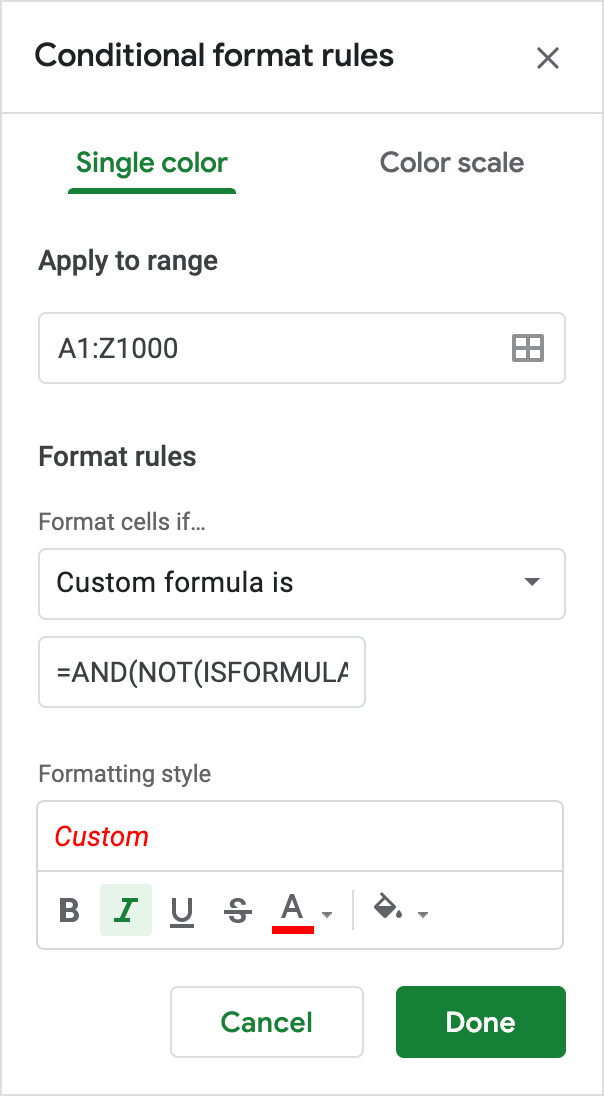
Here’s a quick way to highlight potential inputs in a Google Sheets model by yourself!
=AND(NOT(ISFORMULA(A1)), ISNUMBER(A1))👁 conditional formatting example
Tada, that’s it! Some extra notes:
ISNUMBER specifically matches numbers, which includes dates, but does not include numbers in quotes, e.g., ISNUMBER("23") evaluates to false.I hope this helps you out the next time someone sends you an Excel model!
is a software engineer living in NYC who is building
Superset 💪
and also created
GoFullPage 📸
more »
github · soundcloud · rss
mrcoles.com © 2026