
Question
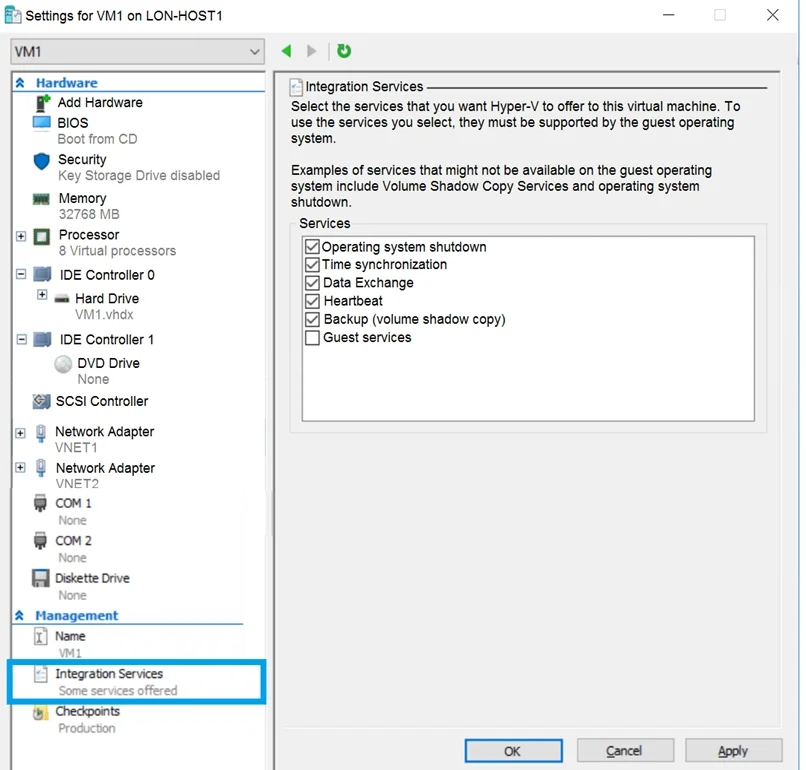
You have an Azure subscription. You have an on-premises virtual machine named VM1. The settings for VM1 are shown in the exhibit. You need to ensure that you can use the disks attached to VM1 as a template for Azure virtual machines. What should you modify on VM1?
Exhibits
Options
- Athe memory
- Bthe network adapters
- Cthe hard drive
- Dthe processor
- EIntegration Services
How the community answered
(15 responses)- A13% (2)
- B7% (1)
- C73% (11)
- E7% (1)
Explanation
From the exhibit we see that the disk is in the VHDX format. Before you upload a Windows virtual machine (VM) from on-premises to Microsoft Azure, you must prepare the virtual hard disk (VHD or VHDX). Azure supports only generation 1 VMs that are in the VHD file format and have a fixed sized disk. The maximum size allowed for the VHD is 1,023 GB. You can convert a generation 1 VM from the VHDX file system to VHD and from a dynamically expanding disk to fixed-sized. https://docs.microsoft.com/en-us/azure/virtual-machines/windows/prepare-for-upload-vhd-image
Community Discussion
No community discussion yet for this question.