
Question
Exhibits
Answer Area
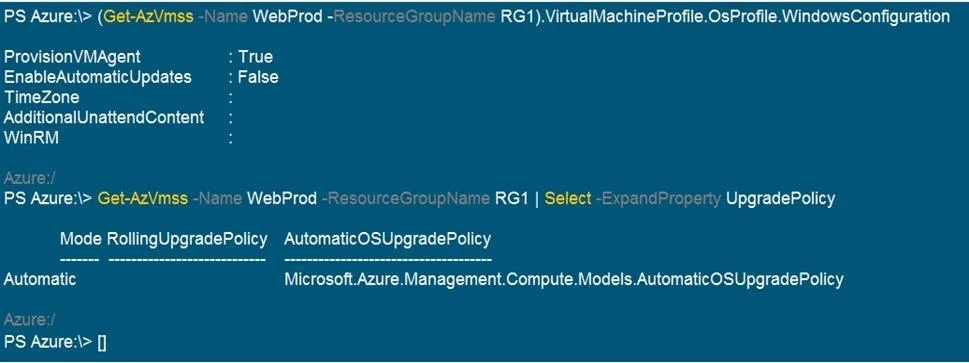
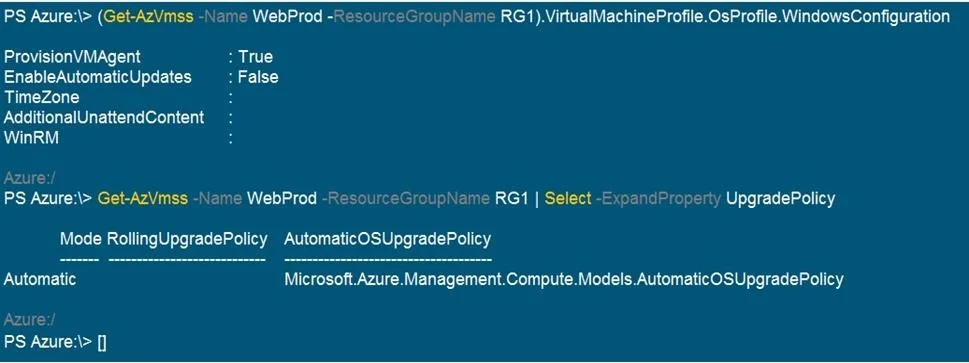
- ProvisionVMAgent is configured as:TrueTrueFalse
- EnableAutomaticUpdates is configured as:FalseTrueFalse
- The RollingUpgradePolicy mode is:AutomaticAutomaticManualRolling
- The AutomaticOSUpgradePolicy configured is:Microsoft.Azure.Management.Compute.Models.AutomaticOSUpgradePolicyMicrosoft.Azure.Management.Compute.Models.AutomaticOSUpgradePolicyManualOSUpgradePolicyNoOSUpgradePolicy
Explanation
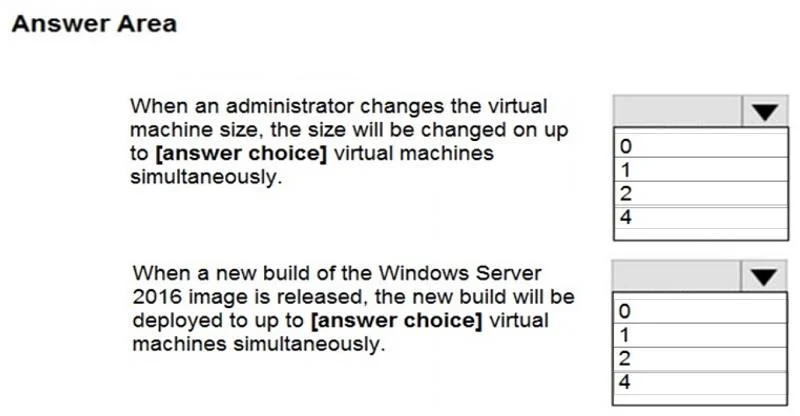
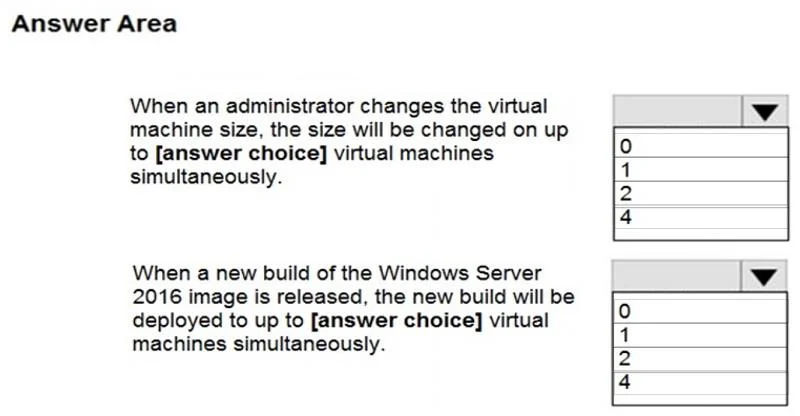
Because the VMSS Upgrade Policy is set to Automatic, manual model changes (like VM size) apply to all instances simultaneously, but Automatic OS Upgrades are not supported and will not deploy automatically.
Approach. For the first drop-down, select 4. The UpgradePolicy mode is set to Automatic. Under this mode, any manual updates made to the scale set model (such as changing the VM instance size) are immediately and simultaneously applied to all existing virtual machine instances. Since the prompt states there are 4 instances, up to 4 VMs will be updated at the same time.
For the second drop-down, select 0. The scenario describes the Automatic OS Image Upgrade feature ('When a new build... is released'). According to Microsoft documentation, Automatic OS Image Upgrades require the scale set's UpgradePolicy.Mode to be explicitly set to Rolling. Because the mode is currently Automatic, the OS image upgrade feature is not supported and will not automatically trigger. Therefore, 0 virtual machines will be updated automatically when a new build is released.
Common mistakes.
- common_mistake. A very common mistake (shown in the provided dump screenshot) is selecting '1' for the second box. People often assume the feature is enabled and calculate a default rolling batch size of 20% (20% of 4 VMs = ~1 VM). However, this completely overlooks that the
UpgradePolicyisAutomaticrather thanRolling, meaning the Automatic OS Upgrade feature is disabled by design. Additionally,EnableAutomaticUpdates: Falseonly disables in-guest Windows Update patching, which is actually a requirement for OS image upgrades, but doesn't override the strict need for the 'Rolling' policy.
Concept tested. Azure Virtual Machine Scale Sets (VMSS) Upgrade Policies, Automatic Model Updates, and Automatic OS Image Upgrades.
Topics
Community Discussion
No community discussion yet for this question.