For a unified experience, please go to the GitHub Issues to ask question, report bugs, and ask for features.
1. INTRODUCTION
1.1 Preface
About
This document aims to provide organized content about how to build a OData V4 service using ASP.NET Web API for OData. It’s more than just a getting started guidance and is more systematic than the samples.
Version
This is the first version of this document written in April, 2015.
Targetted audience
This document fits best the readers who has a relative good knowledge of OData (e.g. knowing the OData primitive and structured types, knowing the basic OData URL conventions, knowing the basic OData features such as operations, queries and so on) and would like to explore how some advanced scenarios can be implemented using Web API for OData.
Beginners to OData or Web API for OData can also leverage this document as a structured way to learn. But it’s strongly recommended to read the Getting Started tutorials on OData.org to get a grasp of OData concepts before reading this doc.
This document also assumes that the readers know how to create projects in Visual Studio and know how to install packages using the Nuget Package Manager. It also assumes they have knowledge in C# programming and are not unfamiliar with concepts like classes, properties, methods, and so on.
Structure of this document
This document starts with a tutorial about how a simplest OData V4 service can be written using ASP.NET Web API for OData. Then it steps into the section about how OData models can be built in different ways. After that, OData routing is introduced in details followed by a description of OData feature implementation. Finally, it talks about security and customization of the OData V4 service.
Let’s get started by creating a simple OData V4 service. It has one entity set Products, one entity type Product. Product has two properties ID and Name, with ID being an integer and Name being a string. The service is read only. The only data clients can get besides the service document and metadata document, is the Products entity set.
a. Create the Visual Studio project
In Visual Studio, create a new C# project from the ASP.NET Web Application template. Name the project “ODataService”.
In the controller, we defined a List<Product> object which has one product element. It’s considered as a in-memory storage of the data of the OData service.
We also defined a Get method that returns the list of products. The method refers to the handling of HTTP GET requests. We’ll cover that in the sections about routing.
e. Configure the OData Endpoint
Open the file App_Start/WebApiConfig.cs. Replace the existing Register method with the following code:
Start the OData service by running the project and open a browser to consume it. You should be able to get access to the service document at http://host/service/ in which http://host/service/ is the root path of your service. The metadata document can be accessed at GET http://host/service/$metadata and the products at GET http://host/service/Products.
2. DEFINING THE MODEL
2.1 Introduction to the model builders
The data model is the basis of an OData service. OData service uses an abstract data model called Entity Data Model (EDM) to describe the exposed data in the service. OData client can issue a GET request to the root URL of the OData service with $metadata to get an XML representation of the service’s data model.
In Microsoft ASP.NET Web API 2.2 for OData v4.0, to build a data model for OData service is to create an IEdmModel object. There are three ways to build an EDM model in Web API OData:
Explicit Edm Model Builder
Implicit, non-convention model builder or fluent API
Implicit, convention model builder.
2.1.1 Build Edm Model
Let’s see the difference between them.
Explicit model builder
To build an Edm model explicitly is to create an IEdmModel object by directly using APIs in ODatalib. The basic code structure to build an Edm model explicitly is shown as:
The Edm Model built by this way is called un-typed (or typeless, week type) Edm model. Owing that there is no corresponding CLR classes.
Non-convention model builder
To build an Edm model using non-convention model builder is to create an IEdmModel object by directly call fluent APIs of ODataModelBuilder. The developer should take all responsibility to add all Edm types, operations, associations, etc into the data model one by one. The basic code structure of this way is shown as:
To build an Edm model using convention model builder is to create an IEdmModel object by a set of conventions. Such conventions are pre-defined rules in Web API OData to help model builder to identify Edm types, keys, association etc automatically, and build them into the final Edm model. ODataConventionModelBuilder wrappers these conventions and apply them to the Edm model when building. The basic code structure of this way is shown as:
Basically, it’s recommended to use convention model builder to build Edm model for its simplicity and convenience. However, if user wants to make more control on the model building, or he doesn’t have the corresponding CLR classes, the non-convention model builder and the explicitly method are also very useful.
2.1.2 Edm Model Sample
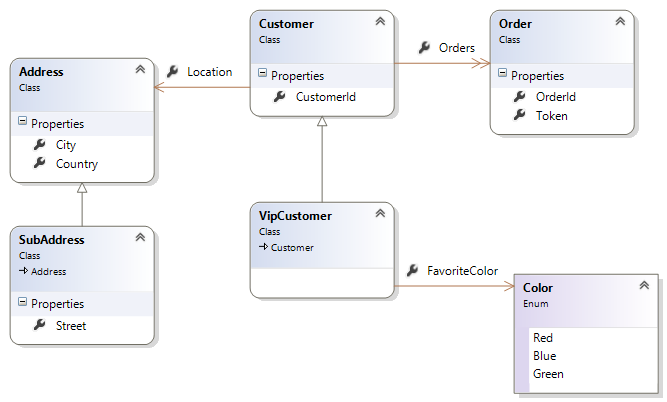
We’ll build an Edm model using the above three methods in the following sections respectively. Each section is designed to walk you through every required aspect to build such Edm model. First of all, let’s have a brief view about the Edm model we will build.
This is a Customer-Order business model, in which three entity types, two complex types and one enum type are included. Here’s the detail information about each types:
• Customer is served as an entity type with three properties.
As mentioned in previous section, to build Edm model explicitly is to create an IEdmModel object directly using ODatalib API. The Edm model built by this method is called type-less model, or week type model, or just un-typed model.
Let’s see how to build the Customer-Order business model.
Enum Type
We can use EdmEnumType to define an Enum type Color as:
To build an Edm model using non-convention model builder is to create an IEdmModel object by directly call fluent APIs of ODataModelBuilder. The developer should take all responsibility to add all Edm types, operations, associations, etc into the data model one by one.
Let’s see how to build the Ccustomer-Order* business model by ODataModelBuilder.
CLR Models
Non-convention model builder is based on CLR classes to build the Edm Model. The Customer-Order business CLR classes are present in abstract section.
Enum Type
The following codes are used to add an Enum type Color:
In order to build an open complex type, you should change the CLR class by adding an IDictionary<string, object> property, the property name can be any name. For example:
In order to build an open entity type, you should change the CLR class by adding an IDictionary<string, object> property, while the property name can be any name. For example:
Besides, you can call Singleton<T>() to add singleton into entity container.
Function
It’s very simple to build function (bound & unbound) in Web API OData. The following codes define two functions. The first is bind to Customer, the second is unbound.
Same as function, it’s also very simple to build action (bound & unbound) in Web API OData. The following codes define two actions. The first is bind to collection of Customer, the second is unbound.
In the previous two sections, we walk you through the required aspects to build an Edm model by directly using ODatalib or leveraging ODataModelBuilder fluent API in WebApi OData.
Obvious, there are many codes you should add to develop a simple Customer-Order business model. However, Web API OData also provides a simple method by using ODataConventionModelBuilder to do the same thing. It’s called convention model builder and can extremely reduce your workload.
Convention model builder uses a set of pre-defined rules (called conventions) to help model builder identify Edm types, keys, associations, relationships, etc automatically, and build them into the final Edm data model.
In this section, we will go through all conventions used in convention model builder. First, let’s see how to build the Edm model using ODataConventionModelBuilder.
CLR Models
We also use the Customer-Order business model presented in abstract section.
Build the Edm Model
The following codes can add all related entity types, complex types, enum type and the corresponding entity sets into the Edm model:
Note: We omit the function/action building because it’s same as non-convention model builder.
Conventions
Wow, how the convention model builder do that! Actually, convention model builder uses a set of pre-defined rules (called conventions) to achieve this.
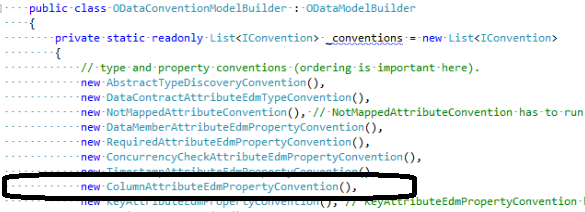
If you open the source code for ODataConventionModelBuilder, You can find the following codes at the beginning of the ODataConventionModelBuilder class:
privatestaticreadonlyList<IConvention>_conventions=newList<IConvention>{// type and property conventions (ordering is important here).newAbstractTypeDiscoveryConvention(),newDataContractAttributeEdmTypeConvention(),newNotMappedAttributeConvention(),// NotMappedAttributeConvention has to run before EntityKeyConventionnewDataMemberAttributeEdmPropertyConvention(),newRequiredAttributeEdmPropertyConvention(),newConcurrencyCheckAttributeEdmPropertyConvention(),newTimestampAttributeEdmPropertyConvention(),newKeyAttributeEdmPropertyConvention(),// KeyAttributeEdmPropertyConvention has to run before EntityKeyConventionnewEntityKeyConvention(),newComplexTypeAttributeConvention(),// This has to run after Key conventions, basically overrules them if there is a ComplexTypeAttributenewIgnoreDataMemberAttributeEdmPropertyConvention(),newNotFilterableAttributeEdmPropertyConvention(),newNonFilterableAttributeEdmPropertyConvention(),newNotSortableAttributeEdmPropertyConvention(),newUnsortableAttributeEdmPropertyConvention(),newNotNavigableAttributeEdmPropertyConvention(),newNotExpandableAttributeEdmPropertyConvention(),newNotCountableAttributeEdmPropertyConvention(),// INavigationSourceConvention'snewSelfLinksGenerationConvention(),newNavigationLinksGenerationConvention(),newAssociationSetDiscoveryConvention(),// IEdmFunctionImportConventions'snewActionLinkGenerationConvention(),newFunctionLinkGenerationConvention(),};
Where lists the conventions wrapped in convention model builder. However, in ODataConventionModelBuilder, there are some conventions which can’t be clearly listed. Let’s walk you through these conventions one by one with some relevant attributes & annotations to illustrate the convention model builder.
Then, the above two types wil be built as Complex Type.
DataContract & DataMember
Rule: If using DataContract or DataMember, only property with [DataMember] attribute will be added into Edm model.
[DataContract]publicclassTrip{[DataMember][Key]publicintTripNum{get;set;}publicGuid?ShareId{get;set;}// will be eliminated[DataMember]publicstringName{get;set;}}
Rule: [NotMapped] deselects the property to be serialized or deserialized, so to some extent, it can be seen as the converse of DataContract & DataMember.
For example, the above if Trip class is changed to the below, it generates exactly the same Trip Entity in EDM document, that is, no ‘SharedId’ property.
Rule: It has the same effect as [NotMapped] attribute. It is able to revert the [DataMember] attribute on the property when the model class doesn’t have [DataContract] attribute.
Rule: A convention used to discover foreign key properties if there is no any foreign key configured on the navigation property.
The basic rule to discover the foreign key is: with the same property type and follow up the naming convention.
The naming convention is:
1. The “Principal class name + principal key name” equals the dependent property name
For example: Customer (Id) <–> Order (CustomerId)
2. or the “Principal key name” equals the dependent property name.
For example: Customer (CustomerId) <–> Order (CustomerId)
In this chapter, we describe the three methods used to build the Edm model in Web API OData and walk you through every required aspect to build a simple Customer-Order Edm model. It’s recommended to use convention model builder to build Edm model for its simplicity and convenience. However, if user wants to make more control on the model building, or he doesn’t have the corresponding CLR classes, the non-convention model builder and the explicitly method are also very useful.
3. ROUTING
3.1 Introduction Routing
In Web API, Routing is how it matches a request URI to an action in a controller. The Routing of Web API OData is derived from Web API Routing and do more extensions.
In Web API OData, an OData controller (not API controller) is severed as the request handler to handle HTTP requests, while the public methods (called action methods) in the controller are invoked to execute the business logic.
So, when the client issues a request to OData service, the Web API OData framework will map the request to an action in the OData controller. Such mapping is based on pre-registered Routes in global configuration.
Register the Web API OData Routes
In Web API, developer can use the following codes to register a Web API route into routing table:
While, Web API OData re-uses the Web API routing table to register the Web OData Routes. However it provides its own extension method called MapODataServiceRoute to register the OData route. MapODataServiceRoute has many versions,
here’s the basic usage:
With these codes, we register an OData route named “myRoute”, uses “odata” as prefix and by calling GetEdmModel() to set up the Edm model.
After registering the Web OData routes, we define an OData route template in the routing table. The route template has the following syntax:
~/odata/~
Now, the Web API OData framework can handle the HTTP request. It tries to match the request Uri against one of the route templates in the routing table. Basically, the following URIs match the odata route:
However, the following URI does not match the odata route, because it doesn’t match “odata” prefix segment:
~/myodata/Customers(1)
Routing Convention
Once the odata route is found, Web API OData will parse the request Uri to get the path segments. Web API OData first uses the ODatalib to parse the request Uri to get the ODL path segments, then convert the ODL path segments to Web API OData path segments.
Once the Uri Parse is finished, Web API OData will try to find the corresponding OData controller and action. The process to find controller and action are the main part of Routing Convention.
Basically, there are two parts of Routing Convention:
Convention Routing
It is also called built-in routing conventions. It uses a set of pre-defined rules to find controller and action.
Attribute Routing
It uses two Attributes to find controller and action. One is ODataRoutePrefixAttribute, the other is ODataRouteAttribute.
3.2 Built-in routing conventions
When Web API gets an OData request, it maps the request to a controller name and an action name. The mapping is based on the HTTP method and the URI. For example, GET /odata/Products(1) maps to ProductsController.GetProduct.
This article describe the built-in OData routing conventions. These conventions are designed specifically for OData endpoints, and they replace the default Web API routing system. (The replacement happens when you call MapODataRoute.)
Built-in Routing Conventions
Before describe the OData routing conventions in Web API, it’s helpful to understand OData URIs. An OData URI consists of:
The service root
The odata path
Query options
For example: http://example.com/odata/Products(1)/Supplier?$top=2
The service root : http://example.com/odata
The odata path : Products(1)/Supplier
Query options : ?$top=2
For OData routing, the important part is the OData path. The OData path is divided into segments, each segments are seperated with ‘/’.
[For example], Products(1)/Supplier has three segments:
Products refers to an entity set named “Products”.
1 is an entity key, selecting a single entity from the set.
Supplier is a navigation property that selects a related entity.
So this path picks out the supplier of product 1.
OData path segments do not always correspond to URI segments. For example, “1” is considered a key path segment.
Controller Names. The controller name is always derived from the entity set at the root of the OData path. For example, if the OData path is Products(1)/Supplier, Web API looks for a controller named ProductsController.
So, the controller convention is: [entityset name] + “Controller”, derived from ODataController
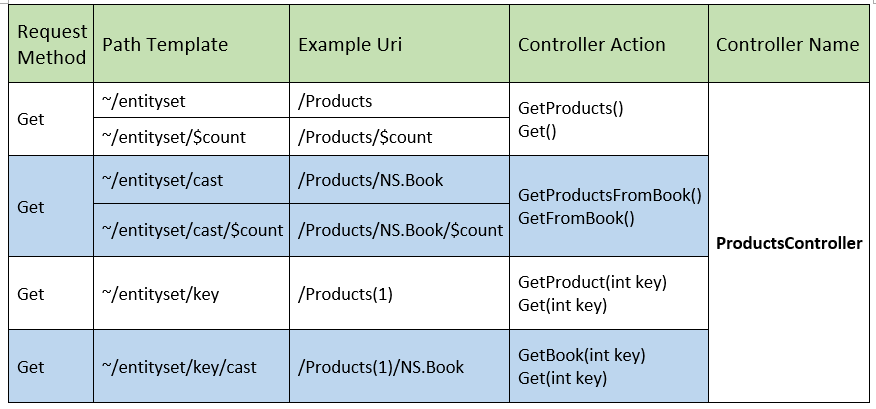
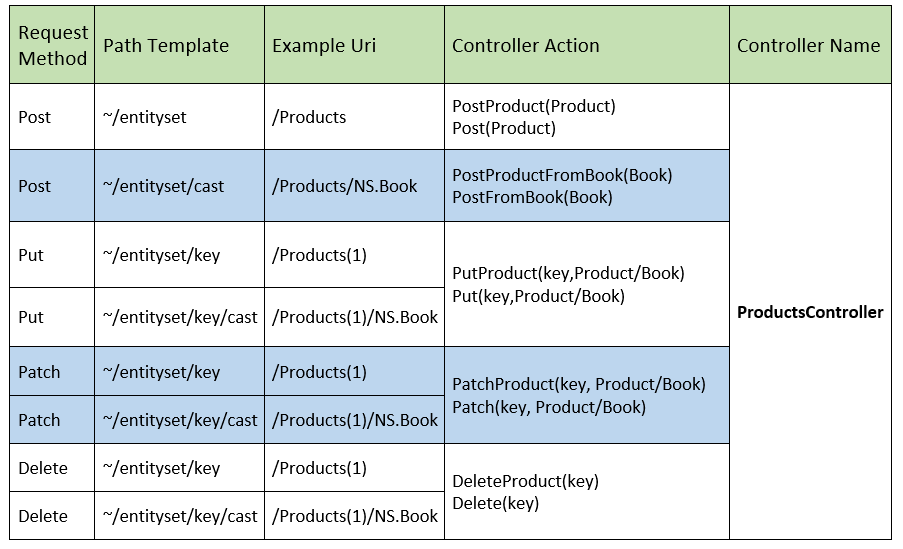
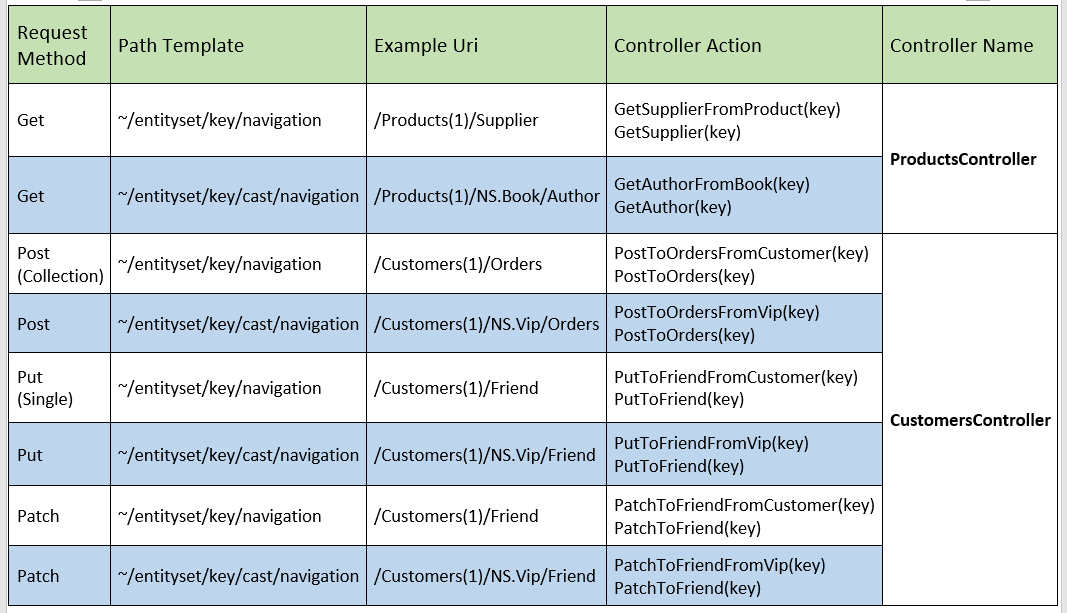
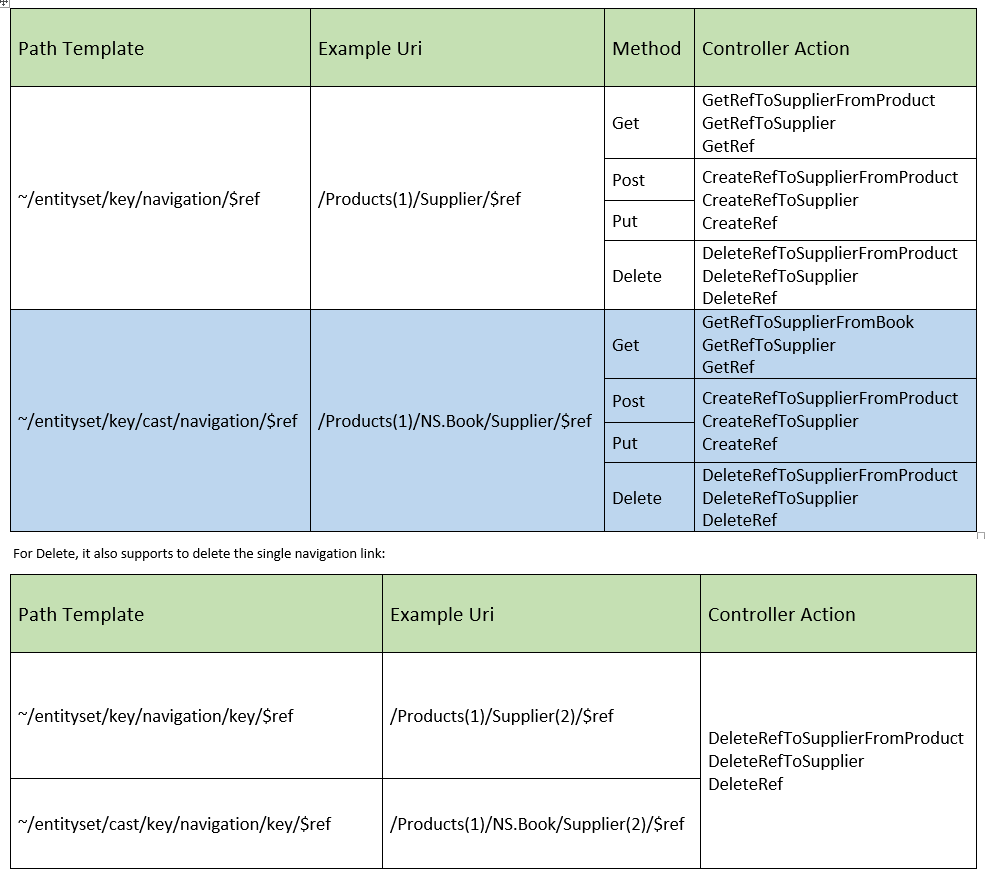
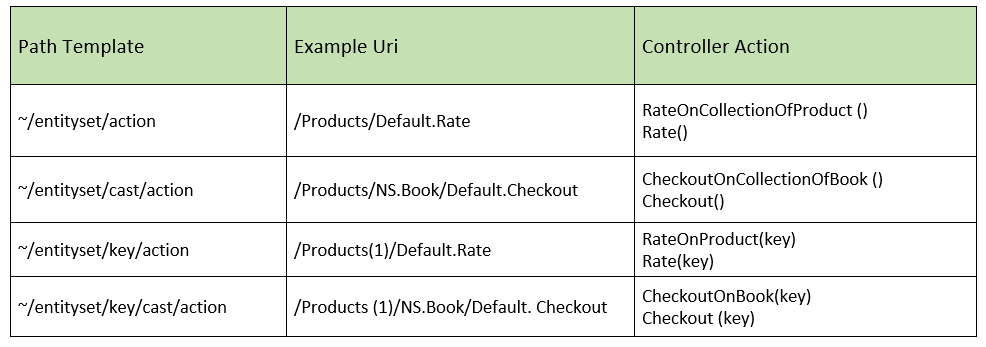
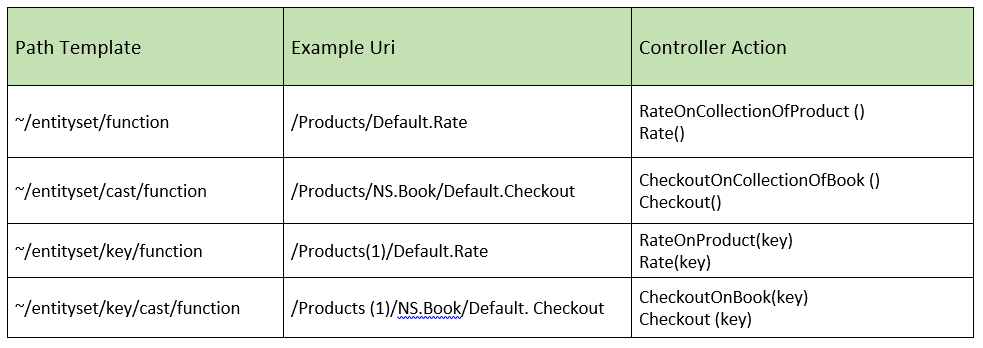
Action Names. Action names are derived from the path segments plus the entity data model (EDM), as listed in the following tables. In some cases, you have two choices for the action name. For example, “Get” or “GetProducts”.
Action only supports the POST request method, and the parameters are sent using the request body. In controller, each action is using an ODataActionParameters to accept the parameters’ value:
If the path contains a key, the action should have a parameter named key.
If the path contains a key into a navigation property, the action should have a parameter named relatedKey.
POST and PUT requests take a parameter of the entity type.
PATCH requests take a parameter of type Delta, where T is the entity type.
For reference, here is an example that shows method signatures for most built-in OData routing convention.
publicclassProductsController:ODataController{// GET /odata/ProductspublicIQueryable<Product>Get()// GET /odata/Products(1)publicProductGet(intkey)// GET /odata/Products(1)/ODataRouting.Models.BookpublicBookGetBook(intkey)// POST /odata/Products publicHttpResponseMessagePost(Productitem)// PUT /odata/Products(1)publicHttpResponseMessagePut(intkey,Productitem)// PATCH /odata/Products(1)publicHttpResponseMessagePatch(intkey,Delta<Product>item)// DELETE /odata/Products(1)publicHttpResponseMessageDelete(intkey)// PUT /odata/Products(1)/ODataRouting.Models.BookpublicHttpResponseMessagePutBook(intkey,Bookitem)// PATCH /odata/Products(1)/ODataRouting.Models.BookpublicHttpResponseMessagePatchBook(intkey,Delta<Book>item)// DELETE /odata/Products(1)/ODataRouting.Models.BookpublicHttpResponseMessageDeleteBook(intkey)// GET /odata/Products(1)/SupplierpublicSupplierGetSupplierFromProduct(intkey)// GET /odata/Products(1)/ODataRouting.Models.Book/AuthorpublicAuthorGetAuthorFromBook(intkey)// POST /odata/Products(1)/Supplier/$refpublicHttpResponseMessageCreateLink(intkey,stringnavigationProperty,[FromBody]Urilink)// DELETE /odata/Products(1)/Supplier/$refpublicHttpResponseMessageDeleteLink(intkey,stringnavigationProperty,[FromBody]Urilink)// DELETE /odata/Products(1)/Parts(1)/$refpublicHttpResponseMessageDeleteLink(intkey,stringrelatedKey,stringnavigationProperty)// GET odata/Products(1)/Name// GET odata/Products(1)/Name/$valuepublicHttpResponseMessageGetNameFromProduct(intkey)// GET /odata/Products(1)/ODataRouting.Models.Book/Title// GET /odata/Products(1)/ODataRouting.Models.Book/Title/$valuepublicHttpResponseMessageGetTitleFromBook(intkey)}
Same as Web API, Web API OData supports a new type of routing called attribute routing. It uses two Attributes to find controller and action. One is ODataPrefixAttribute, the other is ODataRouteAttribute.
You can use attribute routing to define more complex routes and put more control over the routing. Most important, it can extend the coverage of convention routing. For example, you can easily use attribute routing to route the following Uri:
~/odata/Customers(1)/Orders/Price
In Web API OData, attribute routing is combined with convention routing by default.
Enabling Attribute Routing
ODataRoutingConventions provides two methods to register routing conventions:
As the name implies, the first one creates a mutable list of the default OData routing conventions with attribute routing enabled, while the second one only includes convention routing.
In fact, when you call the basic MapODataServiceRoute, it enables the attribute routing by default as:
ODataRouteAttribute is an attribute that can, and only can be placed on an action of an OData controller to specify the OData URLs that the action handles.
Here is an example of an action defined using an ODataRouteAttribute:
With this attribute, Web API OData tries to match the request Uri with Customers({id})/Address/City routing template to GetCityOfACustomer() function in MyController. For example, the following request Uri will invoke GetCityOfACustomer:
ODataRoutePrefixAttribute is an attribute that can, and only can be placed on an OData controller to specify the prefix that will be used for all actions of that controller.
ODataRoutePrefixAttribute is used to reduce the routing template in ODataRouteAttribute if all routing template in the controller start with the same prefix. For example:
The GetAddress matches to Customers({id})/Address route template. It’s called key template because there’s a template {id}. So far in Web API OData, it supports two kind of templates:
If Customer has hundreds of properties, users should add hundres of similar functions in CustomersController. It’s boring and we can create our own routing convention to override it.
Custom routing convention
We can create our own routing convention class by implementing the IODataRoutingConvention. However, if you don’t want to change the behaviour to find the controller, the new added routing convention class can derive from `NavigationSourceRoutingConvention’.
Let’s build a sample property access routing convention class derived from NavigationSourceRoutingConvention.
{"@odata.context":"http://localhost/odata/$metadata#Customers(2)/Location","Country":"The United States","City":"Redmond"}
4. ODATA FEATURES
4.1 DateTime support
This sample will introduce how to support DateTime type in Web API OData V4.
Build DateTime Type
OData V4 doesn’t include DateTime as primitive type. Web API OData V4 uses DateTimeOffset to represent the DateTime.
For example, if user defines a model as:
By Default, converting between DateTimeOffset and DateTime will lose the Time Zone information. Therefore, Web API provides a API to config the Time Zone information on server side. For example:
HttpConfigurationconfiguration=...TimeZoneInfotimeZoneInfo=TimeZoneInfo.FindSystemTimeZoneById("Pacific Standard Time");// -8:00configuration.SetTimeZoneInfo(timeZoneInfo);
$filter DateTime
Since Web API OData 5.6, it supports to filter on DateTime type. For example:
If user doesn’t add any referential constraint, Web API will try to help user to discovery the foreign key automatically. There are two conventions as follows:
1.With same property type and same type name plus key name. For example:
Where, Property (key) “CustomerId” in the Customer equals the property “CustomerId” in the Order.
Now, you can build the Edm Model using convention model builder same as above section.
Define Referential Constraint Programmatically
You can call the new added Public APIs (HasRequired, HasOptional) to define the referential constraint when defining a navigation property. For example:
Define Nullable Referential Constraint Using Convention
Currently, it doesn’t suppport to define nullable referential constraint from attribute and convention method. However, you can do it by Programmatically by calling HasOptional() method:
This sample introduces how to use the Edm.Date & Edm.TimeOfDay supported in Web API OData V5.5.
Build Edm Model
ODL V6.8 introduces two new primitive types. One is Edm.Date, the other is Edm.TimeOfDay. Besides, it also introduces two new struct types to represent the CLR types of Edm.Date and Edm.TimeOfDay.
So, developers can use the new CLR struct types to define their CLR model.
For example, if user defines a model as:
Animal is an abstract entity type without any keys and any properties
Dog & Pig are two sub entity types derived from Animal with own keys.
However, it’s obvious that abstract entity type without keys can’t be used to define any navigation sources (entity set or singleton).
So, if you try to:
In BuildFunction(), we can configure a function with Enum and collection of Enum parameters:
varfunction=builder.EntityType<Customer>().Collection.Function("EnumFunction").Returns<string>();function.Parameter<Color>("e1");function.Parameter<Color?>("e2");// nullablefunction.CollectionParameter<Color?>("e3");// Collection of nullable
Routing
In the CustomersController, add the following method :
However, only parameter alias is supported for entity.
Entity Reference and collection of Entity Reference parameter
In fact, we can’t build a function with entity reference as parameter. However, we can call the function with entity parameter using entity reference value. So, without any change for the EntityFunction, we can call as:
‘[FromODataUri]’ is mandatory for complex, entity and all collection. However, it is optional for Primitive & Enum. But for string primitive type, the value will contain single quotes without ‘[FromODataUri]’.
Thanks.
For un-typed scenario, please refer to untyped page.
We can invoke the action by issuing a Post on ~/odata/Customers/Default.PrimitiveAction with the following request body:
{"p1":7,"p2":9,"p3":[1,3,5,7,9]}
Enum and Collection of Enum parameter
Configuration
In BuildAction(), we can configure an action with Enum and collection of Enum parameters:
varaction=builder.EntityType<Customer>().Collection.Action("EnumAction");action.Parameter<Color>("e1");action.Parameter<Color?>("e2");// nullableaction.CollectionParameter<Color?>("e3");// Collection of nullable
Routing
In the CustomersController, add the following method :
It doesn’t work if “null” value in the collection of entity in the payload. See detail in #100.
It doesn’t work if anything else follows up the collection of entity in the payload. See detail in #65
Null value
If you invoke an action with a ‘null’ action parameter value, please don’t add the parameter (for example, "p1":null) in the payload and leave it un-specified. However, for collection, you should always specify it even the collection is an empty collection (for example, "p1":[]).
Thanks.
For un-typed scenario, please refer to untyped page.
4.8 Operation paramters in untyped scenarios
In this page, we introduce the Function/Action parameter in untyped scenario. For CLR typed scenarios, please refer to Function page and Action page.
Build Edm Model
Let’s build the Edm Model from scratch:
privatestaticIEdmModelGetEdmModel(){EdmModelmodel=newEdmModel();// Enum type "Color"EdmEnumTypecolorEnum=newEdmEnumType("NS","Color");colorEnum.AddMember(newEdmEnumMember(colorEnum,"Red",newEdmIntegerConstant(0)));colorEnum.AddMember(newEdmEnumMember(colorEnum,"Blue",newEdmIntegerConstant(1)));colorEnum.AddMember(newEdmEnumMember(colorEnum,"Green",newEdmIntegerConstant(2)));model.AddElement(colorEnum);// complex type "Address"EdmComplexTypeaddress=newEdmComplexType("NS","Address");address.AddStructuralProperty("Street",EdmPrimitiveTypeKind.String);address.AddStructuralProperty("City",EdmPrimitiveTypeKind.String);model.AddElement(address);// derived complex type "SubAddress"EdmComplexTypesubAddress=newEdmComplexType("NS","SubAddress",address);subAddress.AddStructuralProperty("Code",EdmPrimitiveTypeKind.Double);model.AddElement(subAddress);// entity type "Customer"EdmEntityTypecustomer=newEdmEntityType("NS","Customer");customer.AddKeys(customer.AddStructuralProperty("Id",EdmPrimitiveTypeKind.Int32));customer.AddStructuralProperty("Name",EdmPrimitiveTypeKind.String);model.AddElement(customer);// derived entity type special customerEdmEntityTypesubCustomer=newEdmEntityType("NS","SubCustomer",customer);subCustomer.AddStructuralProperty("Price",EdmPrimitiveTypeKind.Double);model.AddElement(subCustomer);// entity setsEdmEntityContainercontainer=newEdmEntityContainer("NS","Default");model.AddElement(container);container.AddEntitySet("Customers",customer);IEdmTypeReferenceintType=EdmCoreModel.Instance.GetPrimitive(EdmPrimitiveTypeKind.Int32,isNullable:true);EdmEnumTypeReferenceenumType=newEdmEnumTypeReference(colorEnum,isNullable:true);EdmComplexTypeReferencecomplexType=newEdmComplexTypeReference(address,isNullable:true);EdmEntityTypeReferenceentityType=newEdmEntityTypeReference(customer,isNullable:true);// functionsBuildFunction(model,"PrimitiveFunction",entityType,"param",intType);BuildFunction(model,"EnumFunction",entityType,"color",enumType);BuildFunction(model,"ComplexFunction",entityType,"address",complexType);BuildFunction(model,"EntityFunction",entityType,"customer",entityType);// actionsBuildAction(model,"PrimitiveAction",entityType,"param",intType);BuildAction(model,"EnumAction",entityType,"color",enumType);BuildAction(model,"ComplexAction",entityType,"address",complexType);BuildAction(model,"EntityAction",entityType,"customer",entityType);returnmodel;}privatestaticvoidBuildFunction(EdmModelmodel,stringfuncName,IEdmEntityTypeReferencebindingType,stringparamName,IEdmTypeReferenceedmType){IEdmTypeReferencereturnType=EdmCoreModel.Instance.GetPrimitive(EdmPrimitiveTypeKind.Boolean,isNullable:false);EdmFunctionboundFunction=newEdmFunction("NS",funcName,returnType,isBound:true,entitySetPathExpression:null,isComposable:false);boundFunction.AddParameter("entity",bindingType);boundFunction.AddParameter(paramName,edmType);boundFunction.AddParameter(paramName+"List",newEdmCollectionTypeReference(newEdmCollectionType(edmType)));model.AddElement(boundFunction);}privatestaticvoidBuildAction(EdmModelmodel,stringactName,IEdmEntityTypeReferencebindingType,stringparamName,IEdmTypeReferenceedmType){IEdmTypeReferencereturnType=EdmCoreModel.Instance.GetPrimitive(EdmPrimitiveTypeKind.Boolean,isNullable:false);EdmActionboundAction=newEdmAction("NS",actName,returnType,isBound:true,entitySetPathExpression:null);boundAction.AddParameter("entity",bindingType);boundAction.AddParameter(paramName,edmType);boundAction.AddParameter(paramName+"List",newEdmCollectionTypeReference(newEdmCollectionType(edmType)));model.AddElement(boundAction);}
Unbound function and action are similiar with bound function and action in the request format. But only attribute routing can be used for unbound function/action routing.
Thanks.
4.9 Query by dynamic properties
Since Web API OData V5.5, it supports filter, select and orderby on dynamic properties.
Let’s see a sample about this feature.
CLR Model
First of all, we create the following CLR classes as our model:
Since Web API OData V5.5, it supports open type and dynamic property on un-type scenario, dynamic properties can be:
Primitive Type
Enum Type
Complex Type
Collection of above
Let’s see a sample about this feature.
Build un-type Edm Model
Now, we can build the Edm Model as:
privatestaticIEdmModelGetUntypedEdmModel(){varmodel=newEdmModel();// complex type addressEdmComplexTypeaddress=newEdmComplexType("NS","Address",null,false,true);address.AddStructuralProperty("Street",EdmPrimitiveTypeKind.String);model.AddElement(address);// enum type colorEdmEnumTypecolor=newEdmEnumType("NS","Color");color.AddMember(newEdmEnumMember(color,"Red",newEdmIntegerConstant(0)));model.AddElement(color);// entity type customerEdmEntityTypecustomer=newEdmEntityType("NS","UntypedSimpleOpenCustomer",null,false,true);customer.AddKeys(customer.AddStructuralProperty("CustomerId",EdmPrimitiveTypeKind.Int32));customer.AddStructuralProperty("Color",newEdmEnumTypeReference(color,isNullable:true));model.AddElement(customer);EdmEntityContainercontainer=newEdmEntityContainer("NS","Container");container.AddEntitySet("UntypedSimpleOpenCustomers",customer);model.AddElement(container);returnmodel;}
If the dynamic property is not primitive type, you should declare it in model like the code above.
GET an untyped open entity with dynamic property
Routing
In the UntypedSimpleOpenCustomersController, add the following method:
[HttpGet]publicIHttpActionResultGet(intkey){//return an EdmEntityObject...}
Request Samples
We can get the entity as:
~/odata/UntypedSimpleOpenCustomers(1)
POST an untyped open entity with dynamic property
Routing
In the UntypedSimpleOpenCustomersController, add the following method :
Batch requests allow grouping multiple operations into a single HTTP request payload and the service will return a single HTTP response with the response to all operations in the requests. This way, the client can optimize calls to the server and improve the scalability of its service.
DefaultODataBatchHandler contains some configuration, which can be set by customers, to customize the handler. For example, the following code will only allow a maximum of 8 requests per batch and 5 operations per ChangeSet.
We can handle the behavior upon encountering a request within the batch that returns an error by preference odata.continue-on-error, which is specified by OData V4 spec.
Enable Preference odata.continue-on-error
Preference odata.continue-on-error makes no sense by default, and service returns the error for that request and continue processing additional requests within the batch as default behavior.
HTTP/1.1 200 OK
Content-Length: 820
Content-Type: multipart/mixed; boundary=batchresponse_b49114d7-62f7-450a-8064-e27ef9562eda
Server: Microsoft-HTTPAPI/2.0
OData-Version: 4.0
Date: Wed, 12 Aug 2015 02:23:10 GMT

--batchresponse_b49114d7-62f7-450a-8064-e27ef9562eda
Content-Type: application/http
Content-Transfer-Encoding: binary

HTTP/1.1 200 OK
Content-Type: application/json; odata.metadata=minimal; odata.streaming=true
OData-Version: 4.0

{
 "@odata.context":"http://localhost:9001/DefaultBatch/$metadata#DefaultBatchCustomer/$entity","Id":0,"Name":"Name 0"
}
--batchresponse_b49114d7-62f7-450a-8064-e27ef9562eda
Content-Type: application/http
Content-Transfer-Encoding: binary

HTTP/1.1 404 Not Found
Content-Type: application/json; charset=utf-8

{"Message":"No HTTP resource was found that matches the request URI 'http://localhost:9001/DefaultBatch/DefaultBatchCustomerfoo'.","MessageDetail":"No route data was found for this request."}
--batchresponse_b49114d7-62f7-450a-8064-e27ef9562eda--
Service returned error and stop processing.
Request With Preference odata.continue-on-error
Now POST a batch request with Preference odata.continue-on-error:
Web API OData supports some query limitations, for example:
NonFilterable / NotFilterable – $filter
NotCountable – $count
NotExpandable – $expand
NotNavigable – $select
NotSortable / Unsortable – $orderby
However, the corresponding annotations cannot be exposed in metadata document. This sample introduces the capabilities vocabulary support in Web API OData V5.7, which will enable capabilites vocabulary annotations in metadata document.
The related sample codes can be found here.
In OData WebApi 5.7, we can put AutoExpand attribute on navigation property to make it automatically expand without expand query option, or can put this attribute on class to make all Navigation Property on this class automatically expand.
If you call return Product in response, Category will automatically expand and Customer will expand too. It works the same if you put [AutoExpand]on Class if you have more navigation properties to expand.
4.16 Ignore query option
In OData WebApi 5.7, we can ignore some query options when calling ODataQueryOptionApplyTo method, this is helpful when your odata service is integrate with other service that may already applied those query options.
Customize
publicclassMyEnableQueryAttribute:EnableQueryAttribute{publicoverrideIQueryableApplyQuery(IQueryablequeryable,ODataQueryOptionsqueryOptions){// Don't apply Skip and Top.varignoreQueryOptions=AllowedQueryOptions.Skip|AllowedQueryOptions.Top;returnqueryOptions.ApplyTo(queryable,ignoreQueryOptions);}}
4.18 Add NextPageLink and $count for collection property
In OData WebApi V5.7, it supports to add the NextPageLink and $count for collection property.
Enable NextPageLink and $count
It’s easy to enable the NextPageLink and $count for collection property in controller. Users can only put the [EnableQuery(PageSize=x)] on the action of the controller.
For example:
For Microsoft.AspNetCore.OData (supporting ASP.NET Core):
It can be enabled in the service’s HTTP request pipeline configuration method Configure(IApplicationBuilder app, IHostingEnvironment env) of the typical Startup class:
app.UseMvc(routeBuilder=>{routeBuilder.Select().Expand().Filter().OrderBy().MaxTop(100).Count().EnableContinueOnErrorHeader();// Additional configuration to enable continue on error.routeBuilder.MapODataServiceRoute("ODataRoute","odata",builder.GetEdmModel());});
Prefer odata.continue-on-error
We can use the following codes to prefer continue on error
The setting works for ODataConventionModelBuilder as well.
4.22 Use HttpRequestMessage Extension Methods
In Microsoft.AspNet.OData, set of HttpRequestMessage extension methods are provided through HttpRequestMessageExtensions. For services that don’t use LINQ or ODataQueryOptions.ApplyTo(), those extension methods can offer lots of help.
In Microsoft.AspNetCore.OData, which supports ASP.NET Core, set of HttpRequest extension methods are also provided through HttpRequestExtensions.
They are pretty much symmetrical, and the differences will be noted in the examples below. For further details, please refer to Microsoft.AspNet.OData.Extensions.HttpRequestMessageExtensions and Microsoft.AspNet.OData.Extensions.HttpRequestExtensions.
ODataProperties/IODataFeature
OData methods and properties can be GET/SET through:
ODataProperties (for Microsoft.AspNet.OData) from httpRequestMessage.ODataProperties()
IODataFeature (for Microsoft.AspNetCore.OData) from httpRequest.ODataFeature()
Each of them includes the followings:
Path
The ODataPath of the request.
PathHandler
Return DefaultODataPathHandler by default.
RouteName
The Route name for generating OData links.
SelectExpandClause
The parsed the OData SelectExpandClause of the request.
NextLink
Next page link of the results, can be set through GetNextPageLink.
For example, we may need generate service root when querying ref link of a navigation property.
For Microsoft.AspNet.OData only, get the EDM model associated with the request.
IEdmModelmodel=this.Request.GetModel();
GetNextPageLink
Create a link for the next page of results, can be used as the value of @odata.nextLink.
For example, the request Url is http://localhost/Customers/?$select=Name.
OData v4 Web API 5.8 RC
intruduces a new OData Simplefied Uri convention that supports key-as-segment and default OData Uri convention side-by-side.
~/odata/Customers/0
~/odata/Customers(0)
To enable the ODataSimplified Uri convention, in WebApiConfig.cs:
// ...varmodel=builder.GetEdmModel();// Set Uri convention to ODataSimplifiedconfig.SetUrlConventions(ODataUrlConventions.ODataSimplified);config.MapODataServiceRoute("odata","odata",model);
4.24 MaxExpansionDepth in EnableQueryAttribute
Since Web API OData V5.9.1, it corrected the behavior of MaxExpansionDepth of EnableQueryAtrribute. MaxExpansionDepth means the max expansion depth for the $expand query option.
When MaxExpansionDepth value is 0, it means the check is disabled, but if you use $level=max at the same time, the expand depth will be a default value : 2, to avoid the dead loop.
Let’s see some samples about this behavior.
$expand=Manager($levels=max) will be the same as
$expand=Manager($expand=Manager)
$expand=Manager($levels=3) will be the same as
$expand=Manager($expand=Manager($expand=Manager))
Since Web API OData V5.9.0, it supports to bind the custom UriFunctions to CLR methods now, so user can add,modify or override the existing pre defined built-in functions.
ASP.NET Core], the IN operator is a supported feature that enables a shorthand way of writing multiple EQ expressions joined by OR. For example,
GET /service/Products?$filter=Name eq 'Milk' or Name eq 'Cheese' or Name eq 'Donut'
can become
GET /service/Products?$filter=Name in ('Milk', 'Cheese', 'Donut')
Of the binary expression invoking IN, the left operand must be a single value and the right operand must be a comma-separated list of primitive values or a single expression that resolves to a collection; the expression returns true if the left operand is a member of the right operand.
Usage
IN operator is supported only for $filter at the moment and hardcoded collections are supported with parentheses. See examples below.
~/Products?$filter=Name in ('Milk', 'Cheese')
~/Products?$filter=Name in RelevantProductNames
~/Products?$filter=ShipToAddress/CountryCode in MyShippers/Regions
~/Products?$filter=Name in Fully.Qualified.Namespace.MostPopularItemNames
5. SECURITY
5.1 Basic authentication over HTTPS
We’re often asked by people if OData APIs can be secured. The name “Open Data Protocol” and the way we evangelize it (by focusing on how open a protocol it is and how it provides interoperability) may give people the impression that OData APIs doesn’t work with authentication and authorization.
The fact is that using OData is orthogonal to authentication and authorization. That is to say, you may secure an OData API in any way you can secure a generic RESTful API.
We write this post to demonstrate it. The authentication methods we use in this post is the basic authentication over HTTPS. The service library we use is ASP.NET Web API for OData V4.0.
Secure an OData Web API using basic authentication over HTTPS
OData Services requiring authentication SHOULD consider supporting basic authentication as specified in [RFC2617] over HTTPS for the highest level of interoperability with generic clients. They MAY support other authentication methods.
Supporting basic authentication over HTTPS is relatively easy for OData Web API. Suppose you already have a working OData service project. In this post, we implemented an OData API which has only one entity type Product and exposes only one entity set Products. In order to secure Products, the following steps needs to be taken:
1. Create a custom AuthorizeAttribute for the basic authentication
Add a class to your project as follows:
publicclassHttpBasicAuthorizeAttribute:AuthorizeAttribute{publicoverridevoidOnAuthorization(System.Web.Http.Controllers.HttpActionContextactionContext){if(actionContext.Request.Headers.Authorization!=null){// get the Authorization header value from the request and base64 decode itstringuserInfo=Encoding.Default.GetString(Convert.FromBase64String(actionContext.Request.Headers.Authorization.Parameter));// custom authentication logicif(string.Equals(userInfo,string.Format("{0}:{1}","Parry","123456"))){IsAuthorized(actionContext);}else{HandleUnauthorizedRequest(actionContext);}}else{HandleUnauthorizedRequest(actionContext);}}protectedoverridevoidHandleUnauthorizedRequest(System.Web.Http.Controllers.HttpActionContextactionContext){actionContext.Response=newHttpResponseMessage(System.Net.HttpStatusCode.Unauthorized){ReasonPhrase="Unauthorized"};}}
In this sample we name the attribute HttpBasicAuthorizeAttribute. It derives from System.Web.Http.AuthorizeAttribute. We override two of its methods: OnAuthorization and HandleUnauthorizedRequest.
In OnAuthorization, we first get the base64-encoded value of the header Authorization and decode it. Then we apply our custom authentication logic to verify if the decoded value is a valid one. In this sample, we compare the decoded value to “Parry:123456”. As is specified in [RFC2617], this value indicates that the username is “Parry” and password is “123456”.
In HandleUnauthorizedRequest, we handle unauthorized request by responding with HTTP status code 401 Unauthorized.
2. Decorate the controller with the custom AuthorizeAttribute
We decorate our ProductsController with HttpBasicAuthorizeAttribute:
In this sample we name this class RequireHttpsAttribute. It derives from System.Web.Http.Filters.AuthorizationFilterAttribute and overrides its OnAuthorization method by responding with HTTP status code 403 HTTPS Required.
5. Decorate the controller with the custom AuthorizationFilterAttribute
We further decorate our ProductsController with RequireHttpsAttribute:
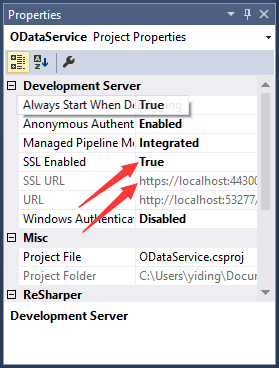
We run the project to test it. When run for the first time, you’ll be asked to create a self-signed certificate. Follow the instruction to create the certificate and proceed.
In the above steps, we’ve secured the OData API by allowing only HTTPS connections to the Products and responding with data only to requests that has a correct Authorization header value (the base64-encoded value of “Parry:123456”: UGFycnk6MTIzNDU2). Our HTTP service endpoint is http://localhost:53277/ and our HTTPS endpoint is https://localhost:43300/.
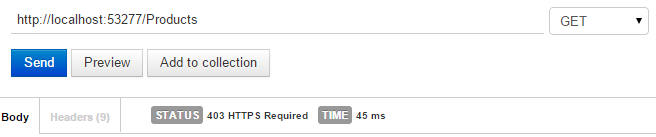
First of all, we send a GET request to http://localhost:53277/Products, and the service responds with an empty payload and the status code 403 HTTPS Required.
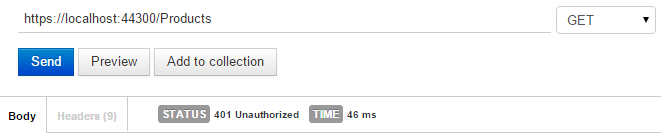
Then we send the request over HTTPS to https://localhost:43300/Products. Since the basic authentication info needs to be provided. The service responds with an empty payload and the status code 401 Unauthorized.
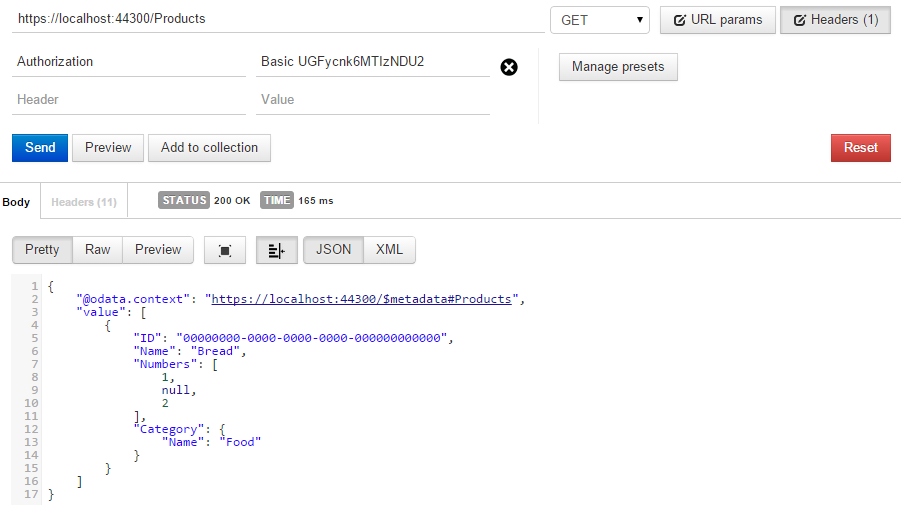
Finally, we set the value of the Authorization header to “Basic UGFycnk6MTIzNDU2” and send it over HTTPS to the same address again. The service now responds with the correct data.
In this post we demoed how an OData API can be secured by basic authentication over HTTPS. You may additionally add authorization logic to the API by further customizing the HttpBasicAuthorizeAttribute class we created. Furthermore, you may also use other authentication methods such as OAuth2 to secure your OData API. More information can be found at: http://www.asp.net/web-api/overview/security.
6. CUSTOMIZATION
6.1 Custom URL parsing
Let’s show how to extend the default OData Uri Parser behavior:
Basic Case Insensitive Support
User can configure as below to support basic case-insensitive parser behavior.
For both Web API OData V3 and V4, a flag IsRelaxedMatch is introduced to relax the version constraint. With IsRelaxedMatch = true, ODataVersionConstraint will allow OData request to contain both V3 and V4 max version headers (V3: MaxDataServiceVersion, V4: OData-MaxVersion). Otherwise, the service will return response with status code 400. The default value of IsRelaxdMatch is false.
This page illustrates how to use sensibility points in the ODataFormatter and plugin custom OData serializers/deserializers, gives a sample extends the ODataFormatter to add support of OData instance annotations.
Let’s see this sample.
CLR Model
First of all, we create the following CLR classes as our model:
If I search for documents by sending the search query, in the result, I’d like have a score for the match for each document, as the score is dependent on the in coming query, it cannot be modeled as a property on response’s document, it should be modeled as an annotation on the document. Let’s do that.
This entity serializer is to add the score annotation (org.northwind.search.score) to document entries.
publicclassAnnotatingEntitySerializer:ODataEntityTypeSerializer{publicAnnotatingEntitySerializer(ODataSerializerProviderserializerProvider):base(serializerProvider){}publicoverrideODataEntryCreateEntry(SelectExpandNodeselectExpandNode,EntityInstanceContextentityInstanceContext){ODataEntryentry=base.CreateEntry(selectExpandNode,entityInstanceContext);Documentdocument=entityInstanceContext.EntityInstanceasDocument;if(entry!=null&&document!=null){// annotate the document with the score.entry.InstanceAnnotations.Add(newODataInstanceAnnotation("org.northwind.search.score",newODataPrimitiveValue(document.Score)));}returnentry;}}
A custom serializer provider
This serializer provider is to inject the AnnotationEntitySerializer.
The sample has a custom entity type serializer, AnnotatingEntitySerializer, that adds the instance annotation to ODataEntry by overriding the CreateEntry method. It defines a custom ODataSerializerProvider to provide AnnotatingEntitySerializer instead of ODataEntityTypeSerializer. Then creates the OData formatters using this serializer provider and uses those formatters in the configuration.
6.4 Custom Stream Entity
Since Web API OData V5.7, it supports to customize entity as stream.
Fluent API
Users can call fluent API to configure the stream entity. For example,
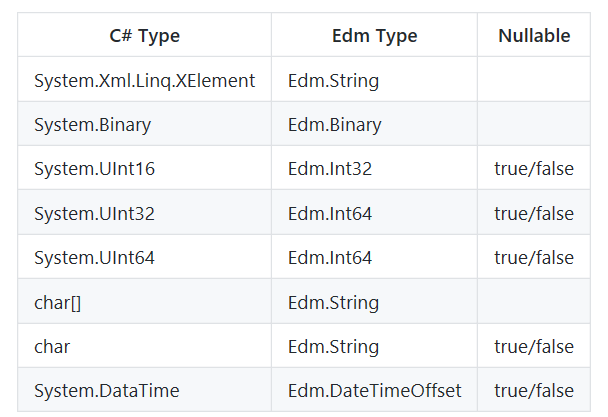
ODataLib has a lot of its primitive types mapping to C# built-in types, for example, System.String maps to Edm.String, System.Guid maps to Edm.Guid.
Web API OData adds supporting for some unsupported types in ODataLib, for example: unsigned int, unsigned long, etc.
GitHub Issue #319 : Convention and Attribute Routing for Dynamic Property. This built upon a previous pull request #222 by Brad Cleaver: Add support for OpenPathSegment
Bug Fixes:
GitHub Issue #300 : date() and time() function doesn’t work with EF.
GitHub Issue #317, Pull request #340 by OData team : Support nullable referential constraint with conventional model builder.
GitHub Issue #331, Pull request #336 by OData team : Support nullable enum prefix free in $filter.
GitHub Issue #281, Pull request #341 by OData team : OData serialization cannot serializer the derived complex types.
GitHub Issue #330, Pull request #350 by OData team : Dynamic property name is null use convention routing.
GitHub Issue #214, Pull request #343 by OData team : Issue about Web API model validation.
GitHub Issue #294, Pull request #323, #332 by OData team : Formatting <see>true</see>, <see langword="null"/> issue in xml comments about true, false, and null.
OData Web API v5.6 package has a dependency on ODataLib 6.11.
Questions and feedback
You and your team are warmly welcomed to try out this new version if you are interested in the new features and fixes above. You are also welcomed to contribute your code to OData Web API repository. For any feature request, issue or idea please feel free to reach out to us at
GitHub Issues.
7.8 OData Web API 6.0.0 alpha1
The NuGet packages for OData Web API v6.0.0 alpha1 are now available on the myget.
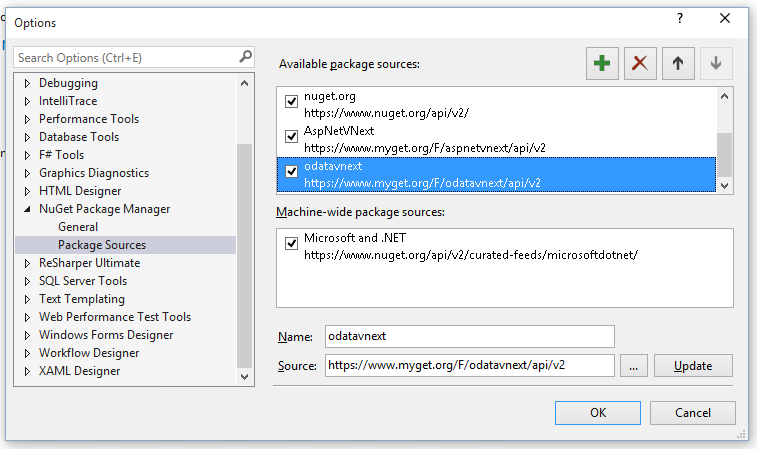
Configure package source
You can configure the NuGet package source for OData Web API v6.0.0 preview releases in the Package Manager Settings:
This release contains the first preview of the next version of OData Web API which is built on ASP.NET 5 and MVC 6. This preview includes the basic support of:
Querying service metadata
Querying entity sets
CRUD of single entity
Querying structural or navigation property
$filter query option
OData Web API v6.0.0 alpha1 package has a dependency on ODataLib 6.12.
OData Web API v5.7-bata package has a dependency on ODataLib 6.13.
Questions and feedback
You and your team are warmly welcomed to try out this new version if you are interested in the new features and fixes above. You are also welcomed to contribute your code to OData Web API repository. For any feature request, issue or idea please feel free to reach out to us at
GitHub Issues.
7.10 OData Web API 5.7 rc
The NuGet packages for OData Web API v5.7 rc are available on the NuGet gallery.
Download this release
You can install or update the NuGet packages for OData Web API v5.7 using the Package Manager Console:
Pull request #407 by OData team : Add the NextPageLink & $Count for collection property
GitHub Issue #334, Pull request #335 by Matt Johnson : Time zone conversions are not DST aware
GitHub Issue #376, Pull request #386 by OData team : $orderby with duplicate property in odata v4 failed.
GitHub Issue #401, Pull request #402 by CrazyViper : DateTime min and max value serialization problem.
GitHub Issue #387, Pull request #393 by OData team : Can’t get untyped enum property.
OData Web API v5.7-rc package has a dependency on ODataLib 6.13.
Questions and feedback
You and your team are warmly welcomed to try out this new version if you are interested in the new features and fixes above. You are also welcomed to contribute your code to OData Web API repository. For any feature request, issue or idea please feel free to reach out to us at
GitHub Issues.
7.11 OData Web API 5.7
The NuGet packages for OData Web API v5.7 are available on the NuGet gallery.
Download this release
You can install or update the NuGet packages for OData Web API v5.7 using the Package Manager Console:
GitHub Issue #442, Pull request #453 by Ilchert : Checking propetry for null changed from Or to OrElse
GitHub Issue #447, Pull request #457 by OData team : Keep default behavior for batch error handling.
GitHub Issue #459, Pull request #474 by OData team : Add concurrency annotation support.
OData Web API v5.7 package has a dependency on ODataLib 6.13.
Questions and feedback
You and your team are warmly welcomed to try out this new version if you are interested in the new features and fixes above. You are also welcomed to contribute your code to OData Web API repository. For any feature request, issue or idea please feel free to reach out to us at
GitHub Issues.
7.12 OData Web API 5.8 beta
The NuGet packages for OData Web API v5.8 beta are available on the NuGet gallery.
Download this release
You can install or update the NuGet packages for OData Web API v5.8 using the Package Manager Console:
$count is evaluated prematurely at the call queryOptions.ApplyTo. Issue #1, PR #562
Unnecessary casts in expression when querying properties of the base class for the inheritor. Issue #560, PR #556 by Yuriy Soldatkin
OData Web API v5.8-beta package has a dependency on ODataLib 6.13.
Questions and feedback
You and your team are warmly welcomed to try out this new version if you are interested in the new features and fixes above. You are also welcomed to contribute your code to OData Web API repository. For any feature request, issue or idea please feel free to reach out to us at
GitHub Issues.
7.13 OData Web API 5.8 rc
The NuGet packages for OData v4 Web API 5.8 RC are available on the NuGet gallery.
Download this release
You can install or update the NuGet packages for OData Web API v5.8 using the Package Manager Console:
PM> Install-Package Microsoft.AspNet.OData -Pre
What’s in this release?
Improvements and fixes:
Fixed typographical error, changed availabe to available in README. PR #519 by orthographic-pedant
[ConcurrencyCheck] attribute doesn’t work with EF. Issue #522, PR #529
Manually using ODataQueryOptions.Validate and setting SelectExpandQueryOption.LevelsMaxLiteralExpansionDepth. Issue #516, PR #524
CultureInfo property can’t be serialized. Issue #427, PR #542
Add operationId for Swagger json generation. Issue #302, PR #552
ETag can’t work for double type. Issue #475, PR #549
Make other nested query options in to work. Issue #557, PR #569
Added config options SerializeNullCollectionsAsEmpty and DoNotSerializeNullCollections. Issue #490, PR #583 by nickkin-msft
Enable to serialize the null dynamic propery by config. Issue #313, PR #573
OData Web API v5.8 RC package has a dependency on OData v4 Lib 6.14.
Questions and feedback
You and your team are warmly welcomed to try out this new version if you are interested in the new features and fixes above. You are also welcomed to contribute your code to OData Web API repository. For any feature request, issue or idea please feel free to reach out to us at
GitHub Issues.
7.14 OData Web API 5.8
The NuGet packages for OData v4 Web API 5.8 are available on the NuGet gallery.
Download this release
You can install or update the NuGet packages for OData Web API v5.8 using the Package Manager Console:
PM> Install-Package Microsoft.AspNet.OData
What’s in this release?
Improvements and fixes:
Fixed typographical error, changed availabe to available in README. PR #519 by orthographic-pedant
[ConcurrencyCheck] attribute doesn’t work with EF. Issue #522, PR #529
Manually using ODataQueryOptions.Validate and setting SelectExpandQueryOption.LevelsMaxLiteralExpansionDepth. Issue #516, PR #524
CultureInfo property can’t be serialized. Issue #427, PR #542
Add operationId for Swagger json generation. Issue #302, PR #552
ETag can’t work for double type. Issue #475, PR #549
You and your team are warmly welcomed to try out this new version if you are interested in the new features and fixes above. You are also welcomed to contribute your code to OData Web API repository. For any feature request, issue or idea please feel free to reach out to us at
GitHub Issues.
7.15 OData Web API 5.9
The NuGet packages for OData v4 Web API 5.9 are available on the NuGet gallery.
Download this release
You can install or update the NuGet packages for OData Web API v5.9 beta using the Package Manager Console:
PM> Install-Package Microsoft.AspNet.OData
What’s in this release?
Improvements and fixes:
Support Pass Null to EntitySet during Feed Serialization. Issue #617, PR #621
DataContractAttribute, etc don’t work for enum type. Issue #640
Provide an extensibility hook for consumers of ODataMediaTypeFormatter to customize base address of service root in OData uris. Issue #644, PR #645 by Jack Freelander
You and your team are warmly welcomed to try out this new version if you are interested in the new features and fixes above. You are also welcomed to contribute your code to OData Web API repository. For any feature request, issue or idea please feel free to reach out to us at
GitHub Issues.
7.16 OData Web API 5.9.1
The NuGet packages for OData v4 Web API 5.9.1 are available on the NuGet gallery.
Download this release
You can install or update the NuGet packages for OData Web API v5.9.1 using the Package Manager Console:
PM> Install-Package Microsoft.AspNet.OData
What’s in this release?
Improvements and fixes:
POST with GeographyPoint throws object must implement IConvertable. Issue #718
You and your team are warmly welcomed to try out this new version if you are interested in the new features and fixes above. You are also welcomed to contribute your code to OData Web API repository. For any feature request, issue or idea please feel free to reach out to us at
GitHub Issues.
7.17 OData Web API 6.0.0-beta
The NuGet packages for OData v4 Web API 6.0.0-beta are available on the NuGet gallery.
Download this release
You can install or update the NuGet packages for OData Web API v6.0.0-beta using the Package Manager Console:
PM> Install-Package Microsoft.AspNet.OData -Pre
What’s in this release?
Breaking Changes:
Unify the entity and complex (collection) type serialization/deserialization, See [ odata issue #504 ]
Rename ODataFeed to ODataResourceSet
Rename ODataEntry to ODataResource
Rename ODataNavigationLink to ODataNestedResourceInfo
Rename ODataPayloadKind.Entry to ODataPayloadKind.Resource
Rename ODataPayloadKind.Feed to ODataPayloadKind.ResourceSet
Rename ODataEntityTypeSerializer to ODataResourceSerializer
Rename ODataFeedSerializer to ODataResourceSetSerizlier
Rename ODataEntityDeserializer to ODataResourceDeserializer
Rename ODataFeedDeserializer to ODataResourceSetDeserializer
Here can find the OData V4 7.0.0 breaking changes docs and tutorials.
Questions and feedback
You and your team are warmly welcomed to try out this new version if you are interested in the new features and fixes above. You are also welcomed to contribute your code to OData Web API repository. For any feature request, issue or idea please feel free to reach out to us at
GitHub Issues.
7.18 OData Web API 6.0.0
The NuGet packages for OData v4 Web API 6.0.0 are available on the NuGet gallery.
Download this release
You can install or update the NuGet packages for OData Web API v6.0.0 using the Package Manager Console:
PM> Install-Package Microsoft.AspNet.OData
What’s in this release?
Breaking Changes:
Unify the entity and complex (collection) type serialization/deserialization, See [ odata issue #504 ]
Rename ODataFeed to ODataResourceSet
Rename ODataEntry to ODataResource
Rename ODataNavigationLink to ODataNestedResourceInfo
Rename ODataPayloadKind.Entry to ODataPayloadKind.Resource
Rename ODataPayloadKind.Feed to ODataPayloadKind.ResourceSet
Rename ODataEntityTypeSerializer to ODataResourceSerializer
Rename ODataFeedSerializer to ODataResourceSetSerizlier
Rename ODataEntityDeserializer to ODataResourceDeserializer
Rename ODataFeedDeserializer to ODataResourceSetDeserializer
Issue #750 Provide a option to disable AutoExpand when $select is present.
Here can find the OData V4 7.0.0 breaking changes docs and tutorials.
Questions and feedback
You and your team are warmly welcomed to try out this new version if you are interested in the new features and fixes above. You are also welcomed to contribute your code to OData Web API repository. For any feature request, issue or idea please feel free to reach out to us at
GitHub Issues.
7.19 OData Web API 5.10
The NuGet packages for OData v4 Web API 5.10 are available on the NuGet gallery.
Download this release
You can install or update the NuGet packages for OData Web API v5.10 using the Package Manager Console:
PM> Install-Package Microsoft.AspNet.OData
What’s in this release?
Improvements and fixes:
Delta feed should only serialize changed properties. Issue #857
Dynamic properties set to null should be written in a Delta Feed. Issue #927
@odata.Etag should be written for singletons, single-valued navigation properties #926
New Features:
ODataProperties supports writing a delta link. Issue #900
A new EdmDeltaComplexObject is added to support serializing changed properties of a complex type. Issue #857
Added a new NavigationSource property for setting the entity set of related EdmDeltaEntityObjects and EdmDeltaDeletedEntityObjects in a flattened result. Issue #937
You and your team are warmly welcomed to try out this new version if you are interested in the new features and fixes above. You are also welcomed to contribute your code to OData Web API repository. For any feature request, issue or idea please feel free to reach out to us at
GitHub Issues.
7.20 OData Web API 6.1
The NuGet packages for OData v4 Web API 6.1 are available on the NuGet gallery.
What’s in this release?
Improvements and fixes:
Problem with ODataResourceDeserializer’s ReadInline method. Issue #1005 -
ResourceContext.BuildResourceInstance can null ref when model and CLR names for a property do not match. Issue #990
String and Byte array values not handled properly in System.Web.OData. Issue #970
Fixes for writing Delta Responses - OData 60. PR #903
Bug in AssociationSetDiscoveryConvention for 6.0. Issue #892
Complex types in delta payload seem to be broken in 6.0. Issue #891
$apply used with Entity Framework causes memory leaks. Issue #874
Create a copy constructor for SelectExpandNode. PR #870
New Features:
ODataProperties supports writing a delta link. Issue #900
A new EdmDeltaComplexObject is added to support serializing changed properties of a complex type. Issue #857
Added a new NavigationSource property for setting the entity set of related EdmDeltaEntityObjects and EdmDeltaDeletedEntityObjects in a flattened result. Issue #937
OData Web API v 5.4 does not support DateTime completely. Issue #221
7.21 OData Web API 5.11
The NuGet packages for OData v4 Web API 5.11 are available on the NuGet gallery.
What’s in this release?
Improvements and fixes:
Dynamic properties don’t have type. Relaxed null check in AggregateExpression and related changes in ApplyBinder to allow usage of dynamic properties in groupby clause. Pull Request #973
String and Byte array values not handled properly in System.Web.OData. Issue #970
Fixes for writing Delta Responses - 5.x. Pull Request #901
Public request in ODataMediaTypeFormatter. Issue #737
the $skip and $top query options allow arithmetic overflows. Issue #578
Created virtual methods to override. Pull Request #547
Count with filter doesn’t work in ODATA queries. Issue #194
New Features:
Adds support to SelectExpandBinder for etags on singletons and nav props. Pull Request #950
8. V1-3 SPECIFIC FEATURES
8.1 ConcurrencyMode and ETag
In OData V3 protocol, concurrencyMode is a special facet that can be applied to any primitive Entity Data Model (EDM) type. Possible values are None, which is the default, and Fixed. When used on an EntityType property, ConcurrencyMode specifies that the value of that declared property should be used for optimistic concurrency checks. In the metadata, concurrencyMode will be shown as following:
In OData WebApi, there are unit test, e2e test for V3 and V4, those test cases are to ensure the feature and bug fix, also to make sure not break old functionality.
Unit Test
Every class in OData WebApi has it’s own unit test class, for example:
OData/src/System.Web.OData/OData/Builder/ActionLinkBuilder.cs ‘s test class is
OData/test/UnitTest/System.Web.OData.Test/OData/Builder/ActionLinkBuilderTests.cs.
You can find that the structural under System.Web.OData folder and System.Web.OData.Test folder are the same, also for V3 System.Web.Http.OData.Test, so if your pull request contains any class add/change, you should add/change(this change here means add test cases) unit test file.
How To Add Unit Test
Try to avoid other dependency use moq.
Make sure you add/change the right class(V4 or V3 or both).
Can add functinal test for complicate scenario, but E2E test cases are better.
E2E Test
E2E test are complete test for user scenarios, always begin with client request and end with server response. If your unit test in pull request can’t cover all scenario well or you have a big pull request, please add E2E test for it.
How To Add E2E Test
Add test cases in exist test class that related to your pull request.
Add new folder and test class for your own scenario.
If the test has any kind of state that is preserved between request, it should be the only test defined in the test class to avoid conflicts when executed along other tests.
Try to test with both in memory data and DB data.
Keep test folder, class style with exist test folder, class.
If you want to debug OData Lib, WebAPI, Restier source, open DEBUG -> Options and Settings in VS, configure below things in General tab:
Uncheck Enable Just My Code (Managed only).
Uncheck Enable .NET Framework source stepping.
One can find the source code for particular releases at https://github.com/OData/WebApi/tags. You can use these source files to properly step through your debugging session.
Mark sure Enable Source Link support is checked.
Setup your symbol source in Symbols tab:
Check Microsoft Symbol Servers.
For versions of OData below 6.x, use the following
Add location: http://srv.symbolsource.org/pdb/Public (For preview/public releases in nuget.org).
Add location: http://srv.symbolsource.org/pdb/MyGet (For nightly build, and preview releases in myget.org).
For versions of OData 6.x and above, use the following
Add location: https://nuget.smbsrc.net/
To check for the existence of the symbols for your particular version, you can run the following command using NuGet.exe: nuget.exe list <namespace> -AllVersion -source https://nuget.smbsrc.net/. (Example: nuget.exe list Microsoft.AspNet.OData -AllVersion -source https://nuget.smbsrc.net/)
Set the cache symbols directory in your, the path should be as short as it can be.
Turn on the CLR first change exception to do a quick debug, open DEBUG -> Exceptions in VS, check the Common Language Runtime Exceptions.
10.2 Work around for SingleResult.Create an empty result
Note: This work around is for https://github.com/OData/WebApi/issues/170, which is not applicable for Microsoft.AspNetCore.OData v7.x.
When SingleResult.Create takes in a query that returns an empty result, a SerializationException is being thrown.
Now, we can define a NullSerializerProvider, we need to avoid the situation of function,action call:
publicclassNullSerializerProvider:DefaultODataSerializerProvider{privatereadonlyNullEntityTypeSerializer_nullEntityTypeSerializer;publicNullSerializerProvider(){_nullEntityTypeSerializer=newNullEntityTypeSerializer(this);}publicoverrideODataSerializerGetODataPayloadSerializer(IEdmModelmodel,Typetype,HttpRequestMessagerequest){varserializer=base.GetODataPayloadSerializer(model,type,request);if(serializer==null){varfunctions=model.SchemaElements.Where(s=>s.SchemaElementKind==EdmSchemaElementKind.Function||s.SchemaElementKind==EdmSchemaElementKind.Action);varisFunctionCall=false;foreach(varfinfunctions){varfname=string.Format("{0}.{1}",f.Namespace,f.Name);if(request.RequestUri.OriginalString.Contains(fname)){isFunctionCall=true;break;}}// only, if it is not a function callif(!isFunctionCall){varresponse=request.GetOwinContext().Response;response.OnSendingHeaders(state=>{((IOwinResponse)state).StatusCode=(int)HttpStatusCode.NotFound;},response);// in case you are NOT using Owin, uncomment the following and comment everything above// HttpContext.Current.Response.StatusCode = (int)HttpStatusCode.NotFound;}return_nullEntityTypeSerializer;}returnserializer;}}
Formatters
Add NullSerializerProvider in ODataMediaTypeFormatters:
The installer of OData V4 Web API Scaffolding can be downloaded from Visual Studio Gallery: Microsoft Web API OData V4 Scaffolding. Double click vsix to install, the extension supports the VS2013 and VS2015, now.
Generate Controller Code With Scaffolding
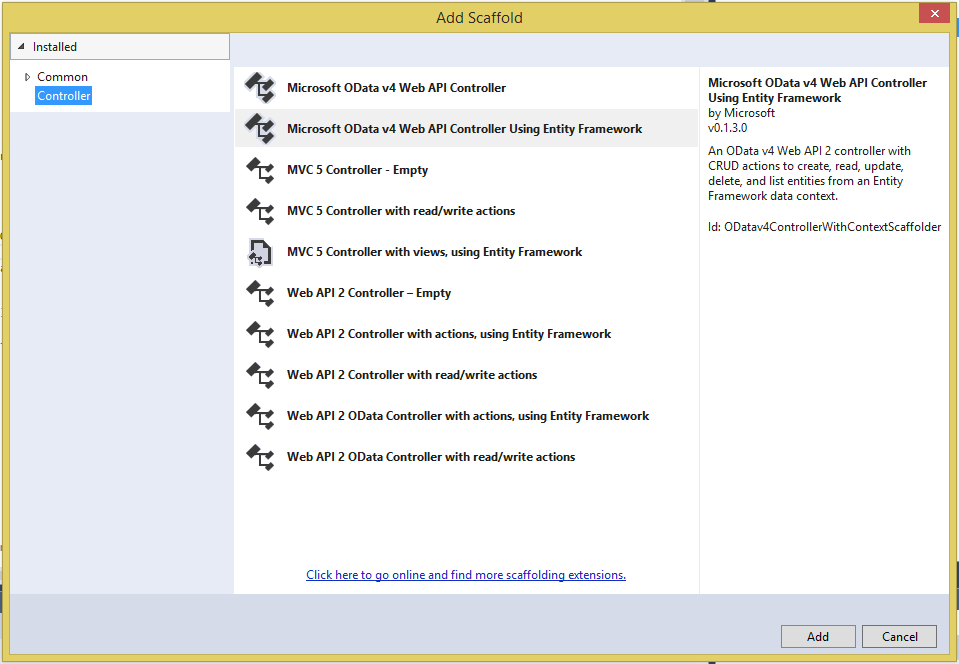
The scaffolding is used to generate controller code for model class. Two kinds of scaffolders are provided: for model without entity framework(Microsoft OData v4 Web API Controller) and model using entity framework(Microsoft OData v4 Web API Controller Using Entity Framework).
Scaffolder for model without entity framework:
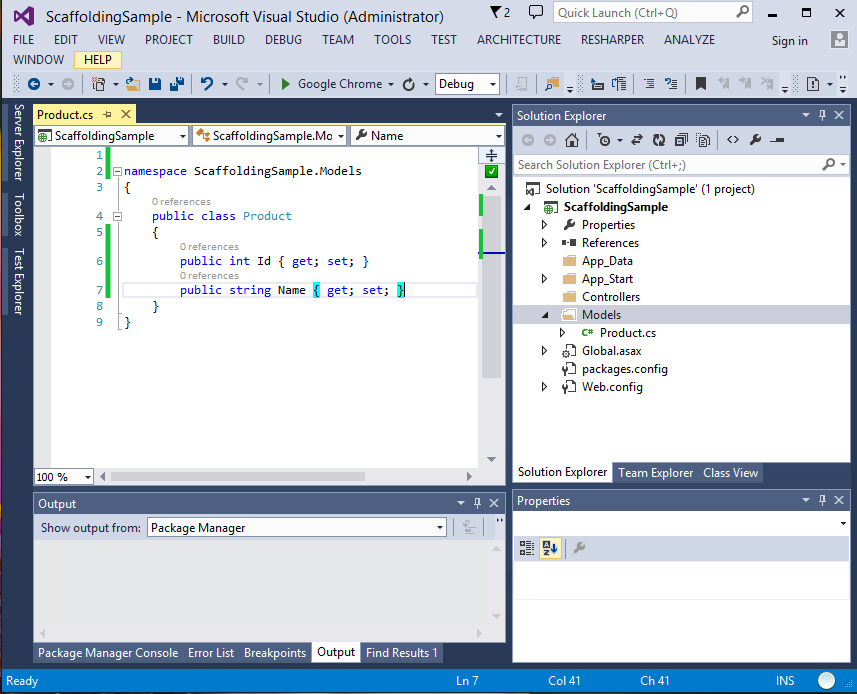
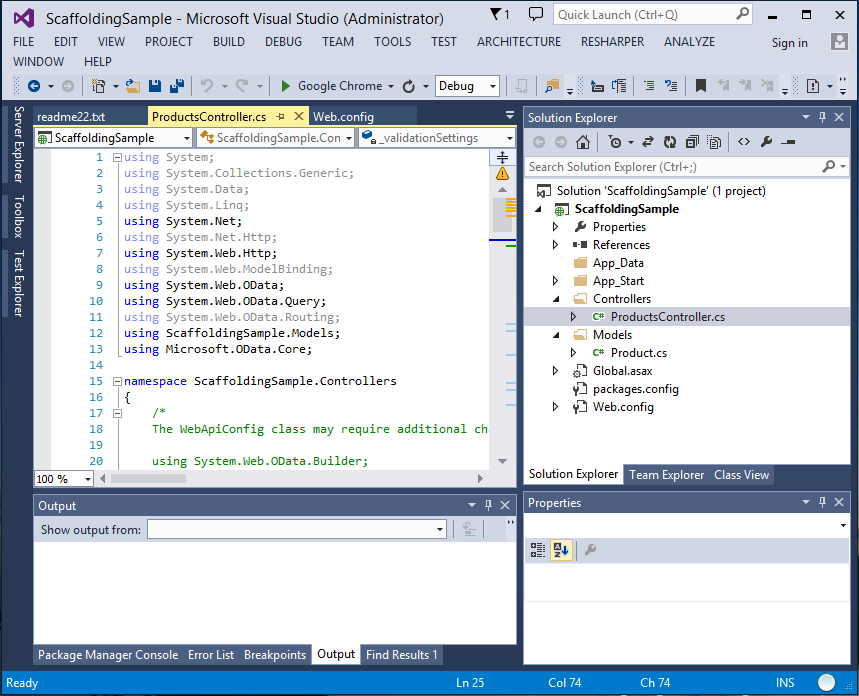
Before using scaffolding, you need to create a web api project and add model classes, the following is a sample:
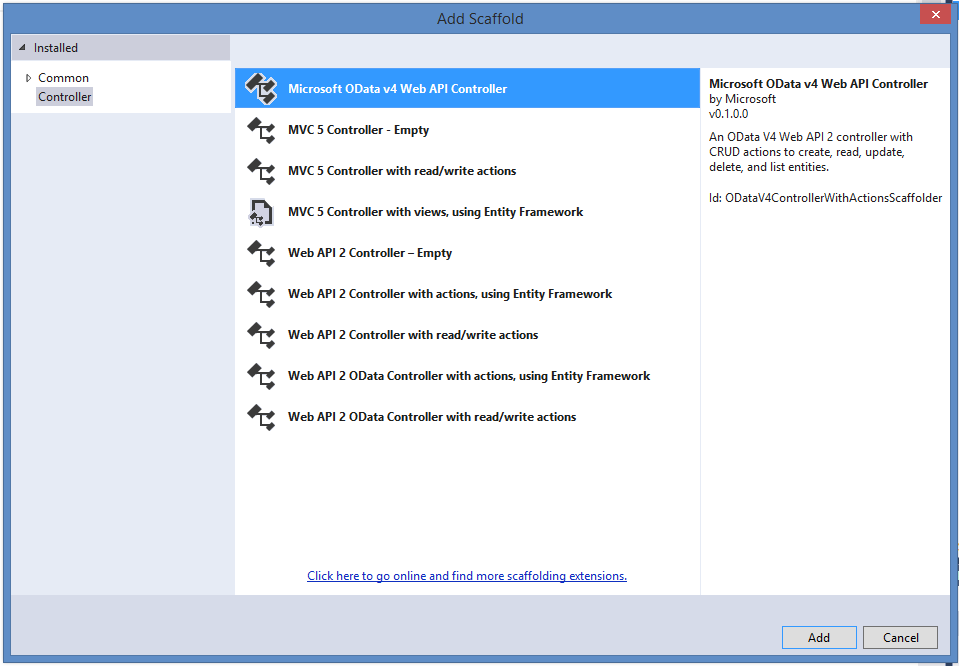
Then, you can right click “Controller” folder in solution explorer, select “Add” -> “Controller”. “Microsoft OData v4 Web API Controller” will be in the scaffolder list, as following:
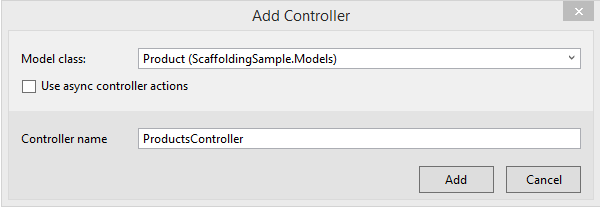
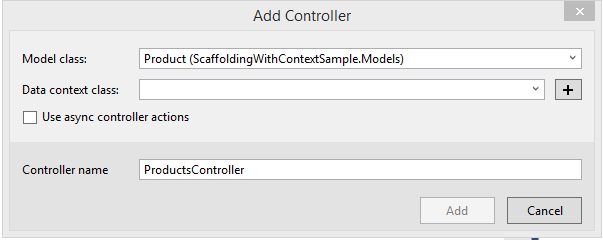
Select scaffoler item, then choose a model class you want to generate the controller. You can also select the “Using Async” if your data need to be got in Async call.
After click “Add”, the controller will be genereted and added into your project. Meanwhile, all reference needed, including OData Lib and OData Web API, will be added into the project, too.
If want to use entity framework as provider in service, no matter whether derived class of DbContext contained in project, when right click “Controller” folder in solution explorer, select “Add” -> “Controller” -> “Microsoft OData v4 Web API Controller Using Entity Framework” as scaffolder:
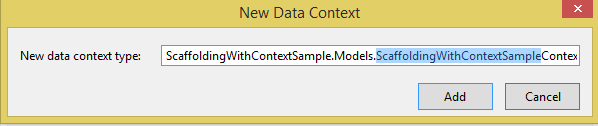
After click “Add”, the controller will be genereted and added into your project, new data context class will be added if needed. Meanwhile, all reference needed, including OData Lib and OData Web API, will be added into the project, too.
Change WebApiConfig.cs File
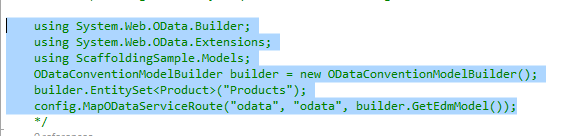
After generating the controller code, you may need to add some code in WebApiConfig.cs to generate model. Actually the code needed are in the comment of generated controller:
Just need to copy/paste the code to WebApiConfig.cs.
Add the Code to retrieve Data
As Scaffolding only genreate the frameowrk of controller code, data retrieve part should also be added into controller generated. Here, we write a simple in-memory data source and return all of them when call “GetProducts” method:
Add in ProductsController:
private static List<Product> products = new List<Product>()
{
new Product() {Id = 1, Name = "Test1"},
};
Add in GetProducts Method:
return Ok(products);
12. DESIGN
12.1 Edm.Date and Edm.TimeOfDay with EF
Problem
The Transact-SQL has date (Format: YYYY-MM-DD) type, but there isn’t a CLR type representing date type. Entity Framework (EF) only supports to use System.DateTime CLR type to map the date type.
OData V4 lib provides a CLR struct Date type and the corresponding primitive type kind Edm.Date. Web API OData V4 supports it. However, EF doesn’t recognize this CLR type, and it can’t map struct Date directly to date type.
So, this doc describes the solution about how to support Edm.Date type with Entity Framework. Meanwhile, this doc also covers the Edm.TimeOfDay type with EF.
Scopes
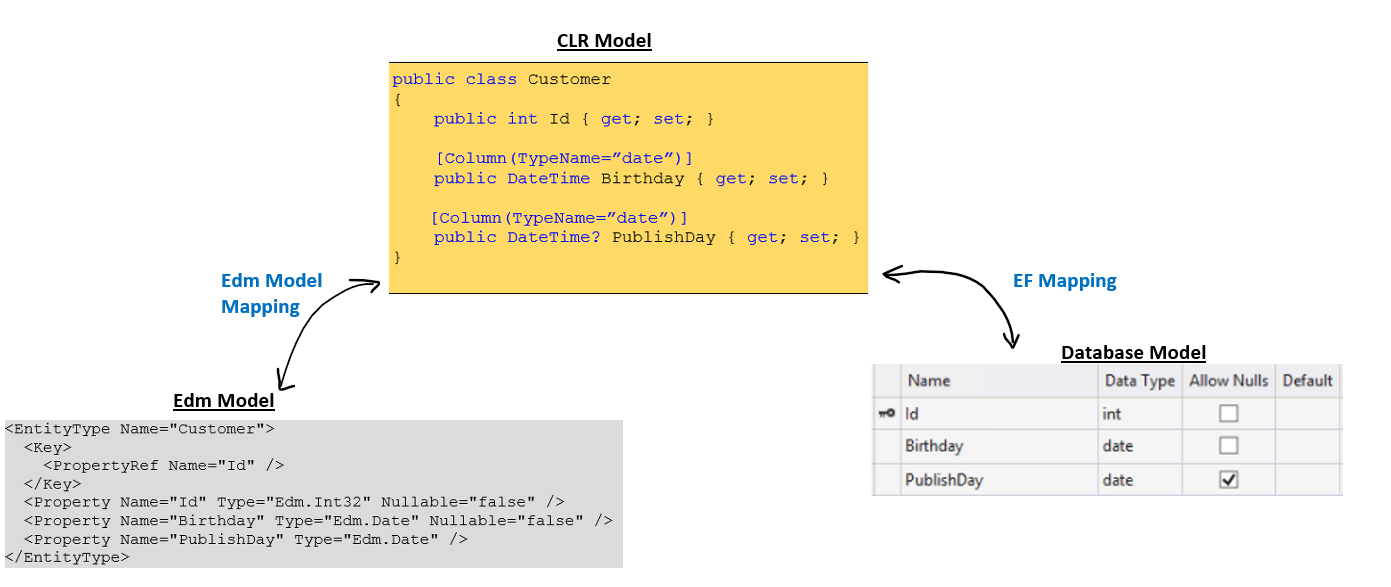
It should support to map the type between date type in Database and Edm.Date type through the CLR System.DateTime type. The map is shown in the following figure:
So, it should provide the below functionalities for the developer:
Can configure the System.DateTime/System.TimeSpan property to Edm.Date/ Edm.TimeOfDay.
Can serialize the date/ time value in the DB as Edm.Date /Edm.TimeOfDay value format.
Can de-serialize the Edm.Date/Edm.TimeOfDay value as date/ time value into DB.
Can do query option on the date/ time value.
Most important, EF doesn’t support the primitive collection. So, Collection of date is not in the scope. The developer can use navigation property to work around.
Detail Design
Date & Time type in SQL DB
Below is the date & time type mapping between DB and .NET:
For time type, it implicitly maps the System.TimeSpan to represent the time value. However, you can use string literal “time” in DataAnnotation or fluent API explicitly.
CLR Date Type in ODL
OData Library defines one struct to hold the value of Edm.Date (Format: YYYY-MM-DD).
namespaceMicrosoft.OData.Edm.Library{// Summary:// Date type for Edm.DatepublicstructDate:IComparable,IComparable<Date>,IEquatable<Date>{…}}
Where, Edm.Date is the corresponding primitive type Kind.
OData Library also defines one struct to hold the value of Edm.TimeOfDay (Format: HH:MM:SS. fractionalSeconds, where fractionalSeconds =1*12DIGIT).
namespaceMicrosoft.OData.Edm.Library{// Summary:// Date type for Edm.TimeOfDay publicstructTimeOfDay:IComparable,IComparable<TimeOfDay>,IEquatable<TimeOfDay>{…}}
Where, Edm.TimeOfDay is the corresponding primitive type Kind.
Configure Date & Time in Web API by Fluent API
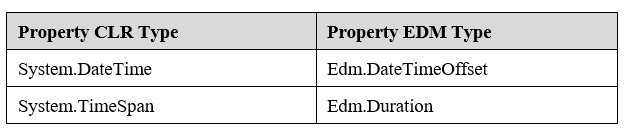
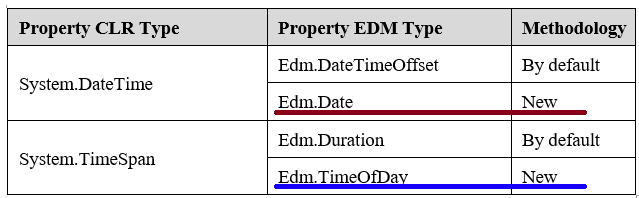
By default, Web API has the following mapping between CLR types and Edm types:
In this class, it will identify the Column attribute applied to System.DateTime or System.TimeSpan property, and call AsDate(…) or AsTimeOfDay() extension methods to add a Date or TimeOfDay mapped property. Be caution, EF supports the TypeName case-insensitive.
After insert the instance of ColumnAttributeEdmPropertyConvention into the conventions in the convention model builder:
We should modify ODataEntityTypeSerializer and ODataComplexTypeSerializer to identify whether or not the System.DataTime is serialized to Edm.Date. So, we should add a function in ODataPrimitiveSerializer:
Fortunately, Web API supports the most scenarios already, however, we should make some codes changes in FilterBinder class to make TimeOfDay scenario to work.
Example
We re-use the Customer model in the Scope. We use the Lambda expression to build the Edm Model as:
WebApi Default Enable Unqualified Operations and Case-insensitive Uri
Overview
OData Layer
OData libraries 7.4.4+ contains updates to improve
usability & compatibility of the library by virtue of exposing options
that can be set by the caller of the OData core library (ODL). Related
to request Uri parsing, the following two simplifications are now
available when URI parser is configured properly:
As usual, namespace is the primary mechanism for resolving name
token conflicts in multiple schema component of the model, therefore
namespace is required up to OData v4. To improve flexibility, with
notion of Default
Namespaces
introduced in OData v4.01, namespace qualifier is optional for
function or action identifier in request Uri. When corresponding
option in ODL Uri parser enabled:
If the function or action identifier contains a namespace
qualifier, as in all the original cases, Uri parser uses
original namespace-qualified semantic to ensure backward
compatibility;
Otherwise, URI parser will search among the main schema and
referenced sub-schemas treated as default namespaces, trying to
resolve the unqualified function & action identifier to unique
function / action element.
Exception will be thrown if no matches are found, or
multiple functions or actions of same name are found in
different namespaces of the model.
Property with same name as unqualified function / action
name could cause the token being bound to a property segment
unexpectedly. This should be avoided per best design
practice in OData protocol: "Service designers should
ensure uniqueness of schema children across all default
namespaces, and should avoid naming bound functions,
actions, or derived types with the same name as a structural
or navigation property of the type."
In OData v4.01, case-insensitive name resolution is supported for
system query
options,
built-in
function
and
operator
names, as well as type names, property names, enum values in form of
strings. When corresponding option in ODL Uri parser is enabled, Uri
parser first uses case-sensitive semantics as before and returns the
result if exact match is found; otherwise, tries case-insensitive
semantics, and returns the unique result found or throws exception
for ambiguous result such as duplicated items.
Most of the case-insensitive support above has been implemented
in current ODL version, except for minor bug fixes and
case-insensitive support for built-in function, which are
addressed as part of this task.
Note the above options are also combinatorial, with expected behavior for Uri parsing.
In ODL implementation, the primary support for the two options above is the default ODataUriResolver and its derived classes.
WebApi Layer
WebApi layer utilizes dependency injection to specify various services
as options for URI parser. Dependencies can be specified in WebApi layer
overriding default values provided by the IServicesProvider container.
With the new default values, WebApi will exhibit different behavior
related Uri parsing. The change should be backward compatible (all
existing cases should work as it used to be), and previous error cases
due to required case-sensitive and namespace qualifier for function
should become working cases, hence improving usability of OData stack.
Scenarios
Write Scenario Description
All scenarios are related to OData Uri parsing using default WebAPI
settings. All sample scenarios assume no name collisions in EDM model,
unless noted otherwise.
Functions: namespace qualified/unqualified
With function defined in the model:
builder.EntityType<Customer>().Action("UpdateAddress");
Namespace qualified function should work as before:
POST /service/Customers(1)/Default.UpdateAddress()
Namespace unqualified function should become a successful case:
POST /service/Customers(1)/UpdateAddress()
Case-Insensitive name resolution:
Case-insensitive property name should become resolvable:
With model: public class InvalidQueryCustomer { public int Id { get; set; } }
GET /service/InvalidQueryCustomers?$filter=id eq 5 : HTTP 200
GET /service/InvalidQueryCustomers(5)?$filter=id eq 5 : HTTP 400 “Query
options $filter, $orderby, $count, $skip, and $top can be applied
only on collections.”
Case-insensitive customer uri function name should become
resolvable:
With model having entity type People defined and following customized Uri function:
FunctionSignatureWithReturnType myFunc
= new
FunctionSignatureWithReturnType(EdmCoreModel.Instance.GetBoolean(true),
GET /service/People?$filter=mYMixedCasesTrInGfUnCtIoN(Name,'BlaBla') : HTTP 200
Combination of case-insensitive type & property name and unqualified
function should become resolvable:
With controller:
[HttpGet]
public ITestActionResult CalculateTotalOrders(int key, int month) {/*…*/}
Following OData v4 Uris should work:
GET /service/Customers(1)/Default. CalculateTotalOrders (month=1) : HTTP 200
GET /service/CuStOmErS(1)/CaLcUlAtEToTaLoRdErS (MONTH=1) : HTTP 200
Design Strategy
Dependency Injection of ODataUriResolver
ODL (Microsoft.OData.Core) library supports dependency injection of a
collection of service types from client via the IServiceProvider
interface. The IServiceProvider can be considered as a container
populated with default objects by ODL, while ODL’s client, such as
WebApi, can override default objects by injecting customized
dependencies.
ODL IContainerBuilder and ContainerBuilderExtensions
The ContainerBuilderExtensions.AddDefaultODataServices(this
IContainerBuilder) implementation populates a collection of default
OData service objects into the container’s builder. For example, default
service of type ODataUriResolver is registered as one instance of
ODataUriResolver as follows:
public static IContainerBuilder AddDefaultODataServices(this IContainerBuilder builder)
{
//………
builder.AddService(ServiceLifetime.Singleton,
sp => ODataUriResolver.GetUriResolver(null));
//………
}
WebAPI dependency injection of customized ODataUriResolver:
WebAPI defines the DefaultContainerBuilder implementing the ODL’s
IContainerBuilder interface.
When root container is created from HttpConfiguration (via the
HttpConfigurationExtensions.CreateODataRootContainer), a
PerRouteContainer instance will be used to:
Create an instance of DefaultContainerBuilder populated with
default OData services noted in above;
Override the ODL’s default ODataUriResolver service instance in
the container builder with WebApi’s new default for
UnqualifiedODataUriResover with EnableCaseInsensitive=true.
// Set Uri resolver to by default enabling unqualified functions/actions and case insensitive match.
builder.AddService(
ServiceLifetime.Singleton,
typeof(ODataUriResolver),
sp => new UnqualifiedODataUriResolver {EnableCaseInsensitive = true});
return builder;
}
WebAPI client (per service) can further inject other dependencies
(for example, typically, adding the EDM model) through
the’configureAction’ argument of the following method from
HttpConfigurationExtensions:
ODataUriParser configuration with injected ODataUriResolver dependency
When WebApi parses the request Uri, instance of ODataDefaultPathHandler is created with associated service provider container, which is further used to create ODataUriParser with injected dependency of ODataUriResolver.
public ODataUriParser(IEdmModel model, Uri relativeUri, IServiceProvider container)
Enable Case-Insensitive for Custom Uri function
One issue is encountered when trying to bind function call token with
case-insensitive enabled. The reason is that at the very beginning of
the function BindAsUriFunction() the name token, when case-insensitive
is enabled, is coerced to lower case (as shown below), which is valid for
build-in function (such as ‘startswith’ and ‘geo.distance’, etc), but
might not be valid for custom uri functions.
To implement with the correct behavior for enabled case-insensitive:
GetUriFunctionSignatures needs to additionally return signatures associated with function names in a dictionary instance.
When resolving best match function based on arguments for the invoked function, MatchSignatureToUriFunction will find the best match. Exception is still thrown in case of ambiguity or no matches found.
Loading large data can be slow. Services often rely on pagination to load the data incrementally to improve the response times and the user experience. Paging can be server-driven or client-driven:
Client-driven paging
In client-driven paging, the client decides how many records it wants to load and asks the server that many records. That is achieved by using $skip and $top query options in conjunction. For instance, if a client needs to request 10 records from 71-80, it can send a similar request as below:
GET ~/Products/$skip=70&$top=10
Server-driven paging
In server-driven paging, the client asks for a collection of entities and the server sends back partial results as well as a nextlink to use to retrieve more results. The nextlink is an opaque link which may use $skiptoken to store state about the request, such as the last read entity.
Problem
Currently, WebAPI uses $skip for server-driven paging which is a slight deviation from the OData standard and can be problematic when the data source can get updated concurrently. For instance, a deletion of a record may cause the last record to be sent down to the client twice.
Proposed Solution
WebAPI will now implement $skiptoken. When a collection of entity is requested which requires paging, we will assign the key value of the last sent entity to $skiptoken in the nextlink url prepended by values of the orderby properties in same order. While processing a request with $skiptoken, we will add another condition to the predicate based on the value of the skipoken.
Technical details
After all the query options have been applied, we determine if the results need pagination. If the results need pagination, we will pass the generated skiptoken value based off of the last result to the method that generates the nextpage link.
Format of the nextlink
The nextlink may contain $skiptoken if the result needs to be paginated. In WebAPI the $skiptoken value will be a list of pairs, where the pair consists of a property name and property value separated by a delimiter(:). The orderby property and value pairs will be followed by key property and value pairs in the value for $skiptoken. Each property and value pair will be comma separated.
We will not use $skiptoken if the requested resource is not an entity type. Rather, normal skip will be used.
This is the default format but services can define their own format for the $skiptoken as well but in that case, they will have to parse and generate the skiptoken value themselves.
Generating the nextlink
The next link generation method in GetNextPageHelper static class will take in the $skiptoken value along with other query parameters and generate the link by doing special handling for $skip, $skiptoken and $top. It will pass on the other query options as they were in the original request.
1. Handle $skip
We will omit the $skip value if the service is configured to support $skiptoken and a collection of entity is being requested. This is because the first response would have applied the $skip query option to the results already.
2. Handle $top
The next link will only appear if the page size is less than the $top query option. We will reduce the value of $top query option by the page size while generating the next link.
3. Handle $skiptoken
The value for the $skiptoken will be updated to new value passed in which is the key value for the last record sent. If the skiptoken value is not sent, we will call the existing method and use $skip for paging instead.
Routing
Since we will only be modifying the query options from the original request to generate the nextlink, the routing will remain same as the original request.
Parsing $skiptoken and generating the Linq expression
New classes will be created for SkipTokenQueryOption and SkipTokenQueryValidator. SkipTokenQueryOption will contain the methods to create and apply the LINQ expression based on the $skiptoken value. To give an example, for a query like the following:
GET ~/EntitySet?$orderby=Prop1,Prop2&$skiptoken=Prop1:value1,Prop2:value2,Id1:idVal1,Id2:idVal2
The following where clause will be added to the predicate:
WHERE Prop1>value1
Or (Prop1=value1 AND Prop2>value2)
Or (Prop1=value1 AND Prop2=value2 AND Id1>Val)
Or (Prop1=value1 AND Prop2=value2 AND Id1=idVal1 AND Id2>idVal2)
Note that the greater than operator will be swapped for less than operator if the order is descending.
Generating the $skiptoken
The SkipTokenQueryOption class will be utilized by ODataQueryOption to pass the token value to the nextlink generator helper methods.
In the process, IWebApiRequestMessage will be modified and GetNextPageLink method will be overloaded to now accept another parameter for the $skiptoken value.
Configuration to use $skiptoken or $skip for server-driven paging
We will allow services to configure if they want to use $skiptoken or $skip for paging per route as there can be performance issues with a large database with multipart keys. By default, we will use $skip.
Moreover, we will ensure stable sorting if the query is configured for using $skiptoken.
Additional details and discussions
1. How would a developer implement paging without using EnableQuery attribute? What about stable ordering in that case?
a. The new SkipTokenQueryOption class will provide 2 methods-
i. GenerateSkipTokenValue – requires the EDM model, the results as IQuerable and OrderbyQueryOption.
ii. ApplyTo - applies the LINQ expression for $skiptoken.
iii. ParseSkipTokenValue - Populates the dictionary of property-value pairs on the class
For developers having non-linq data sources, they can generate the skiptoken value using the new class and use this class in their own implementation of the filtering that ApplyTo does.
b. To ensure stable ordering, we will provide a public method on ODataQueryOptions - GenerateStableOrderQueryOption: It will output an OrderbyQueryOption which can be passed to the skiptoken generator.
Developers not using the EnableQuery attribute will have to generate their own OrderbyQueryOption and generate the skiptoken value themselves.
2. Should the nextlink modify the list of orderby properties to ensure stable ordering?
Currently, the way the code is structured, a lot of the information about the current query ($apply and $orderby) would need to be passed down to the nextlink generator to append to the orderby and moreover, it will make it very cumbersome for developers not using the enable query attribute to use it.
Instead, we will expose methods on ODataQueryOption that will enable developers to generate their orderby clauses for stable sorting.
3. Parameterizing the nextlink instead of using skiptoken?
Currently, the developers not using the enable query attribute generate the next link by using GetNextPageLink extension method on the request. Considering that the data source can even be linq incompatible, this will be a significant deviation from the current implementation for such developers.
Moreover, the need to filter the results based on a certain value fits more into the QueryOption paradigm and makes it more suitable for customers supporting linq.
13. 6.X FEATURES
13.1 Model Bound Attributes
Since Web API OData V6.0.0 which depends on OData Lib 7.0.0, we add a new feature named ModelBoundAttribute, use this feature, we can control the query setting through those attributes to make our service more secure and even control the query result by set page size, automatic select, automatic expand.
Let’s see how to use this feature.
Global Query Setting
Now the default setting for WebAPI OData is : client can’t apply $count, $orderby, $select, $top, $expand, $filter in the query, query like localhost\odata\Customers?$orderby=Name will failed as BadRequest, because all properties are not sort-able by default, this is a breaking change in 6.0.0, if we want to use the default behavior that all query option are enabled in 5.x version, we can configure the HttpConfigration to enable the query option we want like this:
Pagination settings correlate to OData’s @odata.nextLink (server-side pagination) and ?$top=5&$skip=5 (client-side pagination).
We can set the PageSize to control the server-side pagination, and MaxTop to control the maximum value for $top, by default client can’t use $top as we said in the Global Query Setting section, every query option is disabled, if you set the Page Attribute, by default it will enable the $top with no-limit maximum value, or you can set the MaxTop like:
In the model above, we defined the page setting for Customer and Orders navigation property in Customer and Customers navigation property in Order, let’s explain the usage of them one by one.
Page Attribute on Entity Type
The first page attribute on Customer type, means the query setting when we query the Customer type, like localhost\odata\Customers, the max value for $top is 5 and page size of returned customers is 1.
For example:
The query like localhost\odata\Customers?$top=10 will failed with BadRequest : The limit of ‘5’ for Top query has been exceeded.
The page size is 1 if you request localhost\odata\Customers.
Page Attribute on Navigation Property
And what about the page attribute in Order type’s navigation property Customers? it means the query setting when we query the Customers navigation property in Order type. Now we get a query setting for Customer type and a query setting for Customers navigation property in Order type, how do we merge these two settings? The answer is: currently the property’s query setting always override the type’s query setting, if there is no query setting on property, it will inherent query setting from it’s type.
For example:
The query like localhost\odata\Orders?$expand=Customers($top=10) will works because the setting is no limit.
The result of localhost\odata\Orders?$expand=Customers won’t have paging because the setting didn’t set the page size.
So for the attribute on Orders navigation property in Customer type, the page size and maximum value of $top setting will have effect when we request like localhost\odata\Customers?$expand=Orders or localhost\odata\Customers(1)\Orders as long as we are query the Orders property on Customer type.
Count Attribute
Count settings correlate to OData’s ?$count=true (items + count).
We can set the entity type or property is countable or not like:
In the model above, we can tell that the Order is not countable(maybe the number is very large) but Orders property in Customer is countable.
About the priority of attribute on property and type, please refer to Page Attribute section.
So you can have those examples:
Query localhost\odata\Orders?$count=true will failed with BadRequest that orders can’t used for $count
Query localhost\odata\Customers?$expand=Orders($count=true) will works
Query localhost\odata\Customers(1)/Orders?$count=true works too.
OrderBy Attribute
Ordering settings correlate to OData’s $orderby query option.
We can specify which property is sort-able very easy and we can also define very complex rule by use attribute on property and on type. For example:
We can see that the we can have multiple OrderBy attributes, how are they merged? The answer is the Attribute on a class with a constrained set of properties gets high priority, the order of their appear time doesn’t matter.
OrderBy Attribute on EntityType and ComplexType
Let’s go through those attributes to understand the settings, the first attribute means we can specify the single navigation property AutoExpandOrder and single complex property Address when we query Customer type, like query localhost\odata\Customers?$orderby=Address/xxx or localhost\odata\Customers?$orderby=AutoExpandOrder/xxx. And how do we control which property under AutoExandOrder is sort-able?
For the AutoExpandOrder property, we add OrderBy Attribute on Order type, the first attribute means Name is not sort-able, the second attribute means all the property is sort-able, so for the Order type, properties except Name are sort-able.
For example:
Query localhost\odata\Customers?$orderby=Name will failed with BadRequest that Name is not sort-able.
Query localhost\odata\Customers?$orderby=AutoExpandOrder/Name will failed with BadRequest that Name is not sort-able.
OrderBy Attribute on Property
About the priority of attribute on property and type, please refer to Page Attribute section.
We have OrderBy attribute on Address property, it means all properties are sort-able when we query Customer, and for Orders property, it means only Id is sort-able when we query Orders property under Customer.
Query localhost\odata\Customers?$expand=Orders($orderby=Price) will failed with BadRequest that Price is not sort-able.
Filter Attribute
Filtering settings correlate to OData’s $filter query option.
For now we only support to specify which property can be filter just like what we do in OrderBy Attribute, we can simply replace orderby with filter in the example above, so please refer to OrderBy Attribute section.
Select Attribute
Search settings correlate to OData’s $search query option.
We can specify which property can be selected, which property is automatic selected when there is no $select in the query.
Automatic Select
Automatic select mean we will add $select in the query depends on the select attribute.
If we have a User class, and we don’t want to expose some property to client, like secrete property, so client query localhost\odata\Users?$select=Secrete will failed and query localhost\odata\Users? won’t return Secrete property, how can we achieve that with Select Attribute?
The first attribute means all the property will be automatic select when there is no $select in the query, the second attribute means the property Secrete is not select-able. For example, request localhost\odata\Users will have the same response with localhost\odata\Users?$select=Id,Name
Automatic Select on Derived Type
If the target type of our request have some derived types which have automatic select property, then these property will show in the response if there is no $select query option, for example, request localhost\odata\Users will have the same response with localhost\odata\Users?$select=Id,Name,SpecialUser/SpecialName if the SpecinalName property in automatic select.
Select Attribute on Navigation Property
About the priority of attribute on property and type, please refer to Page Attribute section.
About the multiple attribute, please refer to Multiple Attribute section.
We also support Select attribute on navigation property, to control the expand scenario and property access scenario, like if we want client can only select Id and Name from Customer’s navigation property Order.
Expansion settings correlate to OData’s $expand query option.
We can specify which property can be expanded, which property is automatic expanded and we can specify the max depth of the expand property. Currently we support Expand attribute on entity type and navigation property, the using scenario is quite like Select Attribute and other attributes, you can just refer to those sections.
Automatic Expand
Automatic expand mean it will always expand that navigation property, it’s like automatic select, we will add a $expand in the query, so it will expand even if there is a $select which does not contain automatic epxand property.
Model Bound Fluent APIs
We also provide all fluent APIs to configure above attributes if you can’t modify the class by adding attributes, it’s very straight forward and simple to use:
The example shows class with attributes and build model using the model bound fluent APIs if we can’t modify the class. These two approaches are getting two same models.
About the multiple attribute, model bound fluent APIs are the same, the model bound fluent API with a constrained set of properties wins. For example: builder.EntityType<Customer>().Expand().Expand("Friend", SelectExpandType.Disabled), Friend can’t be expanded, even we put Expand() in the end. If there is a setting with same property, the last one wins, for example: .Expand(8, "Friend").Expand(1, "Friend"), the max depth will be 1.
Overall Query Setting Precedence
Query settings can be placed in many places, with the following precedence from lowest to highest: System Default(not query-able by default), Global Configuration, Model Bound Attribute, Fluent API.
Controller Level Query Setting
If we only want to control the setting in one API call, like the Get() method in CustomerController, we can simply use the Settings in EnableQueryAttribute, like:
Add navigation properties in convention model builder
Convention model builder will automatically map the class type properties in complex type as navigation properties if the declaring type of such navigation property has key defined.
So, as the above example, we can use the following codes to define a convention model:
ODataConventionModelBuilderbuilder=newODataConventionModelBuilder();builder.ComplexType<Address>();// just add a starting point
Since Web API OData V6.0.0 beta, we have integrated with the popular dependency injection (DI) framework Microsoft.Extensions.DependencyInjection. By means of DI, we can significantly improve the extensibility of Web API OData as well as simplify the APIs exposed to the developers. Meanwhile, we have incorporated DI support throughout the whole OData stack (including ODataLib, Web API OData and RESTier) thus the three layers can consistently share services and custom implementations via the unified DI container in an OData service. For example, if you register an ODataPayloadValueConverter in a RESTier API class, the low-level ODataLib will be aware of that and use it automatically because they share the same DI container.
For the fundamentals of DI support in OData stacks, please refer to this docs from ODataLib. After understanding that, we can now take a look at how Web API OData implements the container, takes use of it and injects it into ODataLib.
Implement the Container Builder
By default, if you don’t provide a custom container builder, Web API OData will use the DefaultContainerBuilder which implements IContainerBuilder from ODataLib. The default implementation is based on the Microsoft DI framework introduced above and what it does is just delegating the builder operations to the underlying ServiceCollection.
But if you want to use a different DI framework (e.g., Autofac) or make some customizations to the default behavior, you will need to either implement your own container builder from IContainerBuilder or inherit from the DefaultContainerBuilder. For the former one, please refer to the docs from ODataLib. For the latter one, here is a simple example to illustrate how to customize the default container builder.
publicclassMyContainerBuilder:DefaultContainerBuilder{publicoverrideIContainerBuilderAddService(ServiceLifetimelifetime,TypeserviceType,TypeimplementationType){if(serviceType==typeof(ITestService)){// Force the implementation type of ITestService to be TestServiceImpl.base.AddService(lifetime,serviceType,typeof(TestServiceImpl));}returnbase.AddService(lifetime,serviceType,implementationType);}publicoverrideIServiceProviderBuildContainer(){returnnewMyContainer(base.BuildContainer());}}publicclassMyContainer:IServiceProvider{privatereadonlyIServiceProviderinner;publicMyContainer(IServiceProviderinner){this.inner=inner;}publicobjectGetService(TypeserviceType){if(serviceType==typeof(ITestService)){// Force to create a TestServiceImpl2 instance for ITestService.returnnewTestServiceImpl2();}returnbase.GetService(serviceType);}}
After implementing the container builder, you need to register that container builder in HttpConfiguration to tell Web API OData that you want to use your custom one. Please note that you MUST call UseCustomContainerBuilder BEFORE MapODataServiceRoute and EnableDependencyInjection because the root container will be actually created in these two methods. Setting the container builder factory after its creation is meaningless. Of course, if you wish to keep the default container builder implementation, UseCustomContainerBuilder doesn’t need to be called at all.
Basic APIs to register the services have already been documented here. Here we mainly focus on the APIs from Web API OData that help to register the services into the container builder. The key API to register the required services for an OData service is an overload of MapODataServiceRoute which takes a configureAction to configure the container builder (i.e., register the services).
Theoretically you can register any service within the configureAction but there are two mandatory services that you are required to register: the IEdmModel and a collection of IRoutingConvention. Without them, the OData service you build will NOT work correctly. Here is an example of calling the API where a custom batch handler MyBatchHandler is registered. You are free to register any other service you like to the builder.
You might also find that we still preserve the previous overloads of MapODataServiceRoute which take batch handlers, path handlers, HTTP message handlers, etc. They are basically wrapping the first overload that takes a configureAction. The reason why we keep them is that we want to give the users convenience to create OData services and bearings to the APIs they are familiar with.
Once you have called any of the MapODataServiceRoute overloads, the dependency injection for that OData route is enabled and an associated root container is created. As we internally maintain a dictionary to map the route name to its corresponding root container (1-1 mapping), multiple OData routes (i.e., calling MapODataServiceRoute multiple times) are still working great and the services registered in different containers (or routes) will not impact each other. That said, if you want a custom batch handler to work in the two OData routes, register them twice.
Enable Dependency Injection for HTTP Routes
It’s also possible that you don’t want to create OData routes but just HTTP routes. The dependency injection support will NOT be enabled right after you call MapHttpRoute. In this case, you have to call EnableDependencyInjection to enable the dependency injection support for ALL HTTP routes. Please note that all the HTTP routes share the SAME root container which is of course different from the one of any OData route. That said calling EnableDependencyInjection has nothing to do with MapODataServiceRoute.
Please also note that the order of MapHttpRoute and EnableDependencyInjection doesn’t matter because they have no dependency on each other.
Manage and Access the Request Container
Given a root container, we can create scoped containers from it, which is also known as request containers. Mostly you don’t need to manage the creation and destruction of request containers yourself but there are some rare cases you have to touch them. Say you want to implement your custom batch handler, you have the full control of the multi-part batch request. You parse and split it into several batch parts (or sub requests) then you will be responsible for creating and destroying the request containers for the parts. They are implemented as extension methods to HttpRequestMessage in HttpRequestMessageExtensions.
To create the request container, you need to call the following extension method on a request. If you are creating the request container for a request that comes from an HTTP route, just pass null for the routeName.
To delete the request container from a request, you need to call the following extension method on a request. The parameter dispose indicates whether to dispose that request container after deleting it from the request. Disposing a request container means that all the scoped and transient services within that container will also be disposed if they implement IDisposable.
To get the request container associated with that request, simply call the following extension method on a request. Note that you don’t need to provide the route name to get the request container because the container itself has already been stored in the request properties during CreateRequestContainer. There is also a little trick in GetRequestContainer that if you have never called CreateRequestContainer on the request but directly call GetRequestContainer, it will try to create the request container for all the HTTP routes and return that container. Thus the return value of GetRequestContainer should never be null.
Please DO pay attention to the lifetime of the services. DON’T forget to delete and dispose the request container if you create it yourself. And scoped services will be disposed after the request completes.
Services Available in Web API OData
Currently services Available in Web API OData include:
IODataPathHandler whose default implementation is DefaultODataPathHandler and lifetime is Singleton.
XXXQueryValidator whose lifetime are all Singleton.
ODataXXXSerializer and ODataXXXDeserializer whose lifetime are all Singleton. But please note that they are ONLY effective when DefaultODataSerializerProvider and DefaultODataDeserializerProvider are present. Custom serializer and deserializer providers are NOT guaranteed to call those serializers and deserializers from the DI container.
ODataSerializerProvider and ODataDeserializerProvider whose implementation types are DefaultODataSerializerProvider and DefaultODataDeserializerProvider respectively and lifetime are all Singleton. Please note that you might lose all the default serializers and deserializers registered in the DI container if you don’t call into the default providers in your own providers.
IAssembliesResolver whose implementation type is the default one from ASP.NET Web API.
FilterBinder whose implementation type is Transient because each EnableQueryAttribute instance will create its own FilterBinder. Override it if you want to customize the process of binding a $filter syntax tree.
Some segments are just used to wrapper the corresponding segments defined in ODL, such as BatchPathSegment.
Some segments are used to do some conversions, such as BoundFunctionPathSegment, KeyValuePathSegment.
However, ODL defines the same segments and Web API OData needn’t to do such conversion. So, all segment classes defined in Web API OData are removed in v6.x.
Web API OData will directly use the path segment classes defined in ODL as follows:
So, for any complex value, it will use ODataResourceSerializer and ODataResourceDeserializer to read and write.
for any complex collection value, it will use ODataResourceSetSerializer and ODataResourceSetDeserializer to read and write.
There is also a new WebApi OData V7.0.0 for ASP.NET Framework.
The nightly version of this package is available from this nightly url.
The APIs are the same as those in WebApi OData V6.x, except for the new namespace Microsoft.AspNet.OData for V7, which is changed from System.Web.OData.
Web API OData for ASP.NET Core Beta1, has following limitations which are known issues:
Batching is not fully supported
Using EnableQuery in an HTTP route, i.e. non-OData route, is not fully functional
#1175 - When you first start your service under a debugger, the project app URL will
likely make a request on a non-OData route. This will fail with an exception Value cannot be null. Parameter name: routeName. You
can work around this issue by adding routes.EnableDependencyInjection(); in UseMvc() lambda in Configure. You can configure
the default startup request in Project properties, Debug, App URL.
Web API OData for ASP.NET, there are no known issues.
OData V7.0.0 for ASP.NET Core 2.x
The new OData V7.0.0 for ASP.NET Core 2.x package supports the same features set as Web API OData V6.0.0 but works with ASP.NET Core.
You can learn more about ASP.NET Core from the documentation.
To get started with OData V7.0.0 for ASP.NET Core 2.x, you can use code that is very similar to Web API OData V6.0.0. All of the
documentation in Writing a simple OData V4 service is correct except for
configuring the OData endpoint. Instead of using the Register() method, you’ll follow the new service + route configuration model
used in ASP.NET Core.
The namespace for both Web API OData packages is Microsoft.AspNet.OData.
a. Create the Visual Studio project
In Visual Studio 2017, create a new C# project from the ASP.NET Core Web Application template. Name the project “ODataService”.
In the New Project dialog, select ASP.NET Core 2.0 and select the WebApi template. Click OK.
b. Install the OData packages
In the Nuget Package Manager, install Microsoft.AspNetCore.OData and all it’s dependencies.
In the controller, we defined a List<Product> object which has one product element. It’s considered as an in-memory storage
of the data of the OData service.
We also defined a Get method that returns the list of products. The method refers to the handling of HTTP GET requests. We’ll
cover that in the sections about routing.
This Get method is decorated with EnableQueryAttribute, which in turns supports OData query options, for example $expand, $filter etc.
e. Configure the OData Endpoint
Open the file Startup.cs. Replace the existing ConfigureServices and Configure methods with the
following code:
publicvoidConfigureServices(IServiceCollectionservices){services.AddMvc();services.AddOData();}publicvoidConfigure(IApplicationBuilderapp){varbuilder=newODataConventionModelBuilder(app.ApplicationServices);builder.EntitySet<Product>("Products");app.UseMvc(routeBuilder=>{// and this line to enable OData query option, for example $filterrouteBuilder.Select().Expand().Filter().OrderBy().MaxTop(100).Count();routeBuilder.MapODataServiceRoute("ODataRoute","odata",builder.GetEdmModel());// uncomment the following line to Work-around for #1175 in beta1// routeBuilder.EnableDependencyInjection();});}
f. Start the OData service
Start the OData service by running the project and open a browser to consume it. You should be able to get access to the service
document at http://host/odata/ in which http://host/odata/ is the root path of your service. The metadata document
can be accessed at GET http://host:port/odata/$metadata and the products at GET http://host:port/odata/Products where
host:port is the host and port of your service, usually something like localhost:1234.
g. Explore
As mentioned earlier, most of the samples for Web API OData V6.0.0 apply to Web API OData V7.0.0. One of the design goals was to keep
the API between the two as similar as possible. While the APIs are similar, they are not identical due to differences between
ASP.NET and ASP.NET Core, such as HttpRequestMessage is now HttpRequest.
ODataRoutingConvention
Both Microsoft.AspNet.OData and Microsoft.AspNetCore.OData packages support same set of OData routing conventions, including default built-in routing conventions and attribute rounting convention, so that each request can be routed to matching controller for processing. All routing conventions implement the interface IODataRoutingConvention, however, with different definitions, as highlighted below, for the two packages due to different route matching implementations based on ASP.NET Framework and ASP.NET Core:
For ASP.NET Framework:
namespaceMicrosoft.AspNet.OData.Routing.Conventions{/// <summary>/// Provides an abstraction for selecting a controller and an action for OData requests./// </summary>publicinterfaceIODataRoutingConvention{/// <summary>/// Selects the controller for OData requests./// </summary>stringSelectController(ODataPathodataPath,HttpRequestMessagerequest);/// <summary>/// Selects the action for OData requests./// </summary>stringSelectAction(ODataPathodataPath,HttpControllerContextcontrollerContext,ILookup<string,HttpActionDescriptor>actionMap);}}
For ASP.NET Core 2.x:
namespaceMicrosoft.AspNet.OData.Routing.Conventions{/// <summary>/// Provides an abstraction for selecting a controller and an action for OData requests./// </summary>publicinterfaceIODataRoutingConvention{/// <summary>/// Selects the controller and action for OData requests./// </summary> IEnumerable<ControllerActionDescriptor>SelectAction(RouteContextrouteContext);}}
Specific routing convention, e.g. MetadataRoutingConvention, typically implements the package-specific interface, provides package-specific implementation, and shares common logic for both platform in the Microsoft.AspNet.OData.Shared shared project.
14.2 Simplified optional-$-prefix for OData query option for WebAPI query parsing
Since ODL-6.x, OData Core Library supports query option with optional-$-prefix as described in this docs.
Corresponding support on WebAPI layer is available starting WebAPI-7.4.
As result, WebAPI is able to process OData system query with optional $-prefix, as in “GET ~/?filter=id eq 33” with injected dependency setting:
ODataUriResolver.EnableNoDollarQueryOptions=true.
ODL Enhancement
A public boolean attribute EnableNoDollarQueryOptions is added to ODataUriResolver. Public attribute is needed for dependency injection on the WebAPI layer.
WebAPI optional-$-prefix Setting using Dependency Injection
WebAPI service injects the setting using the ODataUriResolver during service initialization:
Builder of service provider container sets the instantiated ODataUriResover config using dependency injection.
Note that UriResolver is typically a singleton for the service instance, since each instance should follow the same Uri convention. In case of other injected dependencies that are configurable per request, scoped dependency should be used.
WebAPI Internal Processing of optional-$-prefix Setting
The ODataQueryOptions constructor pins down the optional-$-prefix setting (see _enableNoDollarSignQueryOptions) from the injected ODataUriResolver.
Based on the optional-$-prefix setting, ODataQueryOptions parses the request Uri in WebAPI layer accordingly.
14.3 WebApi URI parser default setting updates: case-insensitive names and unqualified functions & actions
OData Core Library v7.x has introduced the following two usability improvement:
Uri parsing with case-insensitive name, and
Unqualified functions & actions, which are not required to have namespace prefix.
Starting with WebAPI OData v7.0, these two behaviors are supported by default.
Examples
Prior to WebApi v7.0, for example, the following Uris are supported:
GET /service/Customers?$filter=Id eq 5
POST /service/Customers(5)/Default.UpdateAddress()
With WebApi v7.0by default, in addition to above, the following variances are also supported:
GET /service/Customers?$filter=id eq 5
GET /service/CUSTOMERS?$filter=Id eq 5
POST /service/Customers(5)/UpdateAddress()
and the combination of both case-insensitive and unqualified functions & actions, such as:
POST /service/CUSTOMERS(5)/UpdateAddress()
Backward Compatibility
Case-insensitive semantics is supported for type name, property name and function/action name. WebAPI OData will first try to resolve the name with case-sensitive semantics and return the best match if found; otherwise case-insensitive semantics are applied, returning the unique match or throwing an exception if multiple case-insensitive matches exist.
With support for unqualified function & action, the URI parser will do namespace-qualified function & action resolution when the operation name is namespace-qualified; otherwise all namespaces in the customer’s model are treated as default namespaces, returning the unique match or throwing an exception if multiple unqualified matches exist.
Because of the precedence rules applied, scenarios supported in previous versions of WebAPI continue to be supported with the same semantics, while new scenarios that previously returned errors are also are now supported.
Please note that, even though case-insensitive and unqualified function & action support is added as a usability improvement, services are strongly encouraged to use names that are unique regardless of case, and to avoid naming bound functions, actions, or derived types with the same name as a property of the bound type. For example, a property and unqualified function with same name would resolve to a property name when the unqualified function may have been expected.
Restoring the original behavior
Even though the new behavior is backward compatible for most scenarios, customers can configure WebAPI to enforce case sensitivity and namespace qualification, as in 6.x, using dependency injection:
The above code replaces the ODataUriResolver service that supports case-insensitivity and unqualified names with a default instance of ODataUriResolver that does not.
14.4 OData Web API 7.0 (.NET Core and .NET Classic)
We’re happy to announce the release of ASP.NET Web API OData 7.0 on the NuGet gallery!
ASP.NET Web API OData 7.0 is available in two packages:
[ Issue #822 ] Fix for memory leak in EdmLibHelpers.
Questions and feedback
You and your team are warmly welcomed to try out this new version if you are interested in the new features and fixes above. You are also welcomed to contribute your code to OData Web API repository. For any feature request, issue or idea please feel free to reach out to us at
GitHub Issues.
14.5 OData Web API 7.0.1 (.NET Core and .NET Classic)
The NuGet packages for ASP.NET Web API OData v7.0.1 are available on the NuGet gallery.
You can install or update the NuGet packages for OData Web API v7.0.1 using the Package Manager Console:
You and your team are warmly welcomed to try out this new version if you are interested in the new features and fixes above. You are also welcomed to contribute your code to OData Web API repository. For any feature request, issue or idea please feel free to reach out to us at
GitHub Issues.
14.6 OData Web API 7.1.0 (.NET Core and .NET Classic)
The NuGet packages for ASP.NET Web API OData v7.1.0 are available on the NuGet gallery.
You can install or update the NuGet packages for OData Web API v7.1.0 using the Package Manager Console:
issue #1591 fixes an issue where types created by the ODataModelBuilder did not respect the namespace of the ModelBuilder and instead used the namespace of the CLR type. With PR #1592, OData WebAPI 7.1.0 now correctly uses the namespace on the ModelBuilder, if it has been explicitly set. In order to retain the old behavior of using the namespace of the CLR type, do not set the namespace on the ModelBuilder, or set the namespace on the ModelBuilder to null or to the desired namespace of the CLR type.
What’s in this release?
New Features:
[ #1631 ] Don’t require keys for singleton instances
[ #1628 ] Allow adding new members to a collection through a POST request
[ #1591 ] Support namespaces in OData ModelBuilder
[ #1656 ] Allowing the definition of partner relationships
[ #1555 ] aspnetcore ETagMessageHandler throws then ClrType property name and EdmModel property name differs
[ #1559 ] Don’t assume port 80 for nextLink when request was HTTPS
[ #1579 ] Star select ( $select= * ) not returning dynamic properties
[ #1588 ] Null check on ODataQueryParameterBindingAttribute for Net Core
[ #736 ] EDMX returned from $metadata endpoint has incorrect “Unicode” attributes
[ #850 ] ODataConventionModelBuilder takes into account [EnumMember] on enum members, but ODataPrimitiveSerializer (?) does not, causing mismatch in the payload.
You and your team are warmly welcomed to try out this new version if you are interested in the new features and fixes above. You are also welcomed to contribute your code to OData Web API repository. For any feature request, issue or idea please feel free to reach out to us at
GitHub Issues.