 |
VOOZH | about |
|
VOOZH | about |
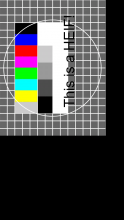
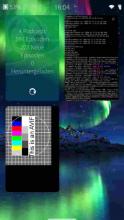
simple minimalistic python app that opens a given image file using gdk-pixbuf or ImageMagick and displays it via sdl2.
It can open all image-formats that your gdk-pixbuf loaders and/or your version of ImageMagick are able to deal with, e.g.:
RAW: needs gdk-pixbuf-loader-libopenraw or ImageMagick+libraw20
heic: needs gdk-pixbuf-loader-libheif
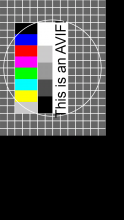
avif: needs gdk-pixbuf-loader-libavif
jxl: needs gdk-pixbuf-loader-jxl
exr: needs ImageMagick + python3-Wand
...
usage: python3 /usr/lib/python3.8/site-packages/imageSDLview/imageSDLview.py file
please change /usr/lib/python3.8/site-packages/imageSDLview/imageSDLview.py to match your display resolution:
#Change this to screensize of your device (960x540 is suitable for a JollaPhone aka Jolla1)
displayheight = 960
displaywidth = 540
Requires: https://openrepos.net/content/lpr/python3-pysdl2 , gdk-pixbuf , gdk-pixbuf-modules , python3-imaging
Recommends:
https://openrepos.net/content/lpr/gdk-pixbuf-loader-libheif
https://openrepos.net/content/lpr/gdk-pixbuf-loader-libopenraw
https://openrepos.net/content/lpr/gdk-pixbuf-loader-libavif
https://openrepos.net/content/lpr/gdk-pixbuf-loader-jxl
https://openrepos.net/content/lpr/python3-wand
https://openrepos.net/content/lpr/imagemagick
sha256sum filename:
3176716c5f1c833d99f3e65856a5fb3d3061037be4932829b62ec9c66289d784 imageSDLview-0.1.2.0-1.noarch.rpm
| Attachment | Size | Date |
|---|---|---|
| 👁 application/x-redhat-package-manager imagesdlview-0.1.0.0-1.noarch.rpm | 11.46 KB | 10/01/2024 - 20:29 |
| 👁 application/x-redhat-package-manager imagesdlview-0.1.2.0-1.noarch.rpm | 11.82 KB | 10/02/2024 - 18:40 |
0.1.2.0-1 : first reduce image resolution to screen size and then rotate image for speedup










Comments
lpr
Wed, 2024/01/31 - 20:02
Permalink
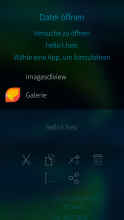
to launch this app from other apps/system-dialogues:
create a imagesdlview.desktop file in ~/.local/share/applications/ with:
[Desktop Entry]
Type=Application
Name=imagesdlview
NoDisplay=true
MimeType=image/heif;image/heic;
Exec=python3 /usr/lib/python3.8/site-packages/imageSDLview/imageSDLview.py %u
then:
xdg-mime default imagesdlview.desktop image/heif
finally:
update-desktop-database ~/.local/share/applications/
and it should work now
(jpegxl .jxl should work the same way, but you’ll have to create a image/jxl mimetype first:
xdg-mime install jpeg-jxl.xml
giving mime scheme in a xml file)
https://forum.sailfishos.org/t/display-heic-heif-files/17885