

assegaiphp/console
The Assegai CLI is a command-line interface tool that helps you to initialize, develop and maintain your Assegai applications.
Maintainers
Requires
- php: >=8.4
- ext-pdo: *
- assegaiphp/common: ^0.9.0
- atatusoft-ltd/plural: ^1.2
- laravel/prompts: ^0.3
- symfony/console: ^8.0
Requires (Dev)
- pestphp/pest: ^4.1
- phpstan/phpstan: ^1.11
Suggests
None
Provides
None
Conflicts
None
Replaces
None
MIT 129cd2ad83d1ee58d529e7d6218fe2a6da2bfc14
- Andrew Masiye <amasiye313.woop@gmail.com>
This package is auto-updated.
Last update: 2026-06-24 01:16:47 UTC
README
👁 Assegai Logo
👁 Latest release
👁 Tests
👁 PHP 8.4+
👁 License
👁 Status active
Assegai Console
Requirements
- PHP 8.4 (minimum)
- Composer 2.x.x
Description
The Assegai Console is the framework CLI for:
- creating new projects
- serving apps locally
- generating framework features
- exporting API contracts and clients
- working with queues, migrations, databases, and Web Components
- upgrading existing workspaces across supported framework release lines
It also supports custom schematics so teams can teach assegai generate about their own company-specific features.
Contribution workflow
For commit and pull request conventions in this repo, see:
Installation
Install the Assegai Console globally using Composer:
$ composer global require assegaiphp/console
Then make sure Composer's global bin directory is on your PATH:
$ composer global config bin-dir --absolute
If the printed directory is not already on your PATH, add it in your shell profile. For example:
$ export PATH="$PATH:$(composer global config bin-dir --absolute)"
Refer to the official Composer documentation if your global Composer home is configured differently.
Usage
Get Started
To create a new Assegai project, run the following command:
$ assegai new my-app
This command will create a new Assegai project in the my-app directory.
The scaffold flow can also:
- initialize git
- configure a database
- write sensitive config to
config/secure.php - set up a starter users resource when ORM is enabled
Development
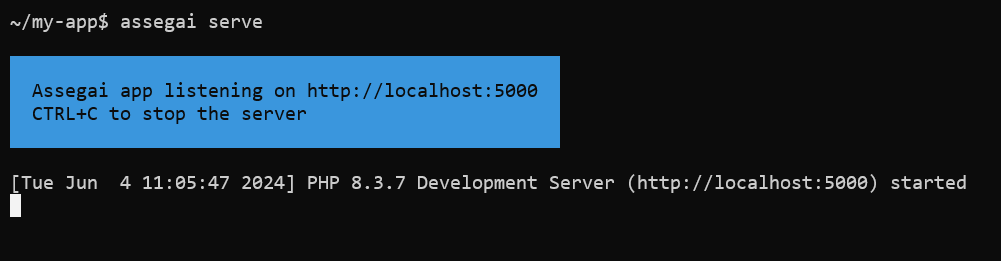
After creating a new project, you can start the development server to preview your application in the browser.
$ cd my-app
To start the development server, navigate to the project directory and run the following command:
$ assegai serve

OpenSwoole runtime
If you want to try the long-lived runtime path instead of the default PHP development server, install the OpenSwoole extension first and then run:
$ assegai serve --runtime=openswoole
You can also persist that choice in assegai.json:
{
 "development": {
 "server": {
 "runtime": "openswoole",
 "host": "127.0.0.1",
 "port": 9510,
 "openswoole": {
 "workerNum": 1,
 "taskWorkerNum": 0,
 "maxRequest": 0,
 "enableCoroutine": true,
 "hookFlags": "all"
 }
 }
 }
}
If the extension is not installed, the CLI now stops early with a direct setup message instead of falling into a runtime bootstrap failure.
The current OpenSwoole path is still experimental. It is intended for careful testing and advanced runtime work, not as a blanket replacement for the default php runtime in every project.
Upgrading existing projects
Use the update command to move an existing workspace onto the current supported framework line:
$ assegai update
The CLI now upgrades installed first-party packages more deliberately and is aware of the active framework release line.
Generating code
Use assegai generate (or assegai g) to scaffold framework artifacts:
$ assegai g resource users
$ assegai g component app --flat
$ assegai g page dashboard --path src/Admin
Useful options include:
--flatto generate directly into the target path instead of creating a name-based subdirectory--pathto place generated files at a source-relative path
Database-aware commands also support MySQL, MariaDB, PostgreSQL, SQLite, and MSSQL where applicable.
Custom schematics
You can extend the generator without forking the CLI.
The default local convention is:
schematics/<name>/
 schematic.json
 templates/
Start with a declarative starter:
assegai schematic:init loyalty-program
Or scaffold a PHP-backed starter when generation needs real logic:
assegai schematic:init customer-portal --php
Inspect what the CLI discovered:
assegai schematic:list
Run a custom schematic through the normal generate workflow:
assegai g loyalty-program rewards
For reusable team schematics, package manifests can be exposed through composer.json:
{
 "extra": {
 "assegai": {
 "schematics": [
 "resources/loyalty/schematic.json"
 ]
 }
 }
}
Learn more in the official documentation.
Stay in touch
- Author - Andrew Masiye, Daniel Kaluba
- Website - https://assegaiphp.com
- X - @assegaiphp
License
Assegai Console is MIT Licensed