

brille24/sylius-customer-options-plugin
Adds product customizing to Sylius
Maintainers
Package info
github.com/Brille24/SyliusCustomOptionsPlugin
Type:sylius-plugin
pkg:composer/brille24/sylius-customer-options-plugin
Requires
- php: >=8.0
- sylius/sylius: ^1.10
Requires (Dev)
- behat/behat: ^3.6.1
- behat/mink-selenium2-driver: ^1.4
- dmore/behat-chrome-extension: ^1.3
- dmore/chrome-mink-driver: ^2.7
- friends-of-behat/mink: ^1.8
- friends-of-behat/mink-browserkit-driver: ^1.4
- friends-of-behat/mink-debug-extension: ^2.0.0
- friends-of-behat/mink-extension: ^2.4
- friends-of-behat/page-object-extension: ^0.3
- friends-of-behat/suite-settings-extension: ^1.0
- friends-of-behat/symfony-extension: ^2.1
- friends-of-behat/variadic-extension: ^1.3
- friendsofsymfony/oauth-server-bundle: >2.0.0-alpha.0 ^2.0@dev
- mamazu/documentation-validator: dev-master
- phpstan/phpstan: ^1.5.4
- phpstan/phpstan-doctrine: ^1.3.2
- phpstan/phpstan-strict-rules: ^1.5
- phpstan/phpstan-symfony: ^1.3
- phpstan/phpstan-webmozart-assert: ^1.2
- phpunit/phpunit: ^9.5
- polishsymfonycommunity/symfony-mocker-container: ^1.0
- sensiolabs/security-checker: ^6.0
- sylius-labs/coding-standard: ^4.0
- symfony/browser-kit: ^5.4 || ^6.0
- symfony/debug-bundle: ^5.4 || ^6.0
- symfony/dotenv: ^5.4 || ^6.0
- symfony/intl: ^5.4 || ^6.0
- symfony/web-profiler-bundle: ^5.4 || ^6.0
- symfony/webpack-encore-bundle: ^1.15
- vimeo/psalm: 4.7.1
Suggests
None
Provides
None
Conflicts
None
Replaces
None
MIT 8b869575fe1c8e70dfb85f1c5f8a0b67438004ae
This package is auto-updated.
Last update: 2026-06-14 18:42:52 UTC
README
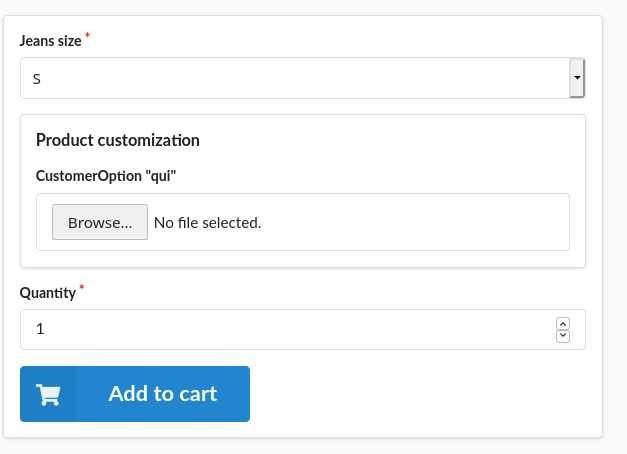
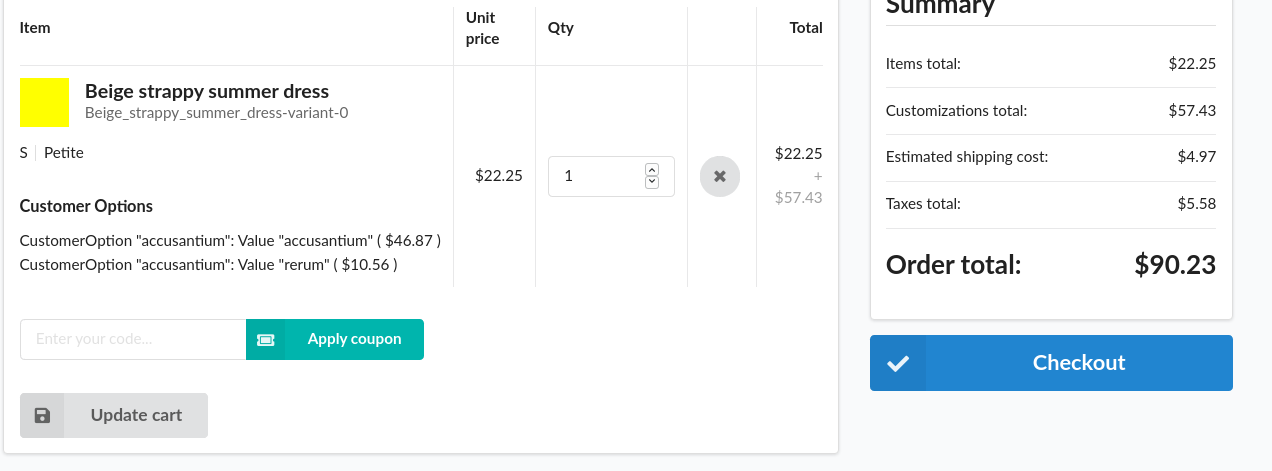
With this plugin the customer can add additional info to the product like so:
👁 The customer can upload a file
👁 And it will be displayed in the cart


Installation
-
Run
composer require brille24/sylius-customer-options-plugin. -
Register the Plugin in your
config/bundles.php:
return [
 //...
 Brille24\SyliusCustomerOptionsPlugin\Brille24SyliusCustomerOptionsPlugin::class => ['all' => true],
];
- Add the
config.ymlto your localconfig/packages/_sylius.yaml:
imports:
 ...
 - { resource: "@Brille24SyliusCustomerOptionsPlugin/Resources/config/app/config.yml" }
- Add the
routing.ymlto your localconfig/routes.yaml:
brille24_customer_options:
 resource: "@Brille24SyliusCustomerOptionsPlugin/Resources/config/app/routing.yml"

sylius_shop_ajax_cart_add_item:
 path: ajax/cart/add
 methods: [POST]
 defaults:
 _controller: sylius.controller.order_item::addAction
 _format: json
 _sylius:
 factory:
 method: createForProductWithCustomerOption
 arguments: [expr:notFoundOnNull(service('sylius.repository.product').find($productId))]
 form:
 type: Sylius\Bundle\CoreBundle\Form\Type\Order\AddToCartType
 options:
 product: expr:notFoundOnNull(service('sylius.repository.product').find($productId))
 redirect:
 route: sylius_shop_cart_summary
 parameters: {}
 flash: sylius.cart.add_item

sylius_shop_partial_cart_add_item:
 path: cart/add-item
 methods: [GET]
 defaults:
 _controller: sylius.controller.order_item::addAction
 _sylius:
 template: $template
 factory:
 method: createForProductWithCustomerOption
 arguments: [expr:notFoundOnNull(service('sylius.repository.product').find($productId))]
 form:
 type: Sylius\Bundle\CoreBundle\Form\Type\Order\AddToCartType
 options:
 product: expr:notFoundOnNull(service('sylius.repository.product').find($productId))
 redirect:
 route: sylius_shop_cart_summary
 parameters: {}
- Copy the template overrides from the plugin directory
From: [shop_dir]/vendor/brille24/sylius-customer-options-plugin/test/Application/templates
To: [shop_dir]/templates
In order to use the customer options, you need to override the product and order item.
use Brille24\SyliusCustomerOptionsPlugin\Entity\ProductInterface;
use Brille24\SyliusCustomerOptionsPlugin\Traits\ProductCustomerOptionCapableTrait;
use Sylius\Component\Core\Model\Product as BaseProduct;

class Product extends BaseProduct implements ProductInterface {
 use ProductCustomerOptionCapableTrait {
 __construct as protected customerOptionCapableConstructor;
 }

 public function __construct()
 {
 parent::__construct();

 $this->customerOptionCapableConstructor();
 }
 // ...
}
use Brille24\SyliusCustomerOptionsPlugin\Entity\OrderItemInterface;
use Brille24\SyliusCustomerOptionsPlugin\Traits\OrderItemCustomerOptionCapableTrait;
use Sylius\Component\Core\Model\OrderItem as BaseOrderItem;

class OrderItem extends BaseOrderItem implements OrderItemInterface
{
 use OrderItemCustomerOptionCapableTrait {
 __construct as protected customerOptionCapableConstructor;
 }

 public function __construct()
 {
 parent::__construct();

 $this->customerOptionCapableConstructor();
 }
 // ...
}
- If you also want default data you need to copy over the
brille24_sylius_customer_options_plugin_fixtures.yamlfile from the package directory and run
bin/console sylius:fixtures:load
- Finally, generate migrations, update the database and update the translations:
bin/console doctrine:migrations:diff
bin/console doctrine:migrations:migrate
bin/console translation:update
Things to consider
- Saving files as customer defined values as the values are currently stored as a string in the database
Developing
When developing it is recommended to use git hooks for this just copy the docs/pre-commit to .git/hooks/pre-commit and make it executable. Then you will check your codestyle before committing.
Usage
Documentation on how to use the plugin can be found here.