

jbzoo/cli
The framework helps create CLI tools and provides new tools for symfony/console, symfony/process.
Maintainers
Requires
- php: ^8.2
- jbzoo/event: ^7.0.2
- jbzoo/utils: ^7.3
- monolog/monolog: ^3.9.0
- symfony/console: >=7.3.4
- symfony/lock: >=7.3.4
- symfony/process: >=7.3.4
Requires (Dev)
- jbzoo/toolbox-dev: ^7.3
Suggests
None
Provides
None
Conflicts
None
Replaces
None
MIT c4d0dfdd61005ff55f4551485179b7170cfb63c6
- Denis Smetannikov <admin.woop@jbzoo.com>
symfonycliprocessconsolecroncommand-lineterminalelasticcrontablogstashELKjbzooconsole-applicationsymfony-consolesymfony-processelk-stack
README
👁 CI
👁 Coverage Status
👁 Psalm Coverage
👁 Psalm Level
👁 CodeFactor

👁 Stable Version
👁 Total Downloads
👁 Dependents
👁 GitHub License
- Why?
- Live Demo
- Quick Start - Build your first CLI App
- Built-in Functionality
- Progress Bar
- Helper Functions
- Easy logging
- Multi processing
- Tips & Tricks
- Contributing
- Useful projects and links
- License
- See Also
Why?
JBZoo CLI Framework is a powerful PHP library that significantly extends Symfony Console functionality, making it easier and faster to create robust command-line applications. Built for PHP 8.2+, it provides enhanced features for professional CLI development.
Key Features
Enhanced Progress Bars
- Advanced progress bars with debugging information and profiling capabilities
- Simple API:
$this->progressBar($items, $callback)replaces complex Symfony ProgressBar setup - Real-time memory and performance monitoring during execution
- See Live Demo
Strict Type Conversion
- Type-safe option parsing with methods like
getOptInt(),getOptBool(),getOptString() - Built-in validation for allowed values and data integrity
- Eliminates common runtime errors from loose type handling
Professional Output System
- Simplified output API:
$this->_($message, $level, $context)instead of verbose Symfony methods - Rich styling with HTML-like tags:
<red>Error</red>,<green-b>Success</green-b> - Context-aware JSON logging for structured data
Multiple Output Modes
--output-mode=text- User-friendly console output (default)--output-mode=cron- Optimized for crontab logging with timestamps and profiling--output-mode=logstash- JSON format for ELK Stack integration
Performance & Debugging
- Built-in profiling with
--profileflag showing memory usage and execution time - Timestamping with
--timestampfor detailed logging - Verbosity levels from quiet (
-q) to debug (-vvv)
Advanced Features
- Multiprocessing support for parallel execution (not multithreading)
- Interactive helpers for user input, confirmations, and selections
- Error handling with configurable exit codes and output streams
Live Demo
Output regular messages
Progress Bar Demo
Quick Start - Build your first CLI App
Installing
composer require jbzoo/cli
The simplest CLI application has the following file structure. See the Demo App for more details.
File Structure
/path/to/app/
 my-app # Binary file (See below)
 composer.json # Composer file
 /Commands/ # Commands directory
 Simple.php # One of the commands (See below)
 /vendor/
 autoload.php # Composer autoload
Composer file
Binary file
Binary file: demo/my-app
Simple CLI Action
The simplest CLI action: ./demo/Commands/DemoSimple.php
Built-in Functionality
Sanitize input variables
As live-demo take a look at demo application - ./demo/Commands/DemoOptionsStrictTypes.php.
Try to launch ./my-app options-strict-types.
// If the option has `InputOption::VALUE_NONE` it returns true/false.
// --option-name
$value = $this->getOpt('option-name'); // `$value === true`

// --option-name=" 123.6 "
$value = $this->getOpt('option-name'); // Returns the value AS-IS. `$value === " 123.6 "`

// --option-name=" 123.6 "
$value = $this->getOptBool('option-name'); // Converts an input variable to boolean. `$value === true`

// --option-name=" 123.6 "
$value = $this->getOptInt('option-name'); // Converts an input variable to integer. `$value === 123`
$value = $this->getOptInt('option-name', 42, [1, 2, 42]); // Strict comparing with allowed values

// --option-name=" 123.6 "
$value = $this->getOptFloat('option-name'); // Converts an input variable to float. `$value === 123.6`
$value = $this->getOptFloat('option-name', 1.0, [1.0, 2.0, 3.0]); // Strict comparing with allowed values

// --option-name=" 123.6 "
$value = $this->getOptString('option-name'); // Converts an input variable to trimmed string. `$value === "123.6"`
$value = $this->getOptString('option-name', 'default', ['default', 'mini', 'full']); // Strict comparing with allowed values

// --option-name=123.6
$value = $this->getOptArray('option-name'); // Converts an input variable to trimmed string. `$value === ["123.6"]`

// --option-name="15 July 2021 13:48:00"
$value = $this->getOptDatetime('option-name'); // Converts an input variable to \DateTimeImmutable object.

// Use standard input as input variable.
// Example. `echo " Qwerty 123 " | php ./my-app agruments`
$value = self::getStdIn(); // Reads StdIn as string value. `$value === " Qwerty 123 \n"`
Rendering text in different colors and styles

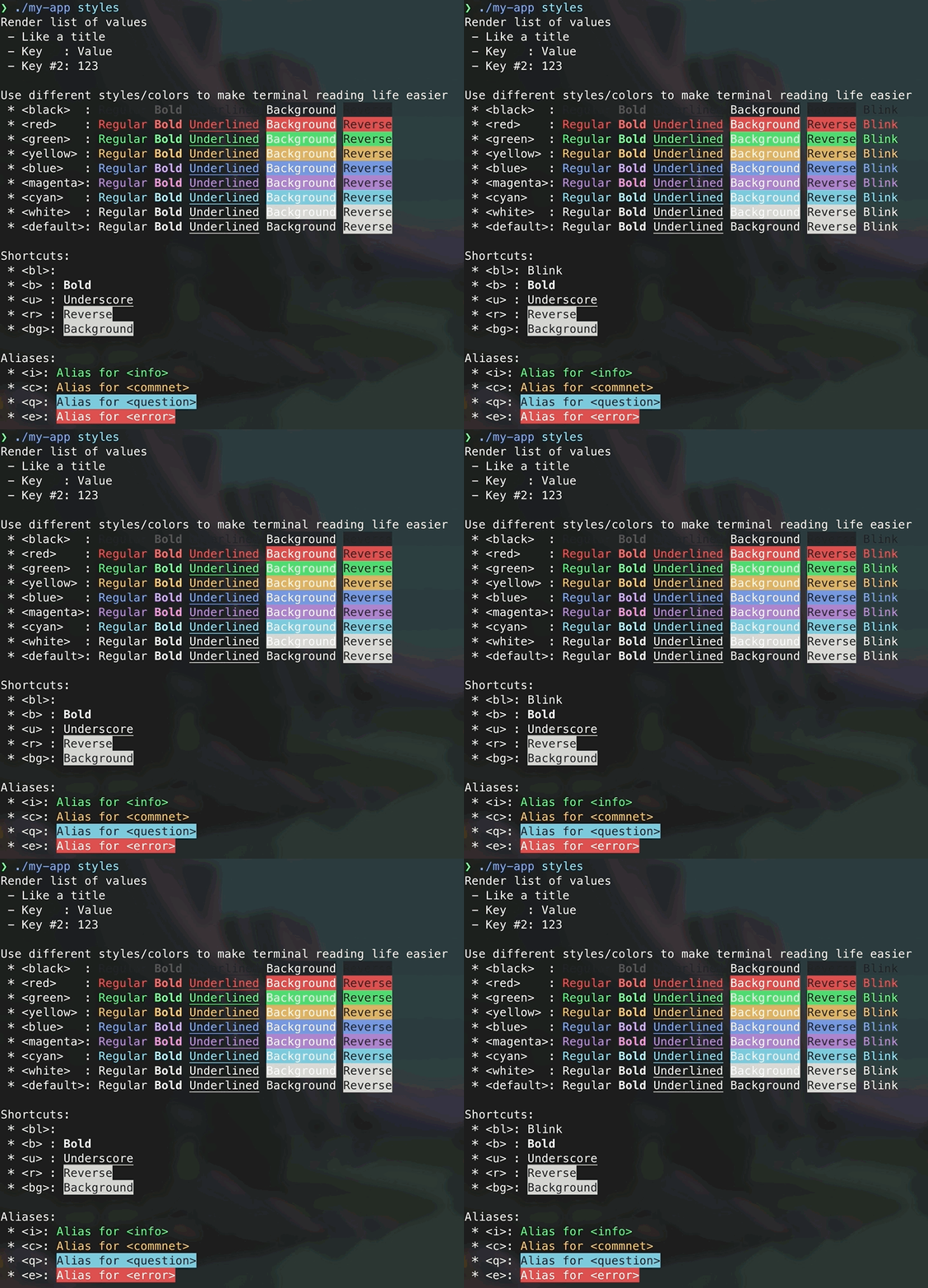
There are list of predefined colors
<black> Text in Black color </black>
<red> Text in Red Color </red>
<green> Text in Green Color </green>
<yellow> Text in Yellow Color </yellow>
<blue> Text in Blue Color </blue>
<magenta>Text in Magenta Color</magenta>
<cyan> Text in Cyan Color </cyan>
<white> Text in White Color </white>

<!-- Usually default color is white. It depends on terminal settings. -->
<!-- You should use it only to overwrite nested tags. -->
<default>Text in Default Color</default>
There are list of predefined styles
<bl>Blinked Text</bl>
<b>Bold Text</b>
<u>Underlined Text</u>
<r>Reverse Color/Backgroud</r>
<bg>Change Background Only</bg>
Also, you can combine colors and styles.
<magenta-bl>Blinked text in magenta color</magenta-bl>
<magenta-b>Bold text in magenta color</magenta-b>
<magenta-u>Underlined text in magenta color</magenta-u>
<magenta-r>Reverse text in magenta color</magenta-r>
<magenta-bg>Reverse only background of text in magenta color</magenta-bg>
And predefined shortcuts for standard styles of Symfony Console
<i> alias for <info>
<c> alias for <commnet>
<q> alias for <question>
<e> alias for <error>
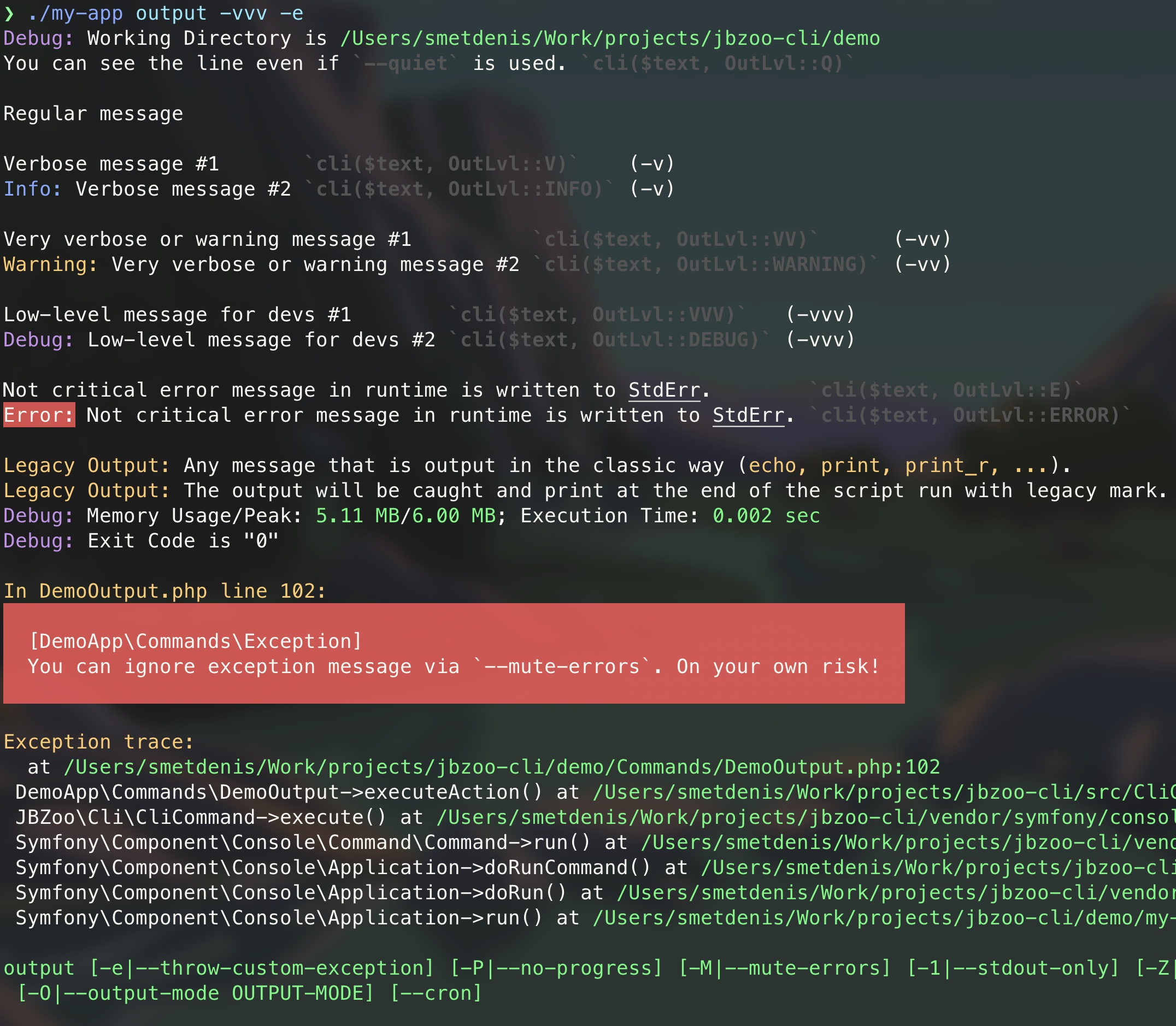
Verbosity Levels
Console commands have different verbosity levels, which determine the messages displayed in their output.
For a live demonstration, see the demo application ./demo/Commands/DemoOutput.php and watch the Demo video.
Example of usage of verbosity levels

// There are two recommended output methods:

/**
 * Prints a message to the output in the command class which inherits from the class \JBZoo\Cli\CliCommand
 *
 * @param string|string[] $messages Output message(s). Can be an array of strings or a string. Array of strings will be imploded with new line.
 * @param string $verboseLevel is one of value form the class \JBZoo\Cli\OutLvl::*
 * @param string $context is array of extra info. Will be serialized to JSON and displayed in the end of the message.
 */
$this->_($messages, $verboseLevel, $context);

/**
 * This is a global alias function of `$this->_(...)`.
 * Use this when you need to display text from classes that don't extend CliCommand.
 */
JBZoo\Cli\cli($messages, $verboseLevel, $context);
# Do not output any message
./my-app output -q
./my-app output --quiet

# Normal behavior, no option required. Only the most useful messages.
./my-app output

# Increase verbosity of messages
./my-app output -v

# Display also the informative non essential messages
./my-app output -vv

# Display all messages (useful to debug errors)
./my-app output -vvv
Memory and time profiling
As live-demo take a look at demo application - ./demo/Commands/DemoProfile.php.
Try to launch ./my-app profile --profile.


Progress Bar
As live-demo take a look at demo application - ./demo/Commands/DemoProgressBar.php and Live Demo.
You can consider this as a substitute for the long cycles you want to profile.
Keep in mind that there is an additional overhead for memory and runtime to calculate all the extra debugging information in --verbose mode.
Simple example


$this->progressBar(5, function (): void {
 // Some code in loop
});
Advanced usage

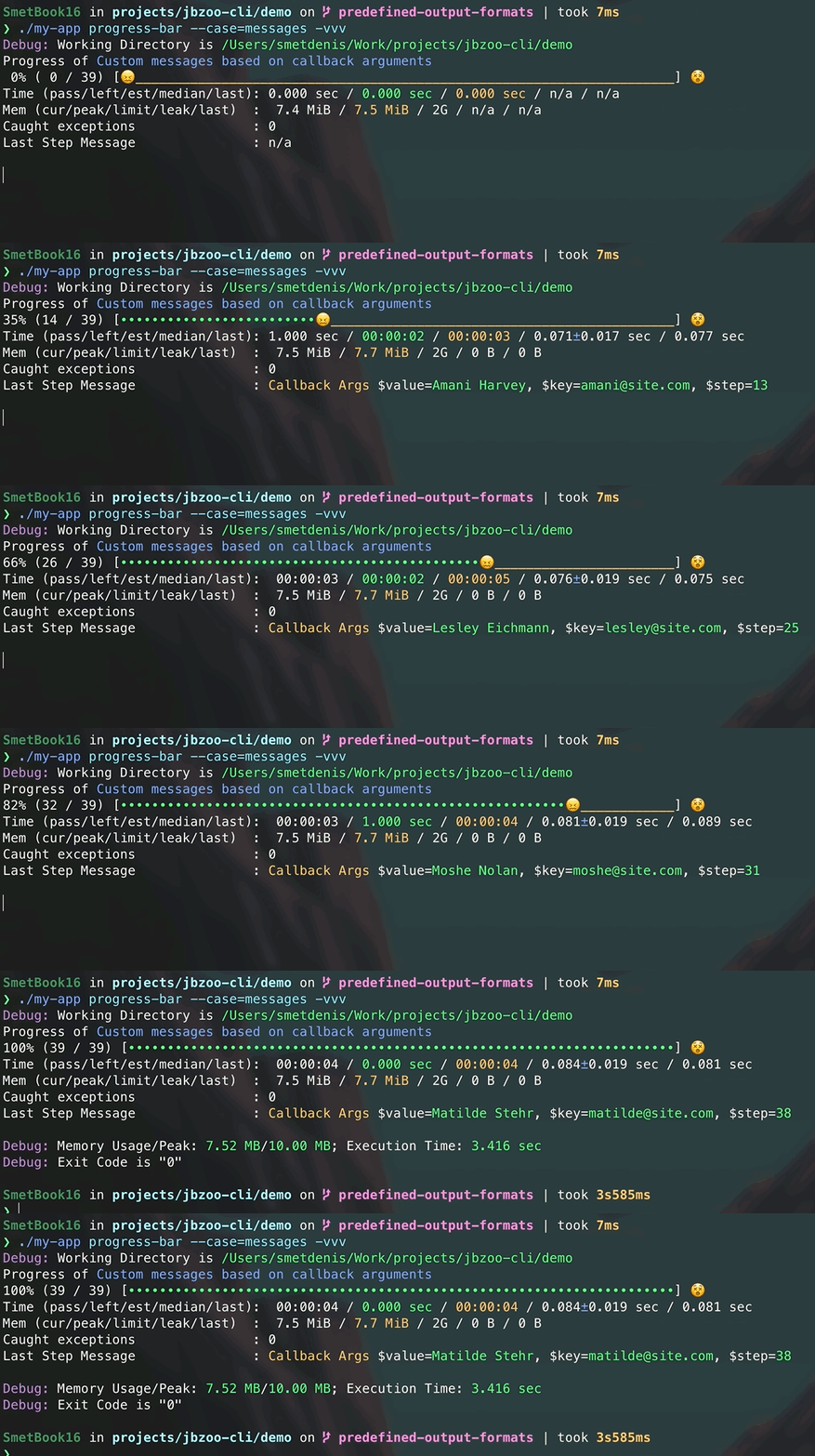
$this->progressBar($arrayOfSomething, function ($value, $key, $step) {
 // Some code in loop

 if ($step === 3) {
 throw new ExceptionBreak("Something went wrong with \$value={$value}. Stop the loop!");
 }

 return "<c>Callback Args</c> \$value=<i>{$value}</i>, \$key=<i>{$key}</i>, \$step=<i>{$step}</i>";
}, 'Custom messages based on callback arguments', $throwBatchException);
Helper Functions
As live-demo take a look at demo application - ./demo/Commands/DemoHelpers.php.
Try to launch ./my-app helpers.
JBZoo/Cli uses Symfony Question Helper as base for aliases.


Regular question
Ask any custom question and wait for a user's input. There is an option to set a default value.
$yourName = $this->ask("What's your name?", 'Default Noname');
$this->_("Your name is \"{$yourName}\"");
Ask user's password
Ask a question and hide the response. This is particularly convenient for passwords. There is an option to set a random value as default value.
$yourSecret = $this->askPassword("New password?", true);
$this->_("Your secret is \"{$yourSecret}\"");
Ask user to select the option
If you have a predefined set of answers the user can choose from, you could use a method askOption which makes sure
that the user can only enter a valid string from a predefined list.
There is an option to set a default option (index or string).
$selectedColor = $this->askOption("What's your favorite color?", ['Red', 'Blue', 'Yellow'], 'Blue');
$this->_("Selected color is {$selectedColor}");
Represent a yes/no question
Suppose you want to confirm an action before actually executing it. Add the following to your command.
$isConfirmed = $this->confirmation('Are you ready to execute the script?');
$this->_("Is confirmed: " . ($isConfirmed ? 'Yes' : 'No'));
Rendering key=>value list
If you need to show an aligned list, use the following code.
use JBZoo\Cli\CliRender;

$this->_(CliRender::list([
 "It's like a title",
 'Option Name' => 'Option Value',
 'Key' => 'Value',
 'Another Key #2' => 'Qwerty',
], '*')); // It's bullet character
 * It's like a title
 * Option Name : Option Value
 * Key : Value
 * Another Key #2: Qwerty
Easy logging
Simple log
./my-app output --timestamp >> /path/to/crontab/logs/$(date +%Y-%m-%d).log 2>&1


Crontab
Just add the --output-mode=cron flag and save the output to a file. Especially, this is very handy for saving logs for Crontab.
./my-app output --output-mode=cron >> /path/to/crontab/logs/$(date +%Y-%m-%d).log 2>&1


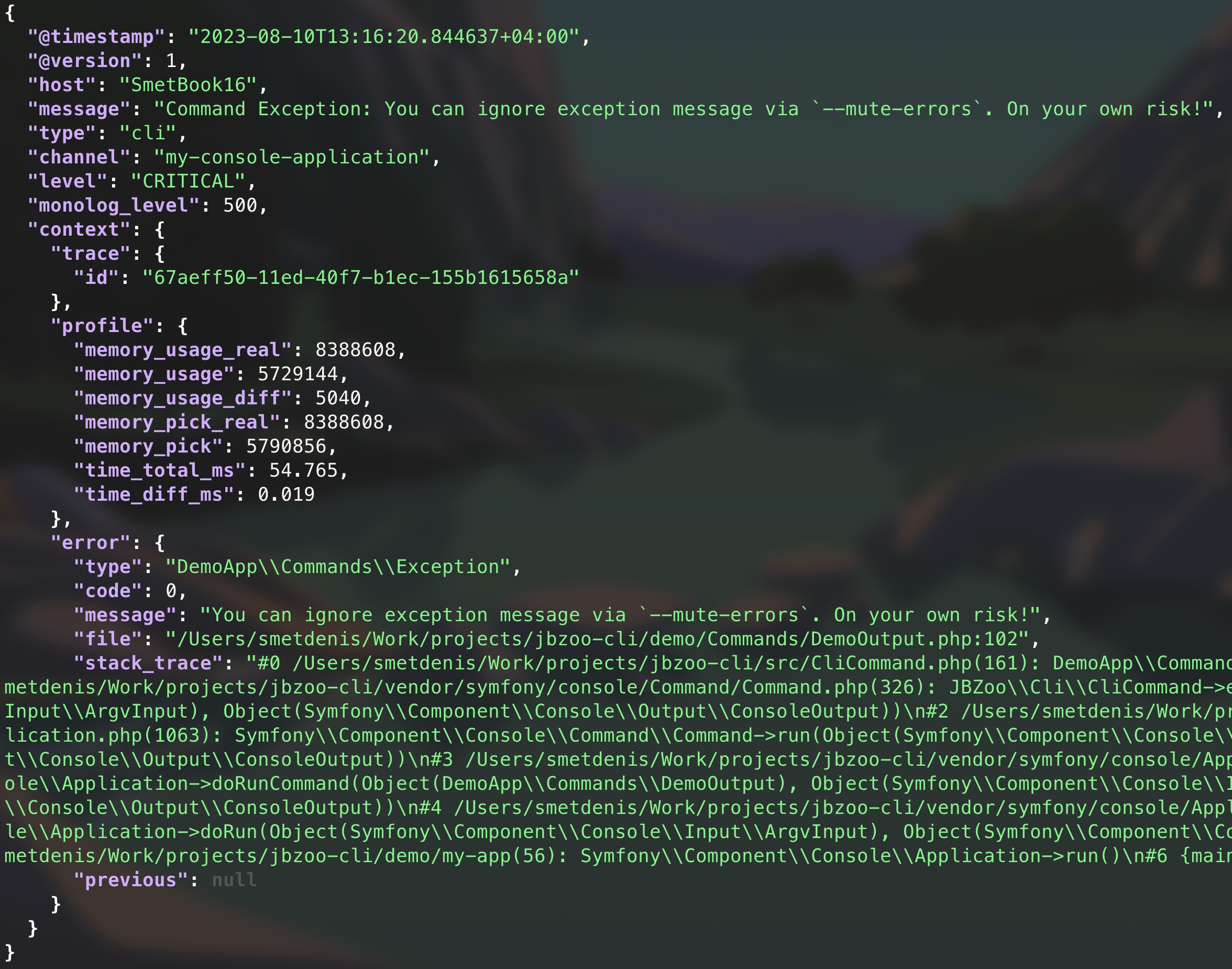
Elasticsearch / Logstash (ELK)
Just add the --output-mode=logstash flag and save the output to a file. Especially, this is very handy for saving logs for ELK Stack.
./my-app output --output-mode=logstash >> /path/to/logstash/logs/$(date +%Y-%m-%d).log 2>&1

Multi processing
There is a multiprocess mode (please don't confuse it with multithreading) to speed up work with a monotonous dataset. Basically, JBZoo\Cli will start a separate child process (not a thread!) for each dataset and wait for all of them to execute (like a Promise). This is how you get acceleration, which will depend on the power of your server and the data processing algorithm.
You will see a simple progress bar, but you won't be able to profile and log nicely, as it works for normal mode.
You can find examples here
- ./tests/TestApp/Commands/TestSleepMulti.php - Parent command
- ./tests/TestApp/Commands/TestSleep.php - Child command
Notes:
- Pay attention on the method
executeOneProcess()andgetListOfChildIds()which are used to manage child processes. They are inherited fromCliCommandMultiProcclass. - Optimal number of child processes is
Number of CPU cores - 1. You can override this value by setting cli options. See them here ./src/CliCommandMultiProc.php. - Be really careful with concurrency. It's not easy to debug. Try to use
-vvvoption to see all errors and warnings.
Tips & Tricks
- Use class
\JBZoo\Cli\Codesto get all available exit codes. - You can add extra context to any message. It will be serialized to JSON and displayed at the end of the message. Just use
CliHelper::getInstance()->appendExtraContext(['section' => ['var' => 'value']]); - You can define constant
\JBZOO_CLI_TIMESTAMP_REAL=trueto addtimestamp_realas extra context. Sometimes it's useful for logstash if the default value@timestampdoesn't work for you.
Contributing
# Fork the repo and build project
make update

# Make your local changes

# Run all tests and check code style
make test-all

# Create your pull request and check all tests on GitHub Actions page
Useful projects and links
- Symfony/Console Docs
- kevinlebrun/colors.php - New colors for the terminal
- php-school/cli-menu - Interactive menu with nested items
- nunomaduro/collision - Beautiful error reporting
- splitbrain/php-cli - Lightweight and no dependencies CLI framework
- thephpleague/climate - Allows you to easily output colored text, special formats
- Exit Codes With Special Meanings
- How to redirect standard (stderr) error in bash
License
MIT
See Also
- CI-Report-Converter - Converting different error reports for deep compatibility with popular CI systems.
- Composer-Diff - See what packages have changed after
composer update. - Composer-Graph - Dependency graph visualization of composer.json based on mermaid-js.
- Mermaid-PHP - Generate diagrams and flowcharts with the help of the mermaid script language.
- Utils - Collection of useful PHP functions, mini-classes, and snippets for every day.
- Image - Package provides object-oriented way to manipulate with images as simple as possible.
- Data - Extended implementation of ArrayObject. Use files as config/array.
- Retry - Tiny PHP library providing retry/backoff functionality with multiple backoff strategies and jitter support.
- SimpleTypes - Converting any values and measures - money, weight, exchange rates, length, ...