

pimcore/output-data-config-toolkit-bundle
Package info
github.com/pimcore/output-data-config-toolkit
Type:pimcore-bundle
pkg:composer/pimcore/output-data-config-toolkit-bundle
Requires
- php: ~8.3.0 || ~8.4.0
- pimcore/pimcore: ^12.3
- symfony/event-dispatcher-contracts: ^3.0
Requires (Dev)
- phpstan/phpstan: ^1.12.15
- phpstan/phpstan-symfony: ^1.2.20
Suggests
None
Provides
None
Conflicts
None
Replaces
None
proprietary 236edd097daf20041b0579abfc47d0bcb02a0804
This package is auto-updated.
Last update: 2026-06-16 05:47:04 UTC
README
Warning
This bundle won't be migrated to Pimcore Studio and therefore will be deprecated with 6.2.
This toolkit provides an user interface to create output formats for data objects based on different output channels. So it is possible to define, which attributes of a data objects should be printed in a certain output channel. An output data configuration consists of
- values = data object attributes
- operators = can combine, modify, calculate, ... values
Table of Contents
- Configuration
- Defining output data configuration for different output channels
- Working with output channels in code
- Events
- Adding new operators
- Defining output data configuration programmatically
- Migration from Pimcore 4
Configuration
Channel Config
After installing the bundle, a config file is located at config/pimcore/outputdataconfig/config.php. In this config file available output channels can be configured as follows:
<?php
 return [
 "channels" => [
 "channel1",
 "channel2",
 "mychannel1",
 "mychannel2"
 ]
 ];
Functional Config
In config.yml:
output_data_config_toolkit:

 tab_options:
 # order classes by name (defaults by id)
 order_by_name: true
 # classes that should be listed by default in output config tab
 default_classes:
 - Product # class name
 - Pimcore\Model\DataObject\ProductCategory # full namespace
 - 12 # class id

 classification_store:
 # defines which classification keys are displayed in the config dialog tree
 # the possible values are:
 # 'all', -> always show all keys
 # 'object', -> only show keys which are in any assigned group of the current object
 # 'relevant', -> use 'object' mode if any group is assigned, else show all keys (i.e. on a folder)
 # 'none' -> do not show classification store keys
 display_mode: relevant
Read more about the classification store display modes.
Defining output data configuration for different output channels
Output data configurations can be configured in an additional tab in the data object editor. There for each data object class and output channel an output output data configuration can be defined.

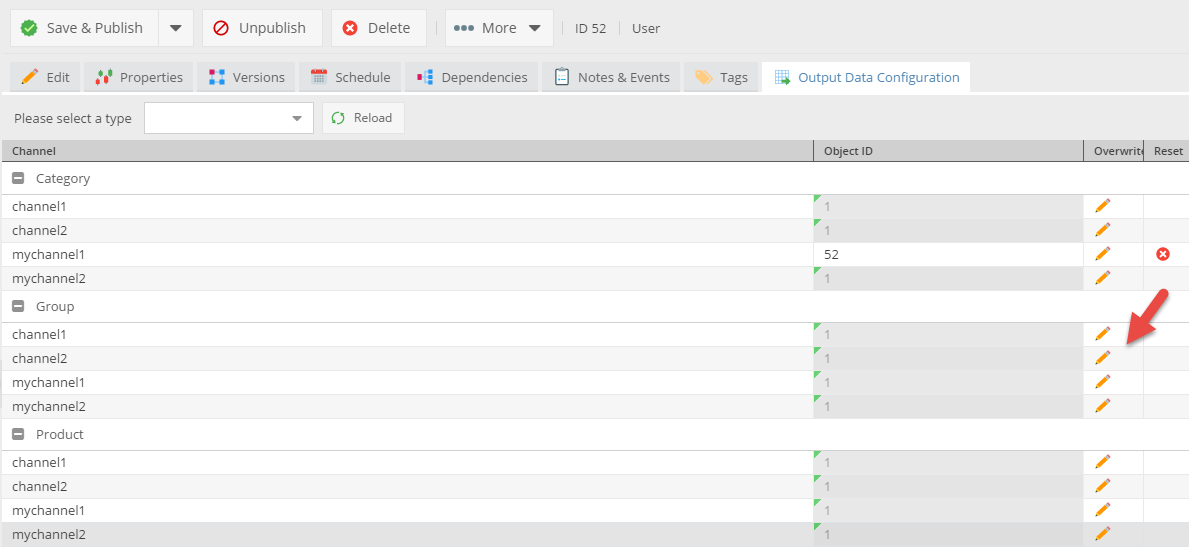
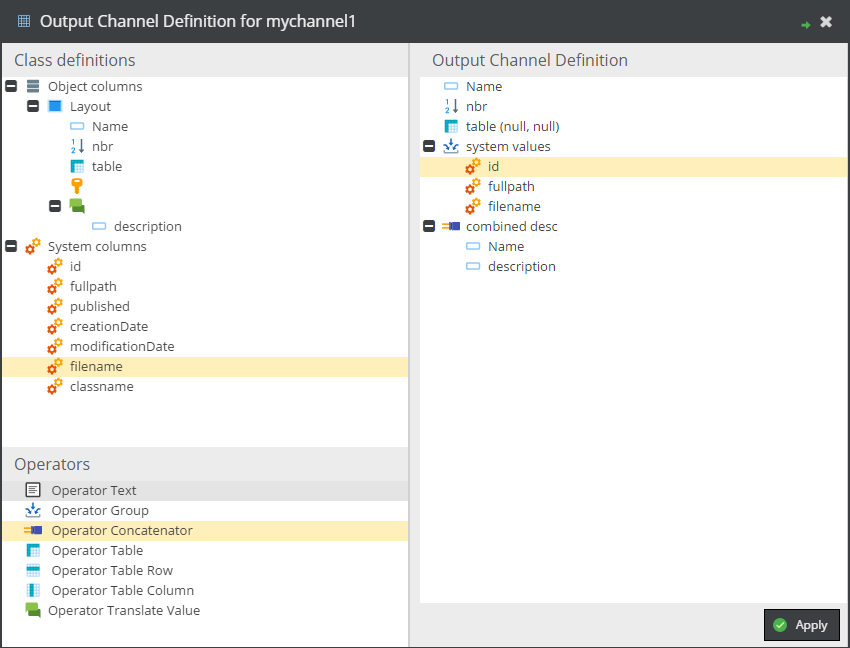
The output data configurations can be inherited along the data objects tree. The column Object ID shows from with data object the output data configuration is inherited from. By clicking overwrite, the editor opens and a new output data configuration can be configured.

Working with output channels in code
The bundle provides a service class, with converts a Pimcore data object to an output data structure based on its ouput data configuration.
<?php

 // returns the output data structure for the given product and the output channel productdetail_specification
 $specificationOutputChannel = OutputDataConfigToolkitBundle\Service::getOutputDataConfig($product, "productdetail_specification");

 //printing output channel in view script with view-helper
 foreach($specificationOutputChannel as $property) {
 $this->productListSpecification($property, $this->product);
 }
A sample template helper see doc/ProductListSpecification.php, the needed service configuration:
# Product Detail Specification Template Helper
app.templating.helper.productDetailSpecification:
 class: App\Templating\Helper\ProductDetailSpecification
 arguments: ['@translator', '@Pimcore\Localization\IntlFormatter']
 tags:
 - { name: templating.helper, alias: productDetailSpecification }
Events
| Event | Description |
|---|---|
outputDataConfigToolkit.initialize |
Before any output-config tab's initialization, so you can i.e. manipulate the configuration object, or only show the tab for a specific class type. For a full example see OutputDataConfigToolkitListener. |
outputDataConfigToolkit.saveEvent |
Before a specific output config is saved. Can be implemented to sort config attributes or to modify attributes in any other way. |
Adding new operators
Create a Pimcore bundle and add following files:
php implementation of operator
- must be in namespace
OutputDataConfigToolkitBundle\ConfigElement\Operator - must implement
AbstractOperator
<?php
namespace OutputDataConfigToolkitBundle\ConfigElement\Operator;

class RemoveZero extends AbstractOperator {


 public function __construct($config, $context = null) {
 parent::__construct($config, $context);
 }

 public function getLabeledValue($object) {
 $childs = $this->getChilds();
 if($childs[0]) {

 $value = $childs[0]->getLabeledValue($object);
 $value->value = $value->value == 0 ? null : $value->value;

 return $value;
 }
 return null;
 }

}
java script implementation of operator
- must be in namespace
pimcore.bundle.outputDataConfigToolkit.outputDataConfigElements.operator - must extend
pimcore.bundle.outputDataConfigToolkit.outputDataConfigElements.Abstract
pimcore.registerNS("pimcore.bundle.outputDataConfigToolkit.outputDataConfigElements.operator.RemoveZero");

pimcore.bundle.outputDataConfigToolkit.outputDataConfigElements.operator.RemoveZero = Class.create(pimcore.bundle.outputDataConfigToolkit.outputDataConfigElements.Abstract, {
 type: "operator",
 class: "RemoveZero",
 iconCls: "pimcore_icon_operator_remove_zero",
 defaultText: "operator_remove_zero",


 getConfigTreeNode: function(configAttributes) {
 if(configAttributes) {
 var node = {
 draggable: true,
 iconCls: this.iconCls,
 text: t(this.defaultText),
 configAttributes: configAttributes,
 isTarget: true,
 maxChildCount: 1,
 expanded: true,
 leaf: false,
 expandable: false
 };
 } else {

 //For building up operator list
 var configAttributes = { type: this.type, class: this.class};

 var node = {
 draggable: true,
 iconCls: this.iconCls,
 text: t(this.defaultText),
 configAttributes: configAttributes,
 isTarget: true,
 maxChildCount: 1,
 leaf: true
 };
 }
 return node;
 },


 getCopyNode: function(source) {
 var copy = new Ext.tree.TreeNode({
 iconCls: this.iconCls,
 text: t(this.defaultText),
 isTarget: true,
 leaf: false,
 maxChildCount: 1,
 expanded: true,
 configAttributes: {
 label: null,
 type: this.type,
 class: this.class
 }
 });
 return copy;
 },


 getConfigDialog: function(node) {
 },

 commitData: function() {
 }
});
Defining output data configuration programmatically
For defining definitions programmatically utilize the \OutputDataConfigToolkitBundle\ConfigAttribute\...
classes.
I.e. adding a classification store key to a channel definition:
$config = new \OutputDataConfigToolkitBundle\ConfigAttribute\Value\DefaultValue();
$config->applyDefaults(); // datatype, type, class
$config->applyFromClassificationKeyConfig($keyConfig);

// create definition for channel and add value
$newConfig = new \OutputDataConfigToolkitBundle\OutputDefinition();
$newConfig->setChannel("my_channel");
$newConfig->setClassId($classId);
$newConfig->setObjectId(12345);
$newConfig->setConfiguration($serializer->serialize($config, 'json'));
$newConfig->save();
Support for textual class ids
Execute the following statement:
ALTER TABLE bundle_outputdataconfigtoolkit_outputdefinition MODIFY `classId` varchar(50);
Migration from Pimcore 4
- Change table name from
plugin_outputdataconfigtoolkit_outputdefinitiontobundle_outputdataconfigtoolkit_outputdefinition.
RENAME TABLE plugin_outputdataconfigtoolkit_outputdefinition TO bundle_outputdataconfigtoolkit_outputdefinition;
- Change namespace from
Elements\OutputDataConfigToolkittoOutputDataConfigToolkitBundle. - Removed key value support.
- Changed permission key to
bundle_outputDataConfigToolkit, execute following SQL statement
UPDATE users_permission_definitions SET `key` = REPLACE(`key`, 'plugin_outputDataConfigToolkit', 'bundle_outputDataConfigToolkit');
UPDATE users SET permissions = REPLACE(`permissions`, 'plugin_outputDataConfigToolkit', 'bundle_outputDataConfigToolkit');
- namespaces for custom operators and values changed from
pimcore.plugin.outputDataConfigToolkit.*topimcore.bundle.outputDataConfigToolkit.*