

redaxo/source
REDAXO CMS core package
Requires
- php: >=8.3
- ext-ctype: *
- ext-iconv: *
- ext-intl: *
- ext-mbstring: *
Requires (Dev)
- jetbrains/phpstorm-attributes: ^1.2
- phpstan/extension-installer: 1.4.3
- phpstan/phpstan: 2.2.1
- phpstan/phpstan-deprecation-rules: 2.0.4
- phpstan/phpstan-phpunit: 2.0.16
- phpstan/phpstan-symfony: 2.0.19
- phpunit/phpunit: ^12.5.17 || ^13.1.13
- psalm/plugin-phpunit: 0.19.7
- psalm/plugin-symfony: v5.3.0
- rector/rector: 2.4.5
- redaxo/php-cs-fixer-config: 3.1.0
- redaxo/psalm-plugin: 2.2.0
- shipmonk/phpstan-baseline-per-identifier: 2.3.0
- vimeo/psalm: 6.16.1
Suggests
None
Provides
None
Conflicts
None
Replaces
- composer/ca-bundle: 1.5.12
- enshrined/svg-sanitize: 0.22.0
- erusev/parsedown: 1.8.0
- erusev/parsedown-extra: 0.9.0
- filp/whoops: 2.18.4
- itsgoingd/clockwork: v5.3.5
- lbuchs/webauthn: v2.2.0
- phpmailer/phpmailer: v7.1.1
- psr/container: 2.0.2
- psr/http-message: 2.0
- psr/log: 3.0.2
- ramsey/collection: 2.1.1
- ramsey/http-range: 2.0.0
- scssphp/scssphp: v1.13.0
- splitbrain/php-archive: 1.4.2
- symfony/console: v7.4.13
- symfony/deprecation-contracts: v3.7.0
- symfony/http-foundation: v7.4.13
- symfony/polyfill-ctype: *
- symfony/polyfill-iconv: *
- symfony/polyfill-intl-grapheme: *
- symfony/polyfill-intl-normalizer: *
- symfony/polyfill-mbstring: *
- symfony/polyfill-php80: *
- symfony/polyfill-php81: *
- symfony/polyfill-php82: *
- symfony/polyfill-php83: *
- symfony/service-contracts: v3.7.0
- symfony/string: v7.4.13
- symfony/var-dumper: v7.4.8
- symfony/yaml: v7.4.13
- voku/anti-xss: 4.1.43
- voku/portable-ascii: 2.1.1
- voku/portable-utf8: 6.1.1
MIT a70ea49624f291319cfe66dd9b53200e25cd3bcd
This package is auto-updated.
Last update: 2026-06-18 15:55:05 UTC
README
🌎 Deutsch

Content Management since 2004. Both simple and flexible.
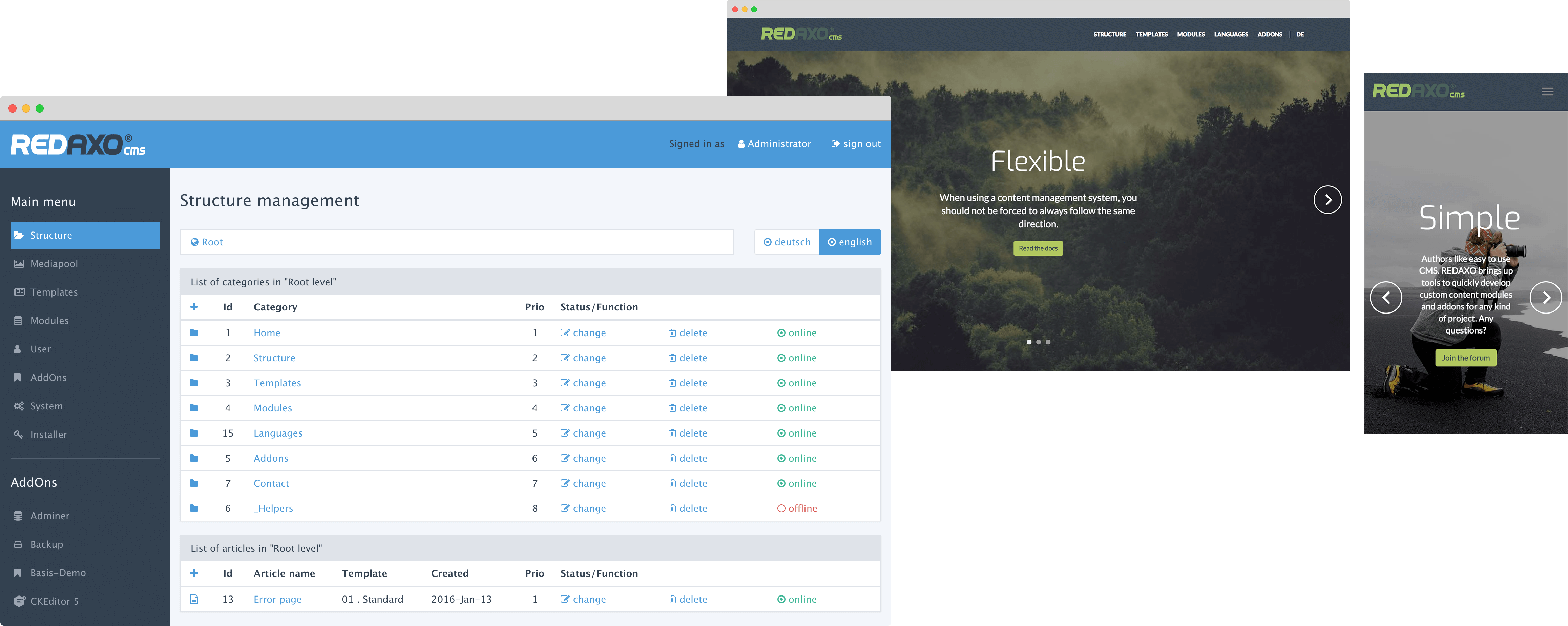
REDAXO provides you an easy-to-learn website framework. It lets you create content from custom modules with full control of any input and output. It is multilingual, highly extendable and adapts to your workflow.

Changelog | Documentation | API Docs | Tricks | Slack | Twitter | Friends Of REDAXO | Community Map
Community ❤️
REDAXO is mainly used in German-speaking countries. However, the software already comes in several languages — English, Spanish, Italian, Swedish, Portuguese — and the community is working on translating more and more content. If you don't understand German, please don't let that stop you from trying REDAXO: The community is known for being extremely helpful and friendly, and we will support you wherever we can! ✌️
Get to know REDAXO and its community:
1. Install CMS and check out the demo websites
This is probably the best way to get to know REDAXO: install the latest release, log in to the admin section and use the built-in Installer addOn to check out one of the demo websites. If you’re new to REDAXO or don’t speak German, search for demo_base (»Basisdemo«) as it is fully translated into English and explains all major topics.
Current demo websites: Base, Community, OnePage, FullPage.
2. Join our Slack
You’ll find a lot of community members in the Slack chat. And also the core developers. This is probably the best option to ask questions and get to know the community. —Happy to see you there, get your invite at redaxo.org/slack!
3. Find people on the Community World Map
Where in the world are people using REDAXO? The map will show you. 🌎 Your marker still missing? Learn how to place it on the map.
Start a new project
To build a website with REDAXO, start from the redaxo/project skeleton. It's the recommended starting point for new projects and contains the setup instructions.
Contributions
To develop on core and core addons, set up the project with these steps:
- Clone the repository:
git clone https://github.com/redaxo/core redaxo && cd redaxo - Install the tools used for the development with Composer:
composer install - You can use the provided Docker configuration to start a local development environment:
docker-compose up -d. In case you need a port other than the default port 80, start it like this:REDAXO_PORT=8080 docker-compose up -d.
Copyright & License
REDAXO was developed by Yakamara (Frankfurt am Main/Germany 🇩🇪), is open-source since 2004 and is released under the MIT license.