silverstripe/selectupload
Enables files to be uploaded into a user-designated folder
Package info
github.com/silverstripe/silverstripe-selectupload
Type:silverstripe-vendormodule
pkg:composer/silverstripe/selectupload
Requires
- silverstripe/framework: ^4.0 || ^5.0
Requires (Dev)
- phpunit/phpunit: ^9.5
- squizlabs/php_codesniffer: ^3.0
Suggests
None
Provides
None
Conflicts
None
Replaces
None
BSD-3-Clause 3934fd6f3afb9d9d020d4bb983b785d442568216
- Damian Mooyman <damian.woop@silverstripe.com>
README

Introduction
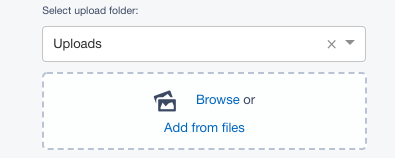
This module introduces an extended version of the UploadField, called SelectUploadField.
This allows users to select the folder that they wish to upload newly added files to,
rather than forcing users to upload to a pre-configured folder.
The folder selection will be remembered for that user, so that if they are uploading files across multiple pages or data-objects they will only need to change this value if they wish to change the destination folder.
Installation
If you have composer you can install using composer require silverstripe/selectupload:*
Otherwise, download the project as a zip archive and extract into the selectupload folder.
Usage
In your project you can use the SelectUploadField field as a substitute for UploadField.
$field = SelectUploadField::create('MyImage', 'My Image')
	->setFoldername('Parent/Subfolder') // set a good default folder
	->setCanSelectFolder('ADMIN') // So that only important people can select any folder
If you wish to replace ALL instances with this field type, you can simply use dependency injection to specify a custom class
In your mysite/_config/config.yml
---
Name: mysettings
---
SilverStripe\Core\Injector\Injector:
 SilverStripe\AssetAdmin\Forms\UploadField:
 class: SilverStripe\SelectUpload\SelectUploadField
This field appears as below: