

trendyminds/craft-palette
A command palette to easily jump to specific areas within Craft
Maintainers
Package info
github.com/trendyminds/craft-palette
Type:craft-plugin
pkg:composer/trendyminds/craft-palette
Requires
- php: ^8.2
- craftcms/cms: ^5.0.0
Requires (Dev)
- laravel/pint: ^1.3
Suggests
None
Provides
None
Conflicts
None
Replaces
None
MIT 925dd172b699691608c576820635259b9a3faeee
This package is auto-updated.
Last update: 2026-06-06 20:07:11 UTC
README
⌨️ CMD+K your way around Craft!
🤔 What is Palette?
Palette allows you to easily jump between areas, entries, assets, and users within Craft without lifting your hands off the keyboard!
If you're a developer, you likely use something like Raycast, Alfred, or Spotlight.
That should also exist in the CMS you use most, right? With Palette you can now jump around with ease!
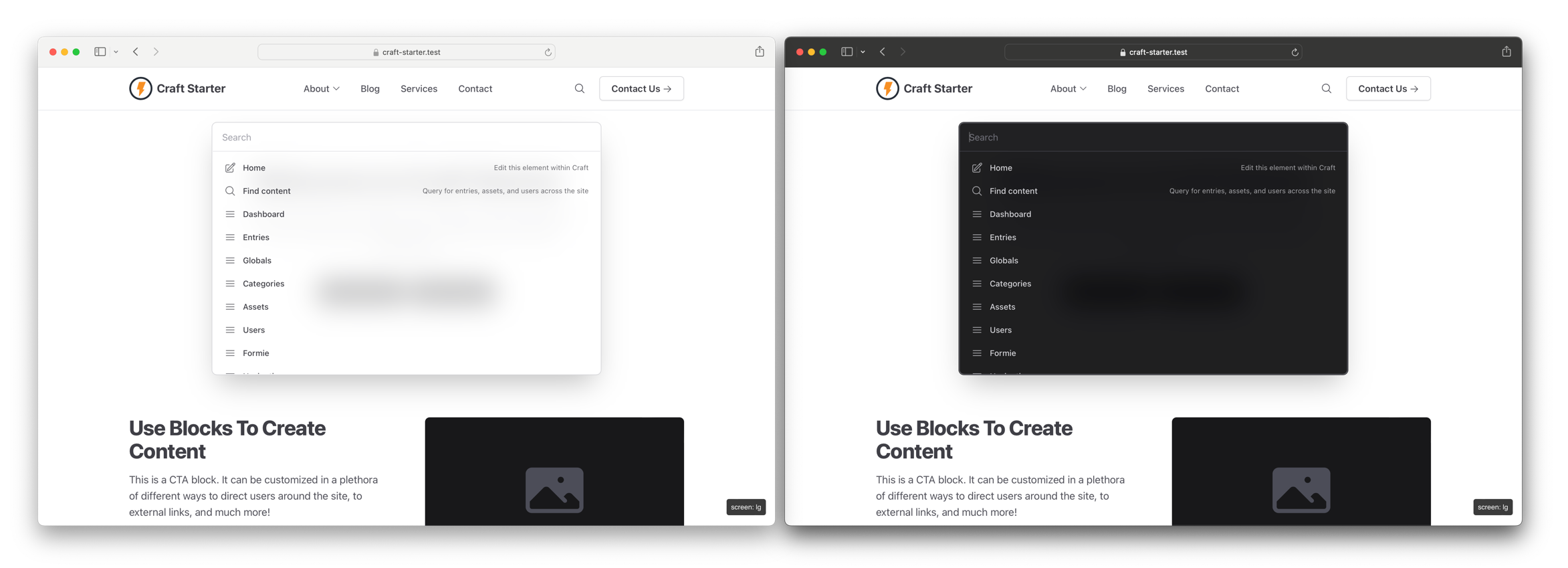
👁 The light and dark themes of Palette shown side by side with the default list of results

⚡️ Features
- 🔍 Available on the front-end and in the control panel
- 🌗 Light and dark mode support
- ⭐️ Zero setup necessary; just install and enable
- 🏎 Compatible with full-page static caching strategies like Blitz
- 🔐 Actions change based on user permissions and if admin changes are allowed
- 🎛️ Change contexts to filter actions or search your content
- 🔌 Plugins that register navigation links, settings areas, and utilities are included automatically
- 💅 Add your own custom URLs via the config file (Craft 4+ only)
📦 Installing
Install Palette one of two ways:
- Install via Craft's Plugin Store
- Run
composer require trendyminds/craft-paletteand enable the plugin from "Settings > Plugins" - Optionally, you can configure Palette by adding a
config/palette.phpfile and modifying the default options
🤝 Contributing
If you would like to contribute to Palette we tried to make it as easy as possible:
- Clone the repo
- Run
npm ito install the Node dependencies - Run
npm run devto begin the watch task - Make your changes
- Run
npm run buildto compile and minify the CSS and JS - Submit a PR!