wwwision/neos-creationdialogproperties
Simple package to easily expose Node properties to the CreationDialog that's available since Neos 3.3.
Maintainers
Package info
github.com/bwaidelich/Wwwision.Neos.CreationDialogProperties
Type:neos-package
pkg:composer/wwwision/neos-creationdialogproperties
Requires
- neos/neos: ^3.3.2 || ^4.0 || ^5.0
Requires (Dev)
None
Suggests
None
Provides
None
Conflicts
None
Replaces
None
MIT d03a085aa8bc23e407fd901286c1b358a2812974
This package is auto-updated.
Last update: 2026-06-29 00:46:40 UTC
README
Simple package to easily expose Node properties to the CreationDialog that's available since Neos 3.3.
DISCLAIMER / BACKGROUND
Neos 3.3 ships with a great new feature called CreationDialog that allows NodeType definitions to specify a dialog that is displayed upon creation of a corresponding node.
By default a custom nodeCreationHandler has to be implemented to process the data of the CreationDialog*. This package provides a generic handler that allows to easily expose certain node properties to be displayed in the dialog.
With Neos 5.1. the functionality of this package has been introduced to the core (see documentation). Thus there is no version of this package compatible for Neos 5.1 and above.
Usage
- Install package via
composer require wwwision/neos-creationdialogproperties - Extend NodeType definitions, adding the
showInCreationDialogoption:
Example Node Type Configuration
'Some.Package:Some.NodeType':
 superTypes:
 'Neos.Neos:Content': true
 ui:
 label: 'Some Content Element'
 # ...
 properties:
 'property1':
 type: string
 options:
 showInCreationDialog: true
 validation:
 'Neos.Neos/Validation/NotEmptyValidator': []
 ui:
 label: 'Mandatory link property'
 inspector:
 editor: 'Neos.Neos/Inspector/Editors/LinkEditor'
 'property2':
 type: string
 options:
 showInCreationDialog: true
 ui:
 label: 'Optional selector property'
 inspector:
 editor: 'Neos.Neos/Inspector/Editors/SelectBoxEditor'
 editorOptions:
 values:
 'value1':
 label: 'Label 01'
 'value2':
 label: 'Label 02'
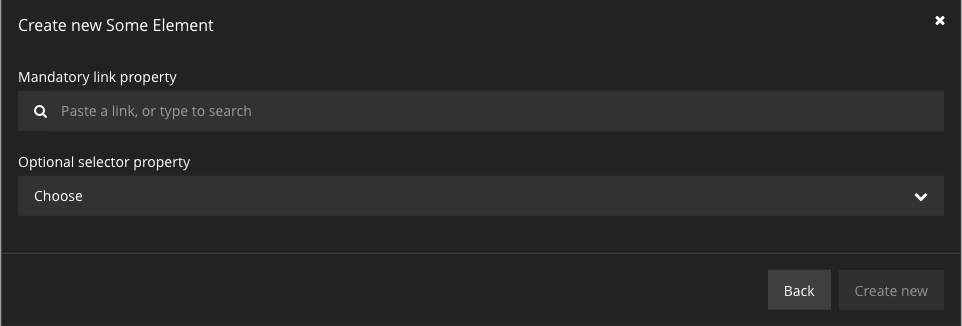
The above will result in the following Creation Dialog to be displayed whenever a node of the corresponding type is inserted: