

wwwision/neos-mailchimp
Flow package that integrates MailChimp into your Neos site / Flow Application
Maintainers
Package info
github.com/bwaidelich/Wwwision.Neos.MailChimp
Type:neos-package
pkg:composer/wwwision/neos-mailchimp
Requires
- neos/neos: ^5.0 || ^7.0 || ^8.0
Requires (Dev)
None
Suggests
None
Provides
None
Conflicts
None
Replaces
None
GPL-3.0+ c1f507b9723d0a74fa31f7b08f04464069b1f947
This package is auto-updated.
Last update: 2026-06-29 01:08:29 UTC
README
Package that integrates MailChimp® to your Neos site or Flow application.
Features
This package comes with two main features:
- A MailChimp® subscription finisher for the Flow Form Framework
- A simple Neos module that allows Neos administrators to manage MailChimp® lists and recipients
Usage
Install this package and make sure to resolve all dependencies. The easiest way to install this package is to use composer:
composer require wwwision/neos-mailchimp
After successful installation make sure to configure the MailChimp® API key in the Settings.yamlof your Site package:
Wwwision:
 Neos:
 MailChimp:
 apiKey: '<VALID_MAILCHIMP_API_KEY>'
Note: The API key can be obtained from mailchimp.com > Account > Extras > API keys
Done. You can now log-in to the Neos backend (as administrator) and manage your newsletter lists and recipients in the new Module administration/mailchimp (Make sure to flush the browser caches if the module should not appear in the menu).
Neos Module
The module is pretty simple and self-explanatory. Currently it allows for:
- Displaying all lists
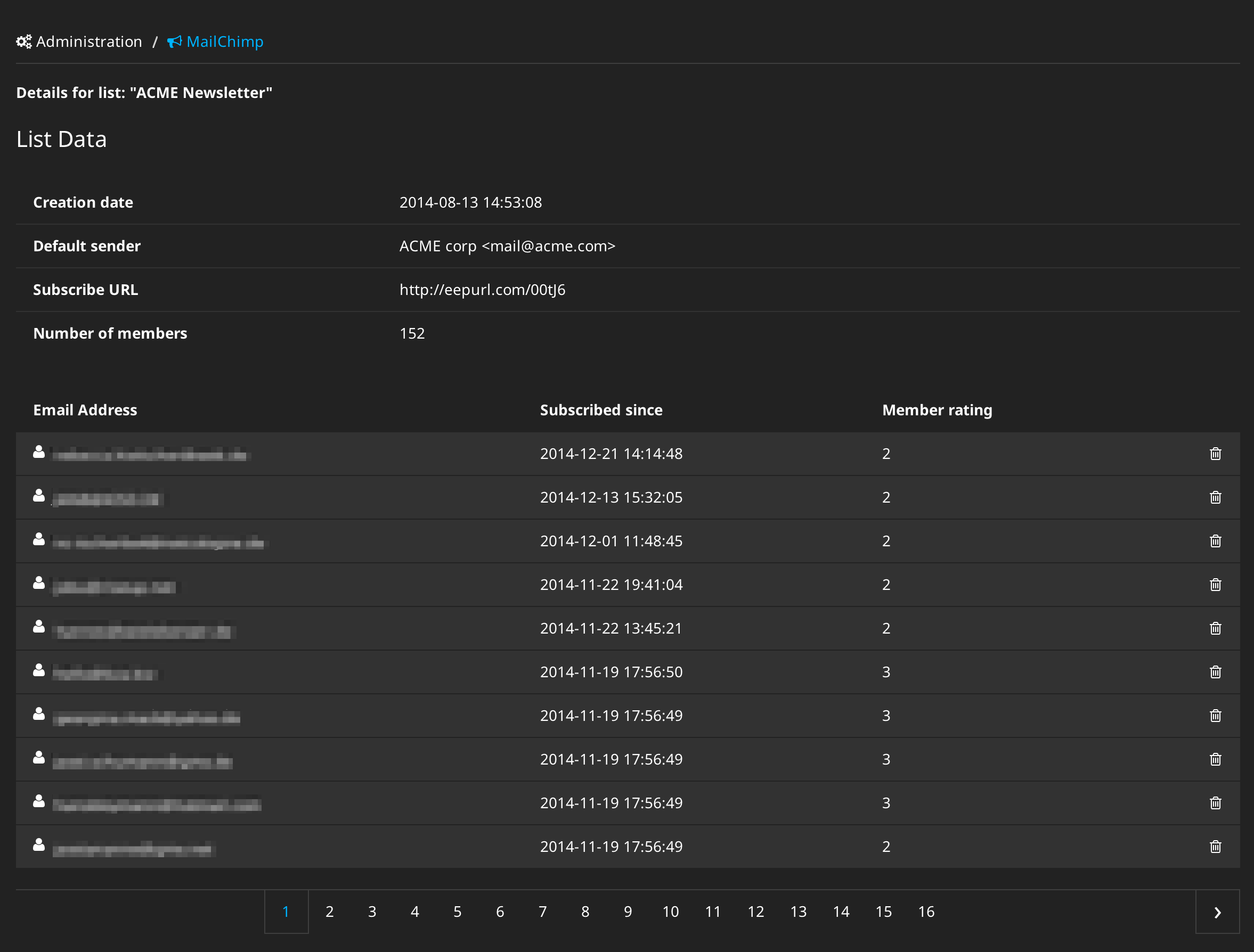
- Displaying details of single lists including creation date, sender information, number of recipients
- Displaying all members of a selected list
- Removing members from a list
- Subscribing new members to a list
👁 Neos module for managing MailChimp® lists
👁 Neos module for managing MailChimp® members



Form Finisher
This package also comes with a simple form finisher that allows for creation of simple Newsletter subscription forms using the Flow Form Framework.
Alternatively you can save the following snippet to Data/Forms/newsletter.yaml to create a simple newsletter subscription form:
type: 'Neos.Form:Form'
identifier: mailchimp
label: Mailchimp
renderables:
 -
 type: 'Neos.Form:Page'
 identifier: page1
 label: 'Page 1'
 renderables:
 -
 type: 'Neos.Form:SingleLineText'
 identifier: 'firstName'
 label: 'First name'
 validators:
 -
 identifier: 'Neos.Flow:NotEmpty'
 properties:
 placeholder: 'Your first name'
 defaultValue: ''
 -
 type: 'Neos.Form:SingleLineText'
 identifier: 'lastName'
 label: 'Last name'
 validators:
 -
 identifier: 'Neos.Flow:NotEmpty'
 properties:
 placeholder: 'Your last name'
 defaultValue: ''
 -
 type: 'Neos.Form:SingleLineText'
 identifier: 'email'
 label: 'E-Mail'
 validators:
 -
 identifier: 'Neos.Flow:NotEmpty'
 -
 identifier: 'Neos.Flow:EmailAddress'
 -
 identifier: 'Wwwision.Neos.MailChimp:UniqueSubscription'
 options:
 listId: '<MAILCHIMP-LIST-ID>'
 properties:
 placeholder: 'Your email address'
 defaultValue: ''
finishers:
 -
 identifier: 'Wwwision.Neos.MailChimp:MailChimpSubscriptionFinisher'
 options:
 listId: '<MAILCHIMP-AUDIENCE-ID>'
 additionalFields:
 'FNAME': '{firstName}'
 'LNAME': '{lastName}'
 -
 identifier: 'Neos.Form:Confirmation'
 options:
 message: 'Thank you, your subscription was successful. Please check your email.'
renderingOptions:
 submitButtonLabel: ''
Note: Replace the two "<MAILCHIMP-AUDIENCE-ID>" with a valid audience (list) identifier that can be obtained from mailchimp.com > Audience > <YOUR-AUDIENCE> > Settings > Audience name & defaults. An Audience ID usually contains numbers such as "1243568790".
With interestGroups option you can set fixed or dynamic interest groups for the user to subscribe to.
# ...
finishers:
 -
 identifier: 'Wwwision.Neos.MailChimp:MailChimpSubscriptionFinisher'
 options:
 listId: '<MAILCHIMP-AUDIENCE-ID>'
 additionalFields:
 'FNAME': '{firstName}'
 'LNAME': '{lastName}'
 interestGroups:
 - 'abc123abc1'
 - 'def123def1'
 - '{interestGroups}' // Placeholder for single value fields (e.g. select box)
 ...
 - '{interestGroups.0}' // Placeholder for multi value fields (e.g. check boxes)
 - '{interestGroups.1}'
The Form finisher can of course be used without Neos (i.e. for Newsletter-subscriptions within plain Flow applications).
DataSources
Interest Categories
Returns a list of all interest categories with ids and label in the subscription list.
DataSourceIdentifier: mailchimp-interest-category
dataSourceAdditionalData:
listId- (string) Id of subscription list
Interests
Returns a list of all interests with ids and label of the given category in the subscription list.
DataSourceIdentifier: mailchimp-interest
dataSourceAdditionalData:
listId- (string) Id of subscription listcategoryId- (string) Id of interest category
Example NodeType configuration
 ...
 properties:
 subscriptionList:
 type: string
 defaultValue: ''
 ui:
 label: Subscription list id
 category:
 type: string
 defaultValue: ''
 ui:
 label: Category
 inspector:
 hidden: 'ClientEval:node.properties.subscriptionList != "" ? false : true'
 editor: Neos.Neos/Inspector/Editors/SelectBoxEditor
 editorOptions:
 allowEmpty: true
 dataSourceIdentifier: mailchimp-interest-category
 dataSourceAdditionalData:
 listId: ClientEval:node.properties.subscriptionList
 interestId:
 type: string
 defaultValue: ''
 ui:
 label: Interest
 inspector:
 group: categories
 hidden: 'ClientEval:node.properties.category != "" ? false : true'
 editor: Neos.Neos/Inspector/Editors/SelectBoxEditor
 editorOptions:
 allowEmpty: true
 dataSourceIdentifier: mailchimp-interest
 dataSourceAdditionalData:
 listId: ClientEval:node.properties.subscriptionList
 categoryId: ClientEval:node.properties.category
Trivia
This package demonstrates...
...how to reuse Neos layouts and partials with Views.yaml
...how to create & configure a form finishers so that it can be used in the Form definition
...how to make use of Objects.yaml to initialize custom API clients
...how to make arbitrary result sets countable and "paginatable" using a CallbackQueryResult object
FAQ
- I get an error
No MailChimp lists found. Did you configure the API key correctly at Wwwision.Neos.MailChimp.apiKey?, what's wrong with me?- Make sure you have configured the API key in the Settings and in the form finisher configuration as described above. If that's the case, make sure your Package dependency is correct. That means: The package that configures the API key must require the
wwwision/neos-mailchimppackage in thecomposer.jsonmanifest. Otherwise the loading order is incorrect and the API key might be overridden by the default settings
- Make sure you have configured the API key in the Settings and in the form finisher configuration as described above. If that's the case, make sure your Package dependency is correct. That means: The package that configures the API key must require the
License
Licensed under GPLv3+, see LICENSE