
Should You Use an AI IDE or an AI Terminal Agent?
Two fundamentally different approaches to AI-assisted development
Last updated: February 20, 2026
Quick Verdict
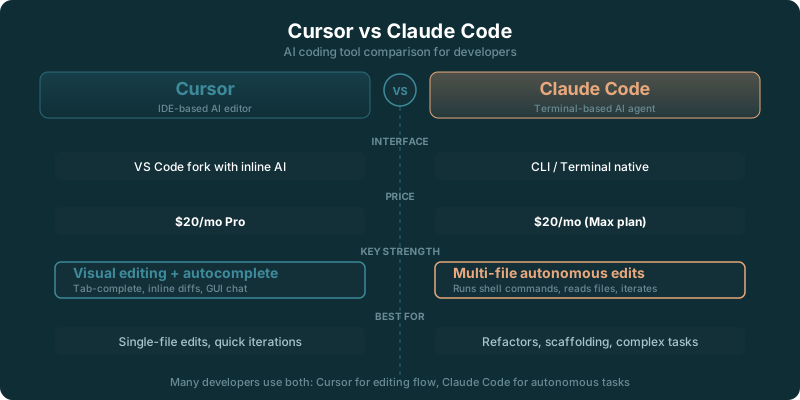
Choose Cursor if: You want AI deeply integrated into a visual IDE with inline completions, a polished GUI, and the ability to switch between AI models. Cursor feels like VS Code with superpowers, and its Composer handles multi-file edits through a familiar interface.
Choose Claude Code if: You want an autonomous coding agent that reads your entire codebase, runs commands, edits files, and executes multi-step tasks from a single natural language prompt. Claude Code works in your terminal alongside your existing editor, not instead of it.
Feature Comparison
| Feature | Cursor | Claude Code |
|---|---|---|
| Interface | Full GUI (VS Code fork) | Terminal / CLI |
| Inline Autocomplete | ✓ Real-time tab completions | No autocomplete |
| Multi-File Editing | Composer (visual diff) | Agent edits files directly |
| Codebase Understanding | Indexed codebase search | Full repo traversal + grep |
| Command Execution | Terminal panel in IDE | ✓ Runs commands autonomously |
| Agentic Autonomy | Agent mode (guided) | High autonomy (reads, writes, runs) |
| AI Model Choice | Claude, GPT-4.1, custom models | Claude only (Opus, Sonnet) |
| Git Integration | GUI-based git controls | Creates commits, branches, PRs |
| Extension Ecosystem | ✓ Full VS Code extensions | None (terminal tool) |
| Works With Existing Editor | Replaces your editor | Works alongside any editor |
| Price (Individual) | $20/month | $20/month (Claude Pro) |
Deep Dive: Where Each Tool Wins
⚡ Cursor Wins: Visual Workflow and Autocomplete
Cursor's biggest advantage is that it's a complete IDE. You get inline autocomplete as you type, visual diffs before accepting changes, a file tree, integrated terminal, debugger, and every VS Code extension you already rely on. For developers who think visually and want to see what the AI is doing before it happens, Cursor's GUI removes ambiguity. You review each change in a diff view, accept or reject it, and move on.
The inline autocomplete alone is worth the price for many developers. Claude Code doesn't offer this at all. When you're writing code and want contextual suggestions to appear as you type, Cursor delivers constantly. It's the kind of feature you don't think about until it's gone.
Model flexibility is another win. Cursor lets you switch between Claude, GPT-4.1, and other models depending on the task. Some refactoring work is better with Claude's precision. Some quick completions are faster with a smaller model. Having the choice within the same tool is convenient. Claude Code, by design, only uses Claude models.
🟠 Claude Code Wins: Autonomy and Depth
Claude Code operates at a different level of abstraction. Instead of helping you write code line by line, it takes a task description and executes it. 'Add authentication middleware with JWT tokens, update the routes, write tests, and run them.' Claude Code will read your codebase to understand the architecture, create the files, write the implementation, run your test suite, and fix failures. You describe the goal; it handles the steps.
The codebase understanding is deeper because Claude Code doesn't just index files. It actively reads them, greps for patterns, follows imports, and builds context on the fly. When you ask it to refactor a function, it traces every caller, checks for side effects, and updates all affected code. Cursor's indexing is fast but shallower. Claude Code's approach takes more time per query but catches things that index-based search misses.
The terminal-first design means Claude Code works with whatever editor you already use. Vim, Emacs, VS Code, Zed, Sublime... it doesn't matter. Claude Code runs in a separate terminal and modifies files on disk. Your editor picks up the changes through file watching. This is liberating if you don't want to switch IDEs, and it means Claude Code integrates into existing team workflows without asking anyone to change their editor.
Use Case Recommendations
⚡ Use Cursor For:
- → Day-to-day coding with inline suggestions
- → Visual code review and diff-based editing
- → Developers who prefer a GUI-first workflow
- → Teams that want model flexibility (Claude + GPT-4.1)
- → VS Code power users with extension dependencies
- → Pair programming style AI interaction
🟠 Use Claude Code For:
- → Large-scale refactoring across many files
- → Autonomous task execution (build features end-to-end)
- → Developers who prefer terminal workflows
- → CI/CD and automation scripting
- → Working with unfamiliar codebases
- → Developers who want to keep their current editor
Pricing Breakdown
| Tier | Cursor | Claude Code |
|---|---|---|
| Free / Trial | Limited free tier | Included with Claude Pro ($20/mo) |
| Individual | $20/month | $20/month (via Claude Pro) |
| Business | $40/month | $25/user/month (Claude Team) |
| Enterprise | Contact sales | Custom (Claude Enterprise) |
Our Recommendation
For IDE-First Developers: Use Cursor. If you live in VS Code and rely on extensions, debugger integration, and visual diffs, Cursor keeps that workflow intact while adding AI. The autocomplete alone makes it worth trying. Add Claude Code later for the occasional large refactoring task where you'd rather describe the goal than click through individual file changes.
For Terminal-First Developers: Use Claude Code. If you already work in Vim, Neovim, or Emacs and your workflow is terminal-centric, Claude Code fits naturally. It doesn't ask you to change your editor. It runs alongside it. The agentic approach handles the tedious multi-file work while you focus on architecture and review.
The Bottom Line: These tools aren't really competitors. They solve different problems. Cursor makes you faster at writing code. Claude Code makes you faster at completing tasks. Many developers use both: Cursor for everyday coding with autocomplete, Claude Code for big-picture changes that span dozens of files. At $20/month each, trying both for a month costs less than a single hour of your time.
Switching Between Cursor and Claude Code
What Transfers Directly
- Your entire codebase and project setup (both work with standard repos)
- Git configuration and workflows
- Project-specific AI rules (.cursorrules maps conceptually to CLAUDE.md)
- General AI interaction patterns and prompt strategies
What Needs Reconfiguration
- AI rules format (.cursorrules vs CLAUDE.md / .claude files)
- Workflow habits (GUI diff review vs terminal-based trust)
- Extension-dependent features (debugger, linter integrations in Cursor vs manual in Claude Code)
- Team collaboration setup (different sharing and permissions models)
Estimated Migration Time
Under an hour to install and start using either tool. The real transition time is adapting your workflow: 1-2 weeks to get comfortable with Cursor's Composer or Claude Code's agentic approach. Since they work alongside each other, you can run both during the transition.