
What is Cursor?
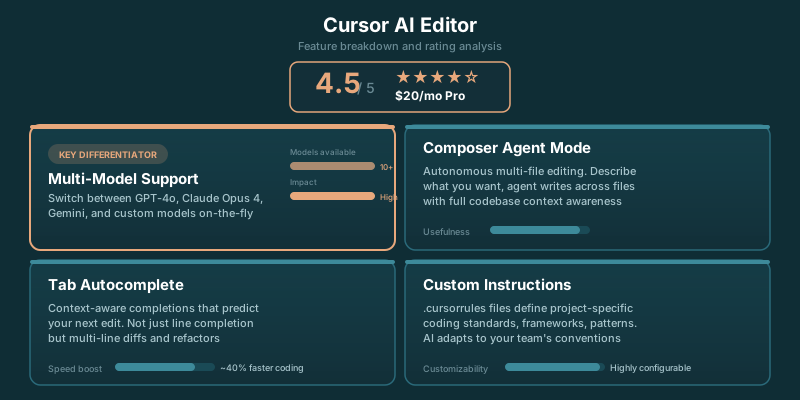
Cursor is a code editor built from the ground up with AI at its core. It's a fork of VS Code, which means you get the familiar interface, extensions, and keybindings you already know — but with AI capabilities that go far beyond simple autocomplete.
Where GitHub Copilot feels like an add-on to your existing editor, Cursor feels like what a code editor would look like if it was designed in 2024 with AI as a first-class citizen.
Key Features
Composer (Multi-File Editing)
This is Cursor's killer feature. Composer lets you make changes across multiple files simultaneously using natural language. Describe what you want ("add error handling to all API routes and update the tests"), and Cursor generates a diff across your entire codebase.
For prompt engineers building AI applications, this is transformative. You can refactor entire LangChain pipelines or update all your prompt templates in one go.
Chat with Your Codebase
Cursor indexes your entire project and lets you ask questions about it. Unlike generic ChatGPT, it has full context about your specific code, dependencies, and patterns.
Model Selection
You can choose between Claude (3.5 Sonnet or Opus) and GPT-4 depending on the task. Claude tends to be better for complex reasoning and longer contexts; GPT-4 is often faster for simple completions.
Tab Completion
Cursor's autocomplete is excellent — on par with Copilot — but it also predicts your next edit location. After accepting a suggestion, pressing Tab might jump you to the next logical place to make changes.
✓ Pros
- Multi-file editing is game-changing
- Full codebase awareness
- Choice of Claude or GPT-4
- VS Code extensions work
- Better context handling than competitors
- Active development, frequent updates
✗ Cons
- $20/month for full features
- Can be slower than native VS Code
- Occasional bugs in Composer
- Learning curve for advanced features
- Some VS Code extensions have issues
Who Should Use Cursor?
Ideal For:
- AI/ML Engineers — Building LangChain apps, prompt engineering, working with embeddings
- Full-Stack Developers — Multi-file refactoring across frontend and backend
- Solo Developers — Where Cursor acts as your AI pair programmer
- Teams standardizing on AI tools — Everyone gets the same AI capabilities
Maybe Not For:
- Large enterprise teams — GitHub Copilot may be easier to get approved
- Developers who prefer JetBrains IDEs — Cursor is VS Code-based only
- Those on strict budgets — Free tier is limited compared to Copilot
Our Verdict
Cursor is the best AI code editor available today, especially for prompt engineers and AI developers. The Composer feature alone is worth the subscription if you're doing any kind of AI application development. The multi-file editing capability saves hours of manual refactoring.
If you're currently using VS Code + Copilot, try Cursor's free tier for a week. Most developers who do don't go back.
Cursor vs Alternatives
See our detailed Cursor vs GitHub Copilot comparison for a head-to-head breakdown. The short version: Cursor is better for complex, multi-file work; Copilot is better for autocomplete and has wider enterprise adoption.