
Windsurf Pricing 2026: Credit System, Plans, and Real Monthly Costs
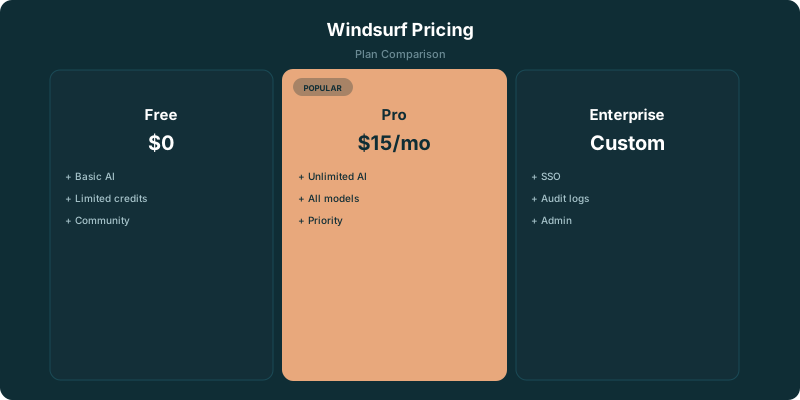
Windsurf uses a credit-based pricing model. Free gives 25 credits. Pro at $15/month includes 500 credits. This page covers the cost math. For a full feature review of Windsurf's Cascade agent and coding quality, see our Windsurf Review.
Free
- ✓ 25 credits per month
- ✓ Unlimited Fast Tab completions
- ✓ Access to AI Chat and Commands
- ✓ 1 App Deploy per day
- ✓ Good for trying Windsurf
Pro
- ✓ 500 credits per month
- ✓ Unlimited Tab, Command, and App Previews
- ✓ Access to Claude Sonnet 4.6, GPT-4.1, Gemini
- ✓ Cascade multi-file editing
- ✓ $5/mo cheaper than Cursor Pro
Teams
- ✓ 500 credits per user per month
- ✓ All Pro features for each user
- ✓ Centralized admin and billing
- ✓ Team management controls
- ✓ SSO and user provisioning
Enterprise
- ✓ Custom credit allocation
- ✓ Zero Data Retention (ZDR) by default
- ✓ Advanced security and compliance
- ✓ Dedicated support
- ✓ Custom deployment options
How the Credit System Works
Every AI interaction in Windsurf costs credits. The exact cost depends on which model handles the request. Windsurf's built-in SWE-1 model costs a fixed number of credits per interaction. Third-party models like Claude Sonnet 4.6 or GPT-4.1 cost credits proportional to the tokens they process.
Tab completions are free on all plans. This means basic autocomplete works indefinitely. Credits are consumed by Chat, Cascade (multi-file editing), and Commands.
When you run out of credits, you can buy add-on packs at $10 for 250 credits. Your monthly allocation resets each billing cycle. Unused credits don't roll over.
Windsurf Credits vs Cursor Credits: How They Actually Compare
Both Windsurf and Cursor moved to credit-based systems, but they work differently under the hood. Understanding the mechanics helps you predict which tool costs less for your workflow.
Cursor gives you a dollar-denominated credit pool: $20 on Pro, $60 on Pro+, $200 on Ultra. Each request deducts from the pool based on the actual API cost of the model you select. Claude Sonnet 4.6 costs more per request than GPT-4.1 Nano. Cursor's Auto mode is unlimited and does not draw from the pool, which means most routine coding tasks are effectively free. The key optimization is using Auto mode by default and only switching to manual model selection when quality matters.
Windsurf gives you a fixed credit count: 500 on Pro. Credits are consumed by Chat, Cascade, and Commands at rates that depend on the model and the length of the interaction. The SWE-1 model costs a predictable number of credits per interaction. Third-party models like Claude Sonnet 4.6 cost credits proportional to tokens processed, meaning long Cascade sessions with complex context can burn through 20-30 credits in a single workflow.
In practice, a developer doing 15-20 AI interactions per day (a mix of Chat questions and Cascade edits) will typically consume 300-400 Windsurf credits per month. That keeps you within the 500-credit Pro allocation most months. The same developer on Cursor Pro would use Auto mode for most requests (free) and dip into the $20 credit pool only for manual model selections, likely spending $8-12 of the pool per month.
The bottom line: light to moderate users spend less on Windsurf ($15/month covers usage). Heavy users who need premium models for every request spend less on Cursor because Auto mode absorbs the routine workload for free. If you are unsure, start with Windsurf's lower price point and monitor your credit consumption for a month before deciding.
Windsurf vs Cursor vs Copilot: Price and Feature Comparison
All three editors offer AI-powered coding with different pricing models and strengths.
| Windsurf Pro | Cursor Pro | Copilot Pro | |
|---|---|---|---|
| Price | $15/mo | $20/mo | $10/mo |
| Credit/Request system | 500 credits | $20 credit pool | 300 premium requests |
| Free tier | 25 credits/mo | Limited requests | 2,000 completions + 50 premium |
| Multi-file editing | Cascade | Composer | Agent mode |
| Tab autocomplete | Unlimited (free) | Unlimited on paid | Unlimited on paid |
| Team plan | $30/user | $40/user | $19/user |
| IDE base | VS Code fork | VS Code fork | VS Code, JetBrains, Neovim |
Hidden Costs & Gotchas
- ⚠ Credits deplete at different rates depending on the AI model. Windsurf's SWE-1 model costs a fixed amount per interaction. Premium third-party models like Claude Sonnet 4.6 charge based on token volume, long conversations drain credits faster.
- ⚠ Add-on credits cost $10 for 250 credits if you exhaust your monthly allocation. That's $0.04 per credit, the same effective rate as the $15/500 Pro plan.
- ⚠ Tab completions are unlimited on all plans, but Cascade (multi-file editing) and Chat consume credits. Heavy Cascade use burns through 500 credits faster than you expect.
- ⚠ Enterprise at $60/user is 2x Teams and includes ZDR (Zero Data Retention) by default. If your organization doesn't need ZDR or advanced compliance, Teams at $30/user is sufficient.
- ⚠ 25 free credits per month is roughly 3-5 meaningful AI sessions. It's a trial, not a workflow.
Which Plan Do You Need?
Developer trying AI code editors
Free tier (25 credits). Enough for 3-5 sessions to evaluate Windsurf's Cascade and AI features. Compare against Cursor's Hobby tier and Copilot's free plan.
Individual developer
Pro at $15/month. 500 credits covers daily use for most developers. At $5 less than Cursor Pro, it's the cheapest full-featured AI code editor with multi-file editing.
Engineering team
Teams at $30/user. 500 credits per user with admin controls. Cheaper than Cursor Teams ($40/user) but more than Copilot Business ($19/user).
The Bottom Line
Windsurf Pro at $15/month is the value play in AI code editors, $5 less than Cursor Pro and $5 more than Copilot Pro, with a solid feature set including Cascade for multi-file editing. The 500-credit monthly allocation covers typical daily coding. If you're evaluating AI code editors, Windsurf is worth testing alongside Cursor and Copilot. The free tier's 25 credits is just enough to form an opinion.
Related Resources
Frequently Asked Questions
Windsurf Pricing Update Tracker (2026)
Windsurf adjusts model access and adds features throughout the year. We track every update so this page stays the most current source. Last reviewed: April 2026.
- April 2026: No list price changes. Pro Plus added Claude Opus 4.6 access. GPT-4.1 access expanded across all paid tiers.
- Q1 2026: Cascade workflow improvements landed across paid tiers. Annual billing discount (~20%) confirmed across all tiers.
- Q4 2025: Tier restructuring introduced the current Free / Pro / Pro Plus / Teams structure with pricing that has held into 2026.
- Q3 2025: Cascade agent mode launched as the differentiator vs Cursor Composer and GitHub Copilot Agent.
AI tool pricing changes weekly. We track all of it.
Weekly data from 22,000+ job postings. Free.
2,700+ subscribers. Unsubscribe anytime.