
More than 5 years have passed since last update.
Kivyを用いた数独ソルバーのGUIのβ版ができました.
2
Last updated at Posted at 2017-10-08
本日は
1.[Python]Z3で数独パズルを解くをリファクタリング にてZ3Solverを作成
- Kivy を用いて数独ソルバーのGUIのα版ができました.
- β版 今ここ シャンバリーレ!
α版からの変更点
- 3x3のブロックがわかるようにデザインを修正.
GridLayoutのspacingを増やすことで対応できました. - ソルバーの処理のスレッドを起動してGUIが固まらないようにした.
- ソルバー動作中のボタン制御
していないこと
- 初期値の設定を行う時の配置矛盾の検知
実装例
sudoku.kv
# :set padding 20

<MainGrid>:
 rows:3
 cols:3
 spacing: 15

<SubGrid>:
 rows:3
 cols:3

<Cell>:
 size_hint_x: 1
 size_hint_y: 1
 font_size: '30dp'

FloatLayout:
 BoxLayout:
 pos_hint: {'center_x': 0.5, 'center_y': 0.5}
 size_hint: (None, None)
 center: root.center
 size: [min(root.width, root.height) - 2 * padding] * 2
 orientation: 'vertical'
 BoxLayout:
 id:blayout
 orientation: 'horizontal'
 size_hint_y: 0.5
 Label:
 id:message
 size_hint_x: 0.5
 text:'SudokuSolver'
 Button:
 id:reset
 size_hint_x: 0.25
 text:'Reset'
 on_press:app.reset()
 Button:
 id:solve
 size_hint_x: 0.25
 text:'Solve'
 on_press:app.solve()
 MainGrid:
 id:main_grid
 size_hint_y: 9
 center: root.center
 size: [min(root.width, root.height) - 2 * padding] * 2
z3solver
import z3
from itertools import product


def grid(i, j): return z3.Int("grid[%d,%d]" % (i, j))


class Z3Solver(z3.Solver):
 GRID_SIZE = 9
 SUB_GRID_SIZE = 3

 def __init__(self, problem):
 super(Z3Solver, self).__init__()
 self.problem = problem
 self._set_problem()

 def solve(self):
 self._set_restriction()
 return self.check()

 def _set_problem(self):
 N = Z3Solver.GRID_SIZE
 for i, j in product(range(N), range(N)):
 if self.problem[i][j] > 0:
 self.add(grid(i, j) == self.problem[i][j])

 def _set_restriction(self):
 N = Z3Solver.GRID_SIZE
 B = Z3Solver.GRID_SIZE // Z3Solver.SUB_GRID_SIZE
 SUB_GRID_SIZE = Z3Solver.SUB_GRID_SIZE
 # set initial value
 self.add(*[1 <= grid(i, j) for i, j in product(range(N), repeat=2)])
 self.add(*[grid(i, j) <= 9 for i, j in product(range(N), repeat=2)])
 # distinct w.r.t col
 for row in range(N):
 self.add(z3.Distinct([grid(row, col) for col in range(N)]))
 # distinct w.r.t row
 for col in range(N):
 self.add(z3.Distinct([grid(row, col) for row in range(N)]))
 # distinct
 for row in range(B):
 for col in range(B):
 block = [grid(B * row + i, B * col + j)
 for i, j in product(range(SUB_GRID_SIZE), repeat=2)]
 self.add(z3.Distinct(block))


def solve_sudoku(problem):
 solver = Z3Solver(problem)
 result = solver.solve()
 if result == z3.sat:
 model = solver.model()
 # print result
 for i in range(Z3Solver.GRID_SIZE):
 for j in range(Z3Solver.GRID_SIZE):
 print("%d " % model[grid(i, j)].as_long(), end="")
 print("")
 print("")
 else:
 print(result)
sudoku.py
from itertools import product
import threading
from itertools import cycle
import z3
from z3solver import Z3Solver
from kivy.app import App
from kivy.uix.button import Label, Button
from kivy.uix.gridlayout import GridLayout
from kivy.uix.behaviors import FocusBehavior
from kivy.uix.boxlayout import BoxLayout
from kivy.clock import Clock


class MainGrid(FocusBehavior, GridLayout):

 def __init__(self, **kwargs):
 super(MainGrid, self).__init__(**kwargs)
 self.shift_down = False

 def keyboard_on_key_down(self, window, keycode, text, modifiers):
 """Based on FocusBehavior that provides automatic keyboard
 access, key presses will be used to select children.
 """
 print('press down')
 if 'shift' in keycode[1]:
 self.shift_down = True

 def keyboard_on_key_up(self, window, keycode):
 """Based on FocusBehavior that provides automatic keyboard
 access, key release will be used to select children.
 """
 print('press up')
 if 'shift' in keycode[1]:
 self.shift_down = False


class SubGrid(GridLayout):

 def __init__(self,**kwargs):
 super(SubGrid, self).__init__(**kwargs)
 self.skip = False

 def add_widget(self, widget):
 """ Override the adding of widgets so we can bind and catch their
 *on_touch_down* events. """
 widget.bind(on_touch_down=self.button_touch_down)
 return super(SubGrid, self).add_widget(widget)

 def button_touch_down(self, button, touch):
 """ Use collision detection to select buttons when the touch occurs
 within their area. """
 if button.collide_point(*touch.pos):
 self.update_cell_value(button)

 def update_cell_value(self, button):
 if self.skip:
 return
 else:
 if self.parent.shift_down:
 button.countdown()
 else:
 button.countup()


class Cell(Button):
 DIC = {0: "*", 1: "1", 2: "2", 3: "3", 4: "4",
 5: "5", 6: "6", 7: "7", 8: "8", 9: "9"}

 def __init__(self, **kwargs):
 super(Cell, self).__init__(**kwargs)
 self.counter = 0
 self.text = Cell.DIC[0]

 def countup(self):
 self.counter = (self.counter+1) % 10
 self.text = Cell.DIC[self.counter]

 def countdown(self):
 self.counter = (self.counter-1) % 10
 self.text = Cell.DIC[self.counter]


class SudokuApp(App):

 def __init__(self, **kwargs):
 super(SudokuApp, self).__init__(**kwargs)
 self.progress = cycle(['|', '/', '-', '\\'])

 def on_start(self):
 self.cells = dict()
 main_grid = self.root.ids.main_grid
 for (k, l) in product(range(3), repeat=2):
 sub_grid = SubGrid(id="block_{}_{}".format(k, l))
 for (i, j) in product(range(3), repeat=2):
 cell = Cell(id="cell_{}_{}".format(3*k+i, 3*l+j))
 self.cells[(3*k+i, 3*l+j)] = cell
 sub_grid.add_widget(cell)
 main_grid.add_widget(sub_grid)

 def progress_msg(self, nap):
 prog = ['|', '/', '-', '\\']
 from itertools import cycle
 self.root.ids.message.text = "Start To Solve..." + next(self.progress)

 def solve(self):
 self.solve_thread = threading.Thread(target=self._solve)
 self.solve_thread.start()
 Clock.schedule_interval(self.progress_msg, 0.1)

 def _solve(self):
 self.root.ids.reset.disabled = True
 self.root.ids.solve.disabled = True
 for sub_grid in self.root.ids.main_grid.children:
 sub_grid.skip = True
 problem = [[0]*9 for _ in range(9)]
 for (i, j) in product(range(9), repeat=2):
 cell = self.cells[(i, j)]
 if cell.text.isnumeric():
 problem[i][j] = int(cell.text)

 solver = Z3Solver(problem)
 result = solver.solve()

 if result == z3.sat:
 model = solver.model()
 grid = lambda i, j: z3.Int("grid[%d,%d]" % (i, j))
 for (i, j) in product(range(Z3Solver.GRID_SIZE), repeat=2):
 self.cells[(i, j)].text = str(model[grid(i, j)])
 self.root.ids.message.text = "Got Answer"
 else:
 self.root.ids.message.text = "Fail To Solve"

 self.root.ids.reset.disabled = False
 self.root.ids.solve.disabled = False
 for sub_grid in self.root.ids.main_grid.children:
 sub_grid.skip = False

 Clock.unschedule(self.progress_msg)

 def reset(self):
 self.root.ids.message.text = "Reset"
 sub_grids = self.root.ids.main_grid.children
 for cell in self.cells.values():
 cell.text = '*'
 cell.counter = 0


def main():
 SudokuApp().run()


if __name__ == '__main__':
 main()
実行例
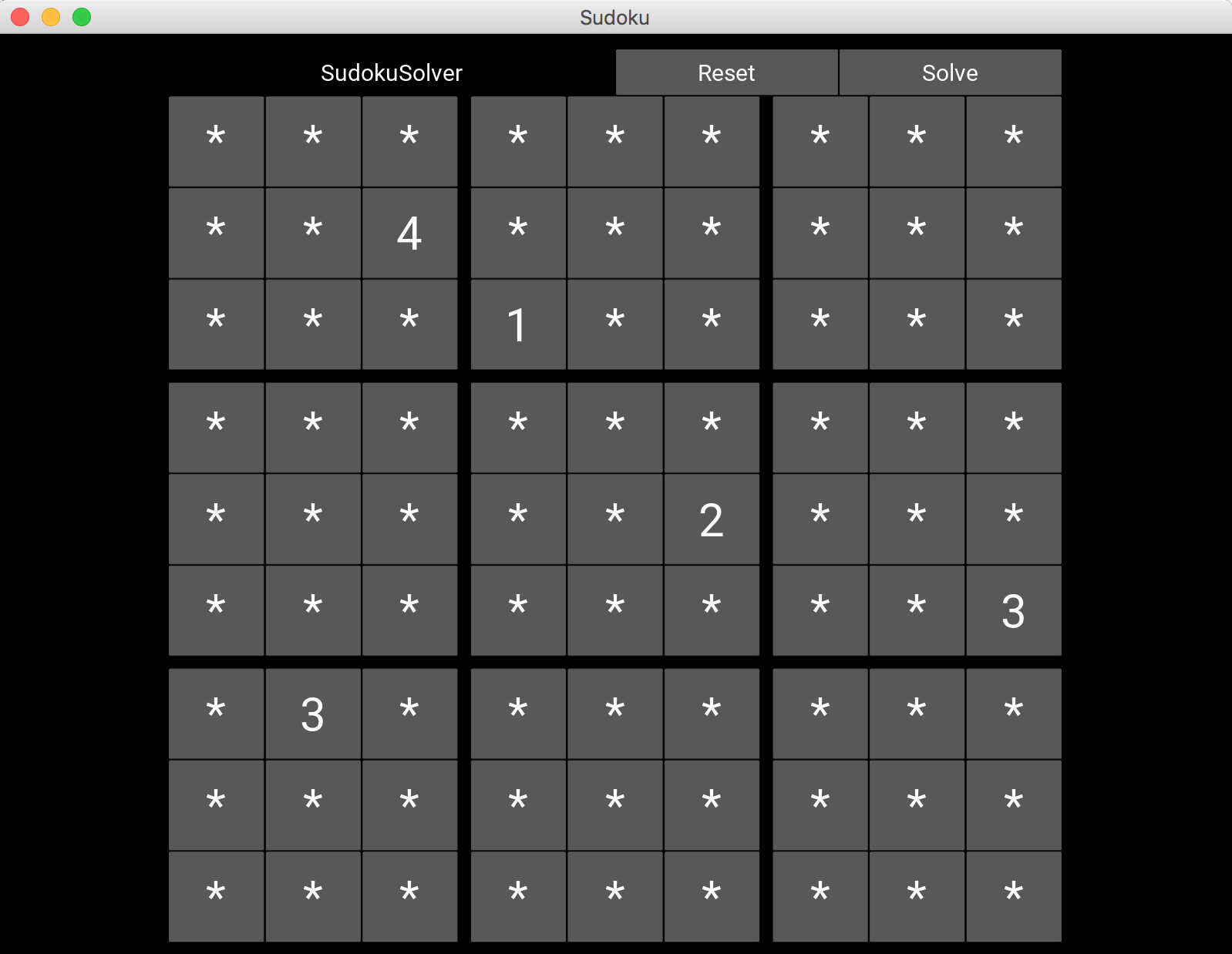
初期設定画面
👁 Screen Shot 2017-10-08 at 14.12.12.png
実行動作中画面
実行中は reset や solve ボタン及び各マスを押しても反応しないように制御しています.左上のメッセージには処理中であることを示すようなアクションを加えました.
👁 Screen Shot 2017-10-08 at 14.13.03.png

処理終了後
👁 Screen Shot 2017-10-08 at 14.15.49.png

スレッド起動しないといけない制御が面倒だった...
ひとまずは最低限の機能はつけたのでよしとしましょう.
次は配布に向けて頑張らねば.
Register as a new user and use Qiita more conveniently
- You get articles that match your needs
- You can efficiently read back useful information
- You can use dark theme