
More than 5 years have passed since last update.

hyper をインストール
brew update
brew cask install hyper
hyperがインストールされるので開く
設定ファイル編集
homeに .hyper.js が生成されているはずなので、
config: {/* ここの部分 */}に
~/.hyper.js
 pokemon: 'random', // Define your favorite pokemon theme
 pokecursor: 'true', // Activate your theme's pokecursor
 pokemonSyntax: 'dark', // Define the color of the terminal tabs
 unibody: 'false', // Define the color of the Hyper window header
 poketab: 'true', // Deactivate your theme's poketab
を追加し
plugins:[]を
~/.hyper.js
plugins: ['hyper-pokemon'],
にするだけ
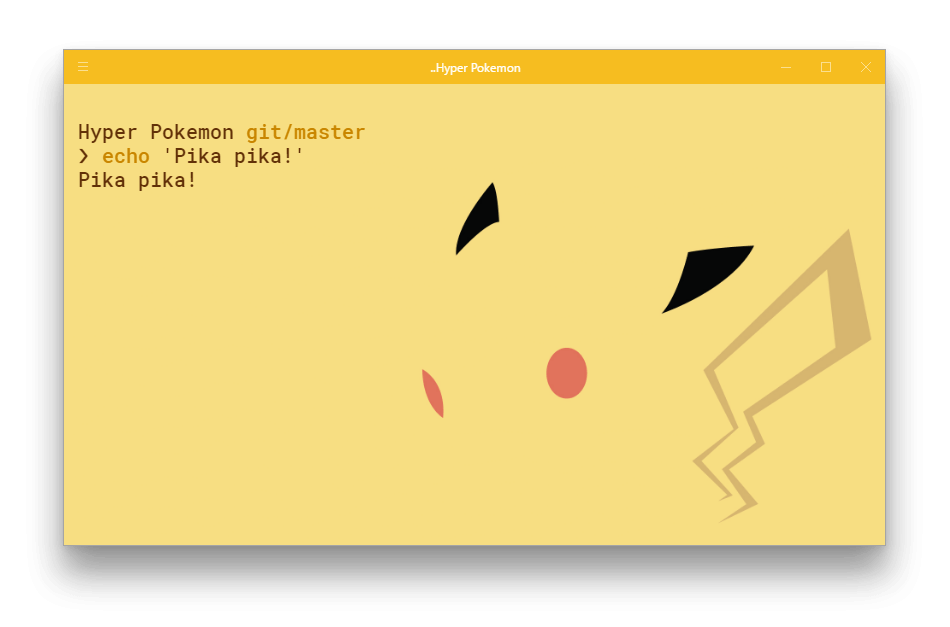
最後に再起動! Pokemon Yeah!
更新するたびにポケモンが変わる設定になっているので、
hyper上で Command + Shift + R を押すと幸せになれます。
一応設定ファイル全体はこちらに
~/.hyper.js
// Future versions of Hyper may add additional config options,
// which will not automatically be merged into this file.
// See https://hyper.is#cfg for all currently supported options.

module.exports = {
 config: {
 // Choose either "stable" for receiving highly polished,
 // or "canary" for less polished but more frequent updates
 updateChannel: 'stable',

 // default font size in pixels for all tabs
 fontSize: 12,

 // font family with optional fallbacks
 fontFamily: 'Menlo, "DejaVu Sans Mono", Consolas, "Lucida Console", monospace',

 // terminal cursor background color and opacity (hex, rgb, hsl, hsv, hwb or cmyk)
 cursorColor: 'rgba(248,28,229,0.8)',

 // `BEAM` for |, `UNDERLINE` for _, `BLOCK` for █
 cursorShape: 'BLOCK',

 // set to true for blinking cursor
 cursorBlink: false,

 // color of the text
 foregroundColor: '#fff',

 // terminal background color
 backgroundColor: '#000',

 // border color (window, tabs)
 borderColor: '#333',

 // custom css to embed in the main window
 css: '',

 // custom css to embed in the terminal window
 termCSS: '',

 // set to `true` (without backticks) if you're using a Linux setup that doesn't show native menus
 // default: `false` on Linux, `true` on Windows (ignored on macOS)
 showHamburgerMenu: '',

 // set to `false` if you want to hide the minimize, maximize and close buttons
 // additionally, set to `'left'` if you want them on the left, like in Ubuntu
 // default: `true` on windows and Linux (ignored on macOS)
 showWindowControls: '',

 // custom padding (css format, i.e.: `top right bottom left`)
 padding: '12px 14px',

 // the full list. if you're going to provide the full color palette,
 // including the 6 x 6 color cubes and the grayscale map, just provide
 // an array here instead of a color map object
 colors: {
 black: '#000000',
 red: '#ff0000',
 green: '#33ff00',
 yellow: '#ffff00',
 blue: '#0066ff',
 magenta: '#cc00ff',
 cyan: '#00ffff',
 white: '#d0d0d0',
 lightBlack: '#808080',
 lightRed: '#ff0000',
 lightGreen: '#33ff00',
 lightYellow: '#ffff00',
 lightBlue: '#0066ff',
 lightMagenta: '#cc00ff',
 lightCyan: '#00ffff',
 lightWhite: '#ffffff'
 },

 // the shell to run when spawning a new session (i.e. /usr/local/bin/fish)
 // if left empty, your system's login shell will be used by default
 //
 // Windows
 // - Make sure to use a full path if the binary name doesn't work
 // - Remove `--login` in shellArgs
 //
 // Bash on Windows
 // - Example: `C:\\Windows\\System32\\bash.exe`
 //
 // Powershell on Windows
 // - Example: `C:\\WINDOWS\\System32\\WindowsPowerShell\\v1.0\\powershell.exe`
 shell: '',

 // for setting shell arguments (i.e. for using interactive shellArgs: ['-i'])
 // by default ['--login'] will be used
 shellArgs: ['--login'],

 // for environment variables
 env: {},

 // set to false for no bell
 bell: 'SOUND',

 // if true, selected text will automatically be copied to the clipboard
 copyOnSelect: false,

 // if true, on right click selected text will be copied or pasted if no
 // selection is present (true by default on Windows)
 // quickEdit: true

 // URL to custom bell
 // bellSoundURL: 'http://example.com/bell.mp3',

 // for advanced config flags please refer to https://hyper.is/#cfg

 pokemon: 'random', // Define your favorite pokemon theme
 pokecursor: 'true', // Activate your theme's pokecursor
 pokemonSyntax: 'dark', // Define the color of the terminal tabs
 unibody: 'false', // Define the color of the Hyper window header
 poketab: 'true', // Deactivate your theme's poketab
 },

 // a list of plugins to fetch and install from npm
 // format: [@org/]project[#version]
 // examples:
 // `hyperpower`
 // `@company/project`
 // `project#1.0.1`
 plugins: ['hyper-pokemon'],

 // in development, you can create a directory under
 // `~/.hyper_plugins/local/` and include it here
 // to load it and avoid it being `npm install`ed
 localPlugins: [],

 keymaps: {
 // Example
 // 'window:devtools': 'cmd+alt+o',
 }
};
あとがき
設定次第でいろいろできるので試すべし
hyper
hyper-pokemon-plugin
追記
https://klauscfhq.github.io/hyper-pokemon/
使えるポケモンのテーマが見れます。
Register as a new user and use Qiita more conveniently
- You get articles that match your needs
- You can efficiently read back useful information
- You can use dark theme