
More than 5 years have passed since last update.

Pythonで簡単なパワポファイルの作成
33
Last updated at Posted at 2015-06-09
Pythonライブラリpython-pptxをつかってプログラムから簡単なpptxファイルを作成します。
まずはpipをつかってライブラリをインストールします。
Pythonのパッケージ管理ツールpipのインストール(Windows)
pip install python-pptx
これでOKです。
では簡単なパワポをつくってみます。
test.py
from pptx import Presentation

prs = Presentation()
title_slide_layout = prs.slide_layouts[0]
slide = prs.slides.add_slide(title_slide_layout)
title = slide.shapes.title
subtitle = slide.placeholders[1]

title.text = "Hello, World!"
subtitle.text = "python-pptx was here!"

prs.save('test.pptx')
実行しますとtest.pptxというファイルが同じディレクトリにつくられます。
python test.py
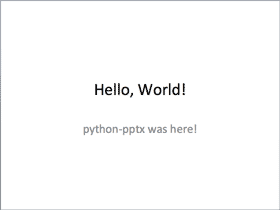
開くとこんな感じのスライドができます。
👁 hello-world.png

ドキュメンテーション
https://python-pptx.readthedocs.org/en/latest/index.html#api
Register as a new user and use Qiita more conveniently
- You get articles that match your needs
- You can efficiently read back useful information
- You can use dark theme