
More than 5 years have passed since last update.


リソースポリシーによるAPI GatewayのIPアドレス制限を試す
はじめに
API Gatewayにリソースポリシーを設定できる様になりました。
これまで API で IP 制限を行うには、CloudFront + AWS WAF を組合せて使うか、
カスタムオーソライザーで制御する必要があり、少々大掛かりだったのですが、
S3 のバケットポリシーの様に JSON 形式で簡単に指定できます。
やってみる
コンソールで API を選択すると、ナビゲーションペインにリソースポリシーが追加されています。
IP 範囲のブラックリストを選択すると自動的にポリシーのサンプルが入力されるので
Resource でステージ、メソッド、リソースパスの情報と、Condition に接続を拒否したい
IP アドレスまたは CIDR ブロックを定義するだけで簡単に設定できます。

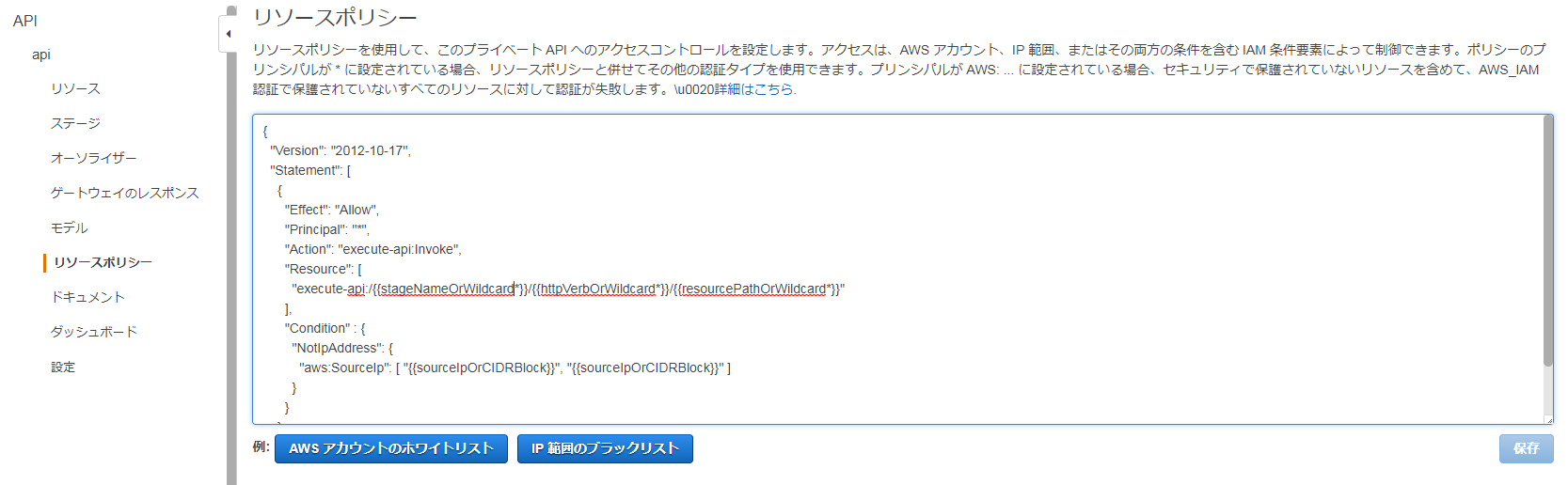
ステージ等は省略可能です、今回はホワイトリスト型に設定したかったので、以下のように指定しました。
{"Version":"2012-10-17","Statement":[{"Effect":"Allow","Principal":"*","Action":"execute-api:Invoke","Resource":"arn:aws:execute-api:ap-northeast-1:<account-id>:<api-id>/*","Condition":{"IpAddress":{"aws:SourceIp":"接続を許可するIPアドレス"}}}]}保存後、API のデプロイをお忘れなく。反映までは数秒かかりました。
許可対象外の IP アドレスから API を呼ぶと、以下のようなエラーメッセージが表示されます
{"Message":"User: anonymous is not authorized to perform: execute-api:Invoke on resource: arn:aws:execute-api:ap-northeast-1:account-i:api-id/dev/GET/}"
リソースポリシーで明示的なDenyを設定し、アクセスが拒否された場合は with an explicit deny
というメッセージも追加されます。
{"Message":"User: anonymous is not authorized to perform: execute-api:Invoke on resource: arn:aws:execute-api:ap-northeast-1:account-i:api-id/dev/GET/ with an explicit deny"}
Conditionには、aws:SourceIP 以外も指定可能で、以下のドキュメントにまとまっています。
https://docs.aws.amazon.com/ja_jp/apigateway/latest/developerguide/apigateway-resource-policies-aws-condition-keys.html
aws:CurrentTime キーによる日付条件や、aws:UserAgent キーによる制限も便利そうです。
注意点
2020/7/10 追記
以前は設定値を空にして保存できなかったのですが、2020年7月時点では
値を空に戻して保存できるようになっており、以下の事象は改善されていました。
{"Version":"2012-10-17","Statement":[{"Effect":"Allow","Principal":"*","Action":"execute-api:Invoke","Resource":"arn:aws:execute-api:ap-northeast-1:<account-id>:<api-id>/*",}]}簡単ですが、以上です。
参考になれば幸いです。
Register as a new user and use Qiita more conveniently
- You get articles that match your needs
- You can efficiently read back useful information
- You can use dark theme