
More than 5 years have passed since last update.

今回はSpire.XLSという無料のライブラリを活用して、エクセル文書の背景に色と画像を追加する方法を紹介します。
下準備
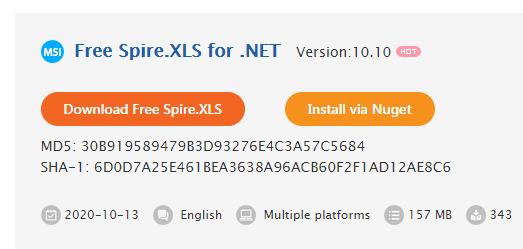
1.E-iceblueの公式サイトからFree Spire.XLS無料版をダウンロードしてください。
👁 f:id:lendoris:20210519144411p:plain

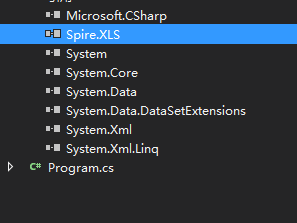
2.Visual Studioを起動して新規プロジェクトを作成してから、インストールされたファイルにあった相応しいSpire.XLS.dllを参照に追加してください。
(Net 4.0を例としたら、デフォルトパスは“Bin→NET4.0→XLS.dll”というようです。)
👁 f:id:lendoris:20210519144429p:plain

背景に色
```C# using Spire.Xls; using System.Drawing; namespace ConsoleApplication1 { class Program { static void Main(string[] args) { //エクセルファイルをロードします。 Workbook workbook = new Workbook(); workbook.LoadFromFile("Sample.xlsx"); Worksheet sheet = workbook.Worksheets[0]; //Excel Rangeで背景に色を設定します。
sheet.Range["A1:E1"].Style.Color = Color.LightSeaGreen;
sheet.Range["A2:E19"].Style.Color = Color.Green;
sheet.Range["A20:E38"].Style.Color = Color.DeepSkyBlue;
//保存します。
workbook.SaveToFile("SetBackgroundColor.xlsx", ExcelVersion.Version2010);
}
}
}
<h4><strong>実行結果</strong></h4>
<p><img src="https://cdn-ak.f.st-hatena.com/images/fotolife/l/lendoris/20210519/20210519145354.png" alt="f:id:lendoris:20210519145354p:plain" title="" class="hatena-fotolife" itemprop="image" /></p>
<h4><strong>背景に画像</strong></h4>
```C#
using Spire.Xls;
using System.Drawing;
namespace ConsoleApplication1
{
 class Program
 {
 static void Main(string[] args)
 {
 //ファイルをロードします。
 Workbook workbook = new Workbook();
 workbook.LoadFromFile("Sample.xlsx");
 Worksheet sheet = workbook.Worksheets[0];

 //画像を追加します。
 Bitmap bm = new Bitmap(Image.FromFile("logo.png"));
 sheet.PageSetup.BackgoundImage = bm;

 //保存します。
 workbook.SaveToFile("SetBackgroundimage.xlsx", ExcelVersion.Version2010);


 }
 }
}
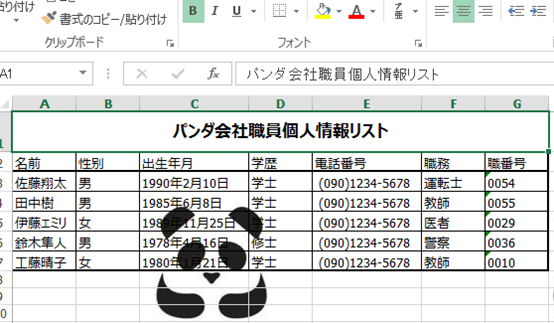
実行結果

Register as a new user and use Qiita more conveniently
- You get articles that match your needs
- You can efficiently read back useful information
- You can use dark theme