
More than 1 year has passed since last update.

Cisco ルータで pppoe サーバーになる (Dynamic IP-1)
Cisco ルーターで pppoe サーバーを作成する

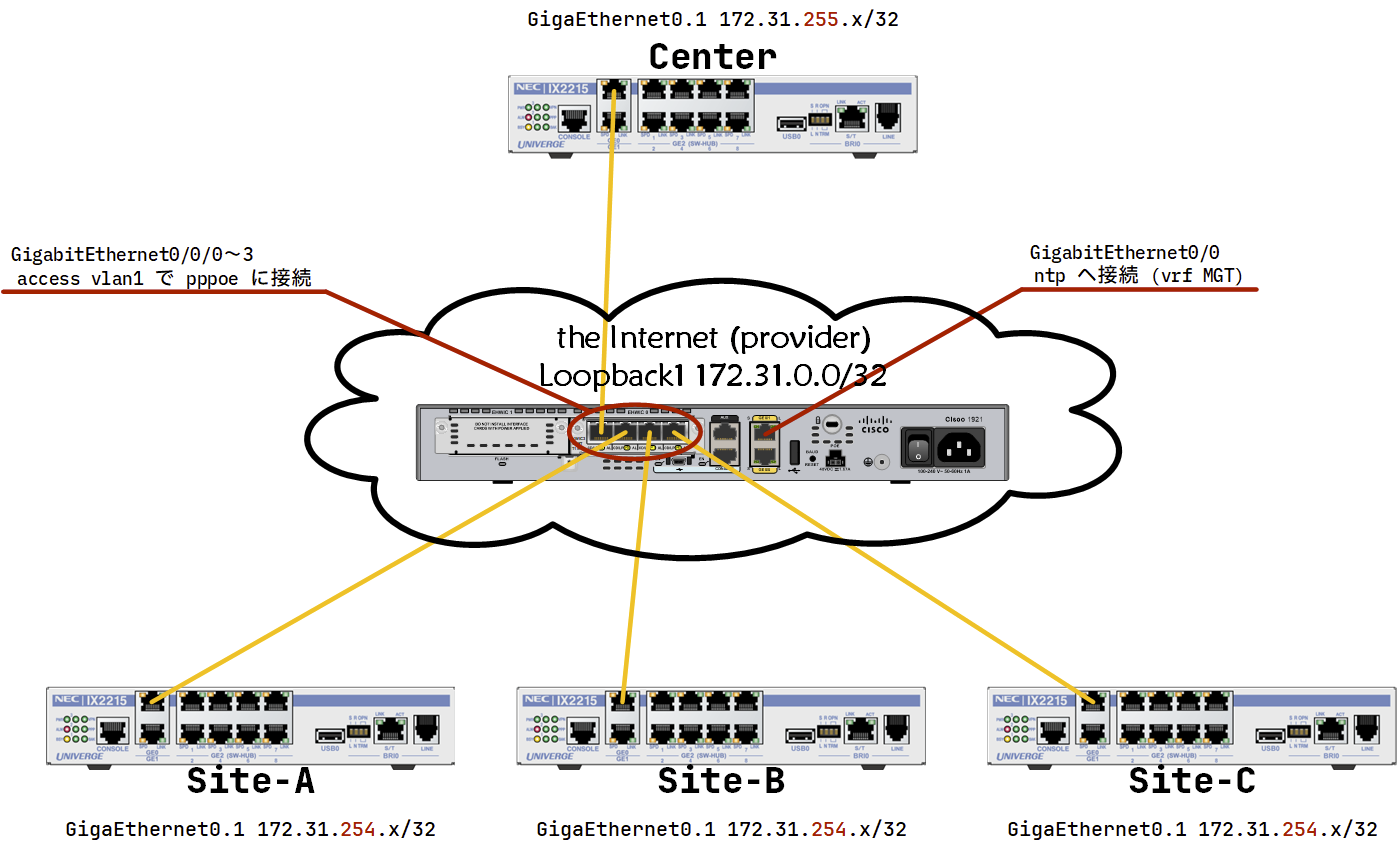
| セグメント | |
|---|---|
| pppoe サーバ | 172.31.0.0/31 |
| Center | 172.31.255.x/24 |
| Site-x | 172.31.254.x/24 |
- Site-x をダイナミック IP で設定する (Dynamic IP-1)
- Center を別セグメントのダイナミック IP で設定する (Dynamic IP-2)
- Center を固定 IP で設定する。 (Static IP)
pppoe サーバになる機械の情報
Cisco 1921 (giga 2port) に 4port スイッチカードを追加したもの。
Router#show version
Cisco IOS Software, C1900 Software (C1900-UNIVERSALK9-M), Version 15.1(4)M9, RELEASE SOFTWARE (fc3)
Technical Support: http://www.cisco.com/techsupport
Copyright (c) 1986-2014 by Cisco Systems, Inc.
Compiled Fri 12-Sep-14 10:32 by prod_rel_team
....
Cisco CISCO1921/K9 (revision 1.0) with 487424K/36864K bytes of memory.
Processor board ID FGL184220QJ
6 Gigabit Ethernet interfaces
1 terminal line
1 Virtual Private Network (VPN) Module
DRAM configuration is 64 bits wide with parity disabled.
255K bytes of non-volatile configuration memory.
245744K bytes of USB Flash usbflash0 (Read/Write)
....
Router#show inventory
NAME: "CISCO1921/K9 chassis", DESCR: "CISCO1921/K9 chassis"
PID: CISCO1921/K9 , VID: V05 , SN: FGL........

NAME: "4 Port GE Non-POE EHWIC Switch on Slot 0 SubSlot 0", DESCR: "4 Port GE Non-POE EHWIC Switch"
PID: EHWIC-4ESG , VID: V01 , SN: FOC........
先ずは site 側の 172.31.254.x を配布する部分を作成する。(Dynamic IP-1)
基本的な設定を入れる
hostname PPPoE-Server
spanning-tree portfast bpduguard

clock timezone JST 9 0
service timestamps debug datetime msec localtime show-timezone
service timestamps log datetime msec localtime show-timezone
ip routing
no ip domain lookup
ssh でのログインの設定
username admin algorithm-type sha256 secret Cisco1
enable algorithm-type sha256 secret Cisco2

ip domain name my.home

crypto key generate rsa modulus 4096
ip ssh version 2

ip access-list extended MGT_SSH
 permit tcp 10.0.0.0 0.255.255.255 host 0.0.0.0 eq 22 log MGT_SSH
 permit tcp 172.16.0.0 0.15.255.255 host 0.0.0.0 eq 22 log MGT_SSH
 permit tcp 192.168.0.0 0.0.255.255 host 0.0.0.0 eq 22 log MGT_SSH
 permit tcp 100.64.0.0 0.63.255.255 host 0.0.0.0 eq 22 log MGT_SSH
 deny ip any host 0.0.0.0 log MGT_SSH

line vty 0 15
 access-class MGT_SSH in
 transport input ssh
 login local
username admin ~ ssh 接続の時のパスワード
enable ~ enable パスワード
ip domain name my.home ssh 用の証明書を作成するためにドメインを設定
crypto key generate rsa modulus 4096 rsa の証明書を作成
ip ssh version 2 ssh ver 1 は使わない
ip access-list extended MGT_SSH ssh の接続元をプライベートアドレス、CGN (キャリアグレードナット) からに制限する。
host 0.0.0.0 は、ルータ自身のアドレスのこと。(実際のルータアドレスを指定すると通信できない→特定のアドレスだけ ssh で待ち受けることは不可)
line vty 0 15 telnet/ssh のリモートアクセスを 0~15 (16セッション) 許可する
access-class MGT_SSH リモートアクセスに access-list の MGT_SSH を適用、
transport input ssh ssh の接続を受け付ける
transport input telnet ssh とすれば、telnet & ssh の両方を受け付ける
login local 接続時のアカウントはルータ上のアカウントを利用 (username admin ~)
ssh での接続パスワードを Cisco1 とし、enable パスワードを Cisco2 に設定。
暗号化方式が古いため ssh -o KexAlgorithms=+diffie-hellman-group14-sha1 -c aes256-cbc admin@A.B.C.D で接続。
ntp 設定
ログ設定をしたのでタイムスタンプが気になるので ntp を設定。影響が出ないように vrf を切る。
ssh もこの vrf から接続できるように設定。(接続元はプライベートアドレスと CGN)
vrf definition MGT
 description Managemane_LAN
 rd 1:100
 address-family ipv4

interface GigabitEthernet0/0
 vrf forwarding MGT
 ip address dhcp
 no shutdown

ntp server vrf MGT 210.173.160.87 minpoll 4

line vty 0 15
 access-class MGT_SSH in vrf-also
in vrf-also vrf を制限せずに telnet/ssh を受け付ける (なければデフォルトの vrf のみ接続可能)
ユーザーとパスワードの登録
username site-A@Cisco password pass-A
username site-B@Cisco password pass-B
username site-C@Cisco password pass-C
username site-D@Cisco password pass-D
username site-E@Cisco password pass-E
secret だと認証が通りません。
pppoe クライアントのアドレスプールを定義
ip local pool PPPOE_POOL 172.31.254.1 172.31.254.254
pppoe サーバのアドレスを定義
- Loopback1 interface にアドレスを設定
interface Loopback1
 ip address 172.31.0.0 255.255.255.255
サーバー側のトンネルの定義
- mtu を設定
- ループバックインターフェイスを利用
- クライアントのアドレスは PPPOE_POOL から
- ppp 認証は chap ※
- DNS を渡す
interface Virtual-Template1
 mtu 1454
 ip unnumbered Loopback1
 peer default ip address pool PPPOE_POOL
 ppp authentication chap
 ppp ipcp dns 1.1.1.1 1.0.0.1
※ RTX1000 や RTX1500 だと chap はうまくいきませんでした。pap も有効にしたほうがいいかもしれません
bba グループを定義
bba-group pppoe PPPOE_GROUP
 virtual-template 1
 sessions auto cleanup
vlan1 で pppoe を待ち受け
interface Vlan1
 no ip address
 pppoe enable group PPPOE_GROUP
クライアント側の設定
機器の情報
Router(config)# show version
NEC Portable Internetwork Core Operating System Software
IX Series IX2215 (magellan-sec) Software, Version 10.8.21, RELEASE SOFTWARE
Compiled Jun 20-Tue-2023 12:11:58 JST #2 by sw-build, coregen-10.8(21)

ROM: System Bootstrap, Version 23.1
System Diagnostic, Version 23.1
Initialization Program, Version 10.2

System uptime is 0 minute
System woke up by reload, caused by command execution
System started at Jan 02-Tue-2024 18:21:47 JST
System image file is "ix2215-ms-10.8.21.ldc"

Processor board ID <0>
IX2215 (P1010E) processor with 262144K bytes of memory.
3 GigaEthernet/IEEE 802.3 interfaces
1 ISDN Basic Rate interface
1 USB interface
1024K bytes of non-volatile configuration memory.
32768K bytes of processor board System flash (Read/Write)
設定
hostname site-A
timezone +09 00

logging buffered
logging subsystem all warn
logging timestamp datetime

ntp server 172.31.0.0
ntp サーバーは pppoe サーバへ問い合わせるように
pppoe 設定
ip route default GigaEthernet0.1

ppp profile ppp_prof_01
 authentication myname site-A@Cisco
 authentication password site-A@Cisco pass-A

interface GigaEthernet0.1
 encapsulation pppoe
 auto-connect
 ppp binding ppp_prof_01
 ip address ipcp
 ip mtu 1454
 ip tcp adjust-mss auto
 ip napt enable
 no shutdown
クライアント用の DHCP 設定
ip dhcp enable

ip dhcp profile NET_192_168_1
 assignable-range 192.168.1.100 192.168.1.110
 default-gateway 192.168.1.254
 dns-server 1.0.0.1

interface GigaEthernet2.0
 ip address 192.168.1.254/24
 ip dhcp binding NET_192_168_1
 no shutdown
情報
pppoe サーバ側のステータス表示
PPPoE-Server#show ip interface brief
Interface IP-Address OK? Method Status Protocol
Embedded-Service-Engine0/0 unassigned YES unset administratively down down
GigabitEthernet0/0 192.168.0.105 YES DHCP up up
GigabitEthernet0/1 unassigned YES unset administratively down down
GigabitEthernet0/0/0 unassigned YES unset up up
GigabitEthernet0/0/1 unassigned YES unset up up
GigabitEthernet0/0/2 unassigned YES unset down down
GigabitEthernet0/0/3 unassigned YES unset down down
Loopback1 172.31.0.0 YES manual up up
Virtual-Access1 unassigned YES unset down down
Virtual-Access2 unassigned YES unset up up
Virtual-Access2.1 172.31.0.0 YES unset up up
Virtual-Template1 172.31.0.0 YES unset down down
Vlan1 unassigned YES unset up up
Virtual-Access2.1 が接続しているのが分かります。
PPPoE-Server#show ppp all
Interface/ID OPEN+ Nego* Fail- Stage Peer Address Peer Name
------------ --------------------- -------- --------------- --------------------
Vi2.1 LCP+ CHAP+ IPCP+ LocalT 172.31.254.2 site-A@Cisco
interface以外に、クライアントの IP アドレス、ユーザ名が分かります。
PPPoE-Server#show pppoe summary
 PTA : Locally terminated sessions
 FWDED: Forwarded sessions
 TRANS: All other sessions (in transient state)

 TOTAL PTA FWDED TRANS
TOTAL 1 1 0 0
Vlan1 1 1 0 0
PPPoE-Server#
接続数が見えます。
PPPoE-Server#show pppoe session
 1 session in LOCALLY_TERMINATED (PTA) State
 1 session total

Uniq ID PPPoE RemMAC Port VT VA State
 SID LocMAC VA-st Type
 131 131 0060.b9aa.e586 Vl1 1 Vi2.1 PTA
 fc5b.39c0.f820 UP
Mac addr、interface が分かります。
PPPoE-Server#show interfaces Virtual-Access2.1
Virtual-Access2.1 is up, line protocol is up
 Hardware is Virtual Access interface
 Interface is unnumbered. Using address of Loopback1 (172.31.0.0)
 MTU 1454 bytes, BW 100000 Kbit/sec, DLY 100000 usec,
 reliability 255/255, txload 1/255, rxload 1/255
 Encapsulation PPP, LCP Open
 Open: IPCP
 PPPoE vaccess, cloned from Virtual-Template1
 Vaccess status 0x0
 Keepalive set (10 sec)
 1568 packets input, 141935 bytes
 899 packets output, 41932 bytes
 Last clearing of "show interface" counters never
pppoe クライアント側のステータス表示
site-A(config)#show ip address
Interface GigaEthernet0.1 is up, line protocol is up
 Internet address is 172.31.254.2/32
 Broadcast address is 255.255.255.255
 Peer address is 172.31.0.0
 Address determined by IPCP
 Primary DNS server is 1.0.0.1
 Secondary DNS server is 8.8.4.4
Interface GigaEthernet2.0 is up, line protocol is up
 Internet address is 192.168.1.254/24
 Broadcast address is 255.255.255.255
 Address determined by config
Interface Null0.0 is up, line protocol is up
 Interface is unnumbered.
site-A(config)#site-A(config)#show ip route
IP Routing Table - 3 entries, 1 hidden, 2044 frees
Entries: 2 Connected, 1 Static, 0 RIP, 0 OSPF, 0 BGP
Codes: C - Connected, S - Static, R - RIP, O - OSPF, IA - OSPF inter area
N1 - OSPF NSSA external type 1, N2 - OSPF NSSA external type 2
E1 - OSPF external type 1, E2 - OSPF external type 2, B - BGP
* - Candidate default, s - Summary
Timers: Age
S* 0.0.0.0/0 [1/1] is directly connected, GigaEthernet0.1, 0:41:33
172.31.0.0/16 is subnetted, 1 subnets
C 172.31.0.0/32 [0/0] is directly connected, GigaEthernet0.1, 0:41:33
C 192.168.1.0/24 [0/0] is directly connected, GigaEthernet2.0, 0:41:02
PPPoE-Server#show ppp all
Interface/ID OPEN+ Nego* Fail- Stage Peer Address Peer Name
------------ --------------------- -------- --------------- --------------------
Vi2.3 LCP+ CHAP+ IPCP+ LocalT 172.31.254.4 site-B@Cisco
Vi2.2 LCP+ CHAP+ IPCP+ LocalT 172.31.254.3 site-B@Cisco
Vi2.1 LCP+ CHAP+ IPCP+ LocalT 172.31.254.2 site-A@Cisco
制限を掛けていないので、2セッション繋がりますね。
うまくつながらない場合には debug
debug pppoe event, debug ppp negotiation, debug pppoe errors などでエラーメッセージを確認すると何かわかるかもしれません。
debug を終了する際 no debug all を入力してもしばらく出力が続くことがあります。出力が多いため ssh や telnet で接続することをお勧めします。
Register as a new user and use Qiita more conveniently
- You get articles that match your needs
- You can efficiently read back useful information
- You can use dark theme