
More than 5 years have passed since last update.
はじめに
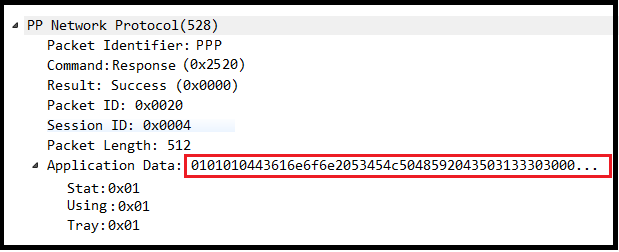
Wireshark の Luaスクリプト解析の時にProto を指定した後に ProtoField を指定するのですが、ProtoField にサブツリーを追加する際にProtoFieldに文字が表示されっぱなしなのが嫌で修正しました。

おらさい
LuaスクリプトでTCPを解析する際の書き方を簡単にまとめました( Wireshark2.0.5/Lua5.2 )
詳しい内容は以下のスクリプトをキーワードにしてググって下さい。
PP_PROTOCOL = Proto.new ("pp", "PP Network Protocol")

-- protocol fields の作成
f_pp = PP_PROTOCOL.fields


CmdName = { -- PP Commands,
 [0x2510] = "Request",
 [0x2520] = "Response"}

Results = { [0x0000] = "Success",
 [0x0001] = "Error"}


-- パケット内の全てのフィールドを書く
f_pp.identifier = ProtoField.string ("pp.identifier", "Packet Identifier")
f_pp.tcpCmd = ProtoField.uint16 ("pp.tcpCommand", "Command", base.HEX, CmdName)
f_pp.result = ProtoField.uint16 ("pp.result", "Result", base.HEX, Results)
f_pp.packetID = ProtoField.uint16 ("pp.packetID", "Packet ID", base.HEX)
f_pp.sessionID = ProtoField.uint16 ("pp.sessionID", "Session ID", base.HEX)
f_pp.packetLength = ProtoField.uint16 ("pp.packetLength", "Packet Length", base.DEC)
f_pp.applicationData = ProtoField.bytes ("pp.data", "Application Data")

-- サブツリーのフィールドを書く
f_pp.PrinterStatus = ProtoField.uint8 ("pp.info", "Stat", base.HEX)
f_pp.UsingClient = ProtoField.uint8 ("pp.info", "Using", base.HEX)
f_pp.EqTrayInfo = ProtoField.uint8 ("pp.info", "Tray", base.HEX)


-- Register the dissector to the TCP Table using the retrieved
port = 600
tcp_table = DissectorTable.get ("tcp.port")
tcp_table:add (port, PP_PROTOCOL)

-- TCP(600) のパケットはこの関数でdissector(解剖)される
function PP_PROTOCOL.dissector (buffer, pinfo, tree)

 -- Protocolカラムにプロトコル名を表示する
 pinfo.cols.protocol = "PPP"

 -- PP_PROTOCOL をツリー構造にする
 local ppTree = tree:add (PP_PROTOCOL, buffer())

 local identifier = buffer(0,4):string()
 if( identifier == "PPP") then

 ppTree:add (f_pp.identifier , buffer( 0, 4))
 ppTree:add (f_pp.tcpCmd , buffer( 4, 2))
 ppTree:add (f_pp.result , buffer( 6, 2))
 ppTree:add (f_pp.packetID , buffer( 8, 2))
 ppTree:add (f_pp.sessionID , buffer(10, 2))
 ppTree:add (f_pp.packetLength, buffer(12, 4))

 -- Application Data をツリー構造にする
 local subTree = ppTree:add (f_pp.applicationData, buffer(16, buffer:len()-16) )

 subTree:add (f_pp.stat, buffer(16+0, 2), buffer(16+0, 2):le_uint())
 subTree:add (f_pp.using, buffer(16+2, 1), buffer(16+2, 1):le_uint())
 subTree:add (f_pp.tray, buffer(16+3, 1), buffer(16+3, 1):le_uint())
 else
 -- パケットが"PPP"から始まらない場合はパケット全体を"Application Data"とする
 ppTree:add (f_pp.applicationData, buffer(0, buffer:len()) )
 end
end
修正方法
f_pp.applicationData = ProtoField.bytes ("pp.data", "Application Data")
を
f_pp.applicationData = ProtoField.none ("pp.data", "Application Data")
に変えれば項目は表示されなくなります。
その他
Application Dataの項目についてバイト列を表示するよりサイズを出した方が便利じゃないか?と思って以下の対応をしたらエラーになりました。
 -- Application Data をツリー構造にする
 local subTree = ppTree:add (f_pp.applicationData, buffer(16, buffer:len()-16), "("..buffer:len()-16..")" )
なので以下のように修正。
 -- Application Data をツリー構造にする
 local subTree = ppTree:add (buffer(16, buffer:len()-16), "("..buffer:len()-16..")" )
これでこんな風に出来ました。
👁 modify.png

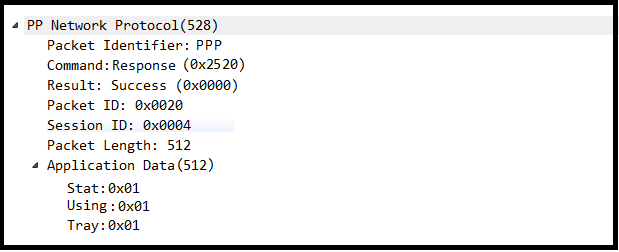
この方法があるならf_pp.applicationData = ProtoField.none ("pp.data", "Application Data")は不要ですね。
まとめ
WiresharkのLauaAPI仕様書を見ると上記以外にも書き方が複数あるっぽい。
取り合えずやりたい事はこんな感じで実現出来たので備忘録として記載しておきます。
Register as a new user and use Qiita more conveniently
- You get articles that match your needs
- You can efficiently read back useful information
- You can use dark theme