
More than 3 years have passed since last update.

Auth0をPhoenix LiveViewと組み合わせて使ってみました (Elixir)
はじめに
-
Elixir 楽しんでいますか👁 :bangbang:
👁 :bangbang:
👁 :bangbang:
- この記事は、「Auth0を使ってID管理にまつわる記事を投稿しよう!」というイベントに応募した記事です
- Phoenix LiveViewと組み合わせて使ってみます

https://auth0.com/docs をまずは検索
- ここを「Phoenix」や「Elixir」で検索してみました
- 「No results found. Would you like to try another search term?」でした
- 残念 👁 :sob:

Googleで検索してみました
- いろいろみつかりました
- Elixir & Phoenix Tutorial: Build an Authenticated App
- ueberauth/ueberauth
- achedeuzot/ueberauth_auth0
- ueberauth/ueberauth_example
- このくらいあればなんとかなるでしょう 👁 :rocket:
👁 :rocket:
👁 :rocket:


完成品
/pageにアクセスすると、ログインしてね〜と言われます
👁 スクリーンショット 2021-08-14 16.00.19.png

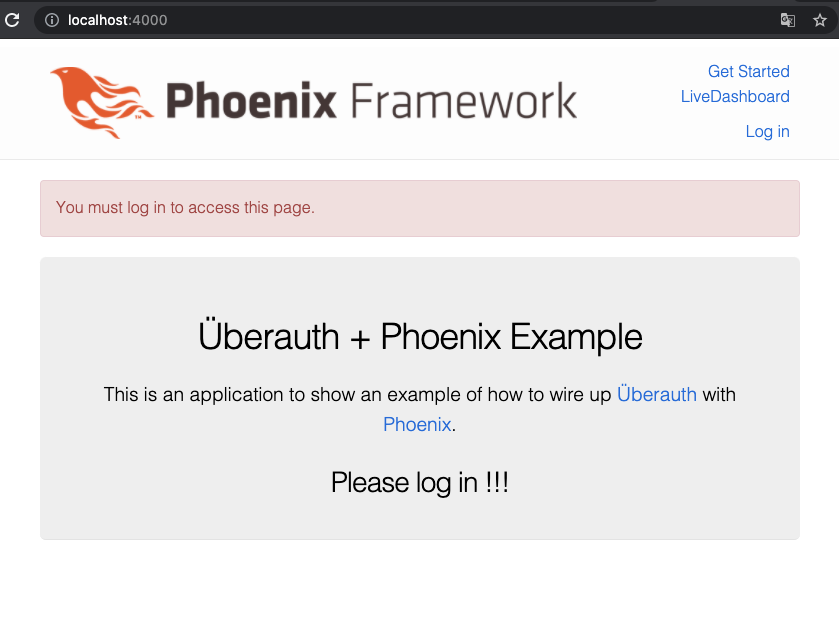
Log inを押すと、「XXXでログイン」画面がでます
👁 スクリーンショット 2021-08-14 15.21.21.png

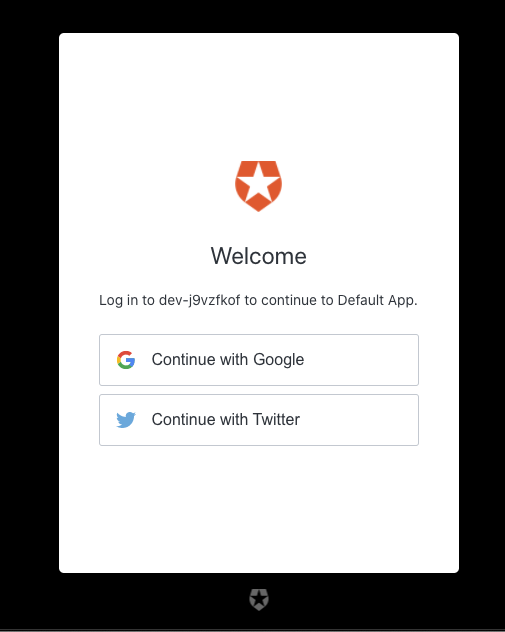
「Googleでログイン」で続けていくと
👁 スクリーンショット 2021-08-14 15.21.46.png

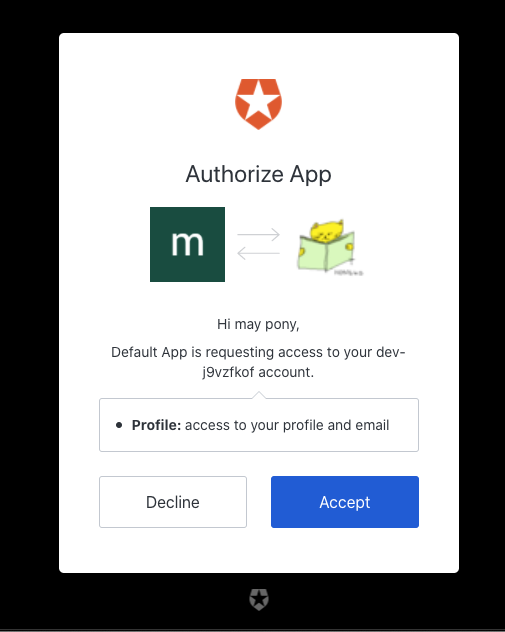
もちろん、迷わずAcceptを押しましょう!
👁 スクリーンショット 2021-08-14 15.22.07.png

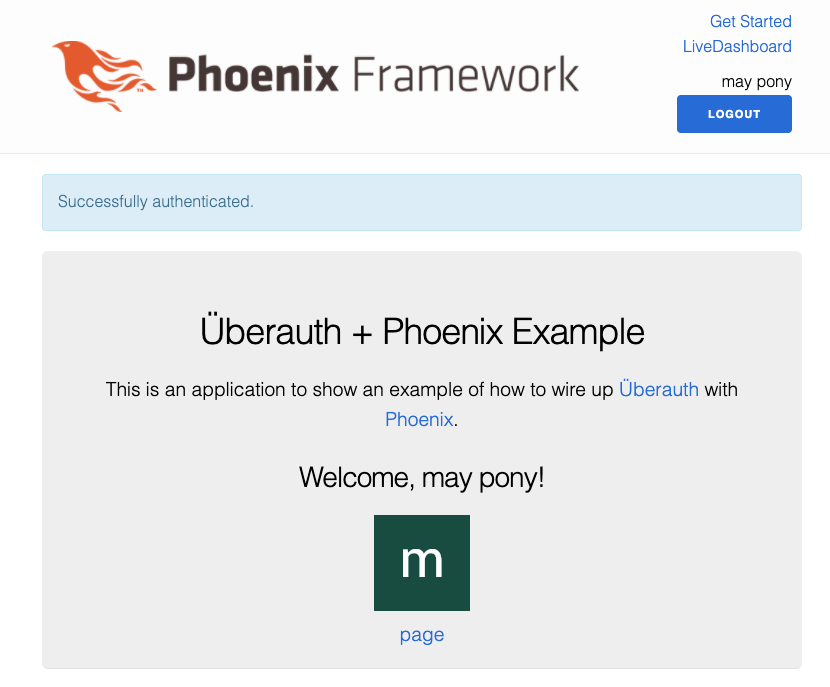
/pageにアクセスすると、ログインしているから今度はアクセスできます
👁 スクリーンショット 2021-08-14 16.05.01.png

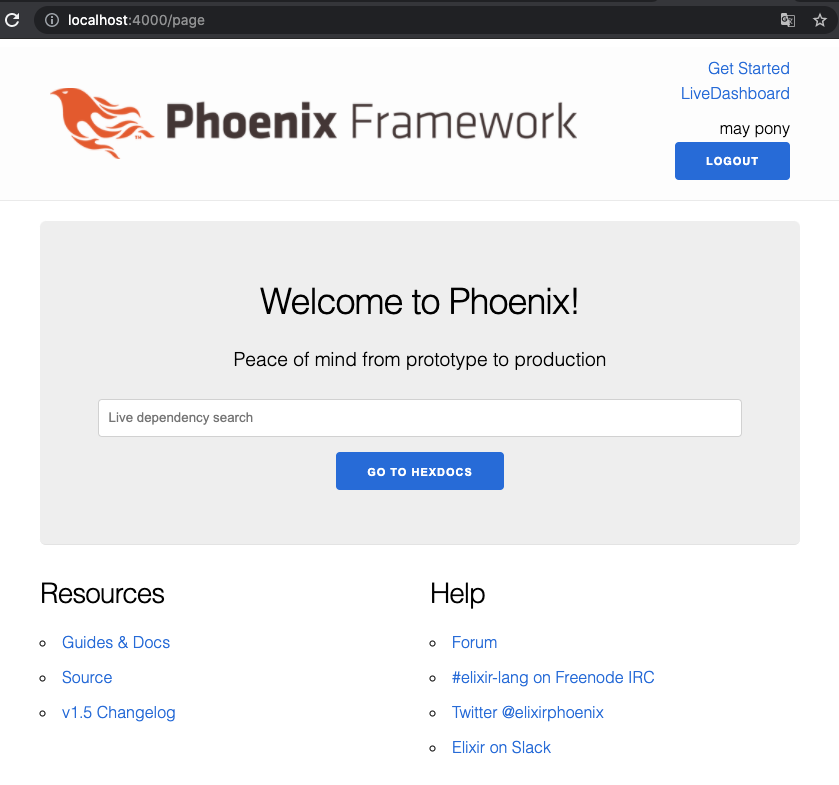
Auth0さんのおかげ! で、「XXXでログイン」を簡単に組み込めました
さあ、つくります!
- 順番は前後しますが環境構築については、別で記事を書きます
- Visual Studio Codeを使うので、「夏の大納涼 Visual Studio / Visual Studio Code / GitHub Codespaces ♥ Azure 祭り」に応募するつもりです 👁 :smile:
- Visual Studio Codeを使うので、「夏の大納涼 Visual Studio / Visual Studio Code / GitHub Codespaces ♥ Azure 祭り」に応募するつもりです 👁 :smile:
- 参考: Phoenixの開発環境をつくる(Elixir)
使用したソフトウェア
| Version | |
|---|---|
| Elixir | 1.12.1 |
| Erlang | 24.0.2 |
| Phoenix | 1.5.9 |
| Node.js | 14.17.5 |
| PostgreSQL | 13.2 |
mix phx.new でプロジェクトを新規作成 (--liveをつけておこう)
$ mix phx.new auth0_sample --live
各種ライブラリ等をインストールしますかについてはここではとりあえず、Nを選んでおいてよいでしょう。
mix.exsを変更
- {:plug_cowboy, "~> 2.0"}
+ {:plug_cowboy, "~> 2.0"},
+ {:ueberauth, "~> 0.7.0"},
+ {:ueberauth_auth0, "~> 1.0"}
 ]
-
mix.exsの変更を保存したら下記のコマンドを実行します
$ cd auth0_sample
$ mix setup
- もしデータベース関係でエラーがでた場合は、
config/dev.exsの設定値を調整してみてください- デフォルト値は、
postgresというロールがDBの作成等ができる権限があることを期待しています
- デフォルト値は、
Phoenix assumes that our PostgreSQL database will have a postgres user account with the correct permissions and a password of "postgres"
config/config.exs
config :ueberauth, Ueberauth,
 providers: [
 auth0: {Ueberauth.Strategy.Auth0, []}
 ]

config :ueberauth, Ueberauth.Strategy.Auth0.OAuth,
 domain: System.get_env("AUTH0_DOMAIN"),
 client_id: System.get_env("AUTH0_CLIENT_ID"),
 client_secret: System.get_env("AUTH0_CLIENT_SECRET")
lib/auth0_sample_web/router.ex
- ポイントはdiff中のコメントに書きます
+ import Auth0SampleWeb.UserAuth
+
 pipeline :browser do
 plug :accepts, ["html"]
 plug :fetch_session
@@ -8,16 +10,32 @@ defmodule Auth0SampleWeb.Router do
 plug :put_root_layout, {Auth0SampleWeb.LayoutView, :root}
 plug :protect_from_forgery
 plug :put_secure_browser_headers
+ plug :fetch_current_user # 文字通りcurrent_userを注入します。UserAuth(後述)に実装します。
 end

 pipeline :api do
 plug :accepts, ["json"]
 end

# Auth0関連のパスです
+ scope "/auth", Auth0SampleWeb do
+ pipe_through :browser
+
+ get "/:provider", AuthController, :request
+ get "/:provider/callback", AuthController, :callback
+ post "/:provider/callback", AuthController, :callback
+ delete "/logout", AuthController, :delete
+ end
+
 scope "/", Auth0SampleWeb do
 pipe_through :browser

- live "/", PageLive, :index
+ live "/", HomeLive, :index, session: {Auth0SampleWeb.Helpers, :keep_current_user, []} # ルートパス
+ end
+
+ scope "/", Auth0SampleWeb do
# /pageへのアクセスにはauthenticated_userを必要としています。UserAuth(後述)にrequire_authenticated_userを実装しています。
+ pipe_through [:browser, :require_authenticated_user]
+
+ live "/page", PageLive, :index
 end
lib/auth0_sample_web/controllers/auth_controller.ex
defmodule Auth0SampleWeb.AuthController do
 @moduledoc """
 Auth controller responsible for handling Ueberauth responses
 """

 use Auth0SampleWeb, :controller

 plug Ueberauth

 alias Ueberauth.Strategy.Helpers
 alias Auth0Sample.UserFromAuth

 def request(conn, _params) do
 render(conn, "request.html", callback_url: Helpers.callback_url(conn))
 end

 def delete(conn, _params) do
 conn
 |> put_flash(:info, "You have been logged out!")
 |> clear_session()
 |> redirect(to: "/")
 end

 def callback(%{assigns: %{ueberauth_failure: _fails}} = conn, _params) do
 conn
 |> put_flash(:error, "Failed to authenticate.")
 |> redirect(to: "/")
 end

 def callback(%{assigns: %{ueberauth_auth: auth}} = conn, _params) do
 case UserFromAuth.find_or_create(auth) do
 {:ok, user} ->
 conn
 |> put_flash(:info, "Successfully authenticated.")
 |> put_session(:current_user, user)
 |> configure_session(renew: true)
 |> redirect(to: "/")

 {:error, reason} ->
 conn
 |> put_flash(:error, reason)
 |> redirect(to: "/")
 end
 end
end
- このモジュールは感じましょう
-
router.exに設定したパスをさばくアクションを定義しています
lib/auth0_sample/user_from_auth.ex
defmodule Auth0Sample.UserFromAuth do
 @moduledoc """
 Retrieve the user information from an auth request
 """
 require Logger
 require Jason

 alias Ueberauth.Auth

 def find_or_create(%Auth{provider: :identity} = auth) do
 case validate_pass(auth.credentials) do
 :ok ->
 {:ok, basic_info(auth)}

 {:error, reason} ->
 {:error, reason}
 end
 end

 def find_or_create(%Auth{} = auth) do
 {:ok, basic_info(auth)}
 end

 # github does it this way
 defp avatar_from_auth(%{info: %{urls: %{avatar_url: image}}}), do: image

 # facebook does it this way
 defp avatar_from_auth(%{info: %{image: image}}), do: image

 # default case if nothing matches
 defp avatar_from_auth(auth) do
 Logger.warn("#{auth.provider} needs to find an avatar URL!")
 Logger.debug(Jason.encode!(auth))
 nil
 end

 defp basic_info(auth) do
 %{id: auth.uid, name: name_from_auth(auth), avatar: avatar_from_auth(auth)}
 end

 defp name_from_auth(auth) do
 if auth.info.name do
 auth.info.name
 else
 name =
 [auth.info.first_name, auth.info.last_name]
 |> Enum.filter(&(&1 != nil and &1 != ""))

 if Enum.empty?(name) do
 auth.info.nickname
 else
 Enum.join(name, " ")
 end
 end
 end

 defp validate_pass(%{other: %{password: nil}}) do
 {:error, "Password required"}
 end

 defp validate_pass(%{other: %{password: pw, password_confirmation: pw}}) do
 :ok
 end

 defp validate_pass(%{other: %{password: _}}) do
 {:error, "Passwords do not match"}
 end

 defp validate_pass(_), do: {:error, "Password Required"}
end
- このモジュールは感じましょう
-
AuthControllerから呼び出されています
lib/auth0_sample_web/controllers/user_auth.ex
-
aaronrenner/phx_gen_authによって作られる
UserAuthモジュールを参考にしました - このモジュールを
router.exに設定して、/pageパスへのアクセスにはログインが必須ということにします - もしかしたら、
lib/auth0_sample_web/controllers/auth_controller.exの処理の一部をこちらに移したほうがすっきりする部分があるかもしれません -
aaronrenner/phx_gen_authで作った場合には、ログイン時に
put_session(:live_socket_id, "users_sessions:#{Base.url_encode64(token)}")というのがありますが今回はありません- なくてもいいのか必ず必要なのかちょっとわかっておりませんので、わかりましたら記事を更新いたします👁 :pray:
👁 :pray_tone1:
👁 :pray_tone2:
👁 :pray_tone3:
👁 :pray_tone4:
👁 :pray_tone5:
- このモジュールは私のオリジナルですので、この記事の中で一番あやしいです
- お気づきのことなどございましたらぜひコメントをください 👁 :bow:
👁 :bow_tone1:
👁 :bow_tone2:
👁 :bow_tone3:
👁 :bow_tone4:
👁 :bow_tone5:
- なくてもいいのか必ず必要なのかちょっとわかっておりませんので、わかりましたら記事を更新いたします👁 :pray:


defmodule Auth0SampleWeb.UserAuth do
 import Plug.Conn
 import Phoenix.Controller

 def fetch_current_user(conn, _opts) do
 user = get_session(conn, :current_user)
 assign(conn, :current_user, user)
 end

 def require_authenticated_user(conn, _opts) do
 if conn.assigns[:current_user] do
 conn
 else
 conn
 |> put_flash(:error, "You must log in to access this page.")
 |> redirect(to: "/")
 |> halt()
 end
 end
end
lib/auth0_sample_web/templates/layout/_user_menu.html.eex
- aaronrenner/phx_gen_authによって加えられる変更内容を参考にしました
- ログインとログアウトのパス(
:to)を変更したのと、@current_user.emailを@current_user.nameに変更したのみです
<ul>
<%= if @current_user do %>
 <li><%= @current_user.name %></li>
 <li><%= link "Logout", to: Routes.auth_path(@conn, :delete), method: "delete", class: "button" %></li>
<% else %>
 <li><%= link "Log in", to: Routes.auth_path(@conn, :request, "auth0") %></li>
<% end %>
</ul>
lib/auth0_sample_web/templates/layout/root.html.leex
- aaronrenner/phx_gen_authによって作成される内容を参考にしました(そのまま)
 <li><%= link "LiveDashboard", to: Routes.live_dashboard_path(@conn, :home) %></li>
 <% end %>
 </ul>
+ <%= render "_user_menu.html", assigns %>
 </nav>
 <a href="https://phoenixframework.org/" class="phx-logo">
 <img src="<%= Routes.static_path(@conn, "/images/phoenix.png") %>" alt="Phoenix Framework Logo"/>
lib/auth0_sample_web/live/home_live.ex
-
http://localhost:4000に訪れたときに表示される画面の処理です
defmodule Auth0SampleWeb.HomeLive do
 use Auth0SampleWeb, :live_view

 def mount(_params, %{"current_user" => current_user}, socket) do
 {:ok, assign(socket, current_user: current_user)}
 end

 def render(assigns) do
 ~L"""
 <section class="phx-hero">
 <h1>Überauth + Phoenix Example</h1>
 <p>
 This is an application to show an example of how to wire up
 <a href="https://github.com/ueberauth/ueberauth">Überauth</a> with
 <a href="https://github.com/phoenixframework/phoenix">Phoenix</a>.
 </p>
 <%= if @current_user do %>
 <h2>Welcome, <%= @current_user.name %>!</h2>
 <div>
 <img src="<%= @current_user.avatar %>" />
 </div>
 <%= link "page", to: "/page" %>
 <br>
 <% else %>
 <h2>Please log in !!!</h2>
 <% end %>
 </section>
 """
 end
end
lib/auth0_sample_web/helpers.ex
- HomeLive.mount/3の第2引数に、UserAuth.fetch_current_userで設定した値が渡ってくるようにしています
- router.exで指定しています
- https://stackoverflow.com/questions/65357773/how-to-pass-plug-loaded-data-to-liveview-components を参考にしました
defmodule Auth0SampleWeb.Helpers do
 def keep_current_user(conn) do
 %{"current_user" => conn.assigns.current_user}
 end
end
Auth0 の設定
- アカウントをお持ちではないかたはアカウントを作成してください
- https://auth0.com/jp/sign-up?tr=1
- 私は
SIGN UP WITH GITHUBでつくりました - 簡単に作ることができました
-
Auth0 Dashboardにて、
Applications > Default Appにて以下の設定を行いました- Settings
- Application Logo: 画像のURLを指定
- Allowed Callback URLs:
http://localhost:4000/auth/auth0/callbackを追加
- Connections
- Username-Password-Authentication: OFF
- Settings
Run
AUTH0_DOMAIN="Settingsタブの値そのまま" \
AUTH0_CLIENT_ID="Settingsタブの値そのまま" \
AUTH0_CLIENT_SECRET="Settingsタブの値そのまま" \
mix phx.server
- Visit: http://localhost:4000/
Wrapping Up 👁 :lgtm:
👁 :lgtm:
👁 :lgtm:
👁 :lgtm:
👁 :lgtm:

- Auth0さんのおかげ! で、「XXXでログイン」を簡単に組み込めました1
- ちょうど「XXXでログイン」をPhoenixでやってみたかったところでした
- 「Auth0を使ってID管理にまつわる記事を投稿しよう!」のおかげで簡単に体験することができました
- ありがとうございます!!!
- Enjoy Elixir👁 :bangbang:
👁 :bangbang:
👁 :bangbang:
ソースコード
-
デフォルトで設定されている値(Client ID, Client Secret)はAuth0さんが提供してくださっているテスト用のものなので、本番用には自身で各種プロバイダに登録をして取得した値を使う必要があります。詳しくは、https://auth0.com/docs/connections/social/devkeys?_gl=1*jyubqr*rollup_ga*MTI0NDU0NTM0OS4xNjI4ODIxNjAz*rollup_ga_F1G3E656YZ*MTYyODkyNzc4Mi43LjEuMTYyODkyODY0OC4zNA..&_ga=2.106717319.562147958.1628821604-1244545349.1628821603 をご参照ください。 ↩
Register as a new user and use Qiita more conveniently
- You get articles that match your needs
- You can efficiently read back useful information
- You can use dark theme