|
VOOZH | about |
|
VOOZH | about |
18th May 2023
I’ve been building out a small suite of command-line tools for working with ChatGPT, GPT-4 and potentially other language models in the future.
The three tools I’ve built so far are:
The idea with these tools is to support working with language model prompts using Unix pipes.
You can install the three like this:
pipx install llm
pipx install ttok
pipx install strip-tags
Or use pip if you haven’t adopted pipx yet.
llm depends on an OpenAI API key in the OPENAI_API_KEY environment variable or a ~/.openai-api-key.txt text file (Update: later versions of LLM changed this, see setup instructions). The other tools don’t require any configuration.
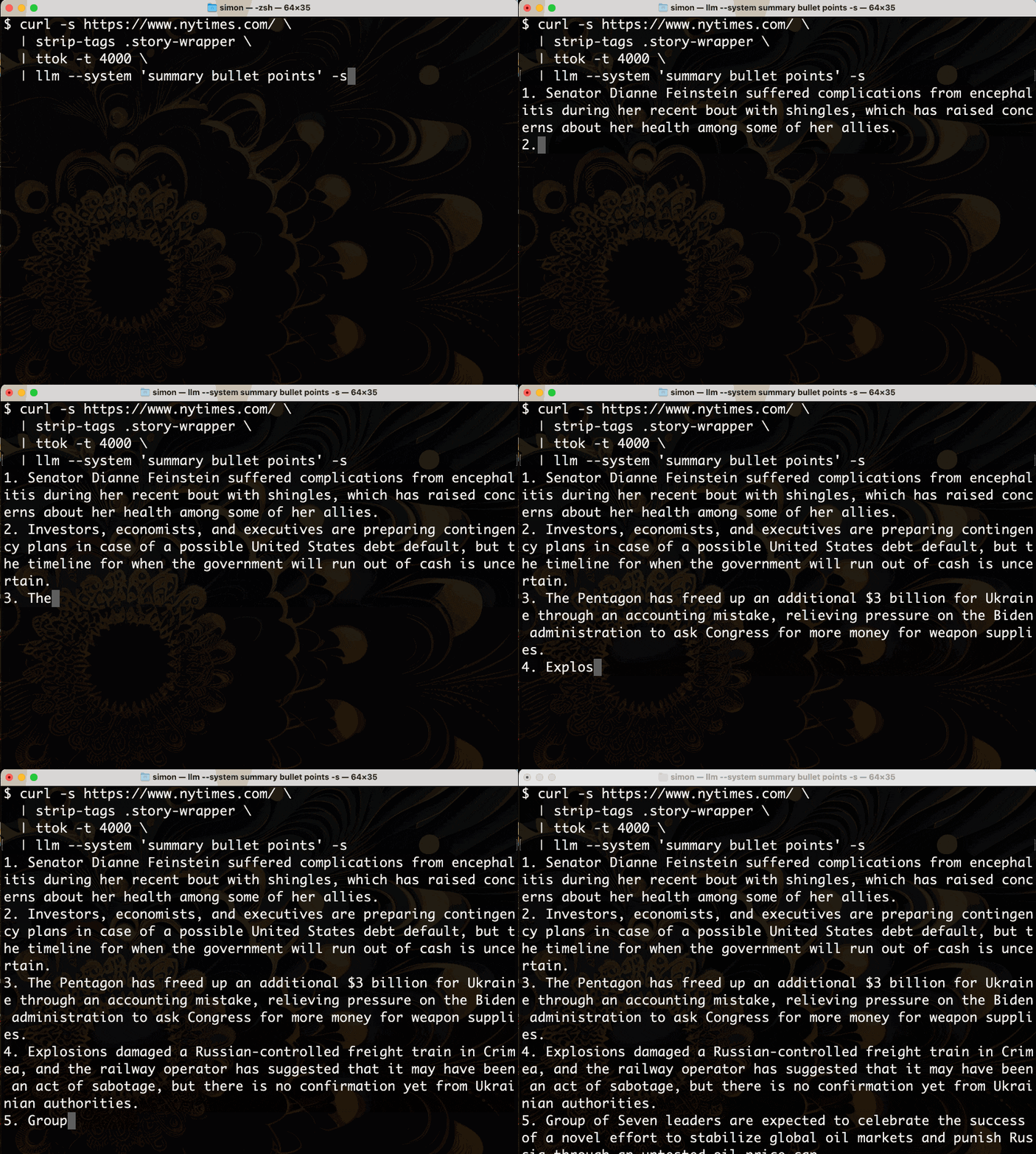
Now let’s use them to summarize the homepage of the New York Times:
curl -s https://www.nytimes.com/ \
 | strip-tags .story-wrapper \
 | ttok -t 4000 \
 | llm --system 'summary bullet points'
Here’s what that command outputs when you run it in the terminal:
Let’s break that down.
curl -s https://www.nytimes.com/ uses curl to retrieve the HTML for the New York Times homepage—the -s option prevents it from outputting any progress information.strip-tags .story-wrapper accepts HTML to standard input, finds just the areas of that page identified by the CSS selector .story-wrapper, then outputs the text for those areas with all HTML tags removed.ttok -t 4000 accepts text to standard input, tokenizes it using the default tokenizer for the gpt-3.5-turbo model, truncates to the first 4,000 tokens and outputs those tokens converted back to text.llm --system 'summary bullet points' accepts the text to standard input as the user prompt, adds a system prompt of “summary bullet points”.I built strip-tags and ttok this morning because I needed better ways to work with tokens.
LLMs such as ChatGPT and GPT-4 work with tokens, not characters.
This is an implementation detail, but it’s one that you can’t avoid for two reasons:
gpt-3.5-turbo (the model used by ChatGPT, and the default model used by the llm command) costs $0.002 / 1,000 tokens. GPT-4 is $0.03 / 1,000 tokens of input and $0.06 / 1,000 for output.Being able to keep track of token counts is really important.
But tokens are actually really hard to count! The rule of thumb is roughly 0.75 * number-of-words, but you can get an exact count by running the same tokenizer that the model uses on your own machine.
OpenAI’s tiktoken library (documented in this notebook) is the best way to do this.
My ttok tool is a very thin wrapper around that library. It can do three different things:
Here’s a quick example showing all three of those in action:
$ echo 'Here is some text' | ttok
5
$ echo 'Here is some text' | ttok --truncate 2
Here is
$ echo 'Here is some text' | ttok --tokens
8586 374 1063 1495 198
My GPT-3 token encoder and decoder Observable notebook provides an interface for exploring how these tokens work in more detail.
HTML tags take up a lot of tokens, and usually aren’t relevant to the prompt you are sending to the model.
My new strip-tags command strips those tags out.
Here’s an example showing quite how much of a difference that can make:
$ curl -s https://simonwillison.net/ | ttok
21543
$ curl -s https://simonwillison.net/ | strip-tags | ttok
9688
For my blog’s homepage, stripping tags reduces the token count by more than half!
The above is still too many tokens to send to the API.
We could truncate them, like this:
$ curl -s https://simonwillison.net/ \
 | strip-tags | ttok --truncate 4000 \
 | llm --system 'turn this into a bad poem'
Which outputs:
download-esm,

A tool to download ECMAScript modules.

Get your packages straight from CDN,

No need for build scripts, let that burden end.

All dependencies will be fetched,

Import statements will be re-writched.

Works like a charm, simple and sleek,

JavaScript just got a whole lot more chic.
But often it’s only specific parts of a page that we care about. The strip-tags command takes an optional list of CSS selectors as arguments—if provided, only those parts of the page will be output.
That’s how the New York Times example works above. Compare the following:
$ curl -s https://www.nytimes.com/ | ttok
210544
$ curl -s https://www.nytimes.com/ | strip-tags | ttok
115117
$ curl -s https://www.nytimes.com/ | strip-tags .story-wrapper | ttok
2165
By selecting just the text from within the <section class="story-wrapper"> elements we can trim the whole page down to just the headlines and summaries of each of the main articles on the page.
I’m really enjoying being able to use the terminal to interact with LLMs in this way. Having a quick way to pipe content to a model opens up all kinds of fun opportunities.
Want a quick explanation of how some code works using GPT-4? Try this:
cat ttok/cli.py | llm --system 'Explain this code' --gpt4
(Output here).
I’ve been having fun piping my shot-scraper tool into it too, which goes a step further than strip-tags in providing a full headless browser.
Here’s an example that uses the Readability recipe from this TIL to extract the main article content, then further strips HTML tags from it and pipes it into the llm command:
shot-scraper javascript https://www.theguardian.com/uk-news/2023/may/18/rmt-to-hold-rail-strike-across-england-on-eve-of-fa-cup-final "
async () => {
 const readability = await import('https://cdn.skypack.dev/@mozilla/readability');
 return (new readability.Readability(document)).parse().content;
}" | strip-tags | llm --system summarize
In terms of next steps, the thing I’m most excited about is teaching that llm command how to talk to other models—initially Claude and PaLM2 via APIs, but I’d love to get it working against locally hosted models running on things like llama.cpp as well.
This is llm, ttok and strip-tags—CLI tools for working with ChatGPT and other LLMs by Simon Willison, posted on 18th May 2023.
Part of series New releases of LLM
Next: Lawyer cites fake cases invented by ChatGPT, judge is not amused
Previous: Delimiters won't save you from prompt injection
Sponsor me for $10/month and get a curated email digest of the month's most important LLM developments.
Pay me to send you less!
Sponsor & subscribe