
The Reports feature in the Simple Membership plugin provides a centralized interface for tracking and analyzing member activity on your site. This tool gives site administrators valuable insights into member logins and other membership-related events.
Accessing the Reports Menu
Navigate to the following admin menu:
Simple Membership → Reports
You’ll see tabs such as:
- Member Logins (Login History, Login Counts by Date)
- Members
- Membership Levels
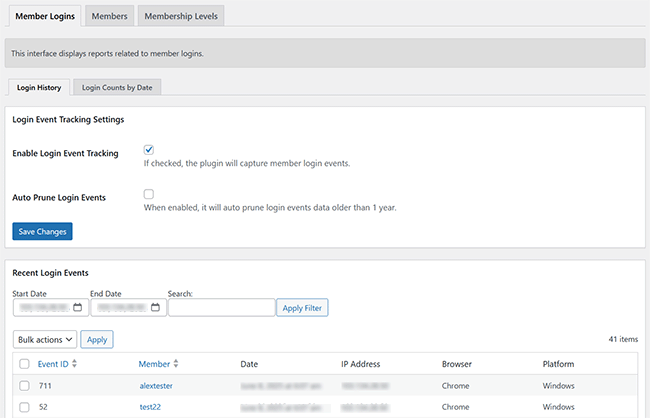
Here’s a preview of how the Reports interface looks:

Login History
Enable the ‘Login Event Tracking‘ option to start recording member login activity. Once enabled, you will be able to view the login history of your members.
The Login History tab displays a list of all member login events. This includes:
- Member Username
- Date/Time of Login
- IP Address
- Browser
- Platform
You can filter the list by date range or search by member username.
Login History Settings
- Enable Login Event Tracking – Check this option to start tracking member login events.
- Auto Prune Login Events – Enable this to automatically remove login records older than 1 year.
We plan to add more features to the Reports menu in future updates.