|
VOOZH | about |
|
VOOZH | about |
Install latest/stable of Blue Recorder
Ubuntu 16.04 or later?
Make sure snap support is enabled in your Desktop store.
Install using the command line
sudo snap install blue-recorderDon't have snapd? Get set up for snaps.
| Channel | Version | Published |
|---|
You are about to open
Do you wish to proceed?
Thank you for your report. Information you provided will help us investigate further.
There was an error while sending your report. Please try again later.
Generate an embeddable card to be shared on external websites.
Customise your embeddable card using the options below.
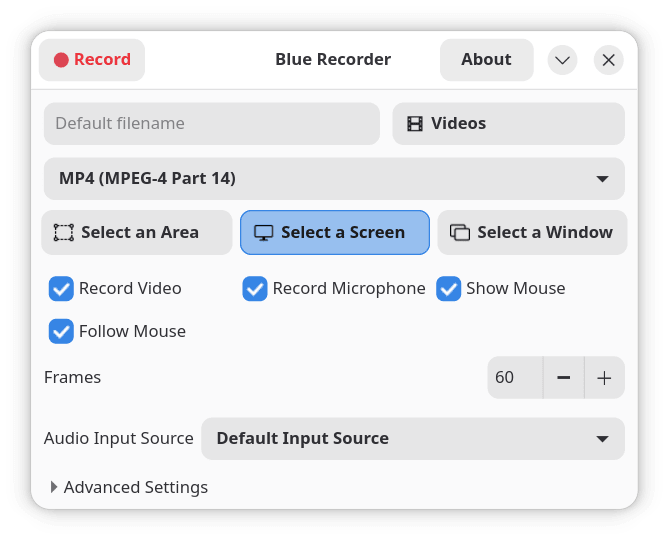
A simple desktop recorder for Linux systems. Built using Rust, GTK+ 4, Gstreamer and ffmpeg. It supports recording audio and video on almost all Linux interfaces (also support Wayland and Xorg). The following formats are currently supported: mkv, avi, mp4, wmv, gif and nut. You can stop the recording process easily by right-clicking the icon and choosing "Stop Record". Or middle-clicking the recording icon in the notifications area (but doesn't work on all interfaces). You can choose the audio input source you want from the list. You can also set the default values you want by simply changing them in the interface, and the program will save them for you for the next time you open it.
** NOTICE: Based on GREEN RECORDER and rewritten in Rust **
** Source: https://github.com/xlmnxp/blue-recorder **
you need to connect audio-record and screencast-legacy to make Blue Recorder work fine
Choose your Linux distribution to get detailed installation instructions. If yours is not shown, get more details on the installing snapd documentation.