VOOZH about

URL: https://snapcraft.io/install/bluemail/centos

⇱ Install BlueMail - Email & Calendar on CentOS using the Snap Store | Snapcraft


The Snap Store will undergo scheduled database maintenance on July 5, 2026 22:00 to July 6, 02:00 UTC. During this time, you will not be able to install or update snaps. No user action is required and services will automatically resume once maintenance is complete.

Install BlueMail - Email & Calendar
on CentOS

πŸ‘ Image

BlueMail - Email & Calendar (bluemail) Package name

BlueMail - The Ultimate Cross-Platform Email & Calendar Experience Secure β€’ Unified β€’ Smart β€’ AI‑Enhanced β€’ Unlimited Accounts

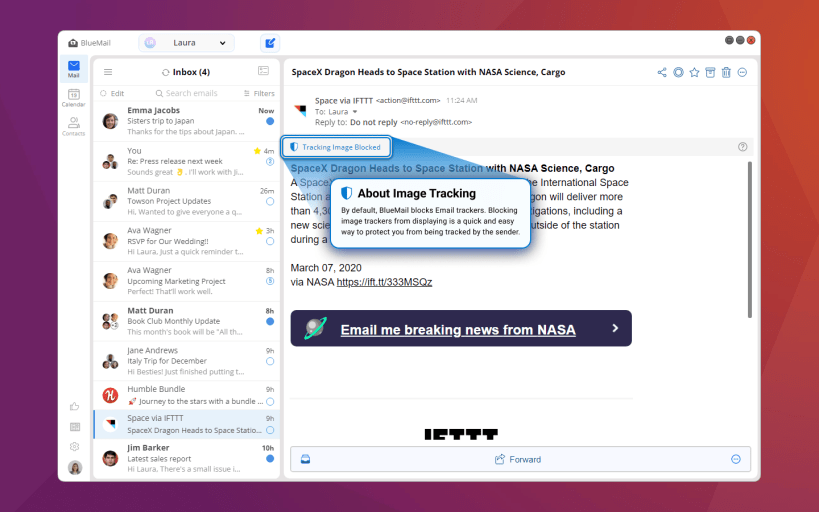
BlueMail is the beautifully designed, powerful email and calendar app trusted by millions worldwide on Linux, Windows, macOS, iOS and Android. With enterprise-grade security, smart AI tools and exceptional usability, BlueMail delivers the ultimate email experience to your Linux desktop.

Key Email & Productivity Features

πŸ“§ Unified Email Inbox

  • Seamlessly manage unlimited email accounts from providers like Gmail, Outlook, Yahoo, iCloud, Exchange (EWS/EAS), Office 365, IMAP, POP3 and SMTP, all in one intuitive app.
  • Instant push email notifications ensure you never miss important messages.

πŸš€ AI-Enhanced Email Productivity

  • GemAI Tools: Summarize long email threads and draft intelligent email responses, saving you time and effort.
  • Ask GemAI: Next level AI. Ask GemAI in any email or conversation. Everyone gets an answer.
  • Smarter email organization with AI-powered suggestions for sorting and managing your inbox.

πŸ“… Integrated Calendar

  • Direct integration with CalDAV and Exchange calendars lets you easily create, view, edit and respond to events right from your inbox.
  • Stay organized with built-in RSVP reminders, event notifications and calendar syncing across all your devices.

πŸ”– Smart Email Management

  • Clusters: Organize emails automatically by sender, topic, or groups for a clutter-free inbox.
  • People-Centric Inbox: Quickly identify and prioritize important emails based on contacts and frequent senders.
  • Task Board (β€œLater”): Snooze emails or set reminders for follow-up tasks, ensuring you never overlook important messages.

πŸ“€ Email Sharing & Collaboration

  • Easily share email conversations with co-access links and manage group emails seamlessly.
  • Simplify team communication and collaboration right from your inbox.

πŸ”’ Privacy & Security at the Core

  • Direct connection to mail servers: no email proxies, no scanning.
  • Built-in encryption, robust spam filtering, secure push notifications and full privacy compliance ensure your data stays protected.
  • End-to-End Encryption: Full PGP support for secure, encrypted communication across all your devices.

🎨 Customization & Flexibility

  • Personalize your email experience with customizable themes, layouts, quick actions and signatures.
  • Extensive search capabilities across multiple email accounts, lightning-fast with powerful filtering options.

🌟 Cross-Platform Continuity

  • Enjoy consistent email and calendar experiences on Linux and seamlessly sync your settings, accounts and preferences across mobile and desktop devices.

🎯 Perfect For

  • Linux users managing multiple email accounts who need streamlined, powerful email workflows.
  • Professionals requiring integrated email and calendar solutions for better productivity.
  • Privacy-conscious individuals looking for secure, direct mail server connections.
  • Anyone wanting a smarter, faster email experience enhanced by cutting-edge AI tools.

Experience BlueMail on Linux and revolutionize the way you manage email.

Details for BlueMail - Email & Calendar

Package name

  • bluemail

License

  • Proprietary

Last updated

  • 20 May 2026 - latest/stable
  • 20 May 2026 - latest/edge

Websites


Contact


Report a Snap Store violation

Thank you for your report. Information you provided will help us investigate further.

There was an error while sending your report. Please try again later.


Enable snaps on CentOS and install BlueMail - Email & Calendar

Snaps are applications packaged with all their dependencies to run on all popular Linux distributions from a single build. They update automatically and roll back gracefully.

Snaps are discoverable and installable from the Snap Store, an app store with an audience of millions.

Enable snapd

Snap is available for , and Red Hat Enterprise Linux 7.6+, from the Extra Packages for Enterprise Linux (EPEL) repository. The EPEL repository can be added to your system with the following command:

sudo yum install epel-release

Snap can now be installed as follows:

sudo yum install snapd

Once installed, the systemd unit that manages the main snap communication socket needs to be enabled:

sudo systemctl enable --now snapd.socket

To enable classic snap support, enter the following to create a symbolic link between /var/lib/snapd/snap and /snap:

sudo ln -s /var/lib/snapd/snap /snap

Either log out and back in again, or restart your system, to ensure snap’s paths are updated correctly.

Install BlueMail - Email & Calendar

To install BlueMail - Email & Calendar, simply use the following command:

sudo snap install bluemail

Other popular snaps…

See more...
See more in Featured

More things to do…

πŸ‘ Image

Get the snap store

Browse and find snaps from the convenience of your desktop using the snap store snap.

πŸ‘ Image

Learn more about snaps

Interested to find out more about snaps? Want to publish your own application? Visit snapcraft.io now.