VOOZH about

URL: https://snapcraft.io/photoscape

⇱ Install PhotoScape on Linux | Snap Store


👁 Image

PhotoScape

Snapcrafters Publisher 👁 Star developer
Star developer

Install latest/stable of PhotoScape

This channel hasn't been updated in a while. It might be unmaintained and have stability or security issues.

Ubuntu 16.04 or later?

Make sure snap support is enabled in your Desktop store.


Install using the command line

sudo snap install photoscape

Don't have snapd? Get set up for snaps.

Channel Version Published

Details for PhotoScape

Package name

  • photoscape

License

  • Proprietary

Last updated

  • 28 December 2021 - latest/stable
  • 27 January 2024 - latest/edge

This snap hasn't been updated in a while. It might be unmaintained and have stability or security issues.


Websites


Contact


Report a Snap Store violation

Thank you for your report. Information you provided will help us investigate further.

There was an error while sending your report. Please try again later.


Share this snap

Generate an embeddable card to be shared on external websites.

Customise your embeddable card using the options below.

Snap Store button:

Options:

Preview:

HTML:

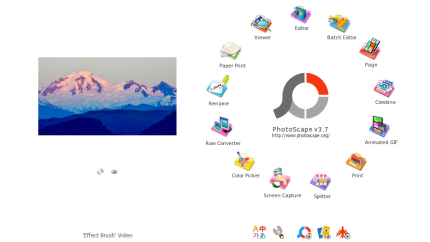
PhotoScape is a fun and easy photo editing software to fix and enhance photos.

PhotoScape is a fun and easy photo editing software that enables you to fix and enhance photos.

Key Features:

  • Viewer: View photos in your folder, create a slideshow
  • Editor: resizing, brightness and color adjustment, white balance, backlight correction, frames, balloons, mosaic mode, adding text, drawing pictures, cropping, filters, red eye removal, blooming, paint brush, clone stamp, effect brush
  • Batch editor: Batch edit multiple photos
  • Page: Merge multiple photos on the page frame to create one final photo
  • Combine: Attach multiple photos vertically or horizontally to create one final photo
  • Animated GIF: Use multiple photos to create a final animated photo
  • Print: Print portrait shots, carte de visites(CDV), passport photos
  • Splitter: Slice a photo into several pieces
  • Screen Capture: Capture your screenshot and save it
  • Color Picker: Zoom in on images, search and pick a color
  • Rename: Change photo file names in batch mode
  • Raw Converter: Convert RAW to JPG
  • Paper Print: Print lined, graph, music and calendar paper
  • Face Search: Find similar faces on the Internet

Note: This Windows application runs on Linux using the Wine compatibility layer.


Install PhotoScape on your Linux distribution

Choose your Linux distribution to get detailed installation instructions. If yours is not shown, get more details on the installing snapd documentation.

👁 Image

Arch Linux

👁 Image

CentOS

👁 Image

Debian

👁 Image

elementary OS

👁 Image

Fedora

👁 Image

KDE Neon

👁 Image

Kubuntu

👁 Image

Manjaro

👁 Image

Pop!_OS

👁 Image

openSUSE

👁 Image

Red Hat Enterprise Linux

👁 Image

Ubuntu


Where people are using PhotoScape

Users by distribution (log)

Ubuntu 24.04
Ubuntu 22.04
Ubuntu 26.04
Ubuntu 20.04
Zorin OS 18
Ubuntu 18.04
Ubuntu 25.10
Zorin OS 17
Linux Mint 22.3
Linux Mint 21.3
Debian 13
Linux Mint 22.2
Ubuntu 16.04
Debian 12
Manjaro
Ubuntu 24.10
Ubuntu 25.04
Zorin OS 16
Linux Mint 20.3
Linux Mint 22.1
Ubuntu 23.10
Fedora 44
pop 22.04
Zorin OS 15
KDE Neon 24.04
Ubuntu 22.10
Linux Mint 21.1
Linux Mint 7
Ubuntu 21.10
Ubuntu 23.04
Fedora 43
Linux Mint 19.3
Linux Mint 21.2
Ubuntu 20.10
Ubuntu 21.04
Debian 11
Linux Mint 21
Linux Mint 22
pop 24.04
Linux Mint 20
Linux Mint 20.1
elementary OS 7.1
Linux Mint 20.2
Ubuntu 19.04

More from Snapcrafters

👁 pyradio

pyradio

Command line internet radio player.

👁 The Climate Trail

The Climate Trail

Surviving The Climate Apocalypse

👁 irssi

irssi

The IRC client of the future

👁 unimatrix

unimatrix

https://github.com/will8211/unimatrix

View all snaps