VOOZH about

URL: https://snapcraft.io/superproductivity

⇱ Install Super Productivity – To-Do, Time Tracker on Linux | Snap Store


👁 Image

Super Productivity – To-Do, Time Tracker (superproductivity) Package name

johannesjo Publisher

Install latest/stable of Super Productivity – To-Do, Time Tracker

Ubuntu 16.04 or later?

Make sure snap support is enabled in your Desktop store.


Install using the command line

sudo snap install superproductivity

Don't have snapd? Get set up for snaps.

Channel Version Published

Details for Super Productivity – To-Do, Time Tracker

Package name

  • superproductivity

License

  • MIT

Last updated

  • 12 June 2026 - latest/stable
  • Yesterday - latest/edge

Websites


Contact


Donations


Source code


Report a bug


Report a Snap Store violation

Thank you for your report. Information you provided will help us investigate further.

There was an error while sending your report. Please try again later.


Share this snap

Generate an embeddable card to be shared on external websites.

Customise your embeddable card using the options below.

Snap Store button:

Options:

Preview:

HTML:

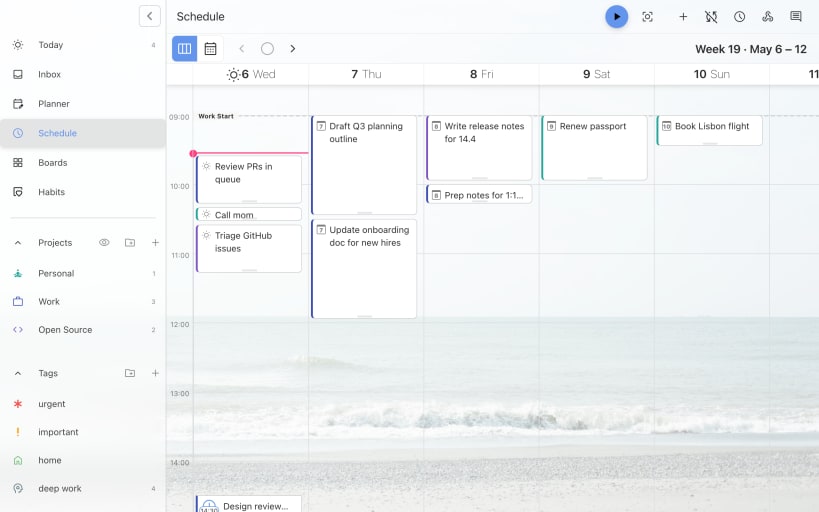
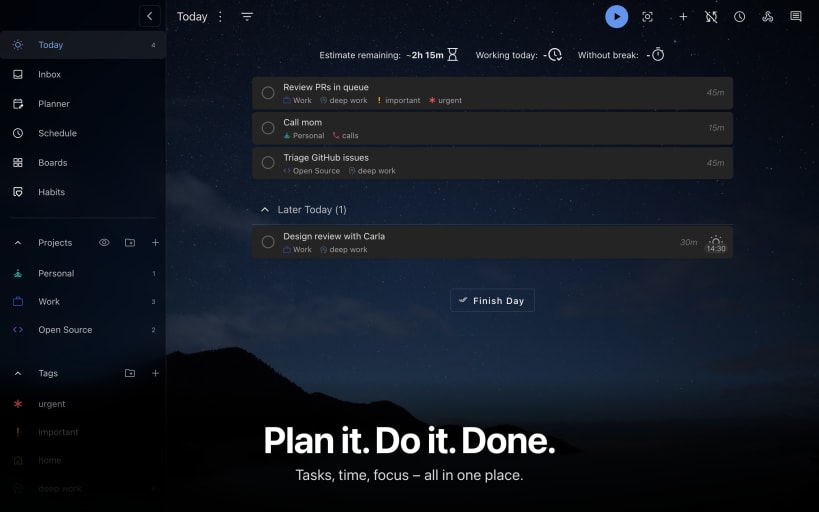
Time tracker & to-do app with Jira/GitHub sync, timeboxing, Pomodoro, and privacy-first design.

Stay focused. Get more done.

Super Productivity is the open-source to-do list, time tracker, and timeboxing app that helps developers and busy professionals stay organized and distraction-free.

Developer integrations: Jira, GitHub, GitLab, OpenProject
Timeboxing, Pomodoro & Flowtime: structure work into focused sessions
Time tracking & detailed reports: understand where your hours go
Cross-platform: Linux, Windows, Android
Privacy-first: no sign-up, no data collection, forever free
Open source: trusted by 20,000+ developers worldwide
Calendar sync: manage tasks and events in one place
Fully customizable: via powerful plug-in system


✨ Why Super Productivity?

  • Turn overwhelming task lists into structured sessions
  • Reduce distractions and context switching
  • Track coding time automatically
  • Keep full control of your data

💡 Perfect for

  • Developers managing Jira/GitHub issues
  • Freelancers tracking billable hours
  • ADHD users needing focus and structure
  • Privacy-conscious professionals

🔒 No subscriptions. No hidden costs. No surveillance.
🎉 Download Super Productivity today and take back control of your time.


Install Super Productivity – To-Do, Time Tracker on your Linux distribution

Choose your Linux distribution to get detailed installation instructions. If yours is not shown, get more details on the installing snapd documentation.

👁 Image

Arch Linux

👁 Image

CentOS

👁 Image

Debian

👁 Image

elementary OS

👁 Image

Fedora

👁 Image

KDE Neon

👁 Image

Kubuntu

👁 Image

Manjaro

👁 Image

Pop!_OS

👁 Image

openSUSE

👁 Image

Red Hat Enterprise Linux

👁 Image

Ubuntu


Where people are using Super Productivity – To-Do, Time Tracker

Users by distribution (log)

Ubuntu 24.04
Ubuntu 22.04
Ubuntu 26.04
Ubuntu 25.10
Ubuntu 20.04
Zorin OS 18
Ubuntu 25.04
Linux Mint 22.3
Debian 13
pop 22.04
Zorin OS 17
Debian 12
Fedora 44
Linux Mint 21.3
Manjaro
pop 24.04
Fedora 43
Ubuntu 18.04
Ubuntu 24.10
KDE Neon 24.04
Linux Mint 22.1
Arch Linux
Linux Mint 22.2
Linux Mint 22
Ubuntu 23.10
Fedora 42
Kali Linux 2026.1
Kali Linux 2026.2
Ubuntu 23.04
Debian 11
Linux Mint 21.1
cachyos
Linux Mint 21.2
Ubuntu 16.04
Zorin OS 16
Debian sid
elementary OS 8
Linux Mint 20.3
Linux Mint 21
endeavouros
Kali Linux 2025.4
openSUSE Leap 16.0
Debian 7.2
KDE Neon 22.04
Ubuntu 22.10