VOOZH about

URL: https://snapcraft.io/xournalpp

⇱ Install Xournal++ on Linux | Snap Store


👁 Image

Xournal++ (xournalpp) Package name

Install latest/stable of Xournal++

Ubuntu 16.04 or later?

Make sure snap support is enabled in your Desktop store.


Install using the command line

sudo snap install xournalpp

Don't have snapd? Get set up for snaps.

Channel Version Published

Details for Xournal++

Package name

  • xournalpp

License

  • GPL-2.0

Last updated

  • 8 May 2026 - latest/stable
  • 8 May 2026 - latest/edge

Websites


Contact


Source code


Report a bug


Report a Snap Store violation

Thank you for your report. Information you provided will help us investigate further.

There was an error while sending your report. Please try again later.


Share this snap

Generate an embeddable card to be shared on external websites.

Customise your embeddable card using the options below.

Snap Store button:

Options:

Preview:

HTML:

Take handwritten notes

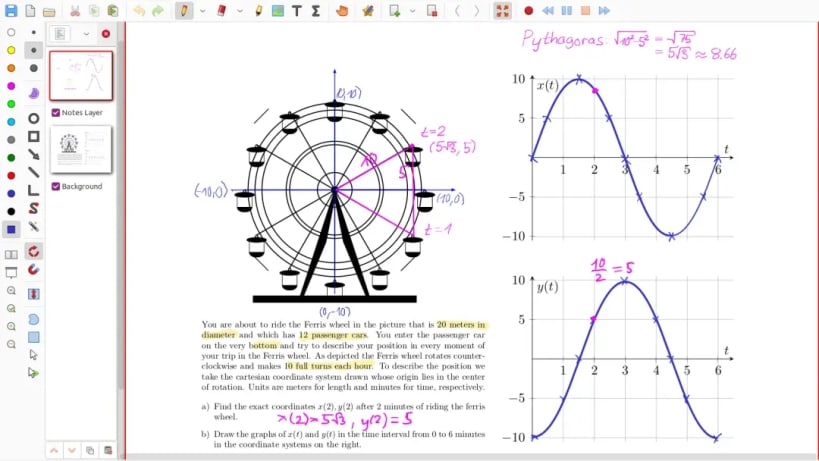
Xournal++ is a hand note-taking software written in C++ with the target of flexibility, functionality and speed. Stroke recognizer and other parts are based on Xournal Code, which you can find at sourceforge. It supports GNU/Linux (e.g. Ubuntu, Debian, Arch, SUSE), macOS and Windows. Supports pen input from devices such as Wacom Tablets.

Xournal++ features:

  • Supports pressure-sensitive styluses and digital pen tables (e.g. Wacom, Huion, XP Pen, etc. tablets)
  • Paper backgrounds for note-taking, scratch paper, or whiteboarding
  • Annotate on top of PDFs
  • Select text from the background PDF, copy, highlight or underline it or strike it through
  • Follow links from the background PDF
  • Export to a variety of formats including SVG, PNG and PDF, both from the GUI and command line
  • Different drawing tools (e.g. pen, highlighter) and stroke styles (e.g. solid, dotted)
  • Shape drawing (line, arrow, circle, rectangle, spline)
  • Use the set-square and compass tools for measurements or as a guide for drawing straight lines, circular arcs and radii
  • Fill shape functionality
  • Shape resizing and rotation
  • Rotation and grid snapping for precise alignment of objects
  • Input stabilization for smoother writing/drawing
  • Text tool for adding text in different fonts, colors, and sizes
  • Enhanced support for image insertion
  • Eraser with multiple configurations
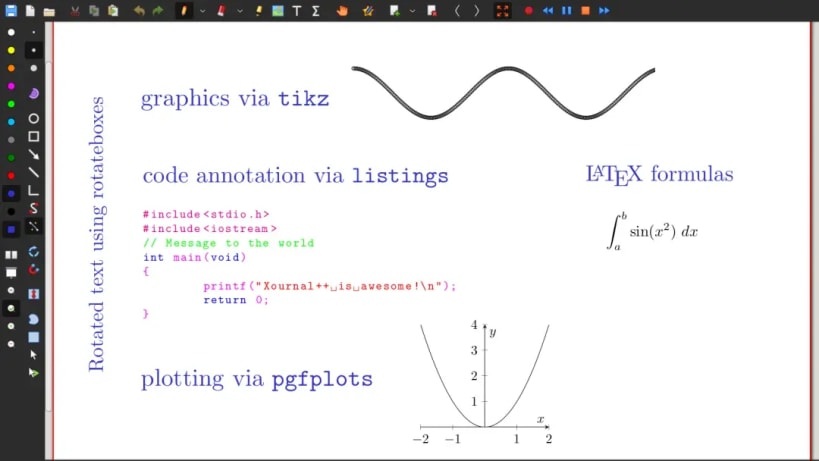
  • LaTeX support (requires a working LaTeX installation) with customizable template and a resizable editor with syntax highlighting
  • Sidebar containing page previews with advanced page sorting, PDF bookmarks and layers (can be individually hidden/edited)
  • Allows mapping different tools/colors etc. to stylus/mouse buttons
  • Customizable toolbar with multiple configurations, e.g. to optimize toolbar for portrait/landscape
  • Custom color palette support using the .gpl format
  • Page template definitions
  • Bug reporting, autosave, and auto backup tools
  • Audio recording and playback alongside with handwritten notes
  • Multi language support (over 20 languages supported)
  • Plugins using Lua scripting

Install Xournal++ on your Linux distribution

Choose your Linux distribution to get detailed installation instructions. If yours is not shown, get more details on the installing snapd documentation.

👁 Image

Arch Linux

👁 Image

CentOS

👁 Image

Debian

👁 Image

elementary OS

👁 Image

Fedora

👁 Image

KDE Neon

👁 Image

Kubuntu

👁 Image

Manjaro

👁 Image

Pop!_OS

👁 Image

openSUSE

👁 Image

Red Hat Enterprise Linux

👁 Image

Ubuntu

👁 Image

Raspberry Pi


Where people are using Xournal++

Users by distribution (log)

Ubuntu 24.04
Ubuntu 22.04
Ubuntu 20.04
Ubuntu 26.04
Ubuntu 25.10
Ubuntu 18.04
Ubuntu 25.04
Debian 12
Debian 13
Linux Mint 21.3
Linux Mint 22.3
Ubuntu 16.04
Ubuntu 24.10
Manjaro
KDE Neon 24.04
pop 22.04
Ubuntu 23.04
Ubuntu 23.10
Debian 11
Zorin OS 18
Fedora 43
Fedora 44
Linux Mint 20.3
Zorin OS 16
Zorin OS 17
Linux Mint 22.2
pop 24.04
Fedora 42
Linux Mint 22
Ubuntu 21.10
Debian 10
Debian sid
Linux Mint 19.3
Linux Mint 20.2
Linux Mint 22.1
Ubuntu 20.10
Ubuntu 21.04
Ubuntu 22.10
elementary OS 7.1
Linux Mint 20
Linux Mint 21
Linux Mint 21.1
Zorin OS 15
Fedora 41
Linux Mint 20.1
KDE Neon 22.04
Linux Mint 19
Linux Mint 21.2
Ubuntu 19.04
Ubuntu 19.10
Linux Mint 19.1
pop 20.04