VOOZH about

URL: https://statcounter.com/joomla/

⇱ Joomla - Free Hit Counter, Visitor Tracker and Web Stats | Statcounter


Joomla Install Guide

Statcounter provides customisable hit counters, visitor tracking, web analytics and website stats for Joomla.

👁 Joomla

  1. Sign up for an account at Statcounter to get your code.

    These instructions will be repeated after you've created an account and added your first project.

  2. Copy the StatCounter code.
  3. Log into your Joomla website.
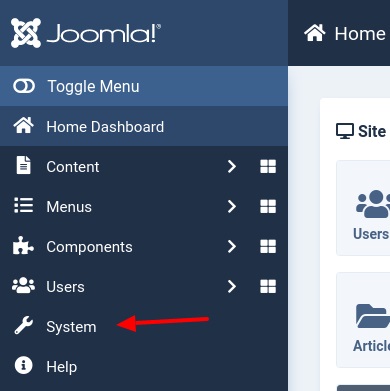
  4. In the left menu click System
  5. 👁 Image
  6. In the Template box click Site Templates
  7. 👁 Image
  8. Click your template name
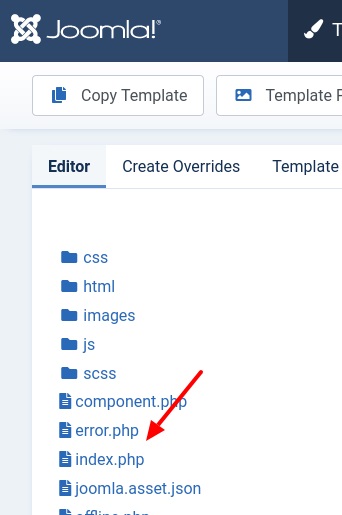
  9. In the left menu click index.php
  10. 👁 Image
  11. In the right box paste your StatCounter code near the end just before </body></html> 👁 Image
  12. Click Save & Close at the top

  13. Note : If the statcounter code doesn't work after being added you might need to clear the Joomla Cache by going back to the System Menu and clicking Clear Cache in the top / center in the Maintenance box.

Get Started

Sign up for a Statcounter account using our Joomla installation guide.

Try it for FREE!

Already a Member?

You can reinstall Joomla on your Statcounter project.


Installation Guides A - Z

Didn't find your answer here?

Our support team is here to help you!

Contact Support

© Statcounter 1999-2026.   All rights reserved.

webf002
27.441024780273