|
VOOZH | about |
|
VOOZH | about |
| Basic Math | |
|---|---|
| Developer(s) | Atari |
| Publisher(s) | Atari |
| Year released | 1977 |
| System(s) | Atari 2600 |
| Genre(s) | Education |
|---|---|
| Players | 1-2 |
| Modes | Single player, Multiplayer |
| Links | 👁 Basic Math Channel 👁 Search |
|---|
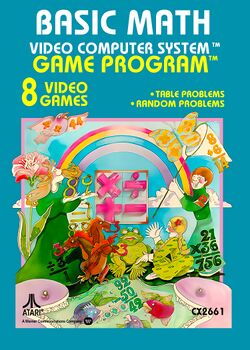
Basic Math was one of the nine Atari 2600 titles that launched with the system in 1977. In an effort to show the public that Atari was about more than just fun and games, and that the Atari 2600 could also be used as a tool for learning, Atari developed an educational title as part of their initial line up of available cartridges. The first one deals with math, as the name implies.
Basic Math can be used to teach young children simple arithmetic. It provides examples of all four basic arithmetic operations (addition, subtraction, multiplication, and division), and the choice of whether to present all problems that can be found in a particular column of a table, or whether to present problem completely at random. Time limits can be set for providing the answer by using the difficulty switches. 10 problems are presented in every set.
As can be expected, Basic Math was not in high demand by Atari 2600 owners, but parents were happy to buy it for their children in an age where the benefits of computers on education were only beginning to come to light and be understood. Sometime around 1980, Atari decided to give the game a "peppier" name and changed it to Fun with Numbers. The cartoon illustration that often accompanied the game's description in catalogs was of a little Einstein inside the TV set (which was not included in the game). It was released as Math under the Sears Telegames label.
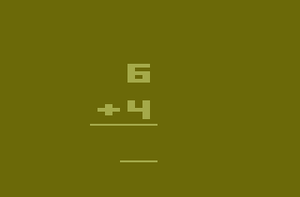
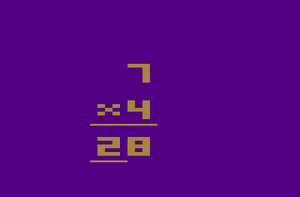
After starting a game, the player is presented with their first problem. Use the joystick to change the value shown beneath the answer bar. Press the joystick up or down to cycle through all ten digits, and press the joystick left or right to line up the answer bar with the digit that you would like to change. Press the button when you have completed selecting your answer. You will hear a tone and then a happy musical selection if you got the answer right, or a sad musical selection if you got the answer wrong. If you got the wrong answer, your answer will be replaced with the correct answer before moving on. After all ten problems have been presented, the player is presented with the number of problems he or she answered correctly on the left side out of the number of problems (10) that they were given on the right side.
As an example, if the problem in question was 6 × 5, the player would start by pushing up on the joystick until the number 0 appeared in the ones digit. Then the player would push the joystick to the left, and line the answer bar up with the tens digit position, and then push up on the joystick until the number 3 appeared. Then the player would push the button. In another example, if the problem in question was 5 ÷ 3, the player would start by pushing up on the joystick until the number 1 appeared in the ones digit. Now, in order to indicate the remainder, the player must push the joystick to the right, not once, but twice. With a space between the ones and the remainder digit, the player would push up on the joystick until a 2 appeared, and push the button to submit his answer. If the 2 appeared only one space to the right of the 1, the answer would be considered incorrect.
Game variations 1 through 4 are Table Problem variations. Each variation is a different operation; 1 is addition, 2 is subtraction, 3 is multiplication, and 4 is division. The player begins each game by selecting which top number they want to work with. The game then proceeds to randomly choose the numbers that appear on the bottom of the problem. If the game runs out of problems for a particular number, the game advances the player's selection by one. For example, if the player selects game variation 1 (addition) and chooses to work with the number 5, the game will ask the player to add 5 to every number from 1 to 9. Since there are ten problem, the player will get one additional problem adding the number 6 to a randomly chosen number. In another example, the player selects game variation 4 (division) and chooses to work with the number 6. The game will ask the player to divide 6 by every number from 1 to 6. When those numbers are exhausted, the game will present four more problems, asking the player to divide 7 by four numbers between 1 and 7.
Game variations 5 through 8 are Random Problem variations. Each variation is a different operation; 5 is addition, 6 is subtraction, 7 is multiplication, and 8 is division. The player does not choose what number to work with, as both the top number and the bottom number are chosen at random. The version provides players with a more difficult challenge, since the sets of problems are unknown until they are presented to the player, and tend to be more complicated.