VOOZH about

URL: https://thenewstack.io/behind-the-scenes-of-the-sunburst-attack/

⇱ Behind the Scenes of the SUNBURST Attack - The New Stack


TNS
SUBSCRIBE
Join our community of software engineering leaders and aspirational developers. Always stay in-the-know by getting the most important news and exclusive content delivered fresh to your inbox to learn more about at-scale software development.
REQUIRED
It seems that you've previously unsubscribed from our newsletter in the past. Click the button below to open the re-subscribe form in a new tab. When you're done, simply close that tab and continue with this form to complete your subscription.
The New Stack does not sell your information or share it with unaffiliated third parties. By continuing, you agree to our Terms of Use and Privacy Policy.
Welcome and thank you for joining The New Stack community!
Please answer a few simple questions to help us deliver the news and resources you are interested in.
REQUIRED
REQUIRED
REQUIRED
REQUIRED
REQUIRED
Great to meet you!
Tell us a bit about your job so we can cover the topics you find most relevant.
REQUIRED
REQUIRED
REQUIRED
REQUIRED
REQUIRED
Welcome!

We’re so glad you’re here. You can expect all the best TNS content to arrive Monday through Friday to keep you on top of the news and at the top of your game.

What’s next?

Check your inbox for a confirmation email where you can adjust your preferences and even join additional groups.

Follow TNS on your favorite social media networks.

Become a TNS follower on LinkedIn.

Check out the latest featured and trending stories while you wait for your first TNS newsletter.

PREV
1 of 2
NEXT
VOXPOP
As a JavaScript developer, what non-React tools do you use most often?
Angular
0%
Astro
0%
Svelte
0%
Vue.js
0%
Other
0%
I only use React
0%
I don't use JavaScript
0%
Thanks for your opinion! Subscribe below to get the final results, published exclusively in our TNS Update newsletter:
NEW! Try Stackie AI
From clobbered drafts to real-time sync
Apr 14th 2026 10:00am, by David Moore
TypeScript 6.0 RC arrives as a bridge to a faster future
Mar 14th 2026 9:00am, by Darryl K. Taft
Mastra empowers web devs to build AI agents in TypeScript
Jan 28th 2026 11:00am, by Loraine Lawson
2021-02-19 08:36:47
Behind the Scenes of the SUNBURST Attack
contributed,sponsor-checkpoint,sponsored,sponsored-post-contributed,
Networking / Security

Behind the Scenes of the SUNBURST Attack

The biggest cyber attack in recent times was in December 2020, when the Sunburst malware was installed on SolarWinds’ Orion product.
Feb 19th, 2021 8:36am by Lior Sonntag and Dror Alon
👁 Featued image for: Behind the Scenes of the SUNBURST Attack
Check Point sponsored this post.

Check Point sponsored this post.

Lior Sonntag
Lior is a Security Researcher at Check Point Software Technologies. He is a security enthusiast who loves to break stuff and put it back together. He's passionate about various InfoSec topics such as Cloud Security, Offensive Security, Vulnerability Research and Reverse Engineering.

The biggest cyberattack in recent times came in the form of what seems like a nation-state-sponsored supply chain attack, in December when the SUNBURST malware was installed on SolarWinds’ Orion product. This made headlines worldwide for good reason — post-compromise activity included data theft through lateral movement, which is when the attacker moves through a network searching for targeted key data and assets. This attack was the work of a highly-skilled actor and the operation was conducted with significant operational security.

This attack consisted of lateral movement of the threat actor from the on-premises network to the cloud, and it was done in two phases:

  1. Phase One: The On-Prem Golden SAML Attack. Here the threat actors gained administrative access to the organization’s Active Directory Federation Services (ADFS) server. This allowed them to forge Security Assertion Markup Language (SAML) tokens and create illegitimate registrations of SAML Trust Relationships. By impersonating a user with valid administrative credentials, the threat actors could change the configuration of the SAML Service Provider (in this case, Azure AD). From there, they successfully gained administrative access to the Azure AD.
  2. Phase Two: Malicious activity in the Cloud. The threat actors then used the Azure Active Directory administrative credentials for malicious activities. This included (but was not limited to): enumeration of existing applications and service principals, injection of credentials into them, impersonation and execution of actions on behalf of them, and the exfiltration of sensitive data like users and mails.
Dror Alon
Dror is Security Research Team Leader at Check Point Software Technologies. He's a proactive researcher in the cyber domain; investigating cyber events, and identifying and resolving the security issues faced by organizations worldwide.

In this analysis, we will focus on the second attack phase, in the cloud, and present key tactics and techniques used by the nation-state actors in the malicious campaign. By using the MITRE ATT&CK framework, we will provide the most likely technical attack flow of the nation-state actor’s actions.

Reviewing Microsoft’s article, the chain of events that occurred through this attack were:

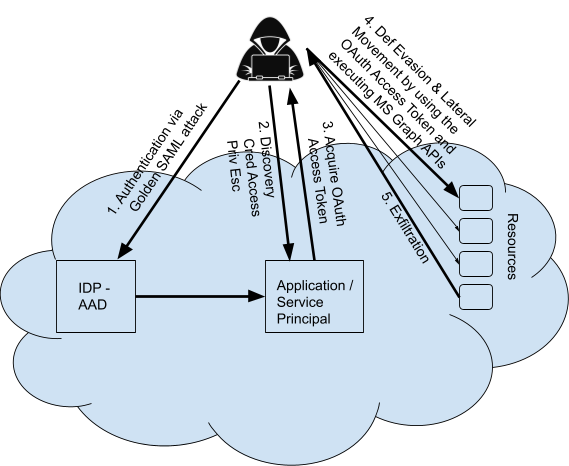
  1. Initial Access (On-Prem): Forged SAML tokens and illegitimate registrations of SAML Trust Relationships; impersonating a user with administrative credentials (in this case, Azure AD).
  2. Discovery: The threat actor enumerates existing applications/service principals (preferably with high traffic patterns).
  3. Credential Access: The threat actor adds credentials to an existing application or service principal.
  4. Privilege Escalation: The threat actor elevates the privileges of the application/service-principal, to allow access to MS Graph APIs Application permissions.
  5. Defense Evasion and Lateral Movement: The threat actor acquires OAuth access tokens of applications, allowing them to impersonate the applications and obfuscate their activity.
  6. Exfiltration: The threat actor calls MS Graph APIs to exfiltrate sensitive data such as users’ data and emails.

👁 Image

Here we will focus on the attack flow in the Cloud Environment after the initial authentication(i.e. steps 2-6). But first, let’s elaborate on the AzureAD Authentication and Authorization mechanisms.

In short, Authentication is proving you are who you say you are. This is done by the Identity Provider (in this case Azure AD). Authorization is the act of granting an authenticated party permission to do something. This is done by the resource the identity is trying to query, utilizing the OAuth 2.0 protocol.

Check Point Software Technologies is a leading provider of cyber security and threat prevention. Check Point CloudGuard provides unified cloud native security for networks, assets and workloads — automating cloud security, preventing threats, and managing posture — across multicloud environments.
Learn More
The latest from Check Point

Discovery

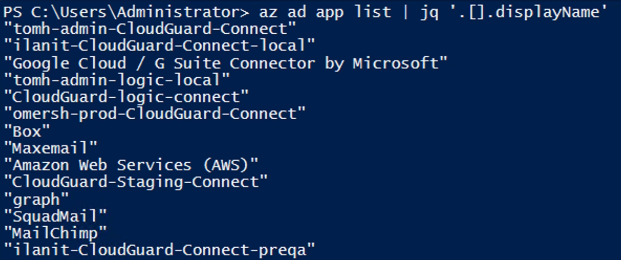
First, the threat actor gains an initial foothold into the Cloud Environment by compromising privileged cloud users with administrative access to the Azure AD. They then add credentials to an existing application or service principal. However, in order to do that, the threat actor needs to firstly list all the existing applications:

👁 Image

The threat actor prefers applications with high traffic patterns (e.g. mail archival applications) which can be used to obfuscate their activity. So, they decide to choose the “MailApp” (an imaginary application name) and extracts its ObjectId and ApplicationId:

👁 Image

In addition, the threat actor extracts the account’s tenantId:

👁 Image

Credential Access

Next, the threat actor creates new credentials and adds them to the application:

👁 Image

Alternatively, the threat actor can create new credentials and add them to an existing service principal associated with the MailApp application:

👁 Image

After this phase, the threat actor has the credentials of the application — which can be used to authenticate to AzureAD on behalf of the application.

Application/Service-Principal Privilege Escalation

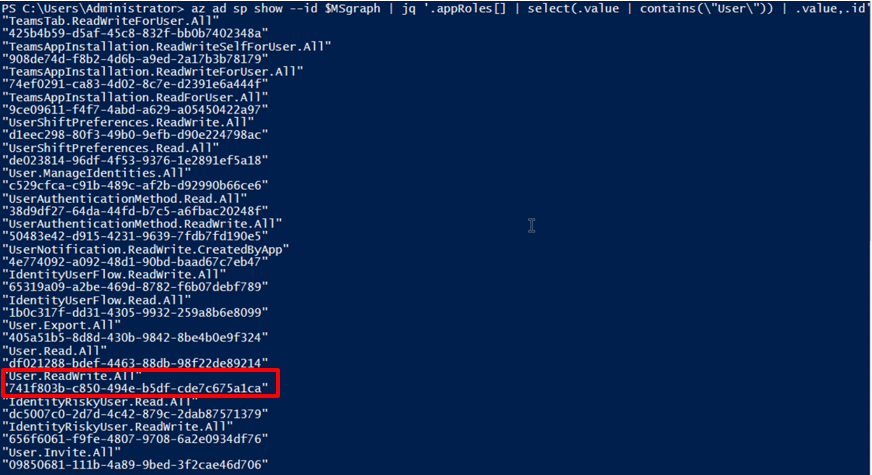
In this step, the threat actor lists all the available permissions related to Microsoft Graph APIs:

👁 Image

The threat actor decides to add the User.ReadWrite.All permission to the MailApp application:

👁 Image

Afterward, the threat actor lists all the available permissions related to Mails and associated to the Microsoft Graph API:

👁 Image

They decide to also add the Mail.ReadWrite permission to the MailApp application:

👁 Image

The error in red indicates that an admin consent must be launched to approve this permission.

The admin consent workflow gives admins a secure way to grant access to applications that require admin approval. When a user tries to access an application but is unable to provide consent, they can send a request for admin approval. The request is sent to admins who have been designated as reviewers.

Due to the fact that the actor already has administrative permissions, they can launch an admin consent on their own:

👁 Image

The admin consent was successful and the Microsoft Graph APIs permissions were successfully added to the MailApp application!

Defense Evasion and Lateral Movement

Then, the actor acquired an OAuth access token for the application, by initiating an HTTP GET request which included the tenantId, objectId, appId and the secret (credentials) obtained from before:

👁 Image

This access token enabled the actor to move laterally, impersonate the MailApp application, and execute actions on behalf of it.

Exfiltration

Finally, the threat actor calls APIs with permissions assigned to the MailApp application.

The threat actor initiated an HTTP GET request, which included the access token to exfiltrate all users in the tenant and all emails related to a specific user.

👁 Image

Users exfiltration

👁 Image

Emails exfiltration

👁 Image

Emails’ subjects exfiltration

In conclusion, the SUNBURST attack was by far one of the most sophisticated attacks of our time — extending beyond on-prem and into the cloud. The threat actor executed advanced techniques to cover their tracks; using discovery, credential access, privilege escalation, lateral movement, defense evasion, and exfiltration all in one attack flow.

Since the attack, the number of victims compromised by SUNBURST continues to rise, and could happen again on any of the cloud providers. Many security vendors are offering free trials to help organizations get a handle on the security of their environment. While this is a step in the right direction, the question is, will you know what to look for and will you be prepared?

Check Point sponsored this post.

Feature image via Pixabay.

Check Point Software Technologies is a leading provider of cyber security and threat prevention. Check Point CloudGuard provides unified cloud native security for networks, assets and workloads — automating cloud security, preventing threats, and managing posture — across multicloud environments.
Learn More
The latest from Check Point
TRENDING STORIES
Lior is a Security Researcher at Check Point Software Technologies. He is a security enthusiast who loves to break stuff and put it back together. He's passionate about various InfoSec topics such as Cloud Security, Offensive Security, Vulnerability Research and...
Read more from Lior Sonntag
Dror is Security Research Team Leader at Check Point Software Technologies. He's a proactive researcher in the cyber domain; investigating cyber events, and identifying and resolving the security issues faced by organizations worldwide.
Read more from Dror Alon
Check Point sponsored this post.
SHARE THIS STORY
TRENDING STORIES
TNS owner Insight Partners is an investor in: Pragma, Golden, SolarWinds.
SHARE THIS STORY
TRENDING STORIES
TNS DAILY NEWSLETTER Receive a free roundup of the most recent TNS articles in your inbox each day.
The New Stack does not sell your information or share it with unaffiliated third parties. By continuing, you agree to our Terms of Use and Privacy Policy.