|
VOOZH | about |
|
VOOZH | about |
We’re so glad you’re here. You can expect all the best TNS content to arrive Monday through Friday to keep you on top of the news and at the top of your game.
Check your inbox for a confirmation email where you can adjust your preferences and even join additional groups.
Follow TNS on your favorite social media networks.
Become a TNS follower on LinkedIn.
Check out the latest featured and trending stories while you wait for your first TNS newsletter.
One of the advantages of running workloads in Kubernetes is the ease of configuring desired state. Once a Replica Set, a StatefulSet, or a Deployment is configured to run a certain number of Pods, Kubernetes control plane will ensure that those many instances are available. Managed Kubernetes offerings such as Google Kubernetes Engine and Azure Kubernetes Service offer Nodes in high availability mode, which delivers increased resiliency.
Cluster federation in Kubernetes takes the concept of high availability to the next level by making clusters resilient. Multiple distributed clusters can be federated to ensure that the workload is available in at least one cluster. The best way of understanding cluster federation is to visualize a meta-cluster spanning multiple Kubernetes clusters. Imagine a logical control plane that orchestrates multiple Kubernetes masters similar to how each master controls the nodes within its own cluster.
In this tutorial, we will configure a federated cluster that spans Kubernetes clusters running in three continents — Asia, Europe, and America.
When combined with a global ingress, traffic can be automatically routed to the nearest cluster. If the application health check fails in any specific cluster, the request will be automatically forwarded to the next available cluster.
It is also possible to federate clusters running in different environments including public cloud and on-premises data center. But, to keep it simple, we will stick to Google Cloud Platform for this guide.
To complete the tutorial, you need an Ubuntu box with Google Cloud SDK and kubectl tool installed. Of course, you also need to have an active account with GCP to deploy resources. If you have a custom domain, update the DNS settings to point it to Google Cloud DNS Name Servers.
Let’s start by creating a zone for the domain in Google Cloud DNS. This will be used by the federated control plane for cross-cluster service discovery.
$ gcloud dns managed-zones create gfed \
          --description "Kubernetes Federation Zone" \
            --dns-name cloudreadylabs.xyz

Verify the zone creation before proceeding.
$ gcloud dns managed-zones describe gfed

creationTime: '2018-06-07T07:28:59.581Z'
description: Kubernetes Federation Zone
dnsName: cloudreadylabs.xyz.
id: '8535855681944743838'
kind: dns#managedZone
name: gfed
nameServers:

- ns-cloud-a1.googledomains.com.
- ns-cloud-a2.googledomains.com.
- ns-cloud-a3.googledomains.com.
- ns-cloud-a4.googledomains.com.
Now, let’s go ahead and create three Kubernetes clusters in Asia, Europe, and America.
$ gcloud container clusters create asia \
            --zone asia-southeast1-a \
            --scopes cloud-platform

$ gcloud container clusters get-credentials asia \
            --zone asia-southeast1-a

$ kubectl create clusterrolebinding cluster-admin-binding \
            --clusterrole cluster-admin --user $(gcloud config get-value account)
The above commands create a cluster, points kubectl to it, and then adds the GCP user to the cluster-admin role. Let’s repeat these steps to create the remaining two clusters.
$ gcloud container clusters create europe \
            --zone europe-west2-a \
            --scopes cloud-platform

$ gcloud container clusters get-credentials europe \
            --zone europe-west2-a

$ kubectl create clusterrolebinding cluster-admin-binding \
            --clusterrole cluster-admin --user $(gcloud config get-value account)

# Create a cluster in US Central
$ gcloud container clusters create america \
            --zone us-central1-a \
            --scopes cloud-platform

$ gcloud container clusters get-credentials america \
            --zone us-central1-a

$ kubectl create clusterrolebinding cluster-admin-binding \
            --clusterrole cluster-admin --user $(gcloud config get-value account)
Checking the GCP Console will show all the three clusters up and running.
Since we will be switching the cluster contexts, it makes sense to rename the entries in local kubeconfig. By default, GKE names the context based on the GCP project id, cluster id, and the zone, which makes it cumbersome to use.
Running the following commands will rename default GKE cluster context to more representative names.
$ kubectl config set-context asia-context \
   --cluster gke_janakiramm-sandbox_asia-southeast1-a_asia \
   --user gke_janakiramm-sandbox_asia-southeast1-a_asia

$ kubectl config delete-context \
gke_janakiramm-sandbox_asia-southeast1-a_asia
$ kubectl config set-context europe-context \
   --cluster gke_janakiramm-sandbox_europe-west2-a_europe \
   --user gke_janakiramm-sandbox_asia-europe-west2-a_europe

$ kubectl config delete-context \
            gke_janakiramm-sandbox_europe-west2-a_europe

$ kubectl config set-context america-context \
   --cluster gke_janakiramm-sandbox_us-central1-a_america \
   --user gke_janakiramm-sandbox_us-central1-a_america

$ kubectl config delete-context \

            gke_janakiramm-sandbox_us-central1-a_america
Don’t forget to replace janakiramm-sandbox with your own GCP project id. Let’s check the latest contexts in kubeconfig file by running kubectl config get-contexts. You should see shorter names for each context.
I strongly encourage you to explore the structure of config file available at $HOME/.kube location.
We now have everything in place to create a federated cluster. For this step, you need to download the kubefed CLI, which runs only in Linux at this time.
$ kubefed init global-context \

  --host-cluster-context=america-context \
  --dns-zone-name="cloudreadylabs.xyz." \
  --dns-provider="google-clouddns"
This step is the most crucial since it creates the federated control plane. After a few minutes, you should see the below output.
Creating a namespace federation-system for federation system components... done
Creating federation control plane service.............. done
Creating federation control plane objects (credentials, persistent volume claim)... done
Creating federation component deployments... done
Updating kubeconfig... done
Waiting for federation control plane to come up..................... done
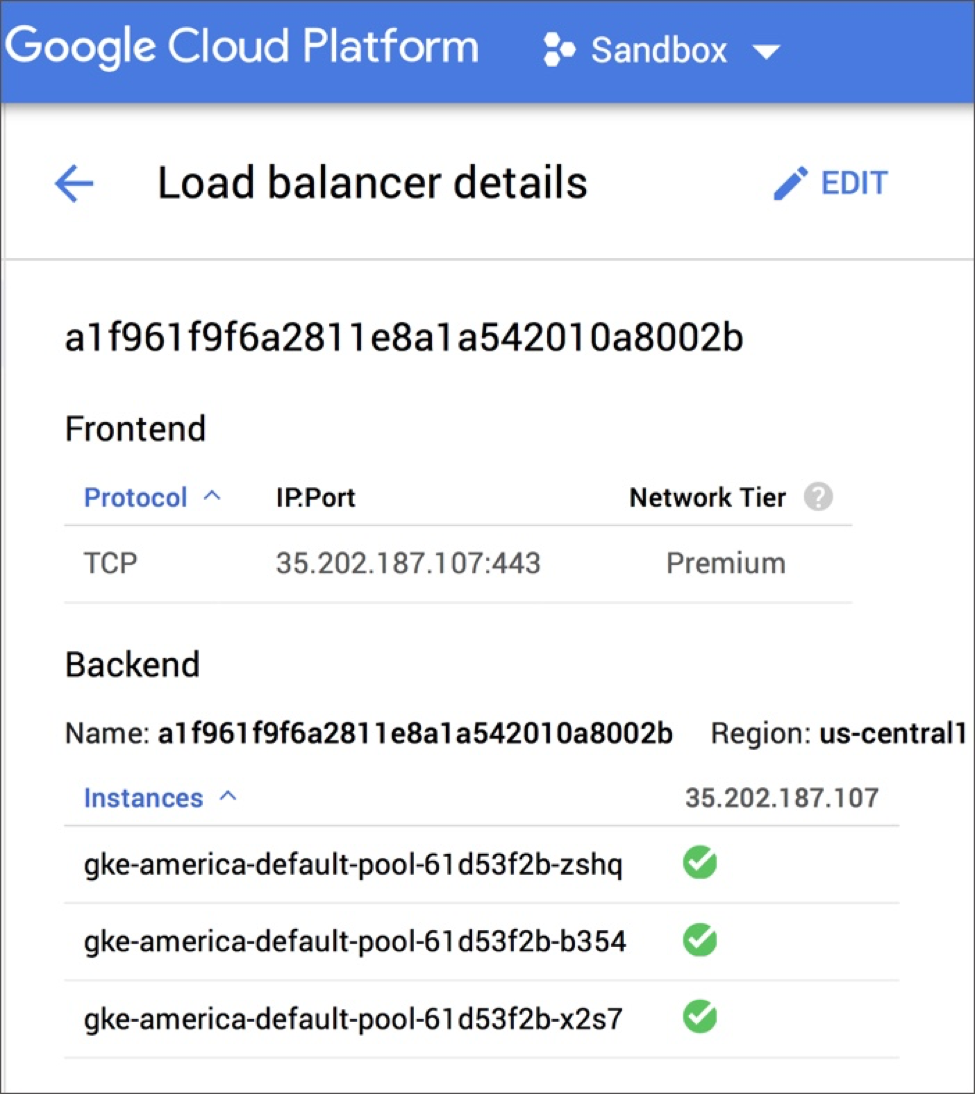
Federation API server is running at: 35.202.187.107
A federated control plane has been created in the GKE cluster deployed in US Central. The local kubeconfig is also updated. The API endpoint for both the CLIs — kubectl and kubefed — is available at 35.202.187.107.
If we visit the Cloud Load Balancer section of GCP Console, we will notice a new load balancer there. Since the federation is hosted by the cluster deployed in us-central1-a, the load balancer is also provisioned in the same cluster.
When the request is sent to the control plane, it goes via the load balancer to one of the nodes that responds to the API.
Let’s go ahead and join all the three clusters to the federated control plane.
$ kubefed --context=global-context join asia \
  --cluster-context=asia-context \
  --host-cluster-context=america-context

$ kubefed --context=global-context join europe \
  --cluster-context=europe-context \
  --host-cluster-context=america-context

$ kubefed --context=global-context join america \
  --cluster-context=america-context \
  --host-cluster-context=america-context
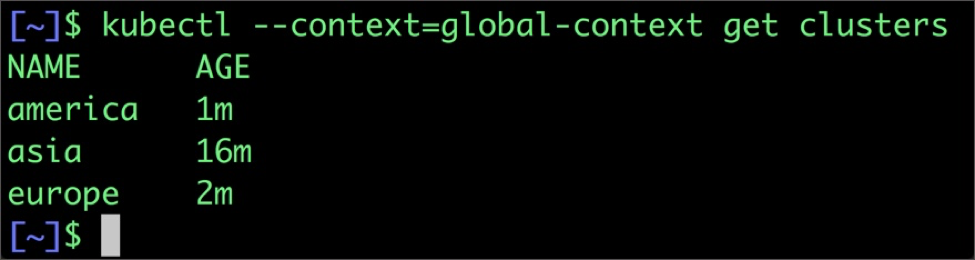
It’s time for us to check if all the clusters are successfully registered with the federated control plane.
$ kubectl --context=global-context get clusters
Due to a bug in kubefed, the default namespace is not present in the federated control plane. We can create it with the below command.
$ kubectl --context=global-context create ns default
We are now done with all the steps to create the federation. The next step is to deploy a workload and test it, which we will continue in the second part of this tutorial.
I will introduce an open source tool from Google called kubemci that can configure a multicluster ingress. Using that, we will be able to expose the distributed workload through a single IP address. Stay tuned for the second and the final part.