|
VOOZH | about |
|
VOOZH | about |
We’re so glad you’re here. You can expect all the best TNS content to arrive Monday through Friday to keep you on top of the news and at the top of your game.
Check your inbox for a confirmation email where you can adjust your preferences and even join additional groups.
Follow TNS on your favorite social media networks.
Become a TNS follower on LinkedIn.
Check out the latest featured and trending stories while you wait for your first TNS newsletter.
Do regular expressions secretly terrify you? Don’t worry, you can admit it — fear of regex is not some shameful quirk you need to keep hidden. All kinds of people, even experienced coders, avoid these freaky-deaky strings of characters that look like chicken tracks (if said chicken happened to be ice skating. While on meth).
For the longest time, I was one of those people ridiculously intimidated by regex. I could stumble through the basics when absolutely necessary but avoided actually learning it for real. It just looked, I dunno, alien. Also I already felt overloaded just trying to grasp JavaScript and Node.js. I figured there had to be workarounds for any situation that might call for using regular expressions. Slowly, though, it became obvious that those workarounds were more painful than actually buckling down and figuring out what is, after all, just another computer language. Specifically, a surprisingly powerful search pattern language that can save any programmer who understands how it works one heck of a lot of time.
What the Hell Even Is a Regular Expression? And Why Should I Care?
According to good ol’ Mozilla Developer Network, “Regular Expressions are patterns used to match character combinations in strings.” Yes, strings as in text or — as the authors of Programming Perl point out — “If you take ‘text’ in the widest possible sense, perhaps 90 percent of what you do is 90 percent text processing.”
This is useful because regular expressions can match just about any pattern. They are fast — faster than the recursive cruft required to not write regex, for sure. And while regexes aren’t the easiest to read, especially for newcomers to the syntax, consider whether you’d rather put in the effort required to puzzle out the logic of one line of cryptic letters and symbols versus the dozens of lines of non-regex code required to achieve the same result.
So you should care because regular expressions can help you save time while you write shorter, cleaner, and more performant code. And this is true for many if not most programming languages: regex is built right into the syntax of some languages, like Perl and JavaScript (courtesy of ECMAScript). Others, like Java, C++, and Python, have regex support as part of their standard library. You can even use regex in Google Code Search, not to mention just about any text editor or IDE.
OK, You Talked Me Into It. How Do I Get Started with Regex?
Today we are going to focus on regular expressions in JavaScript. The cool thing about regex in JavaScript is that regular expressions are actually objects, meaning that we get built-in methods like test() — which returns a Boolean search result indicating presence or absence of matches — and exec() which returns an array of match results (or null if none found).
But that is getting a bit ahead of ourselves. Let’s start with simple regex syntax.
It all comes down to the slash (“/”) sign. Slashes start and end all regular expressions. It can be helpful to think of them taking the place of the single quotes (‘ ’) or even double quotes (“”) you would otherwise use to enclose a plain old string.
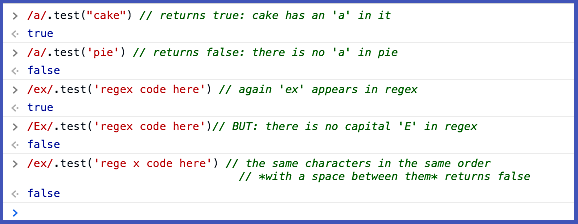
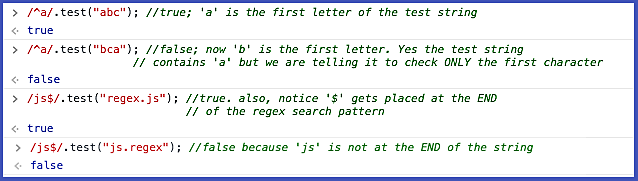
Here is the most basic form of regular expression: one or more straight-up alphanumeric (and/or standard punctuation) characters, between two slashes: /a/. The passed string is then tested for the presence or absence of the search characters — all included characters, appearing in exactly that order with no spaces; think of them as a sub-string — and returns a Boolean value:
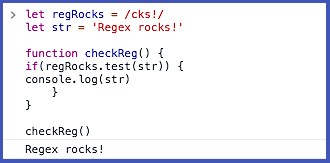
The expression between the slash symbols (/regex code here/) is an absolute literal. (Important note: uppercase and lowercase alphabet characters are treated as two separate and distinct values, much like ASCII character codes). Anything between the two slashes will be treated as literal characters, so keep that in mind if you are searching for a variable name. Searching for var names is totally legit, and totally works — the results, however, will not resolve down to the assigned value. On the flip side, however, you can assign a regular expression to a variable, and even use the return value as a test condition:
Exact searches, and Boolean returns, are both useful and ultimately limited. Fortunately, regex has all kinds of helpful search pattern syntax and symbols that allow searches for just about any permutation you can imagine.
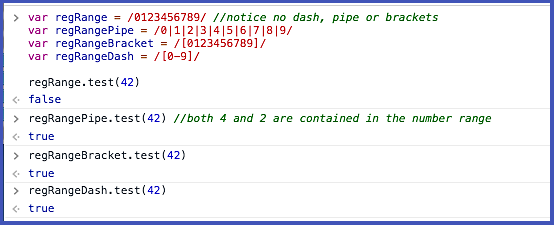
First, the range operators. When searching for multiple alphanumeric characters in a string, regex needs you to indicate the target chars with one of the symbols indicating regex range:
All four of the regex statements below are testing for the presence of numbers between one and nine. Notice that you have to use one of the symbols — pipe, dash or brackets — to get an accurate return value. (Why this happens is beyond the scope of this intro article; for now, just accept it and move on).
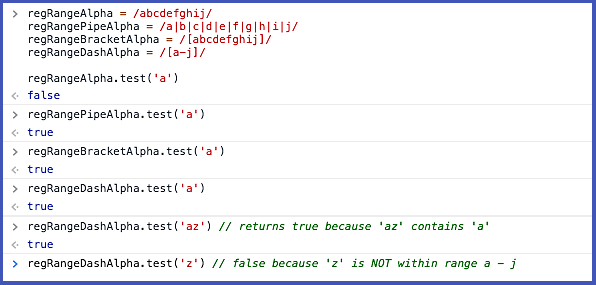
Works for alphabetic characters, too:
The dash, bracket and pipe range operators all search for our target character or pattern occurring anywhere within the designated search string. But you can target specific places to search:
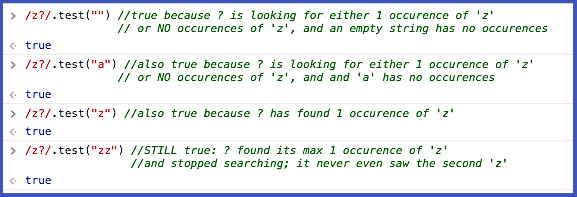
So far we know what to search for (numbers, letters, certain punctuation marks) and where to look for them. But the patterns we’ve used thus far only search for a single appearance of a pattern. What if we want more than one — or none at all? Enter the period ( “.” ), asterisk ( “*” ), question mark ( “?” ), plus sign ( “+” ) and curly brackets ( “{ }” ). Each of these is used to instruct regex how many instances you want it to search for.
Taken one by one, these regex operators are all simple concepts. But we’ve looked at quite a few already, so let’s do a quick review.
/cat/.test('catbird') // true
 [0-5]  looks for a single numeric character between 0 and 5
 [A-F] looks for a single CAPITAL letter between A and F
 /[123]+/.test(‘abc312’) // true because each individual --
 literal -- search item in the square brackets occurs in the
 test string. Order is not important.
 var britCheck = /colou?r/
 britCheck.test('colour') //true
 britCheck.test('color') // also returns true
/ba{2,3}b/.test('baab') // true; there are 2 'a's
/ba{2,3}b/.test(‘bab’) // false; searching for 2 or more instances of ‘a’
Fifteen minutes into exploring regular expressions, and you — yes, you! — are already capable of validating a phone number using even this bare-bones regex syntax!
The key for this exercise is curly braces, which act as regex quantifiers — i.e., they specify the number of times the character(s) in front of the braces are found in a target search. So “{n}” tells regex to match when the preceding character, or character range, occurs n times exactly.
Thus, for example: to validate that a ten digit phone number has been entered into a form with correct format, we can use /\(\d{3}\)-\d{3}-\d{4}/. This tells the regex compiler to look for:
(Notice that, to pass in the Chrome browser (v63), the expression must be enclosed in square brackets as well as the forward slashes. Other browsers can behave differently; some can validate with or without enclosing brackets).
The dashes are kosher in this case because they are being treated as a literal, rather than a regex operator. Strictly speaking, the expression isn’t totally successful: by convention, typical U.S. area codes (the first set of digits inside the parenthesis) and NXX exchanges (the second set of three digits) do not ever begin with zero. This would be permitted in the expression above, since \d allows all digits zero through nine. So to be truly legit, the expression syntax [1-9]\d{2} could be used to find an always-valid area code and NXX exchange.
Seriously. You earned it. This has been a quick and dirty primer on regex essentials, to get you up and going. Check back for our follow-up installment will help you that next step toward Regular Expression Ecstasy, where you will learn negative and positive “lookaheads,” matching strings with the exec() method built into JavaScript to execute a search for a match or matches and return an array of information (or null, in case of mismatch) rather than a Boolean.
We will finish with a hands-on exercise using regex to match a strong password. So drink some coffee, practice what you’ve learned so far, and see you next time!