|
VOOZH | about |
|
VOOZH | about |
We’re so glad you’re here. You can expect all the best TNS content to arrive Monday through Friday to keep you on top of the news and at the top of your game.
Check your inbox for a confirmation email where you can adjust your preferences and even join additional groups.
Follow TNS on your favorite social media networks.
Become a TNS follower on LinkedIn.
Check out the latest featured and trending stories while you wait for your first TNS newsletter.
When I worked on community calendar aggregation, I didn’t just want to solve what remains an unsolved problem. I also wanted to teach communities how to think computationally. “Let’s teach everyone to code” had become a mantra. For some of us, that meant acquainting nontechnical people with key ideas — from information science and software construction — that we saw as useful to everyone.
Thanks to AI, the distinction between data and not-data has begun to blur.
The idea I most wanted to make popular was the syndicated exchange of structured information. The poster child for this concept was of course RSS. I’d personally shown many people how to publish and subscribe to RSS feeds, so I knew that was teachable. The community calendar aggregator was just RSS for calendars. Except, for calendars, there was a more ancient system for exchanging structured information: the RFC 2445 iCalendar standard published in 1998. Google and Microsoft and many other calendars have always been able to read and write that format. I thought that if ordinary folks could wrap their heads around the RSS publish/subscribe pattern, I could also show them how the calendar apps they used every day embodied the same pattern, and would enable flexible calendar aggregation at community (or city) scale.
There are all sorts of reasons why that still hasn’t happened. But one of the major obstacles looks surmountable now. Back then, when presenting the concept of iCalendar-based calendar aggregation, I would patiently explain the difference between data and not-data.
Data was what could be read by a machine. Your Google calendar’s iCalendar feed was data.
Not-data was what machines couldn’t read. The event poster that you stapled to a telephone pole is not data.
“Of course it’s data,” people would say. “We can plainly see it: Saturday, May 18, 10 a.m., downtown Santa Rosa.”
Nope. If an event poster is your main form of promotion, I told them, you were doing it wrong. To be first-class citizens of a calendar ecosystem, your events had to flow as machine-readable feeds. Event posters are colorful, they’re vibrant, and they’re all delightfully different from one another. This is an urban art form, not an information system.
People weren’t wrong to expect otherwise; it just wasn’t possible then. Now, happily, the distinction between data and not-data has begun to blur.
The plugin sends the schema along with the unstructured event information (as text or image) to ChatGPT, which returns structured data that the plugin inserts into the database.
Check out this short clip that replicates Simon Willison’s stunning demo showing how an LLM-backed Datasette plugin, datasette-extract, can convert pictures of event posters into structured data.
I encourage you to replicate the full demo; it’s an eye-opener. If you do, after installing datasette, along with the datasette-extract plugin, be sure to start datasette with the –root argument so you get the authenticated URL that enables the “Database actions” button that leads to the plugin-provided option to “Create table with AI extracted data.”
When you activate that option, you’re prompted to define a schema for a new SQLite table, along with optional hints; for example, that event_date is related to the pattern “YYYY-MM-DD.” You can also provide instructions like, in Simon’s demo, to skip online-only events. Then you can paste in text copied from an event’s web page or upload a picture of an event poster.
The plugin sends the schema along with the unstructured event information (as text or image) to ChatGPT, which returns structured data that the plugin inserts into the database.
The plugin isn’t restricted to event data; you can define any kind of schema that you want ChatGPT to populate. The code for the datasette-extract plugin defines a “tool” that uses “function calling” and returns data in “arguments” — three terms that in this context don’t mean what you expect them to mean. The “tool” isn’t a function like get_weather in this example.
There, get_weather is an actual Python function. Because function_call = “auto”, the API may decide — based on the function_definition — that it’s the right function to help it answer a question about the weather. And if so, it invites us to call the function on its behalf.
The datasette_extract plugin means something else by “function”: a “tool” of that type, named extract_data. There’s no such Python function; it’s more like an abstract notion of a function. The parameters — in this case, the schema for a row of data to be inserted into an SQLite table — are described in a similar way. The code then asks the API to use this abstract “tool” to extract schema-conformant data from the included image data. Confusingly that extracted data appears in the function.arguments object returned from the API.
Simon’s example doesn’t just make fancy use of the OpenAI API, it’s also doing sophisticated things with asynchronous Python IO not only to manage streaming interaction with OpenAI, but also to coordinate with the datasette engine that receives the extracted data.
How important is it to use the “tool” approach? Evidently not critical; here’s a simple alternative that just sends the schema, image data and a basic prompt.
It seems to analyze the image equally well and, in this case, obligingly provides output in iCalendar format.
python event.py rose-parade.jpg
 Based on the schema provided and the information from the image, here's how the event can be represented in iCalendar format:

 BEGIN:VCALENDAR
 VERSION:2.0
 PRODID:-//Your Organization//Your Product//EN
 BEGIN:VEVENT
 UID:20240518T100000Z-1@yourdomain.com
 DTSTAMP:20231001T000000Z
 DTSTART;TZID=America/Los_Angeles:20240518T100000
 DTEND;TZID=America/Los_Angeles:20240518T210000
 SUMMARY:The Luther Burbank Rose Parade and Festival
 DESCRIPTION:The Luther Burbank Rose Parade and Festival will take place on May 18, 2024. The parade starts at 10:00 AM, followed by the festival.
 LOCATION:Downtown Santa Rosa
 END:VEVENT
 END:VCALENDAR
I didn’t imagine a tool that could not only read dates, times, titles and descriptions, but make reasonable guesses about how to match elements in the photo to the database schema.
Back in the day, the dream was to be able to point a camera phone at an event poster and transform the image into an entry in a calendar app. Wrapping the simplified extractor seemed possible but difficult. But maybe a custom GPT will suffice? Sure enough, it does. Here’s that long-imagined scenario now made real.
One notable detail: ChatGPT spins up an instance of Python and fails for whatever reason to load the iCalendar module, so it falls back to another strategy:
It seems the iCalendar module isn’t available. I will generate the iCalendar (.ics) file manually instead.
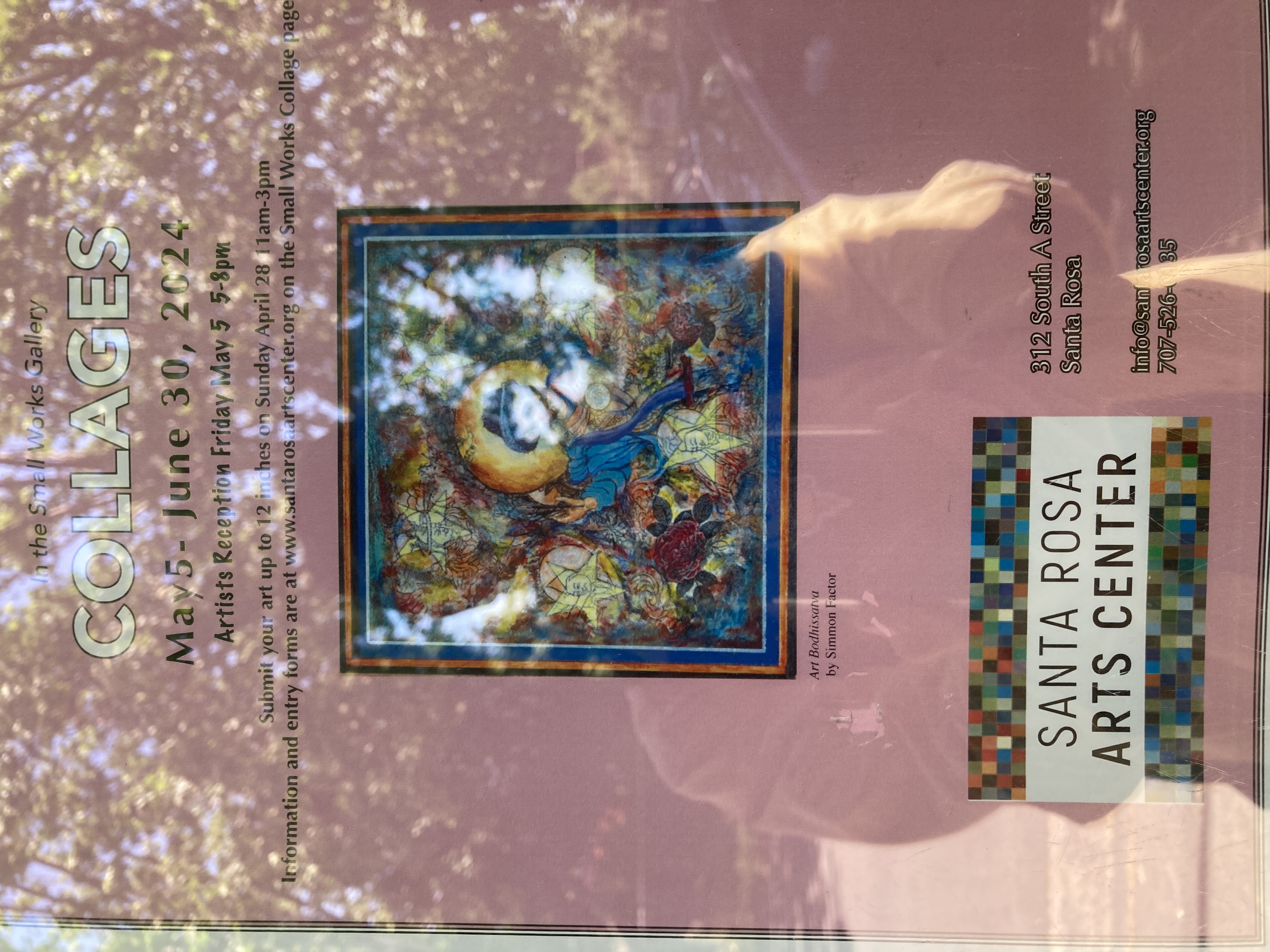
That was an exception. Usually it can load iCalendar, but it’s fascinating to see this kind of resilience and flexibility. That isn’t a scenario I’ve ever envisioned. Nor did I imagine a tool that could not only read dates, times, titles and descriptions, but make reasonable guesses about how to match elements in the photo to the SUMMARY, DESCRIPTION and LOCATION slots in the schema. Consider this image.
Here’s the mapping extracted from the photo.
 SUMMARY:Collages - Artists Reception
 DESCRIPTION:In the Small Works Gallery. Information and entry forms are at www.santarosaartscenter.org on the Small Works Collage page.
 LOCATION:Santa Rosa Arts Center, 312 South A Street, Santa Rosa
You might make different choices, but there are choices being made here, and they are indeed reasonable ones.
Finally, I never imagined that creating and deploying this handy little app wouldn’t require me, or anyone, to be able to write code, because a verbal description of the desired output would suffice.
Is computational thinking still a broadly relevant form of digital literacy? Yes, but perhaps not in the ways we envisioned. You shouldn’t need to know or care about file formats and Python libraries in order to tackle a challenge like this one. But the motivating principle remains the same: Unstructured information becomes more useful when transformed into structured data. Everyone should know that and be able to guide the machine assistants that will do the transformation.