|
VOOZH | about |
|
VOOZH | about |
We’re so glad you’re here. You can expect all the best TNS content to arrive Monday through Friday to keep you on top of the news and at the top of your game.
Check your inbox for a confirmation email where you can adjust your preferences and even join additional groups.
Follow TNS on your favorite social media networks.
Become a TNS follower on LinkedIn.
Check out the latest featured and trending stories while you wait for your first TNS newsletter.
Teams that scale, provision and configure cloud resources manually risk committing errors that might affect the performance or availability of their systems. Fortunately, there’s a way out: It’s called automation.
Cloud automation solutions reduce or eliminate all the manual effort your team invests into configuring virtual machines, creating VM clusters, setting up virtual networks and more.
You can only imagine the time savings companies can achieve with automation. But that’s just the tip of the iceberg!
Read on to discover the most impactful cloud automation use cases across the tech industry.
By automating your cloud setup, you get to remove all the repetitive and manual work involved in deploying and managing cloud workloads. Let’s get real: Manual work is inefficient and error-prone. It often leads to troubleshooting that might affect your workload’s availability.
By minimizing the amount of human labor involved in administering cloud-based operations, you’ll speed up your processes. Fewer mistakes means less time spent on diagnosing and troubleshooting, and more time on developing new things and innovating.
Manual cloud deployment might cause security vulnerabilities, which could put your application and company at risk. Also, it’s a good idea to automate sensitive jobs. You won’t need as many team members logging into mission-critical systems, so the danger of human mistakes and account breaches is greatly reduced.
If you want to streamline your deployment process and implement a truly modern DevOps, you need automation. Infrastructure-as-Code (IaC), tight feedback loops and continuous delivery — they all rely on automation.
Cloud automation tools allow using cloud infrastructure to the fullest, in areas like automated storage and backups, security and compliance management, changes in configurations and settings, and code deployment.
Automation plays an essential role in protecting your systems from risk, be it equipment failure or a cyber attack. To boost your resilience, you can automate backups on the cloud or back up your on-premises infrastructure automatically to an environment based in the cloud.
Teams that spin up systems manually or on an ad-hoc basis make an admin’s life difficult — they have low visibility of what’s running. Automation introduces standardization to the process, giving admins a centralized view and more control over the infrastructure.
Understanding the difference between cloud automation and orchestration is essential for building a smart automation strategy.
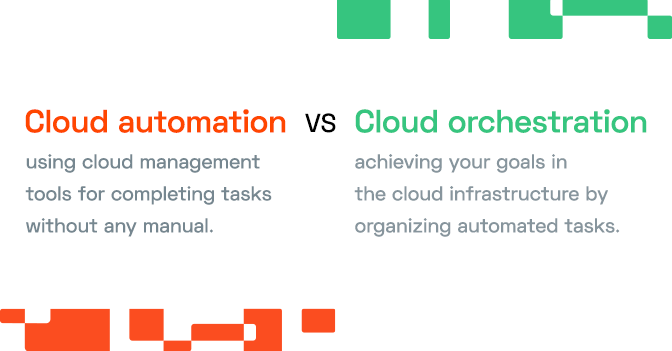
Cloud automation means using cloud management tools for completing tasks without any manual effort. Cloud orchestration is about meeting your goals on a broader level, by organizing these automated tasks.
In cloud orchestration, you connect low-level tasks to create processes and coordinate them throughout the entire infrastructure, across a number of systems or locations.
Cloud automation can be a standalone initiative, but combining these two approaches brings the best results.
A cloud automation tool can shut unused instances down to reduce your cloud costs and mitigate the risk of over-provisioning or sprawl of cloud resources.
No more orphaned instances or shadow IT projects means no more expenses that bring you zero value. Cloud automation solutions are great at identifying zombie infrastructure and can address the problem before it snowballs into a huge cloud bill at the end of the month.
Picking the right virtual machine for the job is hard when you’re faced with hundreds of choices. Which ones have the optimal cost and performance ratio?
An instance selection algorithm can rightsize and autoscale cloud resources for you. Automation solutions process massive volumes of data to identify the best instance types.
Here’s an example scenario:
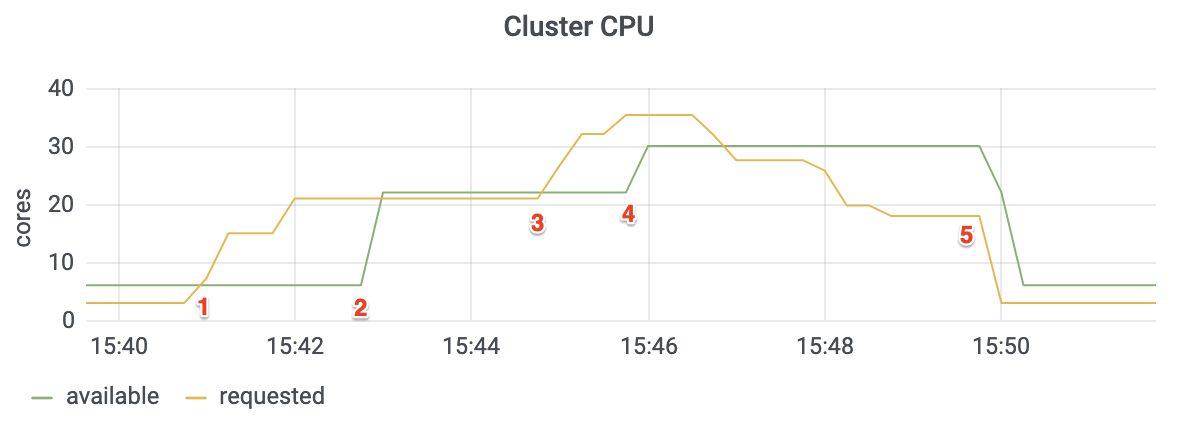
Imagine that you’re running an e-commerce application in Kubernetes. Then you add a solution that takes care of automated provisioning:
Developing Infrastructure-as-Code (IaC) is another key use case for automation. In IaC, the IT infrastructure is defined in configuration files. It’s launched automatically following that configuration.
With cloud automation, you can expand IaC to control nearly all infrastructure aspects and orchestrate more complex systems.
Automation processes can define common configuration items like VMs, containers or virtual private networks. Then they load application components and services into the configuration items and bring them together to build a better operational environment.
Hybrid cloud requires careful integration between the on-premises and public cloud systems. Cloud automation solutions can lift a lot of burden from your shoulders here as well.
They can synchronize assets between local data centers and cloud resources to enable cloud bursting, moving loads to the cloud when your application exceeds local resources.
Cloud automation also opens the doors to disaster recovery scenarios, with the remote site mirroring the on-premises environment.
Teams can save a lot of time and effort by implementing cloud automation. It’s more scalable, secure and quicker, allowing you to create more predictable and dependable workflows.
Are you automating the provisioning, management, or scaling of your cloud resources? Are you planning to try out some automated Ops processes? Share your experience with us on Twitter.
If you use Kubernetes and run it on Amazon EKS, you can kick off your automation journey by generating a free savings report to check how much you could potentially save on your cloud bill.