
Unlocking Multimodal Video Transcription with Gemini
Explore how to transcribe videos with detailed speaker identification in a single prompt

A quick heads-up before we start:
- I’m a developer at Google Cloud. I’m happy to share this article and hope you’ll learn a few things. Thoughts and opinions are entirely my own.
- You can find the source code for this article (including future updates) in this notebook (Apache License version 2.0).
- You can experiment for free with Gemini in Google AI Studio and get an API key to call Gemini programmatically.
- All images, unless otherwise noted, are by me.
✨ Overview
Traditional machine learning (ML) perception models typically focus on specific features and single modalities, deriving insights solely from natural language, speech, or vision analysis. Historically, extracting and consolidating information from multiple modalities has been challenging due to siloed processing, complex architectures, and the risk of data being “lost in translation.” However, multimodal and long-context large language models (LLMs) like Gemini can overcome these issues by processing all modalities within the same context, opening new possibilities.
Moving beyond speech-to-text, this article explores how to achieve comprehensive video transcriptions by leveraging all available modalities. It covers the following topics:
- A methodology for addressing new or complex problems with a multimodal LLM
- A prompt technique for decoupling data and preserving attention: tabular extraction
- Strategies for making the most of Gemini’s 1M-token context in a single request
- Practical examples of multimodal video transcriptions
- Tips & optimizations
🔥 Challenge
To fully transcribe a video, we’re looking to answer the following questions:
- 1️⃣ What was said and when?
- 2️⃣ Who are the speakers?
- 3️⃣ Who said what?
Can we solve this problem in a straightforward and efficient way?
🌟 State of the art
1️⃣ What was said and when?
This is a known problem with an existing solution:
- Speech-to-Text (STT) is a process that takes an audio input and transforms speech into text. STT can provide timestamps at the word level. It is also known as automatic speech recognition (ASR).
In the last decade, task-specific ML models have most effectively addressed this.
2️⃣ Who are the speakers?
We can retrieve speaker names in a video from two sources:
- What’s written (e.g., speakers can be introduced with on-screen information when they first speak)
- What’s spoken (e.g., “Hello Bob! Alice! How are you doing?”)
Vision and Natural Language Processing (NLP) models can help with the following features:
- Vision: Optical Character Recognition (OCR), also called text detection, extracts the text visible in images.
- Vision: Person Detection identifies if and where people are in an image.
- NLP: Entity Extraction can identify named entities in text.
3️⃣ Who said what?
This is another known problem with a partial solution (complementary to Speech-to-Text):
- Speaker Diarization (also known as speaker turn segmentation) is a process that splits an audio stream into segments for the different detected speakers (“Speaker A”, “Speaker B”, etc.).
Researchers have made significant progress in this field for decades, particularly with ML models in recent years, but this is still an active field of research. Existing solutions have shortcomings: they often require human supervision and hints (e.g., the minimum and maximum number of speakers, the language spoken), and typically support only a limited set of languages.
🏺 Traditional ML pipeline
Solving all of 1️⃣, 2️⃣, and 3️⃣ isn’t straightforward. This would likely involve setting up an elaborate supervised processing pipeline, based on a few state-of-the-art ML models, such as the following:
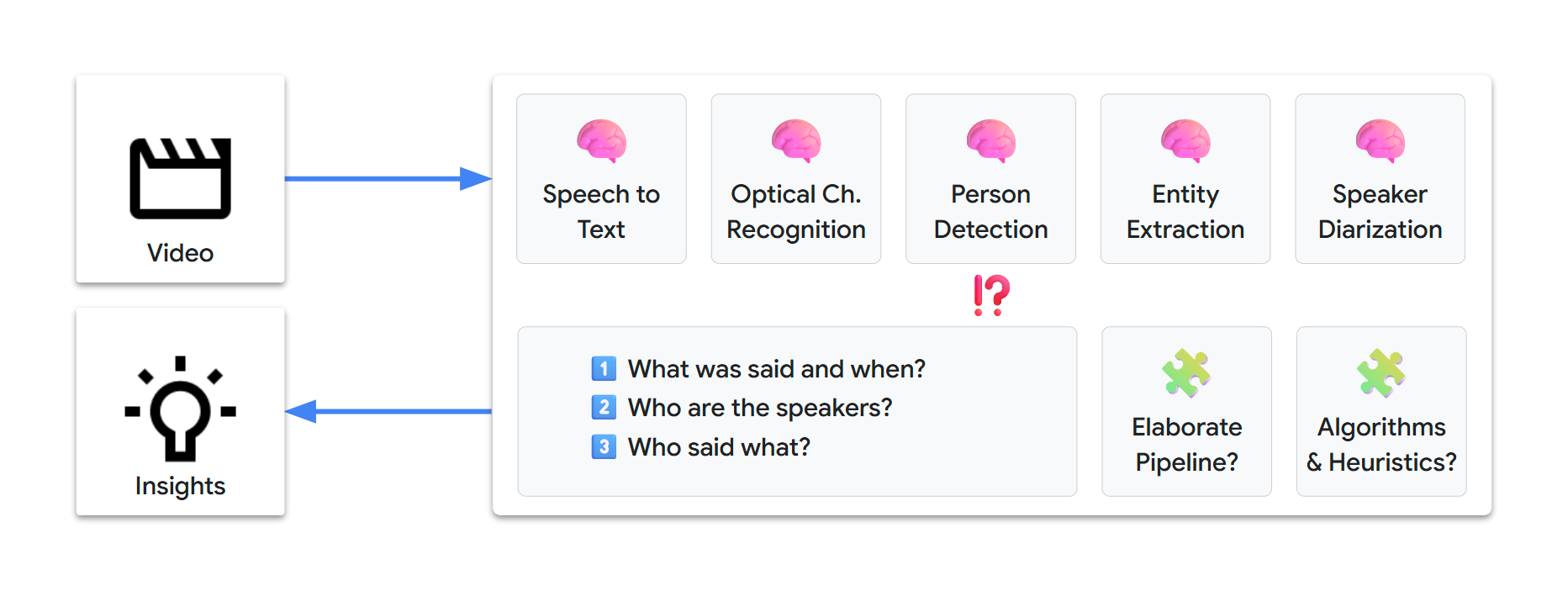
We might need days or weeks to design and set up such a pipeline. Additionally, at the time of writing, our multimodal-video-transcription challenge is not a solved problem, so there’s absolutely no certainty of reaching a viable solution.
💡 A new problem-solving toolbox
Gemini allows for rapid prompt-based problem solving. With just text instructions, we can extract information and transform it into new insights, through a straightforward and automated workflow.
🎬 Multimodal
Gemini is natively multimodal, which means it can process different types of inputs:
- text
- image
- audio
- video
- document
🌐 Multilingual
Gemini is also multilingual:
- It can process inputs and generate outputs in 100+ languages
- If we can solve the video challenge for one language, that solution should naturally extend to all other languages
🧰 A natural-language toolbox
Multimodal and multilingual understanding in a single model lets us shift from relying on task-specific ML models to using a single versatile LLM.
Our challenge now looks a lot simpler:
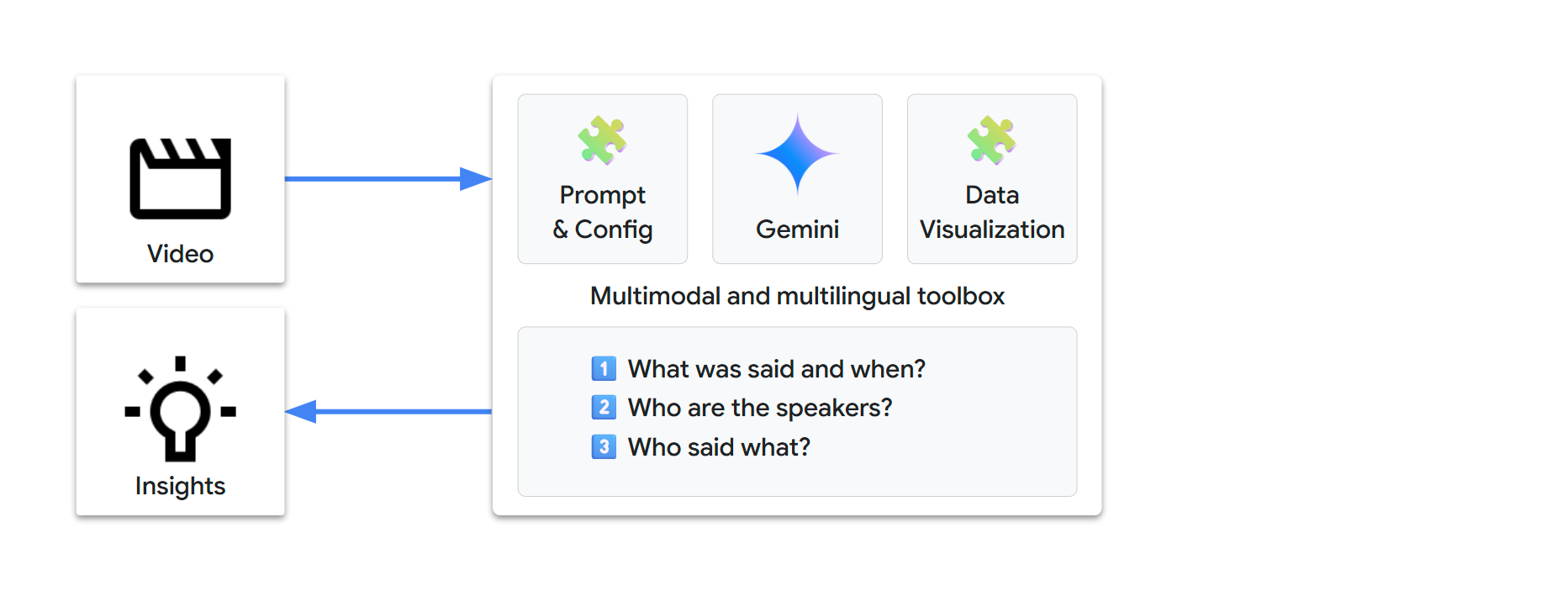
In other words, let’s rephrase our challenge: Can we fully transcribe a video with just the following?
- 1 video
- 1 prompt
- 1 request
Let’s try with Gemini…
🏁 Setup
🐍 Python packages
We’ll use the following packages:
google-genai: the Google Gen AI Python SDK lets us call Gemini with a few lines of codepandasfor data visualization
We’ll also use these packages (dependencies of google-genai):
pydanticfor data managementtenacityfor request management
pip install --quiet "google-genai>=1.49.0" "pandas[output-formatting]"🔗 Gemini API
We have two main options to send requests to Gemini:
- Vertex AI: Build enterprise-ready projects on Google Cloud
- Google AI Studio: Experiment, prototype, and deploy small projects
The Google Gen AI SDK provides a unified interface to these APIs and we can use environment variables for the configuration.
💡 You can store your environment configuration outside of the source code:
| Environment | Method |
|---|---|
| IDE | .env file (or equivalent) |
| Colab | Colab Secrets (🗝️ icon in left panel, see code below) |
| Colab Enterprise | Google Cloud project and location are automatically defined |
| Vertex AI Workbench | Google Cloud project and location are automatically defined |
🤖 Gen AI SDK
To send Gemini requests, create a google.genai client:
from google import genai

check_environment()

client = genai.Client()
Check your configuration:
check_configuration(client)Using the Vertex AI API with project "lpdemo-…" in location "europe-west9"🧠 Gemini model
Gemini comes in different versions.
Let’s get started with Gemini 2.0 Flash, as it offers both high performance and low latency:
GEMINI_2_0_FLASH = "gemini-2.0-flash"
💡 We select Gemini 2.0 Flash intentionally. The Gemini 2.5 model family is generally available and even more capable, but we want to experiment and understand Gemini’s core multimodal behavior. If we complete our challenge with 2.0, this should also work with newer models.
⚙️ Gemini configuration
Gemini can be used in different ways, ranging from factual to creative mode. The problem we’re trying to solve is a data extraction use case. We want results as factual and deterministic as possible. For this, we can change the content generation parameters.
We’ll set the temperature, top_p, and seed parameters to minimize randomness:
temperature=0.0top_p=0.0seed=42(arbitrary fixed value)
🎞️ Video sources
Here are the main video sources that Gemini can analyze:
| source | URI | Vertex AI | Google AI Studio |
|---|---|---|---|
| Google Cloud Storage | gs://bucket/path/to/video.* | ✅ | |
| Web URL | https://path/to/video.* | ✅ | |
| YouTube | https://www.youtube.com/watch?v=YOUTUBE_ID | ✅ | ✅ |
⚠️ Important notes
- Our video test suite primarily uses public YouTube videos. This is for simplicity.
- When analyzing YouTube sources, Gemini receives raw audio/video streams without any additional metadata, exactly as if processing the corresponding video files from Cloud Storage.
- YouTube does offer caption/subtitle/transcript features (user-provided or auto-generated). However, these features focus on word-level speech-to-text and are limited to 40+ languages. Gemini does not receive any of this data and you’ll see that a multimodal transcription with Gemini provides additional benefits.
- Furthermore, our challenge also involves identifying speakers and extracting speaker data, a unique new capability.
🛠️ Helpers
🧪 Prototyping
🌱 Natural behavior
Before diving any deeper, it’s interesting to see how Gemini responds to simple instructions, to develop some intuition about its natural behavior.
Let’s first see what we get with minimalistic prompts and a short English video.
video = TestVideo.GDM_PODCAST_TRAILER_PT59S
display_video(video)

prompt = "Transcribe the video's audio with time information."
generate_content(prompt, video)
Video (source)
----------------- GDM_PODCAST_TRAILER_PT59S / gemini-2.0-flash -----------------
Input tokens : 16,708
Output tokens : 421
------------------------------ start of response -------------------------------
[00:00:00] Do I have to call you Sir Demis now?
[00:00:01] Oh, you don't.
[00:00:02] Absolutely not.
[00:00:04] Welcome to Google DeepMind the podcast with me, your host Professor Hannah Fry.
[00:00:06] We want to take you to the heart of where these ideas are coming from.
[00:00:12] We want to introduce you to the people who are leading the design of our collective future.
[00:00:19] Getting the safety right is probably, I'd say, one of the most important challenges of our time.
[00:00:25] I want safe and capable.
[00:00:27] I want a bridge that will not collapse.
[00:00:30] just give these scientists a superpower that they had not imagined earlier.
[00:00:34] autonomous vehicles.
[00:00:35] It's hard to fathom that when you're working on a search engine.
[00:00:38] We may see entirely new genre or entirely new forms of art come up.
[00:00:42] There may be a new word that is not music, painting, photography, movie making, and that AI will have helped us create it.
[00:00:48] You really want AGI to be able to peer into the mysteries of the universe.
[00:00:51] Yes, quantum mechanics, string theory, well, and the nature of reality.
[00:00:55] Ow.
[00:00:57] the magic of AI.
------------------------------- end of response --------------------------------
Results:
- Gemini naturally outputs a list of
[time] transcriptlines. - That’s Speech-to-Text in one line!
- It looks like we can answer “1️⃣ What was said and when?”.
Now, what about “2️⃣ Who are the speakers?”
prompt = "List the speakers identifiable in the video."
generate_content(prompt, video)
----------------- GDM_PODCAST_TRAILER_PT59S / gemini-2.0-flash -----------------
Input tokens : 16,705
Output tokens : 46
------------------------------ start of response -------------------------------
Here are the speakers identifiable in the video:
* Professor Hannah Fry
* Demis Hassabis
* Anca Dragan
* Pushmeet Kohli
* Jeff Dean
* Douglas Eck
------------------------------- end of response --------------------------------Results:
- Gemini can consolidate the names visible on title cards during the video.
- That’s OCR + entity extraction in one line!
- “2️⃣ Who are the speakers?” looks solved too!
⏩ Not so fast!
The natural next step is to jump to the final instructions, to solve our problem once and for all.
prompt = """
Transcribe the video's audio including speaker names (use `?` if not found).

Format example:
[00:02] John Doe - Hello Alice!
"""
generate_content(prompt, video)
----------------- GDM_PODCAST_TRAILER_PT59S / gemini-2.0-flash -----------------
Input tokens : 16,732
Output tokens : 378
------------------------------ start of response -------------------------------
Here is the audio transcription of the video:
[00:00] ? - Do I have to call you Sir Demis now?
[00:01] Demis Hassabis - Oh, you don't. Absolutely not.
[00:04] Professor Hannah Fry - Welcome to Google DeepMind the podcast with me, your host, Professor Hannah Fry.
[00:06] Professor Hannah Fry - We want to take you to the heart of where these ideas are coming from. We want to introduce you to the people who are leading the design of our collective future.
[00:19] Anca Dragan - Getting the safety right is probably, I'd say, one of the most important challenges of our time. I want safe and capable. I want a bridge that will not collapse.
[00:29] Pushmeet Kohli - Just give these scientists a superpower that they had not imagined earlier.
[00:34] Jeff Dean - Autonomous vehicles. It's hard to fathom that when you're working on a search engine.
[00:38] Douglas Eck - We may see entirely new genre or entirely new forms of art come up. There may be a new word that is not music, painting, photography, movie making, and that AI will have helped us create it.
[00:48] Professor Hannah Fry - You really want AGI to be able to peer into the mysteries of the universe.
[00:51] Demis Hassabis - Yes, quantum mechanics, string theory, well, and the nature of reality.
[00:55] Professor Hannah Fry - Ow!
[00:57] Douglas Eck - The magic of AI.
------------------------------- end of response --------------------------------This is almost correct. The first segment is not attributed to the host (who is only introduced a bit later), but everything else looks correct.
Nonetheless, these are not real-world conditions:
- The video is very short (less than a minute)
- The video is also rather simple (speakers are clearly introduced with on-screen title cards)
Let’s try with this 8-minute (and more complex) video:
generate_content(prompt, TestVideo.GDM_ALPHAFOLD_PT7M54S)This falls apart: Most segments have no identified speaker!
As we are trying to solve a new complex problem, LLMs haven’t been trained on any known solution. This is likely why direct instructions do not yield the expected answer.
At this stage:
- We might conclude that we can’t solve the problem with real-world videos.
- Persevering by trying more and more elaborate prompts for this unsolved problem might result in a waste of time.
Let’s take a step back and think about what happens under the hood…
⚛️ Under the hood
Modern LLMs are mostly based on the Transformer architecture, a new neural network design detailed in a 2017 paper by Google researchers titled Attention Is All You Need. The paper introduced the self-attention mechanism, a key innovation that fundamentally changed the way machines process language.
🪙 Tokens
Tokens are the LLM building blocks. We can consider a token to represent a piece of information.
Examples of Gemini multimodal tokens (with default parameters):
| content | tokens | details |
|---|---|---|
hello | 1 | 1 token for common words/sequences |
passionately | 2 | passion•ately |
passionnément | 3 | passion•né•ment (same adverb in French) |
| image | 258 | per image (or per tile depending on image resolution) |
| audio without timecodes | 25 / second | handled by the audio tokenizer |
| video without audio | 258 / frame | handled by the video tokenizer at 1 frame per second |
MM:SS timecode | 5 | audio chunk or video frame temporal reference |
H:MM:SS timecode | 7 | similarly, for content longer than 1 hour |
🎞️ Sampling frame rate
By default, video frames are sampled at 1 frame per second (1 FPS). These frames are included in the context with their corresponding timecodes.
You can use a custom sampling frame rate with the Part.video_metadata.fps parameter:
| video type | change | fps range |
|---|---|---|
| static, slow | decrease the frame rate | 0.0 < fps < 1.0 |
| dynamic, fast | increase the frame rate | 1.0 < fps <= 24.0 |
💡 For
1.0 < fps, Gemini was trained to understandMM:SS.sssandH:MM:SS.ssstimecodes.
🔍 Media resolution
By default, each sampled frame is represented with 258 tokens.
You can specify a medium or low media resolution with the GenerateContentConfig.media_resolution parameter:
| media_resolution for video inputs | tokens/ frame | benefit |
|---|---|---|
MEDIA_RESOLUTION_MEDIUM (default) | 258 | higher precision, allowing for more detailed understanding |
MEDIA_RESOLUTION_LOW | 66 | faster and cheaper inference, allowing for longer videos |
💡 The “media resolution” can be seen as the “image token resolution”: the number of tokens used to represent an image.
🧮 Probabilities all the way down
The ability of LLMs to communicate in flawless natural language is very impressive, but it’s easy to get carried away and make incorrect assumptions.
Keep in mind how LLMs work:
- An LLM is trained on a massive tokenized dataset, which represents its knowledge (its long-term memory)
- During the training, its neural network learns token patterns
- When you send a request to an LLM, your inputs are transformed into tokens (tokenization)
- To answer your request, the LLM predicts, token by token, the next likely tokens
- Overall, LLMs are exceptional statistical token prediction machines that seem to mimic how some parts of our brain work
This has a few consequences:
- LLM outputs are just statistically likely follow-ups to your inputs
- LLMs show some forms of reasoning: they can match complex patterns but have no actual deep understanding
- LLMs have no consciousness: they are designed to generate tokens and will do so based on your instructions
- Order matters: Tokens that are generated first will influence tokens that are generated next
For the next step, some methodical prompt crafting might help…
🏗️ Prompt crafting
🪜 Methodology
Prompt crafting, also called prompt engineering, is a relatively new field. It involves designing and refining text instructions to guide LLMs towards generating desired outputs. Like writing, it is both an art and a science, a skill that everyone can develop with practice.
We can find countless reference materials about prompt crafting. Some prompts can be very long, complex, and even scary. Crafting prompts with a high-performing LLM like Gemini is much simpler. Here are three key adjectives to keep in mind:
- iterative
- precise
- concise
Iterative
Prompt crafting is typically an iterative process. Here are some recommendations:
- Craft your prompt step by step
- Keep track of your successive iterations
- At every iteration, make sure to measure what’s working versus what’s not
- If you reach a regression, backtrack to a successful iteration
Precise
Precision is key:
- Use words as specific as possible
- Words with multiple meanings can introduce variability, so use precise expressions
- Precision will influence probabilities in your favor
Concise
Concision has additional advantages:
- A short prompt is easier for us developers to understand (and maintain!)
- The longer your prompt is, the more likely you are to introduce inconsistencies or even contradictions, which results in variable interpretations of your instructions
- Test and trust the LLM’s knowledge: this knowledge acts as an implicit context and can make your prompt shorter and clearer
Overall, though this may seem contradictory, if you take the time to be iterative, precise, and concise, you are likely to save a lot of time.
💡 If you want to explore this topic, check out Prompting strategies (Google Cloud reference) and Prompt engineering (68-page PDF by Lee Boonstra).
📚 Terminology
We’re not experts in video transcription (yet!) but we want Gemini to behave as one. Consequently, we’d like to write prompts as specific as possible for this use case. While LLMs process instructions based on their training knowledge, they can also share this knowledge with us.
We can learn a lot by directly asking Gemini:
prompt = """
What is the terminology used for video transcriptions?
Please show a typical output example.
"""
generate_content(prompt, show_as=ShowAs.MARKDOWN)
📝 Tabular extraction
So far, we’ve seen the following:
- We didn’t manage to get the full transcription with identified speakers all at once
- Order matters (because a generated token influences the probabilities for subsequent tokens)
To tackle our challenge, we need Gemini to infer from the following multimodal information:
- text (our instructions + what may be written in the video)
- audio cues (everything said or audible in the video’s audio)
- visual cues (everything visible in the video)
- time (when things happen)
That is quite a mixture of information types!
As video transcription is a data extraction use case, if we think about the final result as a database, our final goal can be seen as the generation of two related tables (transcripts and speakers). If we write it down, our initial three sub-problems now look decoupled:
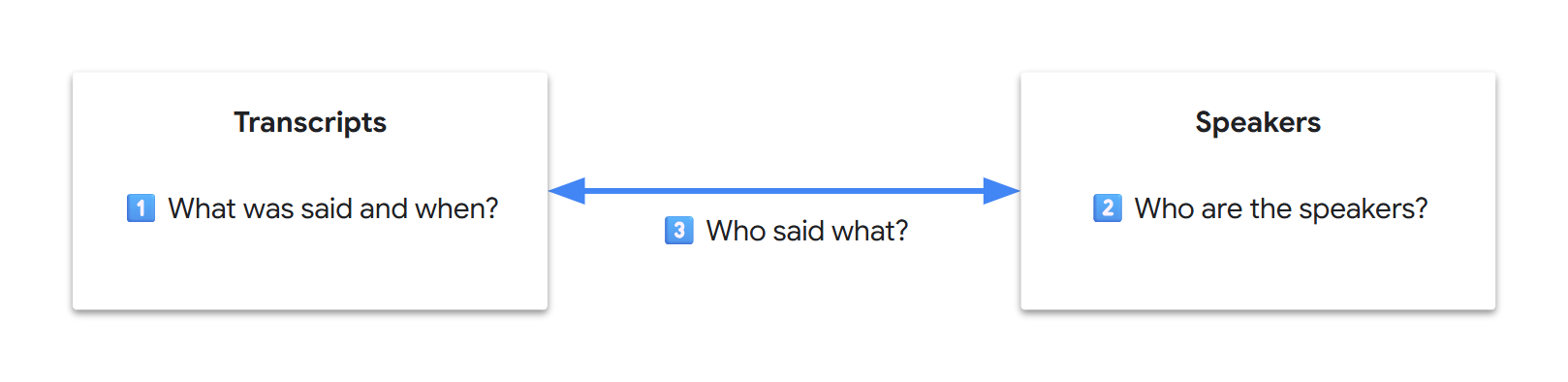
💡 In computer science, data decoupling enhances data locality, often yielding improved performance across areas such as cache utilization, data access, semantic understanding, or system maintenance. Within the LLM Transformer architecture, core performance relies heavily on the attention mechanism. However, the attention pool is finite and tokens compete for attention. Researchers sometimes refer to “attention dilution” for long-context, million-token-scale benchmarks. While we cannot directly debug LLMs as users, intuitively, data decoupling may improve the model’s focus, leading to a better attention span.
Since Gemini is extremely good with patterns, it can automatically generate identifiers to link our tables. In addition, since we eventually want an automated workflow, we can start reasoning in terms of data and fields:
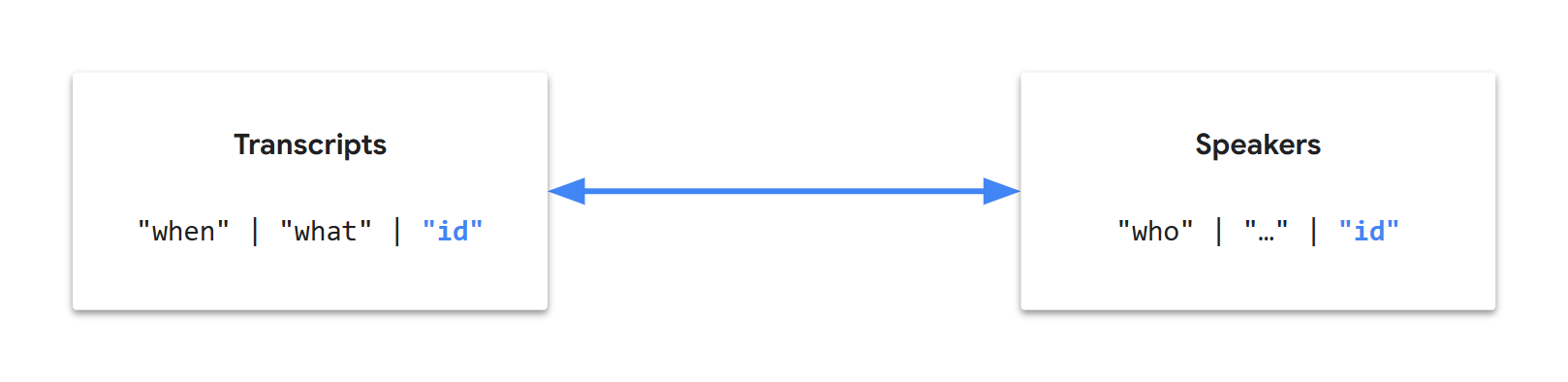
Let’s call this approach “tabular extraction”, split our instructions into two tasks (tables), still in a single request, and arrange them in a meaningful order…
💬 Transcripts
First of all, let’s focus on getting the audio transcripts:
- Gemini has proven to be natively good at audio transcription
- This requires less inference than image analysis
- It is central and independent information
💡 Generating an output that starts with correct answers should help to achieve an overall correct output.
We’ve also seen what a typical transcription entry can look like:
00:02 speaker_1: Welcome!But, right away, there can be some ambiguities in our multimodal use case:
- What is a speaker?
- Is it someone we see/hear?
- What if the person visible in the video is not the one speaking?
- What if the person speaking is never seen in the video?
How do we unconsciously identify who is speaking in a video?
- First, probably by identifying the different voices on the fly?
- Then, probably by consolidating additional audio and visual cues?
Can Gemini understand voice characteristics?
prompt = """
Using only the video's audio, list the following audible characteristics:
- Voice tones
- Voice pitches
- Languages
- Accents
- Speaking styles
"""
video = TestVideo.GDM_PODCAST_TRAILER_PT59S

generate_content(prompt, video, show_as=ShowAs.MARKDOWN)
----------------- GDM_PODCAST_TRAILER_PT59S / gemini-2.0-flash -----------------
Input tokens : 16,730
Output tokens : 168
------------------------------ start of response -------------------------------Okay, here's a breakdown of the audible characteristics in the video's audio:
- **Voice Tones:** The tones range from conversational and friendly to more serious and thoughtful. There are also moments of excitement and humor.
- **Voice Pitches:** There's a mix of high and low pitches, depending on the speaker. The female speakers tend to have higher pitches, while the male speakers have lower pitches.
- **Languages:** The primary language is English.
- **Accents:** There are a variety of accents, including British, American, and possibly others that are harder to pinpoint without more context.
- **Speaking Styles:** The speaking styles vary from formal and professional (like in an interview setting) to more casual and conversational. Some speakers are more articulate and precise, while others are more relaxed.------------------------------- end of response --------------------------------What about a French video?
video = TestVideo.BRUT_FR_DOGS_WATER_LEAK_PT8M28S

generate_content(prompt, video, show_as=ShowAs.MARKDOWN)
-------------- BRUT_FR_DOGS_WATER_LEAK_PT8M28S / gemini-2.0-flash --------------
Input tokens : 144,055
Output tokens : 147
------------------------------ start of response -------------------------------Here's a breakdown of the audible characteristics in the video, based on the audio:
* **Languages:** Primarily French.
* **Accents:** French accents are present, with some variations depending on the speaker.
* **Voice Tones:** The voice tones vary depending on the speaker and the context. Some are conversational and informative, while others are more enthusiastic and encouraging, especially when interacting with the dogs.
* **Voice Pitches:** The voice pitches vary depending on the speaker and the context.
* **Speaking Styles:** The speaking styles vary depending on the speaker and the context. Some are conversational and informative, while others are more enthusiastic and encouraging, especially when interacting with the dogs.------------------------------- end of response --------------------------------⚠️ We have to be cautious here: responses can consolidate multimodal information or even general knowledge. For example, if a person is famous, their name is most likely part of the LLM’s knowledge. If they are known to be from the UK, a possible inference is that they have a British accent. This is why we made our prompt more specific by including “using only the video’s audio”.
💡 If you conduct more tests, for example on private audio files (i.e., not part of common knowledge and with no additional visual cues), you’ll see that Gemini’s audio tokenizer performs exceptionally well and extracts semantic speech information!
After a few iterations, we can arrive at a transcription prompt focusing on the audio and voices:
prompt = """
Task:
- Watch the video and listen carefully to the audio.
- Identify the distinct voices using a `voice` ID (1, 2, 3, etc.).
- Transcribe the video's audio verbatim with voice diarization.
- Include the `start` timecode (MM:SS) for each speech segment.
- Output a JSON array where each object has the following fields:
 - `start`
 - `text`
 - `voice`
"""
video = TestVideo.GDM_PODCAST_TRAILER_PT59S

generate_content(prompt, video, show_as=ShowAs.MARKDOWN)
This is looking good! And if you test these instructions on more complex videos, you’ll get similarly promising results.
Notice how the prompt reuses cherry-picked terms from the terminology previously provided by Gemini, while aiming for precision and concision:
verbatimis unambiguous (unlike “spoken words”)1, 2, 3, etc.is an ellipsis (Gemini can infer the pattern)timecodeis specific (timestamphas more meanings)MM:SSclarifies the timecode format
💡 Gemini 2.0 was trained to understand the specific
MM:SStimecode format. Gemini 2.5 also supports theH:MM:SSformat for longer videos. For the latest updates, refer to the video understanding documentation.
We’re halfway there. Let’s complete our database generation with a second task…
🧑 Speakers
The second task is pretty straightforward: we want to extract speaker information into a second table. The two tables are logically linked by the voice ID.
After a few iterations, we can reach a two-task prompt like the following:
prompt = """
Generate a JSON object with keys `task1_transcripts` and `task2_speakers` for the following tasks.

**Task 1 - Transcripts**

- Watch the video and listen carefully to the audio.
- Identify the distinct voices using a `voice` ID (1, 2, 3, etc.).
- Transcribe the video's audio verbatim with voice diarization.
- Include the `start` timecode (MM:SS) for each speech segment.
- The `task1_transcripts` value is a JSON array where each object has the following fields:
 - `start`
 - `text`
 - `voice`

**Task 2 - Speakers**

- For each `voice` ID from Task 1, extract the name of the corresponding speaker.
- Use visual and audio cues.
- If a speaker's name cannot be found, use `?` as the value.
- The `task2_speakers` value is a JSON array where each object has the following fields:
 - `voice`
 - `name`

JSON:
"""
video = TestVideo.GDM_PODCAST_TRAILER_PT59S

generate_content(prompt, video, show_as=ShowAs.MARKDOWN)
Test this prompt on more complex videos: it’s still looking good!
🚀 Finalization
🧩 Structured output
We’ve iterated towards a precise and concise prompt. Now, we can focus on Gemini’s response:
- The response is plain text containing fenced code blocks
- Instead, we’d like a structured output, to receive consistently formatted responses
- Ideally, we’d also like to avoid having to parse the response, which can be a maintenance burden
Getting structured outputs is an LLM feature also called “controlled generation”. Since we’ve already crafted our prompt in terms of data tables and JSON fields, this is now a formality.
In our request, we can add the following parameters:
response_mime_type="application/json"response_schema="YOUR_JSON_SCHEMA"(docs)
In Python, this gets even easier:
- Use the
pydanticlibrary - Reflect your output structure with classes derived from
pydantic.BaseModel
We can simplify the prompt by removing the output specification parts:
Generate a JSON object with keys `task1_transcripts` and `task2_speakers` for the following tasks.
…
- The `task1_transcripts` value is a JSON array where each object has the following fields:
 - `start`
 - `text`
 - `voice`
…
- The `task2_speakers` value is a JSON array where each object has the following fields:
 - `voice`
 - `name`
… to move them to matching Python classes instead:
import pydantic

class Transcript(pydantic.BaseModel):
 start: str
 text: str
 voice: int

class Speaker(pydantic.BaseModel):
 voice: int
 name: str

class VideoTranscription(pydantic.BaseModel):
 task1_transcripts: list[Transcript] = pydantic.Field(default_factory=list)
 task2_speakers: list[Speaker] = pydantic.Field(default_factory=list)
… and request a structured response:
response = client.models.generate_content(
 # …
 config=GenerateContentConfig(
 # …
 response_mime_type="application/json",
 response_schema=VideoTranscription,
 # …
 ),
)
Finally, retrieving the objects from the response is also direct:
if isinstance(response.parsed, VideoTranscription):
 video_transcription = response.parsed
else:
 video_transcription = VideoTranscription() # Empty transcription
The interesting aspects of this approach are the following:
- The prompt focuses on the logic and the classes focus on the output
- It’s easier to update and maintain typed classes
- The JSON schema is automatically generated by the Gen AI SDK from the class provided in
response_schemaand dispatched to Gemini - The response is automatically parsed by the Gen AI SDK and deserialized into the corresponding Python objects
⚠️ If you keep output specifications in your prompt, ensure there are no contradictions between the prompt and the schema (e.g., same field names and order), as this can negatively impact the quality of the responses.
💡 It’s possible to have more structural information directly in the schema (e.g., detailed field definitions). See Controlled generation.
✨ Implementation
Let’s finalize our code. In addition, now that we have a stable prompt, we can even enrich our solution to extract each speaker’s company, position, and role_in_video:
Test it:
def test_structured_video_transcription(video: Video) -> None:
 transcription = get_video_transcription(video)

 print("-" * 80)
 print(f"Transcripts : {len(transcription.task1_transcripts):3d}")
 print(f"Speakers : {len(transcription.task2_speakers):3d}")
 for speaker in transcription.task2_speakers:
 print(f"- {speaker}")


test_structured_video_transcription(TestVideo.GDM_PODCAST_TRAILER_PT59S)
----------------- GDM_PODCAST_TRAILER_PT59S / gemini-2.0-flash -----------------
Input tokens : 16,917
Output tokens : 989
--------------------------------------------------------------------------------
Transcripts : 13
Speakers : 6
- voice=1 name='Professor Hannah Fry' company='Google DeepMind' position='Host' role_in_video='Host'
- voice=2 name='Demis Hassabis' company='Google DeepMind' position='Co-Founder & CEO' role_in_video='Interviewee'
- voice=3 name='Anca Dragan' company='?' position='Director, AI Safety & Alignment' role_in_video='Interviewee'
- voice=4 name='Pushmeet Kohli' company='?' position='VP Science & Strategic Initiatives' role_in_video='Interviewee'
- voice=5 name='Jeff Dean' company='?' position='Chief Scientist' role_in_video='Interviewee'
- voice=6 name='Douglas Eck' company='?' position='Senior Research Director' role_in_video='Interviewee'📊 Data visualization
We started prototyping in natural language, crafted a prompt, and generated a structured output. Since reading raw data can be cumbersome, we can now present video transcriptions in a more visually appealing way.
Here’s a possible orchestrator function:
def transcribe_video(video: Video, …) -> None:
 display_video(video)
 transcription = get_video_transcription(video, …)
 display_speakers(transcription)
 display_transcripts(transcription)
✅ Challenge complete
🎬 Short video
This video is a trailer for the Google DeepMind podcast. It features a fast-paced montage of 6 interviews. The multimodal transcription is excellent:
transcribe_video(TestVideo.GDM_PODCAST_TRAILER_PT59S)Video (source)
----------------- GDM_PODCAST_TRAILER_PT59S / gemini-2.0-flash -----------------
Input tokens : 16,917
Output tokens : 989
Speakers (6)

Transcripts (13)

🎬 Narrator-only video
This video is a documentary that takes viewers on a virtual tour of the Gombe National Park in Tanzania. There’s no visible speaker. Jane Goodall is correctly detected as the narrator, her name is extracted from the credits:
transcribe_video(TestVideo.JANE_GOODALL_PT2M42S)Video (source)
------------------- JANE_GOODALL_PT2M42S / gemini-2.0-flash --------------------
Input tokens : 46,324
Output tokens : 717
Speakers (1)

Transcripts (14)

💡 Over the past few years, I have regularly used this video to test specialized ML models and these tests consistently resulted in various types of errors. Gemini’s transcription, including punctuation, is perfect.
🎬 French video
This French reportage combines on-the-ground footage of a specialized team using trained dogs to detect leaks in underground drinking water pipes. The recording takes place entirely outdoors in a rural setting. The interviewed workers are introduced with on-screen text overlays. The audio, captured live on location, includes ambient noise. There are also some off-screen or unidentified speakers. This video is rather complex. The multimodal transcription provides excellent results with no false positives:
transcribe_video(TestVideo.BRUT_FR_DOGS_WATER_LEAK_PT8M28S)Video (source)
-------------- BRUT_FR_DOGS_WATER_LEAK_PT8M28S / gemini-2.0-flash --------------
Input tokens : 46,514
Output tokens : 4,924
Speakers (14)

Transcripts (61)

💡 Our prompt was crafted and tested with English videos, but it works without modification with this French video. It should also work for videos in these 100+ different languages.
💡 In a multilingual solution, we might ask to translate our transcriptions into any of those 100+ languages and even perform text cleanup. This can be done in a second request, as the multimodal transcription is complex enough by itself.
💡 Gemini’s audio tokenizer detects more than speech. If you try to list non-speech sounds on audio tracks only (to ensure the response doesn’t benefit from any visual cues), you’ll see it can detect sounds such as “dog bark”, “music”, “sound effect”, “footsteps”, “laughter”, “applause”…
💡 In our data visualization tables, colored rows are inference positives (speakers identified by the model), while gray rows correspond to negatives (unidentified speakers). This makes it easier to understand the results. As the prompt we crafted favors accuracy over recall, colored rows are generally correct, and gray rows correspond either to unnamed/unidentifiable speakers (true negatives) or to speakers that should have been identified (false negatives).
🎬 Complex video
This Google DeepMind video is quite complex:
- It is highly edited and very dynamic
- Speakers are often off-screen and other people can be visible instead
- The researchers are often in groups and it’s not always obvious who’s speaking
- Some video shots were taken 2 years apart: the same speakers can sound and look different!
Gemini 2.0 Flash generates an excellent transcription. However, the complexity of the video can lead to some missed consolidations. Gemini 2.5 Pro shows a deeper inference and manages to consolidate the differently-looking-and-sounding speakers:
transcribe_video(
 TestVideo.GDM_ALPHAFOLD_PT7M54S,
 model=Model.GEMINI_2_5_PRO,
)
Video (source)
-------------------- GDM_ALPHAFOLD_PT7M54S / gemini-2.5-pro --------------------
Input tokens : 43,354
Output tokens : 4,861
Thoughts tokens: 80
Speakers (11)

Transcripts (81)

🎬 Long transcription
The total length of the transcribed text can quickly reach the maximum number of output tokens. With our current JSON response schema, we can reach 8,192 output tokens (supported by Gemini 2.0) with transcriptions of ~25min videos. Gemini 2.5 models support up to 65,536 output tokens (8x more) and let us transcribe longer videos.
For this 54-minute panel discussion, Gemini 2.5 Pro uses only ~30-35% of the input/output token limits:
transcribe_video(
 TestVideo.GDM_AI_FOR_SCIENCE_FRONTIER_PT54M23S,
 model=Model.GEMINI_2_5_PRO,
)
Video (source)
------------ GDM_AI_FOR_SCIENCE_FRONTIER_PT54M23S / gemini-2.5-pro -------------
Input tokens : 297,153
Output tokens : 22,896
Thoughts tokens: 65
Speakers (14)

Transcripts (593)

💡 In this long video, the five panelists are correctly transcribed, diarized, and identified. In the second half of the video, unseen attendees ask questions to the panel. They are correctly identified as audience members and, though their names and companies are never written on the screen, Gemini correctly extracts and even consolidates the information from the audio cues.
🎬 1h+ video
In the latest Google I/O keynote video (1h 10min):
- ~35-40% of the token limit is used (383k/1M in, 25/64k out)
- The dozen speakers are nicely identified, including the demo “AI Voices” (esp. “Casey”)
- Speaker names are extracted from slanted text on the background screen for the live keynote speakers (e.g., Josh Woodward at 0:07) and from lower-third on-screen text in the DolphinGemma reportage (e.g., Dr. Denise Herzing at 1:05:28)
transcribe_video(
 TestVideo.GOOGLE_IO_DEV_KEYNOTE_PT1H10M03S,
 model=Model.GEMINI_2_5_PRO,
)
Video (source)
-------------- GOOGLE_IO_DEV_KEYNOTE_PT1H10M03S / gemini-2.5-pro ---------------
Input tokens : 382,699
Output tokens : 19,772
Thoughts tokens: 75
Speakers (14)

Transcripts (201)

🎬 40 speaker video
In this 1h 40min Google Cloud Next keynote video:
- ~50-70% of the token limit is used (547k/1M in, 45/64k out)
- 40 distinct voices are diarized
- 29 speakers are identified, connected to their 21 respective companies or divisions
- The transcription takes up to 8 minutes (approximately 4 minutes with video tokens cached), which is 13 to 23 times faster than watching the entire video without pauses.
transcribe_video(
 TestVideo.GOOGLE_CLOUD_NEXT_PT1H40M03S,
 model=Model.GEMINI_2_5_PRO,
)
Video (source)
---------------- GOOGLE_CLOUD_NEXT_PT1H40M03S / gemini-2.5-pro -----------------
Input tokens : 546,590
Output tokens : 45,398
Thoughts tokens: 74
Speakers (40)

Transcripts (853)

⚖️ Strengths & weaknesses
👍 Strengths
Overall, Gemini is capable of generating excellent transcriptions that surpass human-generated ones in these aspects:
- Consistency of the transcription
- Impressive semantic understanding
- Highly accurate grammar and punctuation
- No typos or transcription system mistakes
- Exhaustivity (every audible word is transcribed)
💡 As you know, a single incorrect/missing word (or even letter) can completely change the meaning. These strengths help ensure high-quality transcriptions and reduce the risk of misunderstandings.
If we compare YouTube’s user-provided transcriptions (sometimes by professional caption vendors) to our auto-generated ones, we can observe some significant differences. Here are some examples from the last test:
| timecode | ❌ user-provided | ✅ our transcription |
|---|---|---|
| 9:47 | research and models | research and model |
| 13:32 | used by 100,000 businesses | used by over 100,000 businesses |
| 18:19 | infrastructure core layer | infrastructure core for AI |
| 20:21 | hardware system | hardware generation |
| 23:42 | I do deployed ML models | Toyota deployed ML models |
| 34:17 | Vertex video | Vertex Media |
| 41:11 | speed up app development | speed up application coding and development |
| 42:15 | performance and proven insights | performance improvement insights |
| 50:20 | across the milt agent ecosystem | across the multi-agent ecosystem |
| 52:50 | Salesforce, and Dun | Salesforce, or Dun |
| 1:22:28 | please almost | Please welcome |
| 1:31:07 | organizations, like I say Charles | organizations like Charles |
| 1:33:23 | multiple public LOMs | multiple public LLMs |
| 1:33:54 | Gemini’s Agent tech AI | Gemini’s agentic AI |
| 1:34:24 | mitigated outsider risk | mitigated insider risk |
| 1:35:58 | from end point, viral, networks | from endpoint, firewall, networks |
| 1:38:45 | We at Google are | We at Google Cloud are |
👎 Weaknesses
The current prompt isn’t perfect, though. It focuses first on the audio for transcription and then on all cues for speaker data extraction. Though Gemini natively ensures a very high consolidation from the context, the prompt can lead to these side effects:
- Sensitivity to speakers’ pronunciation or accent
- Misspellings for proper nouns
- Inconsistencies between the transcription and a perfectly identified speaker’s name
Here are examples from the same test:
| timecode | ✅ user-provided | ❌ our transcription |
|---|---|---|
| 3:31 | Bosun | Boson |
| 3:52 | Imagen | Imagine |
| 3:52 | Veo | VO |
| 11:15 | Berman | Burman |
| 25:06 | Huang | Wang |
| 38:58 | Allegiant Stadium | Allegiance Stadium |
| 1:29:07 | Snyk | Sneak |
We’ll stop our exploration here and leave it as an exercise, but here are possible ways to fix these errors, in order of simplicity/cost:
- Update the prompt to use visual cues for proper nouns, such as “Ensure all proper nouns (people, companies, products, etc.) are spelled correctly and consistently. Prioritize on-screen text for reference.”
- Enrich the prompt with an additional preliminary table to extract the proper nouns and use them explicitly in the context
- Add available video context metadata in the prompt
- Split the prompt into two successive requests
📈 Tips & optimizations
🔧 Model selection
Each model can differ in terms of performance, speed, and cost.
Here’s a practical summary based on the model specifications, our video test suite, and the current prompt:
| Model | Performance | Speed | Cost | Max. input tokens | Max. output tokens | Video type |
|---|---|---|---|---|---|---|
| Gemini 2.0 Flash | ⭐⭐ | ⭐⭐⭐ | ⭐⭐⭐ | 1,048,576 = 1M | 8,192 = 8k | Standard video, up to 25min |
| Gemini 2.5 Flash | ⭐⭐ | ⭐⭐ | ⭐⭐ | 1,048,576 = 1M | 65,536 = 64k | Standard video, 25min+ |
| Gemini 2.5 Pro | ⭐⭐⭐ | ⭐ | ⭐ | 1,048,576 = 1M | 65,536 = 64k | Complex video or 1h+ video |
🔧 Video segment
You don’t always need to analyze videos from start to finish. You can indicate a video segment with start and/or end offsets in the VideoMetadata structure.
In this example, Gemini will only analyze the 30:00-50:00 segment of the video:
video_metadata = VideoMetadata(
 start_offset="1800.0s",
 end_offset="3000.0s",
 …
)
🔧 Media resolution
In our test suite, the videos are fairly standard. We got excellent results by using a “low” media resolution (“medium” being the default), specified with the GenerateContentConfig.media_resolution parameter.
💡 This provides faster and cheaper inferences, while also enabling the analysis of videos that are three times as long.
We used a simple heuristic based on video duration, but you might want to make it dynamic on a per-video basis:
def get_media_resolution_for_video(video: Video) -> MediaResolution | None:
 if not (video_duration := get_video_duration(video)):
 return None # Default

 # For testing purposes, this is based on video duration, as our short videos tend to be more detailed
 less_than_five_minutes = video_duration < timedelta(minutes=5)
 if less_than_five_minutes:
 media_resolution = MediaResolution.MEDIA_RESOLUTION_MEDIUM
 else:
 media_resolution = MediaResolution.MEDIA_RESOLUTION_LOW

 return media_resolution
⚠️ If you select a “low” media resolution and experience an apparent loss of understanding, you might be losing important details in the sampled video frames. This is easy to fix: switch back to the default media resolution.
🔧 Sampling frame rate
The default sampling frame rate of 1 FPS worked fine in our tests. You might want to customize it for each video:
SamplingFrameRate = float

def get_sampling_frame_rate_for_video(video: Video) -> SamplingFrameRate | None:
 sampling_frame_rate = None # Default (1 FPS for current models)

 # [Optional] Define a custom FPS: 0.0 < sampling_frame_rate <= 24.0

 return sampling_frame_rate
💡 You can mix the parameters. In this extreme example, assuming the input video has a 24fps frame rate, all frames will be sampled for a 10s segment:
video_metadata = VideoMetadata(
 start_offset="42.0s",
 end_offset="52.0s",
 fps=24.0,
)
⚠️ If you use a higher sampling rate, this multiplies the number of frames (and tokens) accordingly, increasing latency and cost. As
10s × 24fps = 240 frames = 4×60s × 1fps, this 10-second analysis at 24 FPS is equivalent to a 4-minute default analysis at 1 FPS.
🎯 Precision vs recall
The prompt can influence the precision and recall of our data extractions, especially when using explicit versus implicit wording. If you want more qualitative results, favor precision using explicit wording; if you want more quantitative results, favor recall using implicit wording:
| wording | favors | generates fewer | LLM behavior |
|---|---|---|---|
| explicit | precision | false positives | relies more (or only) on the provided context |
| implicit | recall | false negatives | relies on the overall context, infers more, and can use its training knowledge |
Here are examples that can lead to subtly different results:
| wording | verbs | qualifiers |
|---|---|---|
| explicit | “extract”, “quote” | “stated”, “direct”, “exact”, “verbatim” |
| implicit | “identify”, “deduce” | “found”, “indirect”, “possible”, “potential” |
💡 Different models can also behave differently for the same prompt. In particular, more performant models might seem more “confident” and make more implicit inferences or consolidations.
💡 As an example, in this AlphaFold video, at the 04:57 timecode, “Spring 2020” is first displayed as context. Then, a short declaration from “The Prime Minister” is heard in the background (“You must stay at home”) without any other hints. When asked to “identify” (rather than “extract”) the speaker, Gemini is likely to infer more and attribute the voice to “Boris Johnson”. There’s absolutely no explicit mention of Boris Johnson; his identity is correctly inferred from the context (“UK”, “Spring 2020”, and “The Prime Minister”).
🏷️ Metadata
In our current tests, Gemini only uses audio and frame tokens, tokenized from sources on Google Cloud Storage or YouTube. If you have additional video metadata, this can be a goldmine; try to add it to your prompt and enrich the video context for better results upfront.
Potentially helpful metadata:
- Video description: This can provide a better understanding of where and when the video was shot.
- Speaker info: This can help auto-correct names that are only heard and not obvious to spell.
- Entity info: Overall, this can help get better transcriptions for custom or private data.
💡 For YouTube videos, no additional metadata or transcript is fetched. Gemini only receives the raw audio and video streams. You can check this yourself by comparing your results with YouTube’s automatic captioning (no punctuation, audio only) or user-provided transcripts (cleaned up), when available.
💡 If you know your video concerns a team or a company, adding internal data in the context can help correct or complete the requested speaker names (provided there are no homonyms in the same context), companies, and job titles.
💡 In this French reportage, in the 06:16-06:31 segment, there are two dogs: Arnold and Rio. “Arnold” is clearly audible, repeated three times, and correctly transcribed. “Rio” is called only once, audible for a fraction of a second in a noisy environment, and the audio transcription can vary. Providing the names of the whole team (owners & dogs, even if they are not all in the video) can help in transcribing this short name consistently.
💡 It should also be possible to ground the results with Google Search, Google Maps, or your own RAG system. See Grounding overview.
🔬 Debugging & evidence
Iterating through successive prompts and debugging LLM outputs can be challenging, especially when trying to understand the reasons for the results.
It’s possible to ask Gemini to provide evidence in the response. In our video transcription solution, we could request a timecoded “evidence” for each speaker’s identified name, company, or role. This enables linking results to their sources, discovering and understanding unexpected insights, checking potential false positives…
💡 In the tested videos, when trying to understand where the insights came from, requesting evidence yielded very insightful explanations, for example:
- Person names could be extracted from various sources (video conference captions, badges, unseen participants introducing themselves when asking questions during a conference panel…)
- Company names could be found from text on uniforms, backpacks, vehicles…
💡 In a document data extraction solution, we could request to provide an “excerpt” as evidence, including page number, chapter number, or any other relevant location information.
🐘 Verbose JSON
The JSON format is currently the most common way to generate structured outputs with LLMs. However, JSON is a rather verbose data format, as field names are repeated for each object. For example, an output can look like the following, with many repeated underlying tokens:
{
 "task1_transcripts": [
 { "start": "00:02", "text": "We've…", "voice": 1 },
 { "start": "00:07", "text": "But we…", "voice": 1 }
 // …
 ],
 "task2_speakers": [
 {
 "voice": 1,
 "name": "John Moult",
 "company": "University of Maryland",
 "position": "Co-Founder, CASP",
 "role_in_video": "Expert"
 },
 // …
 {
 "voice": 3,
 "name": "Demis Hassabis",
 "company": "DeepMind",
 "position": "Founder and CEO",
 "role_in_video": "Team Leader"
 }
 // …
 ]
}
To optimize output size, an interesting possibility is to ask Gemini to generate an XML block containing a CSV for each of your tabular extractions. The field names are specified once in the header, and by using tab separators, for example, we can achieve more compact outputs like the following:
<TASK1_TRANSCRIPT_CSV>
start text voice
00:02 We've… 1
00:07 But we… 1
…
</TASK1_TRANSCRIPT_CSV>
<TASK2_SPEAKER_CSV>
voice name company position role_in_video
1 John Moult University of Maryland Co-Founder, CASP Expert
…
3 Demis Hassabis DeepMind Founder and CEO Team Leader
…
</TASK2_SPEAKER_CSV>
💡 Gemini excels at patterns and formats. Depending on your needs, feel free to experiment with JSON, XML, CSV, YAML, and any custom structured formats. It’s likely that the industry will evolve to allow even more elaborate structured outputs.
🐿️ Context caching
Context caching optimizes the cost and the latency of repeated requests using the same base inputs.
There are two ways requests can benefit from context caching:
- Implicit caching: By default, upon the first request, input tokens are cached, to accelerate responses for subsequent requests with the same base inputs. This is fully automated and no code change is required.
- Explicit caching: You place specific inputs into the cache and reuse this cached content as a base for your requests. This provides full control but requires managing the cache manually.
💡 Implicit caching can be disabled at the project level (see data governance).
Implicit caching is prefix-based, meaning it only works if you put static data first and variable data last.
💡 This explains why the data-plus-instructions input order is preferred, for performance (not LLM-related) reasons.
Cost-wise, the input tokens retrieved with a cache hit benefit from a 90% discount in the following cases:
- Implicit caching: With all Gemini models, cache hits are automatically discounted (without any control on the cache or cache-hit guarantee).
- Explicit caching: With all Gemini models and supported models in Model Garden, you control your cached inputs and their lifespans to ensure cache hits.
💡 Explicit caching needs a specific model version (like
…-001in this example) to ensure the cache remains valid and is not affected by a model update.
ℹ️ Learn more about Context caching.
⏳ Batch prediction
If you need to process a large volume of videos and don’t need synchronous responses, you can use a single batch request and reduce your cost.
💡 Batch requests for Gemini models get a 50% discount compared to standard requests.
ℹ️ Learn more about Batch prediction.
♾️ To production… and beyond
A few additional notes:
- The current prompt is not perfect and can be improved. It has been preserved in its current state to illustrate its development starting with Gemini 2.0 Flash and a simple video test suite.
- The Gemini 2.5 models are more capable and intrinsically provide a better video understanding. However, the current prompt has not been optimized for them. Writing optimal prompts for different models is another challenge.
- If you test transcribing your own videos, especially different types of videos, you may run into new or specific issues. They can probably be addressed by enriching the prompt.
- Future models will likely support more output features. This should allow for richer structured outputs and simpler prompts.
- As models keep learning, it’s also possible that multimodal video transcription will become a one-liner prompt.
- Gemini’s image and audio tokenizers are truly impressive and enable many other use cases. To fully grasp the extent of the possibilities, you can run unit tests on images or audio files.
- We constrained our challenge to using a single request, which optimizes the solution both for speed and cost.
- For applications demanding the absolute highest transcription accuracy, we could isolate the audio-only transcription in a first request before performing speaker identification on the video frames in a second request. It might produce many more voice identifiers than actual speakers, but it should minimize false positives. In the second step, we’d reinject the transcription to focus on extracting and consolidating speaker data from the video frames. This two-step approach would also be a viable strategy to process very long videos, even those several hours in duration.
🏁 Conclusion
Multimodal video transcription, which requires the complex synthesis of audio and visual data, is a true challenge for ML practitioners, without mainstream solutions. A traditional approach, involving an elaborate pipeline of specialized models, would be engineering-intensive without any guarantee of success. In contrast, Gemini proved to be a versatile toolbox for reaching a powerful and straightforward solution based on a single prompt:
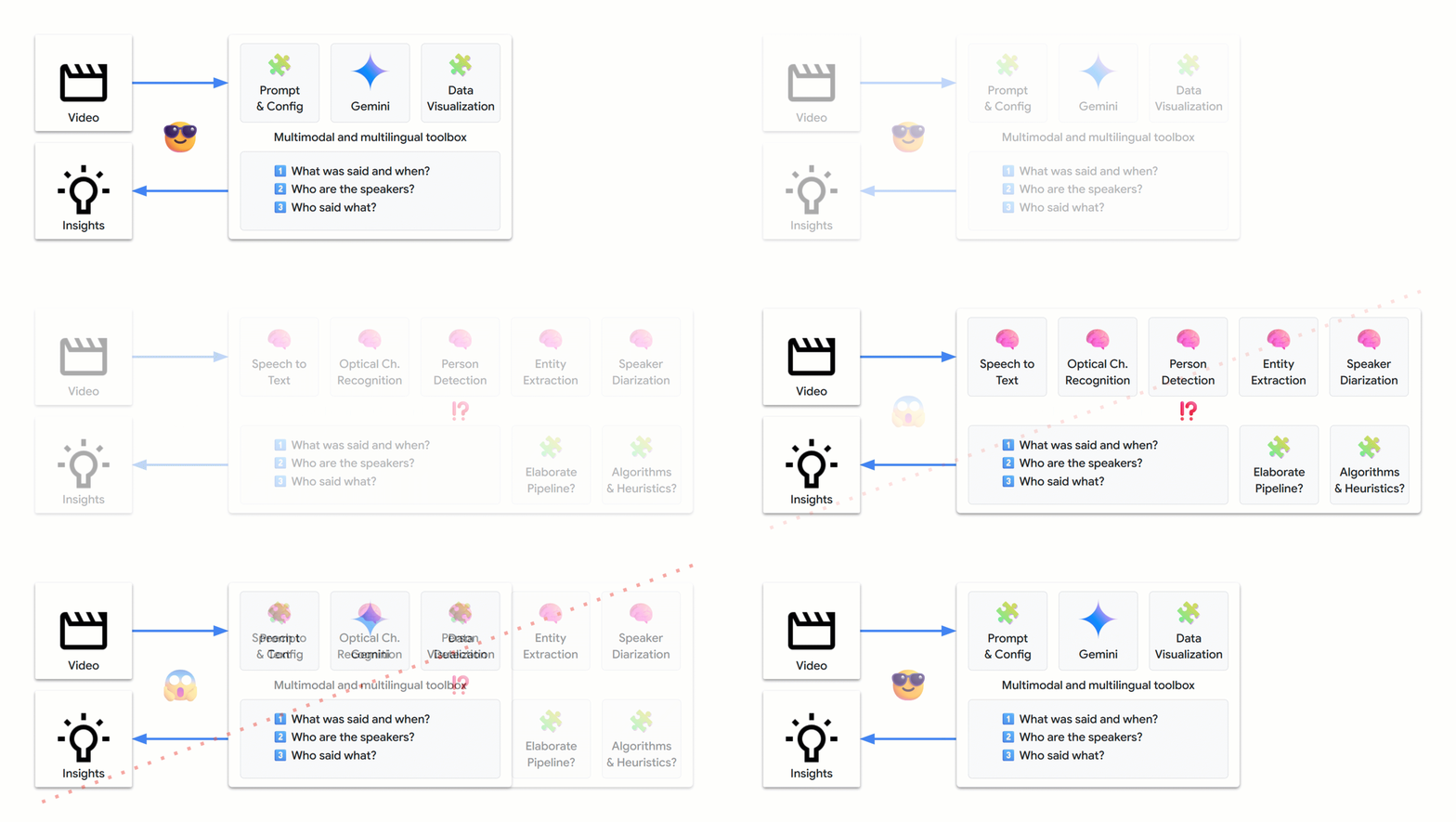
We managed to address this complex problem with the following techniques:
- Prototyping with open prompts to develop intuition about Gemini’s natural strengths
- Taking into account how LLMs work under the hood
- Crafting increasingly specific prompts using a tabular extraction strategy
- Generating structured outputs to move towards production-ready code
- Adding data visualization for easier interpretation of responses and smoother iterations
- Adapting default parameters to optimize the results
- Conducting more tests, iterating, and even enriching the extracted data
These principles should apply to many other data extraction domains and allow you to solve your own complex problems. Have fun and happy solving!
➕ More!
- Run this notebook to reproduce the results from this article and transcribe your own videos
- Experiment for free in Google AI Studio and get an API key to call Gemini programmatically
- Explore additional use cases in the Vertex AI Prompt Gallery
- Stay updated by following the Vertex AI Release Notes
- Follow me on LinkedIn or Twitter / X for more cloud, applied AI, and Python explorations…
Share This Article
Towards Data Science is a community publication. Submit your insights to reach our global audience and earn through the TDS Author Payment Program.
Write for TDS


