VOOZH about

URL: https://www.amazon.com/EDUP-Bluetooth-Wireless-Network-Adapter/dp/B0832MR4WB

โ‡ฑ Amazon.com: EDUP PCIe WiFi 6E Card Bluetooth 5.2 AX 5400 Mbps AX210 Tri-Band 6Ghz/5.8GHz/2.4GHz PCI-E Wireless WiFi Network Adapter Card for Desktop PC Windows10/11 64-bit : Electronics


๐Ÿ‘ Image
๐Ÿ‘ Image
Enjoy fast, free delivery, exclusive deals, and award-winning movies & TV shows.

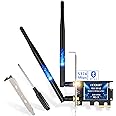
EDUP PCIe WiFi 6E Card Bluetooth 5.2 AX 5400 Mbps AX210 Tri-Band 6Ghz/5.8GHz/2.4GHz PCI-E Wireless WiFi Network Adapter Card for Desktop PC Windows10/11 64-bit

Amazon's Choice highlights highly rated, well-priced products available to ship immediately.
Amazon's Choice

$26.99 $26.99
Get Fast, Free Shipping with Amazon Prime
FREE Returns
Return this item for free

We offer easy, convenient returns with at least one free return option: no shipping charges. All returns must comply with our returns policy.

Learn more about free returns.
  1. Go to your orders and start the return
  2. Select your preferred free shipping option
  3. Drop off and leave!
Bundles with this item
Brief content visible, double tap to read full content.
Full content visible, double tap to read brief content.
See all bundles
{"desktop_buybox_group_1":[{"displayPrice":"$26.99","priceAmount":26.99,"currencySymbol":"$","integerValue":"26","decimalSeparator":".","fractionalValue":"99","symbolPosition":"left","hasSpace":false,"showFractionalPartIfEmpty":true,"offerListingId":"ldokNa6p7loVkBl2j1MgjgZZRIlimmK4l0boOh1%2BzKl%2BM1uhE2xjJXa3lDpnZTqw4M%2BbzuKs4i1l1gtO4prySQv%2Bjqk9qaHl6I%2B6jrChmKR2yLxOZ%2FkCZcnAB7Q%2FXLPEiZZXN1DXD9FPtbiugaaZx0FXikZfybGtnxL1tMoUfe7C3vO2gL9IK2xxKRc39H6Z","locale":"en-US","buyingOptionType":"NEW","aapiBuyingOptionIndex":0}]}

Purchase options and add-ons


Brand EDUP
Hardware Interface 802.11 ac/b/g/n
Color Blue
Compatible Devices Desktop
Product Dimensions 0.01"L
Data Link Protocol Bluetooth
Data Transfer Rate 5400 Megabits Per Second
Unit Count 1.0 Count
UPC 723172896812
Compatible Operating System Family Windows

About this item

  • EDUP WiFi 6E Card Support 6GHz : The PCIE WiFi 6E Card Built-in Intel AX210 chipset provides the latest 802.11ax standard technology. Target Wake Time, delivers from 80MHz to 160MHz higher peak data rates up to 2.4Gbps, and up to 4X capacity improvement in dense or congested environments comparing to 802.11ac. ( WARM TIPS : Please note that to use 6GHz Wi-Fi, the user might use Windows 11 or upgrade to Windows 10 Dev version )
  • Bluetooth 5.2 Technology : PCIE wifi card with Bluetooth 5.2 provides 4x Range over Bluetooth 4.2, 2 x Transmit Speed for faster transmissions thereby reducing the overall power. The powerful energy and continuous workflow can be an ideal home choice with Bluetooth TWS earplugs, earphones, keyboards, mouse printer, etc., which can bring more convenience and demands for your Desktop PC.
  • MU-MIMO & OFDMA Technology : The WiFi 6e Adapter with OFDMA,MU-MIMO support greater network flexibility, faster downloads, sharing and backup, as well as ultra-low latency, lower power consumption. 160 MHz large bandwidth double throughput greatly improves signal gain when multiple users are served at the same time.
  • Compatibility And Install Driver Tips : Support Windows 10/11 64-bit OS. Compatible with all PCIe standard. Standard and Low-Profile Brackets to adapt to your different computer sizes. ( 6Ghz up to 2400Mbps/ 5Ghz up to 2400Mbps /2.4Ghz up to 600Mbps)
  • Driver Download -- You can online download drivers for this card in Intel official website or EDUP website: szedup.com/pcie-adapters/EP9651BYa.html .
  • Driver Online Download : szedup.com/pcie-adapters/EP9651BYa.html
๐Ÿ‘ Image
Report an issue with this product or seller

Frequently bought together

This item: EDUP PCIe WiFi 6E Card Bluetooth 5.2 AX 5400 Mbps AX210 Tri-Band 6Ghz/5.8GHz/2.4GHz PCI-E Wireless WiFi Network Adapter Card for Desktop PC Windows10/11 64-bit
$26.99$26.99
Get it as soon as Friday, Jul 3
In Stock
Sold by EDUP Store and ships from Amazon Fulfillment.
$83.00$83.00
Get it as soon as Friday, Jul 3
Only 6 left in stock - order soon.
Sold by DealsPro1 and ships from Amazon Fulfillment.
Total price: $00$00
To see our price, add these items to your cart.
Try again!
Details
Added to Cart
Some of these items ship sooner than the others.
Choose items to buy together.

Product description

EDUP PCIe Wireless WiFi 6E Card Max 5400Mbps with Bluetooth 5.2 | Intel AX210 Chip I MU-MIMO I OFDMA,Ultra-Low Latency | 802.11AX Tri-Band

๐Ÿ‘ PCIE Wi-Fi 6E AX210 PCIe Network Card Bluetooth 5.2

Specification:

  • Type: PCIE Wi-Fi 6E Network Card with Bluetooth 5.2
  • Support System: Only Windows 10/11 64Bit
  • Chipset: Intel Wi-Fi 6E AX210
  • IEEE WLAN Standard: 802.11a/b/g/n/ac/ax
  • Connection: WiFi 6E / Bluetooth 5.2
  • Support Interface: PCI-E/X1/X4/X8/X16; 9-pin usb for Bluetooth
  • Transmission Rate : 2.4Ghz up to 600Mbps / 5.8Ghz up to 2400Mbps / 6Ghz up to 2400Mbps

Package Included:

  • 1 * EDUP PCI-E Wifi 6E Network Card
  • 2 * External High Gain Antenna
  • 1 * Small Chassis Baffle
  • 1 * Screwdriver ; 2 * Screws
  • 1 * User Manual

๐Ÿ‘ network card pcie

Intel AX210 Chipset:

  • Support dual band 2.4GHz/5.8GHz/6Ghz, Frequency 6GHz up to 2400Mbps,Frequency 5.8GHz up to 2400Mbps, Frequency 2.4GHz up to 600Mbps.
  • It is the best choice for desktop for online gaming and 4K Ultra HD video streaming

๐Ÿ‘ bluetooth wifi card

Bluetooth 5.2 Technology:

  • Expand the range of 4 x Bluetooth 4.2 signal, no need to worry the signal will be weak in the room and waiting long time for transport the large files.
  • It can connect with the mouse, earphone, keyboard and other Bluetooth devices.

๐Ÿ‘ wifi card

MU-MIMO Wireless Technology:

  • Significantly improve the network quality, and the Internet speed is improved compared to ordinary AC network cards. The router can transmit data with 3 devices at the same time.

Knowing the following will give you a better product experience

  • 1. For desktop only. A blue-tooth power cable needs to be connected to the motherboard 9-pin interface, or the blue-tooth function won't work.
  • 2. The specification of this wireless USB adapter is 5400Mbps (2.4G: 600Mbps, 5G: 2400Mbps, 6G: 2400Mbps ). A router with 5400Mbps or above can maximize the performance of our PCIE wifi adapter.
  • 3. This Wi-Fi dongle will not boost the speed of original router, which only helps your computer to receive the router's signal and speed better.
  • 4. It has nothing to do with the quality of this adapter when you can't get the maximum speed. The network environment, router, barriers, laptop and PC 's internal memoryโ€ฆthe interference of many factors can affect the speed.
  • 5. Please turn off the built-in Wi-Fi when using on a desktop pc.( If there is built-in Wi-Fi function in your desktop pc ).

User Stage of Install :

  1. Open the chassis side cover and remove the chassis back panel screws
  2. Insert the PCI-E into the corresponding card slot.
  3. Find the 9-pin USB connector on the motherboard, and plug the external cable of the PCI-E into the USB connector on the motherboard .
  4. Attach the screws to the rear bezel
Brief content visible, double tap to read full content.
Full content visible, double tap to read brief content.

Product Videos

๐Ÿ‘ Image
Customer ReviewEDUP PCIe WiFi 6E Card Bluetooth 5.2 See Full Review

From the brand

  1. Founded in 2010, EDUP is a global provider of reliable networking devices and accessories.

    Our product series are Wireless Wi-Fi Card, Bluetooth Dongle, Satellite Internet Starlink Accessories and so on. All of our products comply with international quality standards and are greatly appreciated in a variety of different markets throughout the world and have got CE, FCC, RoHS approved.


Product information

Features & Specs
Hardware Interface 802.11 ac/b/g/n
Compatible Devices Desktop
Data Link Protocol Bluetooth
Data Transfer Rate 5400 Megabits Per Second
Compatible Operating System Family Windows
Minimum Required Operating System Version Windows 10
Measurements
Item Dimensions L x W x H 0.01"L

Warranty & Support

Amazon.com Return Policy:Amazon.com Voluntary 30-Day Return Guarantee: You can return many items you have purchased within 30 days following delivery of the item to you. Our Voluntary 30-Day Return Guarantee does not affect your legal right of withdrawal in any way. You can find out more about the exceptions and conditions here.
Product Warranty: For warranty information about this product, please click here

Feedback

EDUP PCIe WiFi 6E Card Bluetooth 5.2 AX 5400 Mbps AX210 Tri-Band 6Ghz/5.8GHz/2.4GHz PCI-E Wireless WiFi Network Adapter Card for Desktop PC Windows10/11 64-bit

Share:


Found a lower price? Let us know. Although we can't match every price reported, we'll use your feedback to ensure that our prices remain competitive.

Where did you see a lower price?

Fields with an asterisk are required

Submit Feedback
Please sign in to provide feedback.
Item details
Brand EDUP
UPC 723172896812
Global Trade Identification Number 00723172896812
Manufacturer EDUP
Mfr Part Number EP-AC9636
Model Number EP-EP9651
Unit Count 1.0 Count
Warranty Description 2 year manufacturer
Built-In Media 1* PCIE Network Card
Item Type Name COMPUTER NETWORKING CARD
Best Sellers Rank
ASIN B0832MR4WB
Customer Reviews
4.4 out of 5 stars

Safety and product resources


What's in the box

  • 1* PCIE Network Card

  • Customer reviews

    4.4 out of 5 stars
    3,351 global ratings
    How customer reviews and ratings work

    Customer Reviews, including Product Star Ratings help customers to learn more about the product and decide whether it is the right product for them.

    To calculate the overall star rating and percentage breakdown by star, we donโ€™t use a simple average. Instead, our system considers things like how recent a review is and if the reviewer bought the item on Amazon. It also analyzed reviews to verify trustworthiness.

    Learn more how customers reviews work on Amazon


    Customers say

    Customers find the WiFi adapter performs well with no issues, is super easy to install, and delivers internet speeds up to 200 Mbps. Moreover, they appreciate its quality and consider it good value for money. However, the Bluetooth connectivity and driver installation receive mixed feedback - while some report great connectivity and no driver installation needed, others experience connectivity issues and installation problems. Additionally, reliability is also mixed, with some finding it stable while others report it dying within two weeks.
    AI Generated from the text of customer reviews๐Ÿ‘ Image

    Select to learn more

    263 customers mention performance, 196 positive, 67 negative
    Customers report that the network adapter works flawlessly and is plug-and-play, with one customer specifically mentioning successful operation with Windows 10.
    take it from a repair tech, this works great and its the newest wifi technology out there. Also allows for bluetooth too. Cheap and works great!!...Read more
    Works well, Installed easily, drivers loaded with out an issue The included mini screwdriver is a nice touch....Read more
    ...This card was complete garbage. It worked for a couple of hours and then stopped. Windows refuses to detect the drivers (code 45)....Read more
    Easy to set up and works perfectly. Sure beats USB wifi dongles.Read more
    169 customers mention easy to install, 158 positive, 11 negative
    Customers find the WiFi adapter easy to install, describing it as a fast plug-and-play device that works well with Ubuntu.
    Easy to install the hardware. Drivers were on a CD that was easy to install. Wifi 6 and bluetooth 5 worked perfectly on Windows 10 after installing....Read more
    It was very easy to install (donโ€™t use the install disc it will install the drivers and work fine) it double my internet speed from the old 2.4 card.Read more
    Easy install. Very thorough instructions. Speed test shows no loss going from hardwire to wifi on a 450mb download age 20mb upload internetRead more
    ...Bluetooth works great, and wifi is good too. Nice and simple, easy and quick! I'd recommend this.Read more
    113 customers mention speed, 90 positive, 23 negative
    Customers report that the WiFi adapter delivers advertised speeds and performs as well as wired connections, with some customers noting their internet speed increased from 30 Mbps to 200 Mbps.
    ...6 Card Bluetooth 5.1 AX 3000 Mbps AX200 Dual Band 5.GHz/2.4GHz, it's very fast its faster than the ethernet cable connected, the best PCle Wifi/...Read more
    Fast and reliable cards. Could not get Bluetooth to work, but I'm sure you could, if it's that important to you....Read more
    ...Switching to the low-profile plate for the SFF was quick and easy, and installing the cards was one of the easiest jobs I've ever done on a...Read more
    ...months but then it started craping out on me and losing signal or very low speeds....Read more
    101 customers mention quality, 86 positive, 15 negative
    Customers find the WiFi adapter to be of good quality, with one customer noting it performs better than a dongle.
    Great product at good cost. This product does exactly as stated and connected easily within my desktop computer. I highly recommend the product.Read more
    ...Good card, totally worth it. I may dare to say best WIFI/BT card under $45.Read more
    Good, fast card. Easy to install. NOTE: there is a bluetooth header cable hidden beneath the plastic.Read more
    Great wifi card. First time I've used the wifi 6 kind. Bluetooth works great and internet seems to be faster.Read more
    75 customers mention value for money, 70 positive, 5 negative
    Customers find the WiFi adapter to be good value for money, describing it as really good for the price and a good buy.
    ...If you get a good one, then it's great value but as with most of these lower reviews, it's extremely frustrating when it doesn't....Read more
    Plug and play unstall for wifi. No need for BT so did not test. Good value. Use for online gaming. Will update if things change.Read more
    ...Also allows for bluetooth too. Cheap and works great!! save you money and buy this over the more expensive ones they do the same.Read more
    Great price and spec'd as advertised.Read more
    197 customers mention bluetooth connectivity, 123 positive, 74 negative
    Customers have mixed experiences with the network adapter's Bluetooth connectivity, with some reporting great performance while others experience issues and constant connection drops.
    ...I mainly got it for the bluetooth cause I'm hardwired in... Bluetooth works great and my headphones can even control music transport and volume.Read more
    ...I can find no online help. No help from EDUP. and no bluetooth. Would rate this product overall a 2 and in experience a flat zero.Read more
    Easy to install and great connectivity! Great product for the price, best $30 I've spent.Read more
    ...install was quick and easy and provided fast internet speeds and good BluetoothRead more
    60 customers mention driver installation, 36 positive, 24 negative
    Customers have mixed experiences with driver installation: some report no drivers were needed in Windows 10, while others mention issues with drivers not installing properly.
    ...to make it work. it was really easy to Install, no need to set up the driver. Works great!!Read more
    not sure why it was not showing in device manager there website is skechy for finding the right driverRead more
    Plug n Play for Ubuntu, no drivers needed! WiFi and Bluetooth all in one!...Read more
    ...decide to stop working and I have to go to Device Manager, uninstall the drivers and scan for hardware changes. It then works flawlessly....Read more
    40 customers mention reliability, 12 positive, 28 negative
    Customers have mixed experiences with the WiFi adapter's reliability, with some finding it great and stable, while others report that it did not last very long and died within 2 weeks.
    ...Worked for about two weeks then started dropping out. Tried to update drivers and uninstall/reinstall no improvementRead more
    WiFi takes quite some time to load a page. Could be a faulty card. Buddy has the same card in a similar machine and itโ€™s blistering....Read more
    ...what it normally is, but it is more stable than a USB in terms of reliability and not disconnecting occasionally, and I have only had a few large...Read more
    Bad card, several different card slots and drivers attempted, card was no good....Read more

    Amazon Customer
    5 out of 5 stars
    Just use intel drivers
    Worked great and easy to install, I dual boot catchyos and windows. It was plug and play for linux, but for the windows I had to find the drivers dont use the ones from the paper the website is hard to use and unreliable the wifi card uses intel so you can just use intel wifi and Bluetooth drivers. The wifi is pretty good I use if for games and it workes good, I download things noticeably faster now.
    Thank you for your feedback
    Sorry, there was an error
    Sorry we couldn't load the review
    There was a problem filtering reviews. Please reload the page.

    Top reviews from the United States

    • 5 out of 5 stars
      Excellent product-way better than USB dongles,not taken advantage of WiFi6 yet,Bluetooth is a bonus
      Reviewed in the United States on May 11, 2020
      Brief content visible, double tap to read full content.
      Full content visible, double tap to read brief content.

      Tired of trying various wi-fi USB dongles that has dependency on USB 3.0 for better throughput, I first started looking for the possibility of adding a USB 3.0 hub in my old refurbished desktop. I ran into this product in Amazon, and although Bluetooth was not my main purpose, I wanted to take a stab at this.

      First of all, product arrived way much quicker than they originally said, and secondly, it was the easiest thing to install. I was concerned about the fact the product description did not show a smaller mounting bracket, yet I wanted to try thinking that I will run to a local store if it is not there. It was there, and they also added a magnetic screw driver as that additional little bonus.

      After installation of the product as well as the driver, it all worked like a charm. I wish the UI of the Wi-Fi driver installation was a little more intuitive with a message that installation successful or completed etc. I had to refer to the manual to realize just a spinning icon is all what it takes for the Wi-Fi driver to complete installation. Considering the value I have finally, that little shortcoming can certainly be excused.

      As far as the final output, refer to the image with results from May 9th onwards. I wanted to purposefully try multiple times over the course of last couple of days, since I used to have Wi-Fi disconnected with my old USB. I live in Dallas with a AT&T Fiber 1 GBPS connection. My modem is only 802.11 ac, and not AX. Obviously I didn't expect any better than 1 gbps; 200 or 300 mbps download / upload may appear to be disappointing, but not at all, considering that I am getting the highest throughput (on a wireless device) now only on my oldest device. Also, it makes me look forward to the point when I will upgrade my router also to Wi-Fi 6. I don't have HUGE expectations, but even if exceeds 1 GBPS at that point, this is all worth it.

      Bluetooth came in as a bonus, and when I connected one of my old bluetooth headsets, it worked totally fine, but when I walked 5-6 meters away from desktop, I could hear some disturbance. Most likely because the headset doesn't support Bluetooth 5.0, and at this time I am least worried about this.

      The experience of researching (2-3 hours) and doing something (flat 15 minutes) on my own for the first time with regard to hardware assembly is priceless too!!

      Tired of trying various wi-fi USB dongles that has dependency on USB 3.0 for better throughput, I first started looking for the possibility of adding a USB 3.0 hub in my old refurbished desktop. I ran into this product in Amazon, and although Bluetooth was not my main purpose, I wanted to take a stab at this.

      First of all, product arrived way much quicker than they originally said, and secondly, it was the easiest thing to install. I was concerned about the fact the product description did not show a smaller mounting bracket, yet I wanted to try thinking that I will run to a local store if it is not there. It was there, and they also added a magnetic screw driver as that additional little bonus.

      After installation of the product as well as the driver, it all worked like a charm. I wish the UI of the Wi-Fi driver installation was a little more intuitive with a message that installation successful or completed etc. I had to refer to the manual to realize just a spinning icon is all what it takes for the Wi-Fi driver to complete installation. Considering the value I have finally, that little shortcoming can certainly be excused.

      As far as the final output, refer to the image with results from May 9th onwards. I wanted to purposefully try multiple times over the course of last couple of days, since I used to have Wi-Fi disconnected with my old USB. I live in Dallas with a AT&T Fiber 1 GBPS connection. My modem is only 802.11 ac, and not AX. Obviously I didn't expect any better than 1 gbps; 200 or 300 mbps download / upload may appear to be disappointing, but not at all, considering that I am getting the highest throughput (on a wireless device) now only on my oldest device. Also, it makes me look forward to the point when I will upgrade my router also to Wi-Fi 6. I don't have HUGE expectations, but even if exceeds 1 GBPS at that point, this is all worth it.

      Bluetooth came in as a bonus, and when I connected one of my old bluetooth headsets, it worked totally fine, but when I walked 5-6 meters away from desktop, I could hear some disturbance. Most likely because the headset doesn't support Bluetooth 5.0, and at this time I am least worried about this.

      The experience of researching (2-3 hours) and doing something (flat 15 minutes) on my own for the first time with regard to hardware assembly is priceless too!!

      2 people found this helpful
      Sending feedback...
      Thank you for your feedback.
      Sorry, we failed to record your vote. Please try again
      Sending feedback...
      Thanks, we'll investigate in the next few days.
      Sorry, We failed to report this review. Please try again
    • 5 out of 5 stars
      Just use intel drivers
      Reviewed in the United States on January 14, 2026
      Brief content visible, double tap to read full content.
      Full content visible, double tap to read brief content.

      Worked great and easy to install, I dual boot catchyos and windows. It was plug and play for linux, but for the windows I had to find the drivers dont use the ones from the paper the website is hard to use and unreliable the wifi card uses intel so you can just use intel wifi and Bluetooth drivers. The wifi is pretty good I use if for games and it workes good, I download things noticeably faster now.

      5 out of 5 stars
      Just use intel drivers
      Reviewed in the United States on January 14, 2026

      Worked great and easy to install, I dual boot catchyos and windows. It was plug and play for linux, but for the windows I had to find the drivers dont use the ones from the paper the website is hard to use and unreliable the wifi card uses intel so you can just use intel wifi and Bluetooth drivers. The wifi is pretty good I use if for games and it workes good, I download things noticeably faster now.

      2 people found this helpful
      Sending feedback...
      Thank you for your feedback.
      Sorry, we failed to record your vote. Please try again
      Sending feedback...
      Thanks, we'll investigate in the next few days.
      Sorry, We failed to report this review. Please try again
    • 5 out of 5 stars
      Works great and fast for one gig
      Reviewed in the United States on February 15, 2026
      Brief content visible, double tap to read full content.
      Full content visible, double tap to read brief content.

      Bought a use wifi card. Would not work for one gig. This works great for one gig. The computer guy I had install said it was easy to install. The speeds are great and the reliability is great. Mom doesn't isn't into gaming but word works fine.

      Sending feedback...
      Thank you for your feedback.
      Sorry, we failed to record your vote. Please try again
      Sending feedback...
      Thanks, we'll investigate in the next few days.
      Sorry, We failed to report this review. Please try again
    • 4 out of 5 stars
      Amazing wifi, poor bluetooth
      Reviewed in the United States on November 28, 2020
      Brief content visible, double tap to read full content.
      Full content visible, double tap to read brief content.

      This has overall been a great purchase. Low price, improvement in wifi speeds and quality. I use steam streaming over ethernet with my PC, but I tested it with wifi in my home. My PC was placed in a corner of the basement with bookshelves surrounding it were placed horizontally far from the TV (2nd floor) and router (3rd floor). Very few packets were dropped and the stream maintained sync and playability. I stacked the odds against it and performed well enough. I put it in a more favorable position without blocking the signal beyond still being in the basement and it performing pretty closely to ethernet. Only when the system was struggling in the morn demanding games did any hiccups appears and even then it was still better performance than when I had it blocked off.

      I had to knock off a star because the Bluetooth isn't that great despite the wifi being wonderful. It's good enough to quickly sync any devices, but in favorable and non-favorable conditions it performed poorly with any sustained usage. Bluetooth controllers inputs would be lost, Bluetooth adhoc networks for using a phone as a modem was spotty and had a very noticeable difference in quality when compared to usb tethering with the same phone and service in the same exact location.

      Those are 3-8 foot use case tests, it got worse with bluetooth headphones with a 20 foot distance test. It performed well enough when within a few feet, but again you'd lose sound for half of a second at times. Like every few minutes and sometimes multiple times within a minute.

      At least it's small and fits into the case pretty easy. I bought it for use in my PC as a wifi extender/second wifi network since it already has a direct connection to the router via ethernet. It makes connecting other wifi only devices pretty easy.

      13 people found this helpful
      Sending feedback...
      Thank you for your feedback.
      Sorry, we failed to record your vote. Please try again
      Sending feedback...
      Thanks, we'll investigate in the next few days.
      Sorry, We failed to report this review. Please try again
    • Tiffany Vu
      5 out of 5 stars
      It works!
      Reviewed in the United States on August 29, 2020
      Brief content visible, double tap to read full content.
      Full content visible, double tap to read brief content.

      This review is for the EDUP PCIe WiFi 6 Card Bluetooth 5.0 AX 3000 Mbps AX200 Dual Band 5.GHz/2.4GHz PCI-E Wireless WiFi Network Adapter Card for Desktop Windows 10 64-bit.

      I was very skeptical at first. The package came with a nice brown box with a small driver CD, a tiny screw driver, 2 screws, and a low profile bracket. My old Dell PC had a 300 Mbps Wireless N with only 2.4Ghz band. My router is a TM-AC1900 with dual band 2.4Ghz and 5Ghz, and my Internet is 240Mbps down and 10Mbps up. My PCI wireless N max download speed was 50-60Mbps. I wanted a faster AX wifi adapter card to max out my Internet speed at 240Mbps. So I searched on Amazon, and this one is lowest price with a 4.4/5 stars and more than 1,000 reviews. I want to try it knowing Amazon would let me return it if things don't work. The AX3000 speed is so tempting.

      The small CD driver did not work on my PC's optical drive, luckily, they also provided a small manual that tells you to go to their website to download the drivers.

      My Windows 10 pro PC picked up the wireless AX card without any driver but the Bluetooth did not work. I went to their website and downloaded the driver for the Bluetooth and it works instantly.

      My Internet speed went from 60Mbps to max out my Internet speed at 240Mbps. The Bluetooth connects easily to my Bluetooth headsets and my Bluetooth speakers without any issues. It's nice to max out my Internet speed, what I pay for.

      20 people found this helpful
      Sending feedback...
      Thank you for your feedback.
      Sorry, we failed to record your vote. Please try again
      Sending feedback...
      Thanks, we'll investigate in the next few days.
      Sorry, We failed to report this review. Please try again
    • Nathan Spitzer
      5 out of 5 stars
      Works as described, easy to install
      Reviewed in the United States on May 28, 2020
      Brief content visible, double tap to read full content.
      Full content visible, double tap to read brief content.

      I bought this for my sons desktop computer which was using an external wireless bridge which wasn't giving great performance. The AP he is connecting to is an Ubiquiti AP a couple of rooms over on the same floor.

      Installing the card only took a few minutes

      Helpful hint: Go to Intel's website and download the drivers for the AX200 wireless chipset BEFORE installing, especially if installing this required disconnecting your current network. DON'T go to the venders site for drivers or use the Windows default drivers.

      It took about 30 seconds to install in his PC's PCIE 1x slot and connect the jumper from the card to a USB header on the motherboard (only required for bluetooth). After installation connected the provided antennas to the card. Once the computer was booted I installed the latest drivers from Intels site for both wireless and bluetooth and it started working. Once I had connected to my home network I checked the wireless connection speed by running "netsh wlan show interfaces" and it showed 866Mbs which is the max for a 2x2 wireless card connecting to a 2x2 802.11ac AP . A quick speed test using the xfinity speedtest site (my Internet provider) showed something like 125Mbs which considering this was wireless is very very respectable.

      Overall this is a great product, performs as expected and requires the bare minimum level of computer knowledge to install.

      2 people found this helpful
      Sending feedback...
      Thank you for your feedback.
      Sorry, we failed to record your vote. Please try again
      Sending feedback...
      Thanks, we'll investigate in the next few days.
      Sorry, We failed to report this review. Please try again
    • 1 out of 5 stars
      Bluetooth failed, not worth the $25 I spent on this.
      Reviewed in the United States on May 15, 2026
      Brief content visible, double tap to read full content.
      Full content visible, double tap to read brief content.

      Bluetooth functionality is woefully inconsistent. It works every few days; most of the time it has an error that says "Windows cannot start this hardware device because its configuration information (in the registry) is incomplete or damaged. (Code 19)"

      Drivers didn't fix the issue. Don't be cheap- just buy a better card from a reputable source.

      Sending feedback...
      Thank you for your feedback.
      Sorry, we failed to record your vote. Please try again
      Sending feedback...
      Thanks, we'll investigate in the next few days.
      Sorry, We failed to report this review. Please try again
    • 3 out of 5 stars
      Black extenders broke
      Reviewed in the United States on December 24, 2025
      Brief content visible, double tap to read full content.
      Full content visible, double tap to read brief content.

      It works, and Iโ€™ve used for years but the 2 wifi extenders that screw onto the outside broke. I wasnโ€™t especially harsh with them but the hinges wore out and the tips broke so I no longer use them. I am wondering if I can replace them but thereโ€™s no way to get product support. I would prefer to not have to buy a whole new card to fix this issue. If I do it wonโ€™t be from this brand.

      One person found this helpful
      Sending feedback...
      Thank you for your feedback.
      Sorry, we failed to record your vote. Please try again
      Sending feedback...
      Thanks, we'll investigate in the next few days.
      Sorry, We failed to report this review. Please try again

    Top reviews from other countries

      Translated by Amazon
      See original
    • 5 out of 5 stars
      Buena relaciรณn calidad/precio con un micro intel
      Reviewed in Spain on August 5, 2020
      Brief content visible, double tap to read full content.
      Full content visible, double tap to read brief content.

      Funcionando perfectamente. Todo perfecto: fรกcil de instalar y la wifi/bluetooth como un caรฑรณn.

      Un buen opciรณn serรญa aรฑadir un porta entenas exterior, es verdad que se anuncia sin ello.

      Sending feedback...
      Thanks, we'll investigate in the next few days.
      Sorry, We failed to report this review. Please try again
      Sorry, we couldn't translate the review
      Translated from Spanish by Amazon
      See original
    • 5 out of 5 stars
      That's nice and easy - Excellent value, excellent speed!
      Reviewed in Canada on March 18, 2021
      Brief content visible, double tap to read full content.
      Full content visible, double tap to read brief content.

      I actually didn't know what to expect since I needed to get a WIFI adapter card into an old 2015 Dell OptiPlex 3020 MiniTower desktop computer that I inherited. The computer has a LAN port but I couldn't drag a CAT6e cable from my office downstairs to upstairs without exposing the network cable. So, I got this WIFI6 network adapter. It's frickin awesome to say the least! I tested this as soon as I got connection to my ASUS RT-AC86u wireless router. My router is only an 802.11ac router, but the Intel AX200 card that's in the EDUP PCIe WIFI6 Card works and has the speed I need on my wireless network to the Internet. The speed is tested through SpeedTest.net and I wanted to see 300+Mbps download speed (my max speed from Shaw's Internet 300) and I got that no problem. I use the 5GHz speed bandwidth only.

      Here's the deal: Initially, I had connected the PCIe WIFI network card to the PCI-ex16 slot (long PCIe slot). Windows 10 Pro was able to recognize the card but the it detected it had a conflict even after I downloaded the Intel drivers for it. After several tries to let Windows diagnose the issue unsuccessfully, I move the WIFI network adapter card to one of the PCI-ex1 slots (really short PCIe slot). Voila! The card is recognized in Windows 10 and can see all the wireless networks around! I think the seller's description says "This WiFi device not work with the motherboard of Lenovo and Dell". It worked for the Dell OptiPlex motherboard. It should work with all existing desktop MOBO's that has at least one free PCI-ex1 slot and the downloaded drivers from Intel directly. Windows 10 and Intel will recognize and report the hardware as Intel AX200. This upgrade is NICE!

      Update: March 19, 2021

      ---------------------------

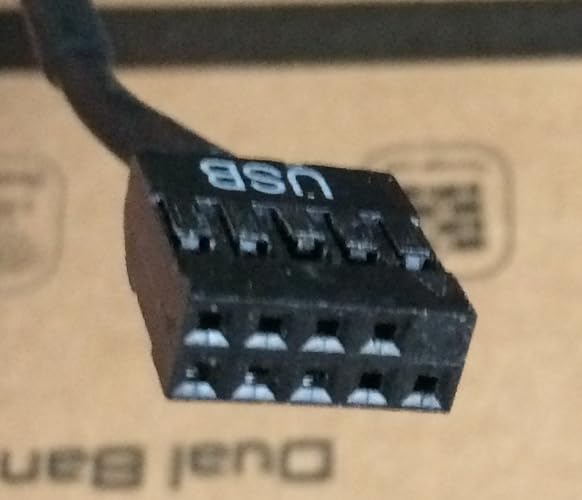
      The Bluetooth 5 for the AX200 chip does work! The USB Bluetooth cable is supplied and has a 4-pin header plug on one end and a 9=pin header plug on the other end. So, here's the deal with plugging this USB cable in. The 4-pin header is a no-brainer. You can only plug this onto the end of the adapter card one way. Here's the other issue where numerous people have said that on the Dell or Lenovo motherboards or even other motherboards, when you plug into the internal 9-pin header (this also goes in one way since the 9th pin hole on one end is blocked and it matches up with the missing pin for the internal USB header on the MOBO), the Bluetooth will not be recognized by Windows no matter what you do. Others have tried unplugging the other internal USB header that connects to the front panel of the computer. That works - HOWEVER, now when you boot your computer, your get a stoppage in the boot saying the front panel USB has been disconnected! That's not a fix. Took me quite some time looking at the USB port wiring layout, but I finally figured it out and it worked. Take a good look at the 9-pin header plug. It will have the letters "USB" labelled. That is the top. If all wires are attached the top row, move then down to the bottom row. You can remove all the wires from the plastic harness by using a pin and lift each plastic slit while slightly applying pull on all wires at the same time. Don't pry out the plastic slits, just lift them up so you can slide all the terminals out. Once you have them all out, rotate each wire 180 degrees so that the terminals will have the barbs turn down. This is to prevent the terminals from sliding out when you put them into the bottom row. The bottom row is where you'll have 5 pin holes instead of 4 (if you look from the header plug end). The wiring should be exactly the same color pattern or location as it did before except it is now moved to the bottom row with the letters "USB" printed at the top. So, from left to right. you'll have:

      1) Empty pin hole

      2) Black

      3) Green

      4) White

      5) Red

      Or if you look from Right to Left or if your "USB" is facing down

      1) Red

      2) White

      3) Green

      4) Black

      5) Empty pin hole

      (See pictures 11 and 12)

      Update: March 21, 2021

      ----------------------------

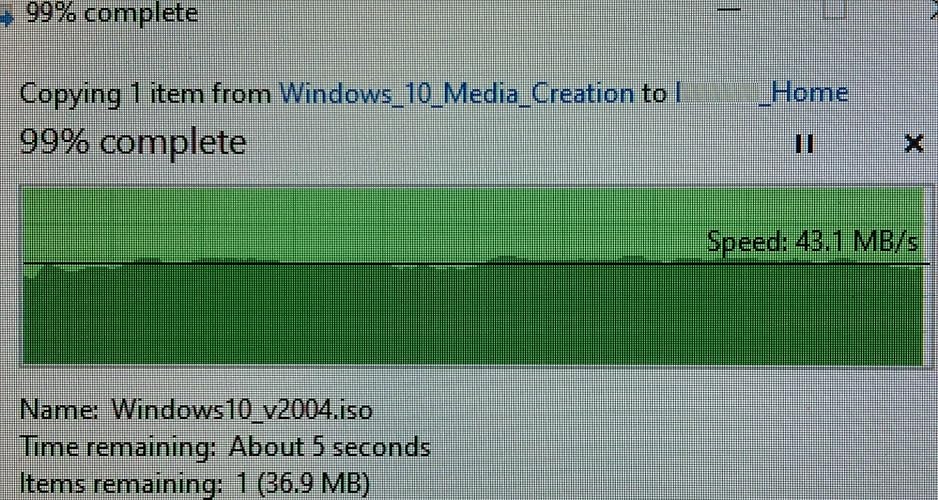
      I did some tests regarding large and small files transfers on my own home network. The results are really good even using the 802.11ac rather than with WIFI6. My tests are with photo files (around 1-4MB) for a chunk of 1GB is around 45 seconds and Windows throughput is around 19MB/s. Large single file using Windows 10 Media Creation ISO (4.5GB) is around 43MB/s. Just as a comparison test, I plugged a CAT5e and a CAT6e cable to test and for the 1GB multi-file transfer is around 45MB/s and for the ISO 4.5GB, the transfer speed is 111MB/s! The speed for file transferring for 802.11ac is actually not bad at all! The Internet speed I got on the main floor with one wall is a straight pass of 329Mbps and on upstairs with several walls and a door, the download speed is still respectable at 253Mbps.

      I'm super stoked since now I don't have to purchase one of those 9-pin to USB Type A male cable and wire it from internal to external to a USB port.

      Overall, I'm pretty happy with this purchase. The quality and the performance is superb! You can't go wrong with this network card.


      5 out of 5 stars
      That's nice and easy - Excellent value, excellent speed!
      Reviewed in Canada on March 18, 2021

      I actually didn't know what to expect since I needed to get a WIFI adapter card into an old 2015 Dell OptiPlex 3020 MiniTower desktop computer that I inherited. The computer has a LAN port but I couldn't drag a CAT6e cable from my office downstairs to upstairs without exposing the network cable. So, I got this WIFI6 network adapter. It's frickin awesome to say the least! I tested this as soon as I got connection to my ASUS RT-AC86u wireless router. My router is only an 802.11ac router, but the Intel AX200 card that's in the EDUP PCIe WIFI6 Card works and has the speed I need on my wireless network to the Internet. The speed is tested through SpeedTest.net and I wanted to see 300+Mbps download speed (my max speed from Shaw's Internet 300) and I got that no problem. I use the 5GHz speed bandwidth only.

      Here's the deal: Initially, I had connected the PCIe WIFI network card to the PCI-ex16 slot (long PCIe slot). Windows 10 Pro was able to recognize the card but the it detected it had a conflict even after I downloaded the Intel drivers for it. After several tries to let Windows diagnose the issue unsuccessfully, I move the WIFI network adapter card to one of the PCI-ex1 slots (really short PCIe slot). Voila! The card is recognized in Windows 10 and can see all the wireless networks around! I think the seller's description says "This WiFi device not work with the motherboard of Lenovo and Dell". It worked for the Dell OptiPlex motherboard. It should work with all existing desktop MOBO's that has at least one free PCI-ex1 slot and the downloaded drivers from Intel directly. Windows 10 and Intel will recognize and report the hardware as Intel AX200. This upgrade is NICE!

      Update: March 19, 2021

      ---------------------------

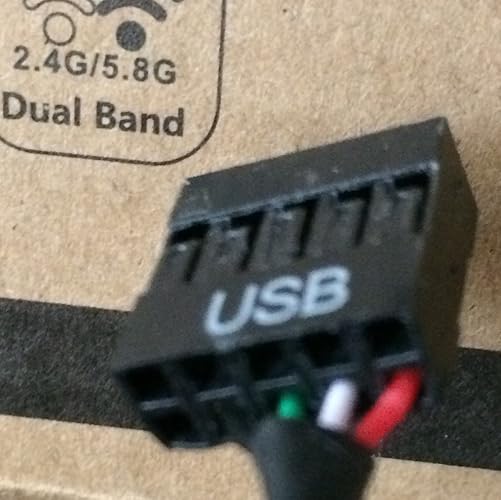
      The Bluetooth 5 for the AX200 chip does work! The USB Bluetooth cable is supplied and has a 4-pin header plug on one end and a 9=pin header plug on the other end. So, here's the deal with plugging this USB cable in. The 4-pin header is a no-brainer. You can only plug this onto the end of the adapter card one way. Here's the other issue where numerous people have said that on the Dell or Lenovo motherboards or even other motherboards, when you plug into the internal 9-pin header (this also goes in one way since the 9th pin hole on one end is blocked and it matches up with the missing pin for the internal USB header on the MOBO), the Bluetooth will not be recognized by Windows no matter what you do. Others have tried unplugging the other internal USB header that connects to the front panel of the computer. That works - HOWEVER, now when you boot your computer, your get a stoppage in the boot saying the front panel USB has been disconnected! That's not a fix. Took me quite some time looking at the USB port wiring layout, but I finally figured it out and it worked. Take a good look at the 9-pin header plug. It will have the letters "USB" labelled. That is the top. If all wires are attached the top row, move then down to the bottom row. You can remove all the wires from the plastic harness by using a pin and lift each plastic slit while slightly applying pull on all wires at the same time. Don't pry out the plastic slits, just lift them up so you can slide all the terminals out. Once you have them all out, rotate each wire 180 degrees so that the terminals will have the barbs turn down. This is to prevent the terminals from sliding out when you put them into the bottom row. The bottom row is where you'll have 5 pin holes instead of 4 (if you look from the header plug end). The wiring should be exactly the same color pattern or location as it did before except it is now moved to the bottom row with the letters "USB" printed at the top. So, from left to right. you'll have:

      1) Empty pin hole

      2) Black

      3) Green

      4) White

      5) Red

      Or if you look from Right to Left or if your "USB" is facing down

      1) Red

      2) White

      3) Green

      4) Black

      5) Empty pin hole

      (See pictures 11 and 12)

      Update: March 21, 2021

      ----------------------------

      I did some tests regarding large and small files transfers on my own home network. The results are really good even using the 802.11ac rather than with WIFI6. My tests are with photo files (around 1-4MB) for a chunk of 1GB is around 45 seconds and Windows throughput is around 19MB/s. Large single file using Windows 10 Media Creation ISO (4.5GB) is around 43MB/s. Just as a comparison test, I plugged a CAT5e and a CAT6e cable to test and for the 1GB multi-file transfer is around 45MB/s and for the ISO 4.5GB, the transfer speed is 111MB/s! The speed for file transferring for 802.11ac is actually not bad at all! The Internet speed I got on the main floor with one wall is a straight pass of 329Mbps and on upstairs with several walls and a door, the download speed is still respectable at 253Mbps.

      I'm super stoked since now I don't have to purchase one of those 9-pin to USB Type A male cable and wire it from internal to external to a USB port.

      Overall, I'm pretty happy with this purchase. The quality and the performance is superb! You can't go wrong with this network card.

      Sending feedback...
      Thanks, we'll investigate in the next few days.
      Sorry, We failed to report this review. Please try again
    • Lina pineda
      5 out of 5 stars
      100% funcional
      Reviewed in Mexico on April 7, 2020
      Brief content visible, double tap to read full content.
      Full content visible, double tap to read brief content.

      Tenia mis dudas, ya que en algunas pรกginas y comentarios se dice que este chip (intel AX200) no es compatible con tarjetas madre AMD, pero me funcionรณ sin problemas, despuรฉs de instalar, windows reconociรณ inmediatamente la tarjeta, no tuve que instalar drivers. Si tu modem tiene wi-fi de 5 Ghz este tipo de tarjeta mejora mucho la velocidad de navegaciรณn, en varias prueba que hice me diรณ la misma velocidad que si estuviera conectado con cable de red.

      Sending feedback...
      Thanks, we'll investigate in the next few days.
      Sorry, We failed to report this review. Please try again
      Sorry, we couldn't translate the review
      Translated from Spanish by Amazon
      See original
    • 5 out of 5 stars
      Facile ed efficace
      Reviewed in Italy on December 1, 2020
      Brief content visible, double tap to read full content.
      Full content visible, double tap to read brief content.

      Facile da montare, viene riconosciuta subito da windows 10 senza dover installare dei driver specifici.

      Ha anche un ottima ricezione del segnale wifi e il bluetooth รจ perfetto.

      Sending feedback...
      Thanks, we'll investigate in the next few days.
      Sorry, We failed to report this review. Please try again
      Sorry, we couldn't translate the review
      Translated from Italian by Amazon
      See original
    • 5 out of 5 stars
      Funktioniert einwandfrei -
      Reviewed in Germany on March 29, 2021
      Brief content visible, double tap to read full content.
      Full content visible, double tap to read brief content.

      Einbau hat problemlos funktioniert, alles Nรถtige war dabei - auch eine kleinere Blende fรผr den Einschub bei einem Small PC.

      Nach Einbau hat WLAN und Bluetooth sofort funktioniert, ich musste gar keine Treiber installieren oder runterladen. Alternativ lag aber auch noch eine Treiber CD bei.

      Sending feedback...
      Thanks, we'll investigate in the next few days.
      Sorry, We failed to report this review. Please try again
      Sorry, we couldn't translate the review
      Translated from German by Amazon
      See original

    Product summary presents key product information

    Keyboard shortcut  shift + alt + opt + D

    Product Summary: EDUP PCIe WiFi 6E Card Bluetooth 5.2 AX 5400 Mbps AX210 Tri-Band 6Ghz/5.8GHz/2.4GHz PCI-E Wireless WiFi Network Adapter Card for Desktop PC Windows10/11 64-bit

    From EDUP

    4.4 out of 5 stars, 3,351 ratings

    Customer reviews

    About this Item

    • EDUP WiFi 6E Card Support 6GHz : The PCIE WiFi 6E Card Built-in Intel AX210 chipset provides the latest 802.11ax standard technology. Target Wake Time, delivers from 80MHz to 160MHz higher peak data rates up to 2.4Gbps, and up to 4X capacity improvement in dense or congested environments comparing to 802.11ac. ( WARM TIPS : Please note that to use 6GHz Wi-Fi, the user might use Windows 11 or upgrade to Windows 10 Dev version )
    • Bluetooth 5.2 Technology : PCIE wifi card with Bluetooth 5.2 provides 4x Range over Bluetooth 4.2, 2 x Transmit Speed for faster transmissions thereby reducing the overall power. The powerful energy and continuous workflow can be an ideal home choice with Bluetooth TWS earplugs, earphones, keyboards, mouse printer, etc., which can bring more convenience and demands for your Desktop PC.
    • MU-MIMO & OFDMA Technology : The WiFi 6e Adapter with OFDMA,MU-MIMO support greater network flexibility, faster downloads, sharing and backup, as well as ultra-low latency, lower power consumption. 160 MHz large bandwidth double throughput greatly improves signal gain when multiple users are served at the same time.
    • Compatibility And Install Driver Tips : Support Windows 10/11 64-bit OS. Compatible with all PCIe standard. Standard and Low-Profile Brackets to adapt to your different computer sizes. ( 6Ghz up to 2400Mbps/ 5Ghz up to 2400Mbps /2.4Ghz up to 600Mbps)
    • Driver Download -- You can online download drivers for this card in Intel official website or EDUP website: szedup.com/pcie-adapters/EP9651BYa.html .
    • Driver Online Download : szedup.com/pcie-adapters/EP9651BYa.html

    Product Description

    EDUP WiFi 6E Card Support 6GHz : The PCIE WiFi 6E Card Built-in Intel AX210 chipset provides the latest 802.11ax standard technology. Target Wake Time, delivers from 80MHz to 160MHz higher peak data rates up to 2.4Gbps, and up to 4X capacity improvement in dense or congested environments comparing to 802.11ac. ( WARM TIPS : Please note that to use 6GHz Wi-Fi, the user might use Windows 11 or upgrade to Windows 10 Dev version )

    Feedback

    Did you find this product summary feature useful?

    Yes, it is useful
    No, it is not useful
    Thank you for your feedback
    Thank you for your feedback. You selected "Yes, it is useful"
    Thank you for your feedback. You selected "No, it is not useful"
    Change your feedback