|
VOOZH | about |
|
VOOZH | about |
We offer easy, convenient returns with at least one free return option: no shipping charges. All returns must comply with our returns policy.
Learn more about free returns.| Brand | GeeekPi |
| Hardware Interface | PCI, PCIE x 1 |
| Style | Classic |
| Compatible Devices | Raspberry Pi 5 |
| Number of Items | 1 |
How to enable PCIe on Raspberry Pi 5?
dtparam=pciex1
And the connection is certified for Gen 2.0 speed (5 GT/sec), but you can force it to Gen 3.0 (10 GT/sec) if you add the following line after:
dtparam=pciex1_gen=3
You can run devices at PCIe Gen 3.0 speeds if you test and they run stable.
sudo rpi-eeprom-config --edit
Adding following parts:
PCIE_PROBE=1
BOOT_ORDER=0xf416
The 6 means to enable booting from nvme. Reboot Raspberry Pi 5 and try to use `lsblk` or `lspci -vvv` to get more details of the PCIe device.
|
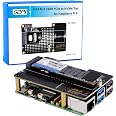
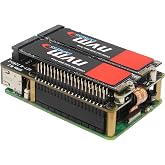
GeeekPi N05 M.2 NVMe to PCIe Adapter for Raspberry Pi 5
|
GeeekPi N04 M.2 NVMe to PCIe Adapter for Raspberry Pi 5
|
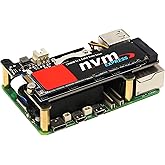
GeeekPi PCIe M.2 M-Key NVMe SSD PCIe Peripheral Bottom Board for Raspberry Pi 5
|
GeeekPi PCIe Express to Mini PCIe HAT M02 for Raspberry Pi 5
|
GeeekPi M01 PCIe M.2 E-Key NVMe SSD PCIe Peripheral Board for Raspberry Pi 5
|
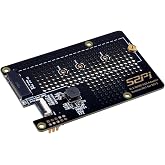
GeeekPi Tiny PCIe M.2 Key-M NVMe SSD PCIe Peripheral Board for Raspberry Pi 5
|
|
|---|---|---|---|---|---|---|
| Customer Reviews |
4.8 out of 5 stars 67
|
4.4 out of 5 stars 311
|
4.4 out of 5 stars 58
|
4.0 out of 5 stars 6
|
3.6 out of 5 stars 5
|
4.2 out of 5 stars 32
|
| Price | — no data | $12.90$12.90 | $16.89$16.89 | $16.99$16.99 | $17.99$17.99 | $13.99$13.99 |
| Compatibility | Raspberry Pi 5 | Raspberry Pi 5 | Raspberry Pi 5 | Raspberry Pi 5 | Raspberry Pi 5 | Raspberry Pi 5 |
| Support | PCIe | PCIe | PCIe | PCIe | PCIe | PCIe |
| Function | Support M.2 NVMe SSD 2230 2242 | Support M.2 NVMe SSD 2230 2242 2260 2280 | Support M.2 Key-M NVMe SSD 2230/2242/2260/2280 | Support All Mini PCIe Devices Network Cards Mini PCIe Adapter | Support M.2 E-Key NVMe SSD 2230/2242 | Support M.2 NVMe SSD 2230 2242 |
| Model | N05 | N04 | N07 | M02 | M01 | N10 |
| Compatible case | Metal Case for Raspberry Pi 5 ASIN:B0CJM52Y4H | Metal Case for Raspberry Pi 5 ASIN:B0CJM52Y4H | no data | no data | no data | no data |
| Position | Top | Top | Bottom | Top | Top | Top |
| Brand | GeeekPi |
|---|---|
| Model Number | N04-New |
| Manufacturer | GeeekPi |
| Mfr Part Number | EP-0210 -New |
| Warranty Description | 6 months |
| Built-In Media | Blu-ray |
| Best Sellers Rank | |
| ASIN | B0CRK4YB4C |
| Customer Reviews |
4.4 out of 5 stars |
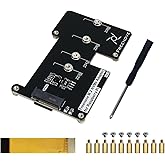
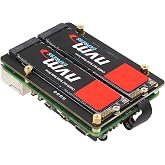
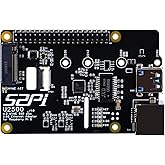
GeeekPi N04 M.2 NVMe to PCIe Adapter for Raspberry Pi 5, Support M.2 NVMe SSD 2230 2242 2260 2280
Share:
Found a lower price? Let us know. Although we can't match every price reported, we'll use your feedback to ensure that our prices remain competitive.
Fields with an asterisk * are required
| Hardware Interface | PCI, PCIE x 1 |
|---|---|
| Compatible Devices | Raspberry Pi 5 |
| Operating System | Linux |
| Style Name | Classic |
|---|
Customer Reviews, including Product Star Ratings help customers to learn more about the product and decide whether it is the right product for them.
To calculate the overall star rating and percentage breakdown by star, we don’t use a simple average. Instead, our system considers things like how recent a review is and if the reviewer bought the item on Amazon. It also analyzed reviews to verify trustworthiness.
Learn more how customers reviews work on AmazonAdd nvme storage to Rpi 4 or 5 for increased speed, storage space, and performance. Super-easy setup in Raspberry OS. This board plus a nvme stick gave me a 1TB machine, and now it boots in a couple seconds. It's a great upgrade for rPi if you're still using SD card. Once it boots, rPi can clone the SD into the nvme. No need for any other adapter. Instructions on the rPi site are great.
Works as expected
Wouldn’t work at first. I tried following the guides with putting parameters in the config.txt. Nothing would ever show and it wouldn’t light up. I removed all the config lines I tried and it worked the first time without them. It’s been smooth ever since!
I really like this adapter. It is extremely quick. The installation is fairly easy as well. The reason for 4-stars is that they make you completely remove the adapter to remove the SSD. The screw that holds down the SSD is underneath the adapter. Which is poorly designed.
Outside of that, it's excellent. This is the second adapter I have purchased in the past 3 months.
And yes... I do highly recommend this adapter.
Great product, easy setup, and performs as expected, and I've reached nearly the maximum speed for NVMe Gen 3x1, which is the limit of the RPi5.
Test was performed with a Micron 2500 1TB NVMe Gen 4x4 (PN: MTFDKBA1T0QGN-1BN1AABGA)
I'll update if anything fails.
Great product, easy setup, and performs as expected, and I've reached nearly the maximum speed for NVMe Gen 3x1, which is the limit of the RPi5.
Test was performed with a Micron 2500 1TB NVMe Gen 4x4 (PN: MTFDKBA1T0QGN-1BN1AABGA)
I'll update if anything fails.
Been running this non stop for a year now as a back up storage for my pc. I think the limitations of the speed that some people mention is not that hats fault it’s a single pci lane with a 1gig Ethernet that’s really the pi’s fault not the hat you’re always going to be limited. Came with clear instructions on what to enter in the console for the pi to notice the ssd. If you have trouble just ask chatgpt it helped me out with the commands to copy the os on the sd card to the ssd had everything running in less then 5 minutes
I wanted to move to an NVMe drive for a little web server I'm running on my Pi5 and this one fits perfectly and works equally as well. So far, I've had no problems and I'd say for the price, it can't really be beat! Installation was super easy of course as it just snaps right onto the top of the Pi.
Perfect fit, easy to setup and I’ve had no issues. I’ve continuously used the drive attached to this hat for months without issue.
Works well with 80mm cable to allow for tower cooler. Seeing speeds of 600+. Very happy
Item (an m.2 add on hat for raspberry pi) worked immediately on my RPi 5. Multi-boot several distros using PINN. Works great. Recommend to anyone that wants to add nvme support to their Pi.
Works as expected. But you need external machine with usb to nvme converter to re image os. If I tried boot Pi5 from sd card try to image directly from within pi. This way is not yet working as nvme is not shown as drive in pi imager. May be it works in future. Also I have observed when I set boot order as sd->nvme->usb. It misses boot for first time. Second time it boots from nvme.this adds to the boot time. Once booted it is very fast.so yes it works as per expectation but setup could be easier. I used wd blue 512gb ssd to flash ubuntu.
Works fine.
Works great. Didn't test the speed though. All the tools available.