![]() |
VOOZH | about |
We offer easy, convenient returns with at least one free return option: no shipping charges. All returns must comply with our returns policy.
Learn more about free returns.We offer easy, convenient returns with at least one free return option: no shipping charges. All returns must comply with our returns policy.
Learn more about free returns.| Compatible Devices | PC,Mobile,Ipad mini |
|---|---|
| Controller Type | Mobile Controller |
| Connectivity Technology | USB C |
| Additional Features | Ergonomic |
| Button Quantity | 8 |
| Hardware Platform | Smartphone |
| Power Source | Battery Powered |
| Compatible Video Game Console Models | Sony PlayStation 5 |
| Item Weight | 608 Grams |
|---|---|
| Package Quantity | 1 |
| Item Dimensions | 3.94 x 1.97 x 7.87 inches |
| Color | Black |
|---|
Razer Kishi Ultra Gaming Controller for Android, iPhone 15 & 16 Series, iPad Mini A17 Pro & 6 (USB C): Pro Controls - Ergonomic Grip - Stream PC, Xbox, PS5 Games on Mobile, Phone, Tablet - Chroma RGB
Share:
Found a lower price? Let us know. Although we can't match every price reported, we'll use your feedback to ensure that our prices remain competitive.
Fields with an asterisk * are required
| Brand Name | Razer |
|---|---|
| Model Name | Kishi Ultra |
| Warranty Description | 1 Year Manufacturer |
| Manufacturer | Razer |
| UPC | 840272909782 |
| Model Number | RZ06-05070100-R3U1 |
| Manufacturer Part Number | RZ06-05070100-R3U1 |
| Unit Count | 1.0 Count |
| Best Sellers Rank |
|
| ASIN | B0CXGMPLWK |
| Customer Reviews |
4.5 out of 5 stars |
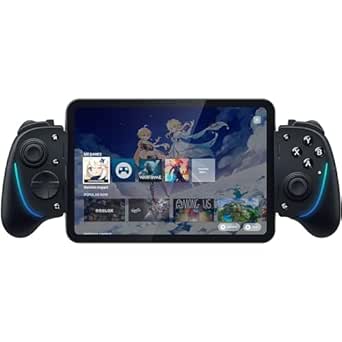
Enter a new era of mobile gaming with the power of a full-fledged pro console controller. The Kishi Ultra forges into new terrain as the greatest mobile controller ever created. Meticulously designed with console-class ergonomics, immersive haptics, and Razer Chroma RGB, the Kishi Ultra delivers a true console experience with zero compromise.
Download Razer PC Remote Play to stream games from your PC to your mobile device
Console gaming form factor meets Mobile Gaming convenience
Featuring Mecha-tactile 8-way d-pad & action buttons, Hall Effect triggers, programmable buttons
High-fidelity haptics that are more detailed than console controller vibrations and Chroma RGB
Avoid the hassle of removing your case to play
Enter a new era of mobile gaming with Razer mobile products, for bringing your best game anywhere you play
Play Everywhere. Hear Everything. The Ultimate Cross-platform true wireless earbuds with Razer HyperSpeed Wireless for universal low latency
Razer Kishi V2 USB C is a universal mobile gaming controller that brings a console-class gameplay experience to your smartphone
| Inputs | Two analog thumbstickswith clickable buttons (L3/R3) | One Mecha-tactile 8-way D-pad | Mecha-tactile ABXY face buttons | Two hall effect triggers (L2/R2) | Two bumpers (L1/R1) | Two programmable multifunction buttons (L4/R4) | Menu and Options buttons (labelled Start and Select in some games) | Home Button | Screenshot/Record| Razer Nexus Button |
| Ports | TYPE C plug for phone connection | TYPE C port for passthrough charging only | Charging indicator light |
| Dimensions and Weight | Height: 64.3mm | Width: 244.8mm | Depth: 210mm | Weight: 266g |
| Device Size Compatibility | Max dimensions: 12.32 mm (thickness, including camera) x 208.9 mm (Length) for phones and tablets. Remove or swap the included rubber cushions to give your device a secure fit. |
| iOS Device Compatibility | iPad mini A17 Pro, iPad mini (6th generation), iPhone 16, iPhone 16 Pro, iPhone 16 Pro Max, iPhone 15, iPhone 15 Plus, iPhone 15 Pro, and iPhone 15 Pro Max |
| Android Device Compatibility | Samsung Galaxy S23 Series, Google Pixel 6 / 7 / 8, Razer Edge |
| Other Device Compatibility | Compatible with Windows 11 and iPad via USB C cable |
Which devices does the Kishi Ultra work with?
The Razer Kishi Ultra is compatible with iPad mini A17 Pro, iPad mini 6, iPhone 16, iPhone 16 Pro, iPhone 16 Pro Max, iPhone 15, iPhone 15 Plus, iPhone 15 Pro, and iPhone 15 Pro Max. It also supports Android Devices running Android 12 or higher
What kind devices can I connect with Kishi Ultra?
You can connect the Kishi Ultra with iOS/Android smartphones that have USB C ports. The controller can also be connected to iPad mini A17 Pro/6th gen and Android tablets (up to 8 inches) with USB C ports
Do I have to remove my phone's case to use Kishi Ultra?
The Kishi Ultra works with most popular phone cases. Swap out or remove the attached rubber cushions to give your device and its case the most secure fit possible. Cases that directly cover the USB port of phones may not be compatible
Can I connect my earbuds while playing with Kishi Ultra?
Yes, the Kishi Ultra supports 3.5 mm audio for a direct audio connection, allowing you to enjoy immersive sound while gaming
Which games can I play with Razer Kishi Ultra?
Kishi Ultra for works with games that have controller support. Not all games and services have controller support for Android. Use Virtual Controller Mode via Razer Nexus on your Android to map touch screen controls to your controller.
| 👁 Image Kishi Ultra | 👁 Image Kishi V2 Pro for Android | 👁 Image Kishi V2 USB C | 👁 Image Kishi V2 (Lightning) | |
|---|---|---|---|---|
|
Customer Reviews
|
4.5 out of 5 stars 605
|
4.2 out of 5 stars 2,199
|
4.2 out of 5 stars 147
|
4.2 out of 5 stars 2,199
|
|
Price
| $96.97$96.97 | — | $106.78$106.78 | $39.99$39.99 |
|
Device Compatibility
| iPhone 15, iPad Mini, Android | Android Only | iPhone 15, Android | iPhones with Lightning Port |
|
Extendable Bridge
| Yes (Universal Fit) | Yes (Universal Android fit) | Yes (Universal Fit) | Yes (Lightning iPhone Fit) |
|
Controller Width Expanded
| 334.8 mm / 13.18 in | 265.5 mm / 10.45 in | - | - |
|
Button Type
| Mecha-Tactile & Hall-Effect | Microswitch & Analog Triggers | Microswitch & Analog Triggers | Microswitch & Analog Triggers |
|
Audio Input
| 3.5 mm Audio Jack | 3.5 mm Audio Jack | - | - |
|
Haptics Support
| ✔ | ✔ | ✘ | ✘ |
|
Razer Software
| Razer Nexus 3.0 | Razer Nexus 3.0 | Razer Nexus 3.0 | Razer Nexus 3.0 |
|
Special Functionality
| Razer Chroma RGB | - | - | - |
Customer Reviews, including Product Star Ratings help customers to learn more about the product and decide whether it is the right product for them.
To calculate the overall star rating and percentage breakdown by star, we don’t use a simple average. Instead, our system considers things like how recent a review is and if the reviewer bought the item on Amazon. It also analyzed reviews to verify trustworthiness.
Learn more how customers reviews work on AmazonWhat can I say about the Razer Kishi Ultra? It feels phenomenal in hand, and the buttons feel clicky. It’s the best d-pad I’ve had in a controller, including DS and Series and Pro controllers. It fits my iPad Mini 6 perfectly and even with my Folio case on!
I own 3 telescopic controllers, the Backbone, Galileo G8 and this. I’d rank them as 1) Kishi 2) Galileo G8 and 3) Backbone. Each serve their purpose. The backbone is great for small and quick gaming when you don’t have room. Middle tier is G8, works great and feels great. The top tier is the Kishi.
My only complains is the programmable button next to the shoulder buttons. It would’ve been more logical to map them behind the grips! That’s a missed opportunity. Also the location of the home button and the select button, should be swapped. The Nexus app is kind of lacking for iOS/iPadOS. I don’t like that I have to manually add things to my favourites from within the app. Also game pass cloud beta could’ve been better. You should be able to add shortcuts to the Nexus app, since Microsoft doesn’t have a dedicated cloud iOS app, you have to rely on browser URL for it. These are minor complaints, I know but they do hold true.
Last issue is the price, I can’t recommend if you’re on a budget. GameSir Galileo g8 does exactly what I needed sans one thing. It doesn’t fit the iPad Mini out of box. It’s half the price at 79.99, and well crafted, but the Razer has it beat for that aforementioned fact alone. Both of course lack portability of the backbone, which is normally 99.99, poorly priced for what you get. I will continue to use all three, for each specific use case.
What can I say about the Razer Kishi Ultra? It feels phenomenal in hand, and the buttons feel clicky. It’s the best d-pad I’ve had in a controller, including DS and Series and Pro controllers. It fits my iPad Mini 6 perfectly and even with my Folio case on!
I own 3 telescopic controllers, the Backbone, Galileo G8 and this. I’d rank them as 1) Kishi 2) Galileo G8 and 3) Backbone. Each serve their purpose. The backbone is great for small and quick gaming when you don’t have room. Middle tier is G8, works great and feels great. The top tier is the Kishi.
My only complains is the programmable button next to the shoulder buttons. It would’ve been more logical to map them behind the grips! That’s a missed opportunity. Also the location of the home button and the select button, should be swapped. The Nexus app is kind of lacking for iOS/iPadOS. I don’t like that I have to manually add things to my favourites from within the app. Also game pass cloud beta could’ve been better. You should be able to add shortcuts to the Nexus app, since Microsoft doesn’t have a dedicated cloud iOS app, you have to rely on browser URL for it. These are minor complaints, I know but they do hold true.
Last issue is the price, I can’t recommend if you’re on a budget. GameSir Galileo g8 does exactly what I needed sans one thing. It doesn’t fit the iPad Mini out of box. It’s half the price at 79.99, and well crafted, but the Razer has it beat for that aforementioned fact alone. Both of course lack portability of the backbone, which is normally 99.99, poorly priced for what you get. I will continue to use all three, for each specific use case.
Incredible device that works as good on iPad Mini 6 as it does with iPhone 15 Pro. Haven’t tried it with a case on the iPad Mini 6, but with a case on my iPhone (thin case) it works without any rubber guard.
Great trigger feel, and super customizable dead zones and digital vs analog inputs modes give you a ton of power with just the trigger settings, same with the joy sticks but to a lesser degree you can choose from two options for the input and then set the dead zones, although the “circulars input” versus normal is quite interesting for certain in-game scenarios. I love the lighting options being expansive enough to feel mine and yet remaining locked in many ways which ensures consistency in my experience using the product and in its design (which was well thought out and planned for).
Only thing I wish is for the ability to record a series of inputs to use for the R4 and L4 (basically the same as M1 and M2) buttons using the Nexus app like I can with my Manba One controller’s back buttons. Timing and ability to use the joysticks for this input is key, it allows me to map the buttons to complex input required for timed stick shooting in NBA 2K and NHL 2K and is the best feature that so few controller’s allow despite having the capability.
The only device that allows this and is an expandable gaming controller which hugs l the screen of another device is the abxylute S8 Bluetooth Gaming Controller, which connects using Bluetooth and doesn’t allow for charging while it’s connected and around the device. Pass through charging is a must with this type of mobile gaming. Despite this one flaw (please resolve it with an update), Razer Kishi Ultra crushes everybody in many other ways.
The Razer Nexus app is great and a true testament to the dedication that Razer has for PC players, with a nice way to show all of your mobile games and desktop games in one single customizable place. Like a card deck, everything being exactly where you want it, even the background picture and lighting according to my wants. Nice job, bonus credits to the developers at Razer.
I was conflicted with purchasing the Backbone vs the Razer Kishi Ultra so I ended up keeping both and here's why.
Background:
I have medium/small hands with a claw grip so when I end up extending my fingers beyond the resting range, depending if the controller is too large or too small, there will be some strain on my hands from extended gaming sessions.
Grip:
Using the Backbone felt pretty comfortable for my use and sized hands because of how smaller the controller is versus a normal sized controller. If I had to compare it to a controller, I'd say its comparable to a Nintendo switch controller. However, the Backbone buttons/layout are a bit more spaced out than the Switch controllers so it feels a bit more natural to hold. As for the Kishi, it is a bit more bulky and double the size of the backbone since it feels similar to holding a slightly thicker Xbox controller. Initially when holding the Kishi, I felt strain on my hands when using with my iPhone 15 pro max. But after trying the Kishi with my ipad mini 6, I got used to the grip after a few minutes and was able to play Zenless Zone Zero (action game) for 3 hours nonstop. I'd say it was very comfortable to hold when sitting, laying down, or resting your arms on a desk. So if you have medium to large hands, the kishi definitely feels a lot comfortable to hold once you get used to it and takes the cake over the Backbone.
Portability:
The Backbone is very compact/mobile for travel and I can easily fit it my pocket with or without my slim case. So if I needed to game for a few moments on the road, I can easily pull it out of my pocket and connect to my iPhone 15 pro max fairly easily. As for the Kishi, since it is a bit bulky you might need to have a small bag or carrying case to lug this around as it is much wider and thicker. So if you are a serious mobile gamer and travel, just be prepared to carry this around in a backpack as it it'll be difficult to simply toss into your pockets.
Compatibility with cases
The Backbone had updated their design from the previous version of the Backbone (1st gen) to accommodate phone cases. The latest Backbone attachments were able to hold my iphone 15 pro max with a case, so again portability and convenience was a nice factor here. Unfortunately with the Kishi, I wasn't able to fit my iPhone 15 pro max while using the slim case nor was I able to fit my iPad mini 6 also with a slim case. I had to remove both cases in both instances to successfully align the usb-C on the Kishi controller with the devices' ports. There is almost no room for my cases to fit without bending the controller's usb c as I think the Kishi was designed to eliminate any leverage movement between controller and device which is totally understandable. They do provide three different fitting attachments (phone, ipad, android) with the Kishi but I might need to modify one of them to continue to keep my device's case on without having to constantly remove it.
Gaming/Connectivity
Both controllers excel very well with responsiveness and timing for mobile/streaming/gaming type of activities. Both are very good when remote play via PS5 or Steam Link when on the same network. I didn't counter any latency or lag issues with either controller which is a plus.
Bottom line
I decided to keep both the Kishi and Backbone as they will serve different purposes. The Backbone will now be purely used for my traveling purposes as I like to travel light and can use the Backbone to attach to my phone without having to remove the case and can easily store away. I plan on keeping the Kishi for my home use (remote play via PS5/Steam, mobile gaming within home) as the grip feels a lot more comfortable for long hours and I prefer the spacing of the controls a lot more over the Backbone. Ultimately, I end up using the Kishi more than the Backbone whenever I'm at home.
I'd give the Kishi a 4.5/5 (Amazon doesn't have in between star ratings) since the only con I see is having to remove the cases to attach the Kishi to my devices. But rest assured that this is a very solid controller to have and definitely worth picking up if you plan on going on long trips, gaming conventions, or laying in bed to continue to playing via endless hours.
I for sure recommend picking up the Razer Kishi Ultra.
I was conflicted with purchasing the Backbone vs the Razer Kishi Ultra so I ended up keeping both and here's why.
Background:
I have medium/small hands with a claw grip so when I end up extending my fingers beyond the resting range, depending if the controller is too large or too small, there will be some strain on my hands from extended gaming sessions.
Grip:
Using the Backbone felt pretty comfortable for my use and sized hands because of how smaller the controller is versus a normal sized controller. If I had to compare it to a controller, I'd say its comparable to a Nintendo switch controller. However, the Backbone buttons/layout are a bit more spaced out than the Switch controllers so it feels a bit more natural to hold. As for the Kishi, it is a bit more bulky and double the size of the backbone since it feels similar to holding a slightly thicker Xbox controller. Initially when holding the Kishi, I felt strain on my hands when using with my iPhone 15 pro max. But after trying the Kishi with my ipad mini 6, I got used to the grip after a few minutes and was able to play Zenless Zone Zero (action game) for 3 hours nonstop. I'd say it was very comfortable to hold when sitting, laying down, or resting your arms on a desk. So if you have medium to large hands, the kishi definitely feels a lot comfortable to hold once you get used to it and takes the cake over the Backbone.
Portability:
The Backbone is very compact/mobile for travel and I can easily fit it my pocket with or without my slim case. So if I needed to game for a few moments on the road, I can easily pull it out of my pocket and connect to my iPhone 15 pro max fairly easily. As for the Kishi, since it is a bit bulky you might need to have a small bag or carrying case to lug this around as it is much wider and thicker. So if you are a serious mobile gamer and travel, just be prepared to carry this around in a backpack as it it'll be difficult to simply toss into your pockets.
Compatibility with cases
The Backbone had updated their design from the previous version of the Backbone (1st gen) to accommodate phone cases. The latest Backbone attachments were able to hold my iphone 15 pro max with a case, so again portability and convenience was a nice factor here. Unfortunately with the Kishi, I wasn't able to fit my iPhone 15 pro max while using the slim case nor was I able to fit my iPad mini 6 also with a slim case. I had to remove both cases in both instances to successfully align the usb-C on the Kishi controller with the devices' ports. There is almost no room for my cases to fit without bending the controller's usb c as I think the Kishi was designed to eliminate any leverage movement between controller and device which is totally understandable. They do provide three different fitting attachments (phone, ipad, android) with the Kishi but I might need to modify one of them to continue to keep my device's case on without having to constantly remove it.
Gaming/Connectivity
Both controllers excel very well with responsiveness and timing for mobile/streaming/gaming type of activities. Both are very good when remote play via PS5 or Steam Link when on the same network. I didn't counter any latency or lag issues with either controller which is a plus.
Bottom line
I decided to keep both the Kishi and Backbone as they will serve different purposes. The Backbone will now be purely used for my traveling purposes as I like to travel light and can use the Backbone to attach to my phone without having to remove the case and can easily store away. I plan on keeping the Kishi for my home use (remote play via PS5/Steam, mobile gaming within home) as the grip feels a lot more comfortable for long hours and I prefer the spacing of the controls a lot more over the Backbone. Ultimately, I end up using the Kishi more than the Backbone whenever I'm at home.
I'd give the Kishi a 4.5/5 (Amazon doesn't have in between star ratings) since the only con I see is having to remove the cases to attach the Kishi to my devices. But rest assured that this is a very solid controller to have and definitely worth picking up if you plan on going on long trips, gaming conventions, or laying in bed to continue to playing via endless hours.
I for sure recommend picking up the Razer Kishi Ultra.

Great controller. Been using it daily and it's not failed me once. The app works great. Fits good in my hands. I don't have to take the case off my nothing phone 2. It just works really well for me. The buttons click nice. It's a great design. Keep it up Razer. A+
For PS5, I was able to map the Playstation touchpad to a two-button combo using a different app, PXPlay on app store. I could not do this with the Razer Nexus app or the standard PS Remote Play app, the Razer Nexus app allows other game apps to populate for convenience and to change the RGB or turn it off. I was unable to map the L4 or R4 buttons to anything useful, I was hoping to map to the touchpad but that doesn't seem possible, I had to use the two button combo mapping on a separate app specifically for Playstation. It's lightweight, and goes into standby mode when the iPad is off/asleep after 15 minutes, I timed it. This controller and everything that came with it was in perfect condition. I did not use any of the supplied rubber bumpers because my iPad is in a case. I did place a small bundle of electrical tape against the left side to prevent the volume up/down buttons from being pressed, my case allowed me to do this with it still being super sturdy and it fits into the slot on the side no problem. I did not want to have to remove the case, ever. I really didn't want a heavier item that required me to charge it separately, this allows passthrough charging while playing. I did not buy it brand new, it was listed as used from Amazon.
I had all kinds of gamepads from all kinds of brands, including mobile controllers — and this thing leaves absolutely everything behind by a mile. The build quality, the ergonomics, the buttons and sticks — everything feels and works great, and two extra buttons are a nice addition.
Probably, the best choice for both native mobile and remote play (PS/Steam/Xbox) gaming.
Razor’s proprietary software is a bit extra, but get the job done and, few unnecessary functions aside, is a great addition to the product.
Overall, 5/5 product, at current price it’s an incredible deal.
PS: product description fails to mention it, but this gamepad works perfectly with iPhone 17/pro/pro max.
The handle is of first-class workmanship. It has all the necessary functions and is the best one I have ever used. Its drawback is that it requires reconnection after power loss. Sometimes it suddenly malfunctions during the game. I think this might be an occasional product issue. I have already applied for a replacement.
I simply love this controller. It works with my iPhone 15 Pro Max WITH the case on. I don't even have to use the enclosed adapters to make it work.
It connects quickly and easily. I basically fire up Call of Duty Mobile, and I'm winning games. Seriously, it took a bit of adjustment to watch an iPhone screen, but I'm getting 5-15 kd ratios, taking first place in nearly every match.
The thumbsticks have a good feel that makes accurate aiming and movement a breeze. The triggers have enough play that you can feather your shots.
The RGB is cool, though I'm not a big RGB fan, so if I didn't have it I'd be fine.
My only complaint is that it uses the Xbox configuration for the location of the D pad. I hate it, since I'm so used to the PS5 controller. But I'm used to it, though I get a little confused when I try to hit the Dpad, and it's not in the location I want.
Overall, this is a good buy. And even though the cost is higher than other controllers, you get what you pay for — high quality and high performance. Definitely worth the cost.
Exelente adaptable materiales premiun me encantó 10
I was on the fence about buying a backbone within the next couple weeks but, this dropped out of nowhere. I can’t begin to tell you how amazing this device is. It’s big, it’s got a nice rubber grip like the Xbox elite controllers, haptics (not on iOS YET). The backbone is good for getting the foot in the door playing around but, it was missing quality of features that I would like when I’m not at a desk or at a tv for extended periods. Like I said this thing is MASSIVE as in the photo and if you have big hands like myself this is perfect cause the backbone isn’t for you. The buttons on the controller click almost like a keyboard if that has any meaning. Games wise I played pretty much any gamepass game that’s cloud, helldivers works great with the steam link thing and yes the delta iOS emulator works like a charm with this. I’m also thinking about buying the new iPad mini and using it with this down the road. Razer really knocked it outta the park with this one. I know the price is a little much but, the features and quality of life updates that the other mobile phone controllers DONT have make this stand out. 9.5/10 *NOTE I’m using an IPhone 15 Pro Max with a dbrand ghost case* This thing is pretty much case friendly unless you got a brick protecting your phone lol
Je me trouve tres bien avec un bon grip, pas tres grande et avec controlles confortables. Qualité Razer.
Pour environ 65€ c'est un tres bon achat.
Muy bueno 10/10
Definitely gets 5 stars! Easy to hook up and start playing although I have had to relearn how to play some games. It fits my S21 ultra in its case easily! Feels great in the hands. Great fun!