|
VOOZH | about |
|
VOOZH | about |
We offer easy, convenient returns with at least one free return option: no shipping charges. All returns must comply with our returns policy.
Learn more about free returns.| Brand | Sony |
| Media Type | CD, DVD |
| Special Feature | Compact |
| Resolution | 1920x1080 |
| Connector Type | HDMI |
| Connectivity Technology | HDMI |
| Model Name | DVPSR510H |
| Color | Black |
| Item Weight | 2 Pounds |
| Audio Output Mode | Stereo |
Experience near HD picture quality and solid sound in a compact design. This versatile DVD player features fast/slow playback so you don’t miss a beat. You can even listen to your favorite CDs or tracks from your MP3 player.
| Ultra-compact design | Measuring just 10.6 in (270 mm) in length, this DVD player’s slim, compact design makes it a simple and stylish addition to your home entertainment system. |
| 1080p upscaling | Boost the quality of your DVD collection to near to Full HD. Connect the player to your TV via an HDMI cable and see standard definition movies upscaled to smooth, jagged-free, 1080p quality. |
| Multi-format playback | This DVD player supports the playback of CD-R/RW, DVD-RW/+R/+R DL, DVD-RW/-R/-R DL (including 3.15 in DVD), JPEG, MP3, WMA, AAC, and linear PCM playback. |
| Fast & slow playback w/ sound | Choose the speed of your playback. You can watch DVDs at a speed approximately 1.5 times faster than conventional playback — ideal for scanning drama or news. Slow playback with sound is also supported, so you can watch sports action in detail or listen to language programs at a slower speed. |
| Slideshow playback | See your favorite photos in a slideshow format with JPEG playback. You can also add background music from MP3 sources. |
| Multi disc resume | The DVD player can memorize the resume points of up to 6 previously played discs, so you can pick up where you left off any time |
| Versatile remote control | Using the remote control supplied with the DVD player, you can control TV sets from most major manufacturers, including basic control functions such as on/off, channel selection, and volume control. |
| Dolby Digital | Hear your DVDs as the director intended with Dolby Digital codec support. It delivers 5.1 channel surround sound when you’re watching movies. |
| Media Type | CD, DVD |
|---|---|
| Other Special Features of the Product | Compact |
| Resolution | 1920x1080 |
| Connector Type | HDMI |
| Connectivity Technology | HDMI |
| Audio Output Mode | Stereo |
| Audio Encoding | Dolby Digital 5.1 |
| Power Consumption | 6 Watts |
| Supported Audio Format | CD-DA, MP3 |
| Surround Sound Channel Configuration | 2.0 |
| Total Number of HDMI Ports | 1 |
| Video Encoding | MPEG-2 |
| Compatible Devices | Television |
| Analog Video Format | NTSC |
| Number of Channels | 2 |
| Video Output Resolution | 1080p |
| Controller Type | Remote Control |
| File Format | JPEG, MP3 |
| Color | Black |
|---|
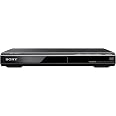
Sony DVPSR510H DVD Player, with HDMI port (Upscaling)
Share:
Found a lower price? Let us know. Although we can't match every price reported, we'll use your feedback to ensure that our prices remain competitive.
Fields with an asterisk * are required
| Brand | Sony |
|---|---|
| Model Name | DVPSR510H |
| Built-In Media | Multi-Band Tv Remote, Sony Dvpsr510H Dvd Player |
| UPC | 027242841093 |
| Global Trade Identification Number | 00027242841093 |
| Manufacturer | Sony |
| Model Number | DVPSR510H |
| Mfr Part Number | DVPSR510H |
| Item Type Name | home audio or video theater systems |
| Warranty Description | 1 year coverage for labor, 1 year coverage for parts |
| Manufacturer Contact Information | SAN DIEGO, CA, 92127 US |
| Unit Count | 1.0 Count |
| Best Sellers Rank |
|
| ASIN | B007F9XHAY |
| Customer Reviews |
4.4 out of 5 stars |
| Item Weight | 2 Pounds |
|---|---|
| Item Dimensions L x W x H | 10.63"L x 8.23"W x 1.52"H |
Experience near HD picture quality and solid sound in a compact design. This versatile DVD player features fast/slow playback so you don’t miss a beat. You can even listen to your favorite CDs or tracks from your MP3 player.
SAN DIEGO, CA, 92127 US
No returns.
Customer Reviews, including Product Star Ratings help customers to learn more about the product and decide whether it is the right product for them.
To calculate the overall star rating and percentage breakdown by star, we don’t use a simple average. Instead, our system considers things like how recent a review is and if the reviewer bought the item on Amazon. It also analyzed reviews to verify trustworthiness.
Learn more how customers reviews work on AmazonThis DVD player works just fine. Where we camp with our RV, there is absolutely no cable, satellite, or TV service at all, so it's nice to buy a few DVDs and have this player to watch movies at night or on rainy days.
It was a good buy for the money . Worked perfectly as an attachment to my home audio
Here are the good and bad on this product.
.
.
ADVANTAGES
.
1. Price is average. It compares to Toshiba, which makes a similar product.
.
2. The size is very small.
.
3. The upscaling feature is better than Toshiba. The HD picture is very sharp.
.
For those who do not understand "upscaling," let me explain. The moving picture on a television screen is created by very tiny dots (pixels) continuously flashing different colors, tones, and intensities in fractions of a second. These lines of pixels are stacked vertically and horizontally across the television screen. More pixels eliminate the jagged edges of video images. For this reason, HDTV with its 1,280 pixels horizontally and 720 pixels vertically shows more detail and sharper images than the standard television screen of 720x480.
.
Blu-ray video discs are designed to broadcast a 1,280x720 image, while standard DVDs show a 720x480 image. The improved sharpness and detail justifies the price of Blu-ray movies. They are usually two to three times the price of standard DVDs.
.
Upscaling is an inexpensive way to enable standard DVDs to broadcast an 1,280x720 image. The process is quite simple. An electric circuit board analyzes and records each vertical and horizontal line of colored dots. A mathematical average between the two lines is calculated. Then, an "averaged pixel line" is artificially created and forced between the true pixel lines. The added lines boost the 720x480 image to a 1,280x720 image.
.
Unfortunately, there are two problems. First, the process takes a fraction of a second. This translate to a very slight flickering. You can only see this up close while comparing identical movie scenes with a Blu-ray. Second, the artificially created pixel line is an average between the true pixel lines. In an identical Blu-ray scene, that line may fall above or below the "average" in color, tone, or intensity. As a result, the upscaling image is not as "true to life" as Blu-ray.
.
For most people, the two disadvantages are non-issues. The DVD player is 40% the price of a Blu-ray unit. Each standard DVD movie is half or a third the price of its Blu-ray counterpart.
.
4. It has a special feature that no other DVD player has. When the unit is turned "off," it remembers the exact spot on the movie. Later on when the Sony is turned "on," the DVD advances to that exact spot, and the film continues.
.
.
DISADVANTAGES
.
1. The unit looks and feels cheap.
.
2. The DVD carrier is made of thin plastic. It flexes when it is touched.
.
3. Sony does not provide a HDMI cable. You need to purchase it separately.
.
4. Almost everything is operated via the hand controller. If it breaks or becomes lost, operating the unit becomes almost impossible.
.
5. A 90-day warranty is short. . . . In fact, the warranty is almost useless. The cost in shipping the unit for factory repair work and its return equals 50% of the original price. You might as well throw the defective product into the trash can.
I purchased this DVD to play movies on DVDs attached to a high definition SONY TV via HDMI cable. I was looking for basic functionality that works well at a good price, and this is exactly what I got in this unit.
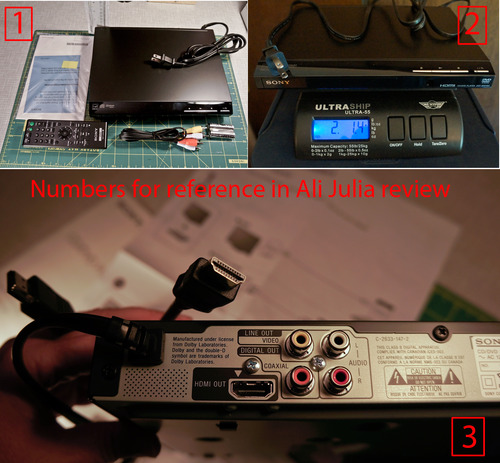
I am attaching a collage of three photos that I will be referencing in this review.
Photo #1 shows everything that came in the package: the DVD player, instructions, 3-RCA component video coax cable, remote and batteries. NOTE: HDMI cable is NOT included.
I placed the unit next to the rulers so you can see the dimensions of the unit: 10.5 inches long x 8 inches wide x 1.5 inch high. The power cord is 58 inches long.
The top of the DVD player is flat, so I was able to stack other things on top of it. The unit has no display, other than a green light next to the power button which tells you when the unit is on.
Photo #2 shows the DVD on a digital scale. It is very light weighing in at 2 pound and 1.4 oz
Photo #3 shows the back panel and the HDMI cable (not included). HDMI (High definition Multimedia Interface) delivers audio and high def video over the same cable. When you use HDMI cable you don't need to use the RCA cables that came with the DVD. I am showing the shape of the HDMI connector in case someone will find it helpful as it needs to be purchased separately. Amazon sells them at a really good price DVI Gear HDMI Cable 2M 6 feet.
HDMI cable is not required. I prefer it. Why? DVD will do upscaling with either cable but the quality of the output is likely to be better with HDMI. Using HDMI the signal remains digital. Using RCA the video has to go from Digital (source) to analog (signal) to digital (display). Each conversion results in a loss of quality.
UP-SCALING
-----------
This unit provides good up-scaling. Up-scaling is the ability to play standard definition DVDs on a high definition TV. Standard definition TV set and regular DVDs have a maximum resolution of 720x576. The high definition sets have higher resolution. If you play a standard definition DVD on a high resolution TV the video without up-scaling feature the video will look pixelated. Up-scaling adds pixels to the video to smooth out the pixelated images. The final image is not as good as tru Blu-Ray DVD, but I find it completely acceptable. I am watching the movies on LCD TV. Up-scaling works best on LCD and Plasma TVs, and not as well on CRT-based high definition TVs.
The default HDMI output from HDMI OUT output is set to 1920x1080p. This can be changed if needed, and is controlled by the TV/projector settings.
SUBTITLES and FAST/SLOW SPEED CONTROLS (Section added based on an interesting comment question)
--------------------------------------------
The DVD player supports 5 speeds: 0.6x, 0.8x, 1x (normal), 1.2x, and 1.4x. The speed is changed by repeatedly clicking on the fast/slow speed button on the remote. There are two ways to turn on subtitles: at the start of the DVD and at any time via remote. The sound is very good at each speed, however the subtitles are only shown at normal speed. When I tried forcing them on at another speed via remote control the player generates a message "operation not possible". As soon as I return to 1x speed the subtitles are shown again.
DVD player supports the following file formats:
-----------------------------------------------
1. Video: MPEG-1
2. Photo: JPEG
3. Music: MP3
Supported extensions:
--------------------
.mpg, .mpeg, .jpg, .mp3, .wma, .m4a, .wav,
Supported disks:
-------------------
DVD, DVD+-RW/+-R/+-R DL, Music CD/Super VCD, CD-R/-RW
RESTRICTIONS:
--------------
Files with copyright protection (digital Rights Management) cannot be played
Lossless files cannot be played
The player cannot play images in DVD-VR mode with CPRM (Content Protection for Recordable Media)
The player is designed to play disks with Compact Disk (CD) standard. DualDisks and music disks encoded with copyright protection do not conform to CD standard and may not be compatible with this unit.
WARNINGS from the manual:
-------------------------
1. To play a complex hierarchy of folders may take some time. Create albums with no more than two hierarchies.
2. The player will recognize a maximum of 200 albums and 600 files
It can recognize 300 photo and 300 music files if Photo(Music) is selected
3. The player cannot play a video file of size more than (720 width x 576 height)/2 GB
The remote is compatible with the following TVs:
------------------------------------------------
Sony (default)
Hitachi
LG/Goldstar/NEC
MGA/Mitsibishi
Panasonic
Philips
Pioneer
RCA
Samsung
Sharp
Toshiba
INSTALLATION:
---------------
1. Plug in HDMI cable
2. If you are using HDMI cable ignore RCA cables enclosed in the box
3. Plug in DVD into power and attach HDMI cable to the TV
4. Now you need to configure your TV to recognize the new HDMI component
For my SONY TV there were three steps
4a. Under components menu - Label Video inputs
This option tells TV which HDMI input to use and which one to skip. My TV has four HDMI connections, one already used and three were available. I was not sure which one I used for DVD so I enabled them all in this step
4b. I went to the list of all inputs where I saw all 4 HDMI connections I tried each one. Two of them generated an error that there was no input, one was my old connection (DVR) and one was the new DVD. This told me which inputs I should disable.
4c. I went back into "label video inputs" and set the label to "skip" for the two HDMI connections that told me "no input"
Overall, DVD player works well. The tray operations smoothly, the quality of the display is good, the remote works well. The only thing I don't like that the DVD turns off itself in 30 minutes if I put it on pause. I would have liked the ability to control this manually, or alternatively have the automatic power off be 2 hours. The unit does not shut off if it is being used. The auto shut off happens if the unit is in pause or stopped.
Ali Julia review
I purchased this DVD to play movies on DVDs attached to a high definition SONY TV via HDMI cable. I was looking for basic functionality that works well at a good price, and this is exactly what I got in this unit.
I am attaching a collage of three photos that I will be referencing in this review.
Photo #1 shows everything that came in the package: the DVD player, instructions, 3-RCA component video coax cable, remote and batteries. NOTE: HDMI cable is NOT included.
I placed the unit next to the rulers so you can see the dimensions of the unit: 10.5 inches long x 8 inches wide x 1.5 inch high. The power cord is 58 inches long.
The top of the DVD player is flat, so I was able to stack other things on top of it. The unit has no display, other than a green light next to the power button which tells you when the unit is on.
Photo #2 shows the DVD on a digital scale. It is very light weighing in at 2 pound and 1.4 oz
Photo #3 shows the back panel and the HDMI cable (not included). HDMI (High definition Multimedia Interface) delivers audio and high def video over the same cable. When you use HDMI cable you don't need to use the RCA cables that came with the DVD. I am showing the shape of the HDMI connector in case someone will find it helpful as it needs to be purchased separately. Amazon sells them at a really good price DVI Gear HDMI Cable 2M 6 feet.
HDMI cable is not required. I prefer it. Why? DVD will do upscaling with either cable but the quality of the output is likely to be better with HDMI. Using HDMI the signal remains digital. Using RCA the video has to go from Digital (source) to analog (signal) to digital (display). Each conversion results in a loss of quality.
UP-SCALING
-----------
This unit provides good up-scaling. Up-scaling is the ability to play standard definition DVDs on a high definition TV. Standard definition TV set and regular DVDs have a maximum resolution of 720x576. The high definition sets have higher resolution. If you play a standard definition DVD on a high resolution TV the video without up-scaling feature the video will look pixelated. Up-scaling adds pixels to the video to smooth out the pixelated images. The final image is not as good as tru Blu-Ray DVD, but I find it completely acceptable. I am watching the movies on LCD TV. Up-scaling works best on LCD and Plasma TVs, and not as well on CRT-based high definition TVs.
The default HDMI output from HDMI OUT output is set to 1920x1080p. This can be changed if needed, and is controlled by the TV/projector settings.
SUBTITLES and FAST/SLOW SPEED CONTROLS (Section added based on an interesting comment question)
--------------------------------------------
The DVD player supports 5 speeds: 0.6x, 0.8x, 1x (normal), 1.2x, and 1.4x. The speed is changed by repeatedly clicking on the fast/slow speed button on the remote. There are two ways to turn on subtitles: at the start of the DVD and at any time via remote. The sound is very good at each speed, however the subtitles are only shown at normal speed. When I tried forcing them on at another speed via remote control the player generates a message "operation not possible". As soon as I return to 1x speed the subtitles are shown again.
DVD player supports the following file formats:
-----------------------------------------------
1. Video: MPEG-1
2. Photo: JPEG
3. Music: MP3
Supported extensions:
--------------------
.mpg, .mpeg, .jpg, .mp3, .wma, .m4a, .wav,
Supported disks:
-------------------
DVD, DVD+-RW/+-R/+-R DL, Music CD/Super VCD, CD-R/-RW
RESTRICTIONS:
--------------
Files with copyright protection (digital Rights Management) cannot be played
Lossless files cannot be played
The player cannot play images in DVD-VR mode with CPRM (Content Protection for Recordable Media)
The player is designed to play disks with Compact Disk (CD) standard. DualDisks and music disks encoded with copyright protection do not conform to CD standard and may not be compatible with this unit.
WARNINGS from the manual:
-------------------------
1. To play a complex hierarchy of folders may take some time. Create albums with no more than two hierarchies.
2. The player will recognize a maximum of 200 albums and 600 files
It can recognize 300 photo and 300 music files if Photo(Music) is selected
3. The player cannot play a video file of size more than (720 width x 576 height)/2 GB
The remote is compatible with the following TVs:
------------------------------------------------
Sony (default)
Hitachi
LG/Goldstar/NEC
MGA/Mitsibishi
Panasonic
Philips
Pioneer
RCA
Samsung
Sharp
Toshiba
INSTALLATION:
---------------
1. Plug in HDMI cable
2. If you are using HDMI cable ignore RCA cables enclosed in the box
3. Plug in DVD into power and attach HDMI cable to the TV
4. Now you need to configure your TV to recognize the new HDMI component
For my SONY TV there were three steps
4a. Under components menu - Label Video inputs
This option tells TV which HDMI input to use and which one to skip. My TV has four HDMI connections, one already used and three were available. I was not sure which one I used for DVD so I enabled them all in this step
4b. I went to the list of all inputs where I saw all 4 HDMI connections I tried each one. Two of them generated an error that there was no input, one was my old connection (DVR) and one was the new DVD. This told me which inputs I should disable.
4c. I went back into "label video inputs" and set the label to "skip" for the two HDMI connections that told me "no input"
Overall, DVD player works well. The tray operations smoothly, the quality of the display is good, the remote works well. The only thing I don't like that the DVD turns off itself in 30 minutes if I put it on pause. I would have liked the ability to control this manually, or alternatively have the automatic power off be 2 hours. The unit does not shut off if it is being used. The auto shut off happens if the unit is in pause or stopped.
Ali Julia review
My husband and I recently purchased a new flat panel television, which was not compatible with our old dvd player. We wanted a basic model DVD player that could be connected through a HDMI cable to our new television. Although we only wanted a basic model, I still wanted to purchase a brand that I knew was backed by quality. This sony DVD player perfectly fits our needs. It steps you through the setup. It took me less than 5 minutes to set it up and less than 3 minutes to connect it to the television. The picture quality is crisp. The connectivity to the remote is flawless. We have not experienced any lag or distortion when playing DVDs. We have been very pleased with this purchase.
Very nice DVD player, but I had difficulty with linking it to my tv. The technology was not as intuitive as I had hoped. That's nothing against the DVD, just my ability to set it all up intially.
Works fine. Easy to install. I love the small size, my old DVD player took up so much room. I'm watching all my old favorites again. I did purchase a HDMI cable. I always found it gave a better picture. No bells and whistles that I don't need. Good value for the price.
Very small profile compared to typical stereo components. There is no external display of any kind (e.g. track number, play time) except a tiny power light, makes status difficult to discern especially when using the remote. Small size makes operating buttons hard to use. Plays CD’s very well. Can’t argue with Sony quality at this price point.
主にCDトランスポートとして購入しました。
RCAのアナログ出力はオーディオCDのソニー(昔のモデル)を彷彿させる音でした。音がとても良い。
他の会社のでも良かったのですが…REGZAのDVDプレーヤーはビデオ再生は安定していたが音はこんなものかという音でした。
ドライブ能力はちゃっちいのでこれ以上は元々望んでません。
しかし以外だったのがHDMIからの出力。
ソニーDVDプレイヤー→Hi-Vision アクオス(HDMI)…デジタルOPT出力→ソニーアンプ内蔵アクティブスピーカーへと接続。
テレビの音はミュートにしてソニーアンプ内蔵スピーカーから音を鳴らしました。メニューで音の選択肢が多くて楽しめる。沢山のそんなに観て無かったほったらかし音楽DVDの音が素晴らしい音で鳴りました。2グレードは違う音です。
ビデオは映像メインという諦めがひっくり返りました。
組み合わせもありますがコレのHDMIは馬鹿に出来ない。もちろんソニーのBRAVIAに併せる前提なのかと思います。
音楽LIVEのDVDを観る人はもう1つあっていいプレイヤーかも知れませんね。
テレビ録画のDVD再生等はまだ確認してません。
後はソニータイマー炸裂がいつかという事だけです。
今は星5つ。まあ6カ月以上もてば星5つで良いでしょう。
追記
後で2025年バージョンのソニーのBlu-rayプレイヤーを購入したが、これでDVDを観るなら、めんどくさいかも知れないが、こちらの方が音がいい。PCMのビット数を16と24から選べます。
この差は大きいです。音楽DVDならBlu-rayプレイヤーとは別にこちらも有るのは正解と判りました。
参考まで…。
Contrairement au descriptif le lecteur n'est PAS Blu-Ray. De plus la fiche d'alimentation n'est pas au format EU mais US donc inutilisable. NE PAS ACHETER!
I setup a small Vintage system for my mom in law who wanted to play her Elvis CD's for Christmas. She bought a crappy mini sytem at the flea market that wouldnt read her cd's so I promised I would make it right.
I got this because it was cheap and reads everything from dvd to cd cdr and cdrw etc. RCA out to a vintage Kenwood 4006 25Watt integrated amp and 2 Klisch synergy bookshelf speakers. Sounds really great compared to the fleamarket job.
This is a very small machine. No LCD in front to show tracks or anything but it does what I need to to do. She opens the tray puts the disk in waits a while and hits play...simple for mom.
She was rockin the house down when I went and plow her snow yesterday so i would say Mission accomplished
Buen aparato. Sólo falta que reproduzca Region 4. Ojalá siga existiendo el formato Fisico.
Faites attention, le câble d’alimentation n’est pas adéquate pour l’Europe