![]() |
VOOZH | about |
High price
Amazon strives to offer customers high quality pricing. We have recently seen better prices on Amazon or from other retailers for this product.
| Brand | Razer |
| Compatible Devices | Laptop |
| Connectivity Technology | Micro USB |
| Keyboard Description | Gaming |
| Recommended Uses For Product | Gaming |
| Special Feature | Portable, USB-C Wired, Compact Keyboard, Backlit, Lighting, Detachable |
| Color | Classic Black |
| Keyboard backlighting color support | RGB |
| Style | Huntsman Mini |
| Product Dimensions | 11.56"L x 4.07"W x 1.45"H |
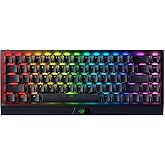
Dominate on a different scale with the Razer Huntsman Mini—a 60% gaming keyboard with cutting-edge Razer Optical Switches. Highly portable and ideal for streamlined setups, it’s time to experience lightning-fast actuation in our most compact form factor yet.
Choose between Black or Mercury Editions, and between Clicky or our improved Linear Switches.
Enjoy more responsive counter-strafing and aerial strafing for bunny hopping in FPS games with faster input activation between two selected keys. Prioritize your latest input without having to release the previous key
Speed of Light
Offers faster, lighter, and smoother actuation's than mechanical switches
Side-Printed Functions
Designed for greater durability, they’ll never have their labeling wear off with intense use
Lighting Presets
Activate up to 5 profiles, and choose between preset lighting effects without the need for software
Easy Setup and Storage
A cable latch ensures that it stays securely connected during gameplay
For Greater Durability
The casing is robust enough to withstand long hours of intense, regular use
#1 SELLING PC GAMING PERIPHERALS BRAND IN THE U.S. — Source: Circana, Retail Tracking Service, U.S., Dollar Sales, Gaming Designed Mice, Keyboards, and PC Headsets, Jan. 2019- Dec. 2023 combined
Experience non-stop comfort for all-day competitive play with our ultra-lightweight wireless headset. Featuring a super wideband mic and titanium-coated drivers for absolute clarity and power
Featuring our best-in-class technologies and a symmetrical shape improved with pros, shake up the meta with a wireless, lightweight esports mouse that thrives in top-flight competitive play
Refined by top esports pros, its ergonomic form is 25% lighter than its predecessor and backed by a set of cutting-edge upgrades
Zero in on a perfect aim with our first-ever glass gaming mouse mat - built to last with premium tempered glass. Optimized for optical sensors and specially treated for quieter swipes
What are the shortcuts for function keys?
You can access them by pressing the function key (FN) combined with the corresponding number (e.g. FN+1 for F1).
How do I cycle between the preset lighting effects?
Preset lighting effects work when Razer Synapse is not running – press FN + CTRL + 1 to 7 to cycle between the preset lighting effects. Pressing on the same number multiple times cycles through colors and effect variations.
Can I use my own USB Type-C Cable?
Yes, the Razer Huntsman Mini uses a non-proprietary USB Type-C cable—which means other similar cables will work just fine.
Do the keycaps have side-prints for secondary functions?
Yes, all secondary functions (function row, home key cluster, media controls, macros, and brightness control) are shown on the side of the keycap facing you.
Which keycaps can I use on the Razer Huntsman Mini?
The Razer Huntsman Mini can use any standard keycap set. We recommend checking out our Razer PBT Keycap Upgrade Sets to mix and match your colors.
Dominate on a different scale with the Razer Huntsman Mini—a 60% gaming keyboard with cutting-edge Razer Optical Switches. Highly portable and ideal for streamlined setups, it’s time to experience lightning-fast actuation in our most compact form factor yet.
| Compatible Devices | Laptop |
|---|---|
| Connectivity Technology | Micro USB |
| Additional Features | Portable, USB-C Wired, Compact Keyboard, Backlit, Lighting, Detachable |
| Keyboard Backlighting Color Support | RGB |
| Language | English |
| Power Source | Corded Electric |
| Switch Type | Linear Optical |
| Keyboard Layout | QWERTY |
| Hand Orientation | Ambidextrous |
| Button Quantity | 61 |
| Water Resistance Level | Not Water Resistant |
| Smart Home Compatibility | Smart Home Compatible |
| Minimum Required Operating System Version | Windows 10 |
| Compatible Operating System Family | Windows |
| Number of Keys | 61 |
| Number of Sections | 13 |
| Color | Classic Black |
|---|---|
| Style Name | Huntsman Mini |
Razer Huntsman Mini 60% Gaming Keyboard: Linear Optical Switches - Aluminum Top Frame - Chroma RGB Lighting - PBT Keycaps - Onboard Memory - Snap Tap - Black
Share:
Found a lower price? Let us know. Although we can't match every price reported, we'll use your feedback to ensure that our prices remain competitive.
Fields with an asterisk * are required
| Brand | Razer |
|---|---|
| Keyboard Description | Gaming |
| Antenna Location | Gaming |
| Built-In Media | Detachable Type C to Type A cable, Razer Huntsman Mini, User Manual |
| Model Number | RZ03-03390200-R3M1 |
| Model Name | Huntsman |
| Series Number | 3390200 |
| Unit Count | 1.0 Count |
| Manufacturer | Razer |
| UPC | 811659037596 |
| Mfr Part Number | RZ03-03390200-R3M1 |
| Item Type Name | Gaming Keyboard |
| Item Weight | 1.1 Pounds |
| Warranty Description | 2 year manufacturer |
| Best Sellers Rank |
|
| ASIN | B08B3JSKGR |
| Customer Reviews |
4.6 out of 5 stars |
| Item Dimensions L x W x H | 11.56"L x 4.07"W x 1.45"H |
|---|---|
| Enclosure Material | Aluminum |
Customer Reviews, including Product Star Ratings help customers to learn more about the product and decide whether it is the right product for them.
To calculate the overall star rating and percentage breakdown by star, we don’t use a simple average. Instead, our system considers things like how recent a review is and if the reviewer bought the item on Amazon. It also analyzed reviews to verify trustworthiness.
Learn more how customers reviews work on Amazonthe razer huntsman mini 60% gaming keyboard is pretty awesome. the linear optical switches feel super fast and responsive, which makes gaming and typing really smooth. i love the chroma rgb lighting – it’s super customizable and adds a lot of flair to my setup. the 60% layout is perfect for people who want more desk space, and it’s still really functional even with fewer keys. the pbt keycaps feel high quality, and the onboard memory is a nice touch for saving custom profiles. the snap tap feature is great for a clean, clicky feel with every keypress. if you're into compact keyboards, this one’s a solid choice.
Excellent and functional keyboard; its keys are soft and satisfying to press, they don't tire your fingers and you can play for hours without problems.
This is my first quality keyboard and first 60% keyboard. Previously I only had a red dragon keyboard so I do not have much experience with better options. What I really like about the Razer products is all of the customization. I am able to customizer the color scheme on the keyboard and adjust the speed of color change as well as what color each individual key is. I like the sound of the click on this board as well. It has some clicking but not as much as a lot of other gaming keyboards. It's enough for me to hear but not too much to where it's all my stream will hear through my microphone. The only part of the keyboard that does not feel as high quality is the space bar. I noticed this right away and it was kind of weird to me since the space bar is probably the most used button on a keyboard. If you're looking to get a 60% keyboard I would just make sure you mostly use the keyboard for gaming and not typing. Because of the size you're missing easy access to many buttons. You will have to use the function key in order to use delete, Page up, home, arrow keys etc. Also the layout has taken a minute for me to get used to where my fingers are on the keyboard when I am typing.
What can I say, it’s razer! Well made, exceeded all my expectations, been playing hard on fps games between pc and ps5 for years, close to 350 hours on bf6 and more than 5years on cod and valorant. And still it’s running. Would I buy another the answer would be yes!!!! Yes!!!! and yes!!!!!!!
You won’t need another!!! TRUST!!
I'm not exaggerating, it literately stopped working in around 5 minutes. I had it plugged into my desktop and the lights turned off after just a few minutes. I thought maybe my computer went to sleep, nope. I tried unplugging and plugging it back in on both ends of the usb cable nothing and lights wouldn't come back on. Tried another usb C to A cable, didn't work. Took it and plugged it into my Razer Blade laptop and nothing. The keyboard feels and sounds great, but considering it didn't last for me beyond 10 minutes I can't call it good which sucks because the typing feels and sounds great! So for now, I've plugged back in my reliable $15 Walmart keyboard.
Next day edit
After fiddling with it some more it would seem the usb c port on the keyboard is where the problem is. I can get Windows to detect the keyboard if I wiggle the plugged in cable provided but it rapidly connects and disconnects and the lights on the keyboard flash. It doesn't stay on long enough for Windows to set it up. So I'm not sure if this is a quality or shipping issue, but either way still disappointing. I also tried multiple other usb cables and they didn't help. I actually had better luck with the cable provided, but still not enough to get it to stay on.
After Service RMA
Increasing rating after contacting Razer support and working with them to get a RMA replacement. The replaced keyboard works great and I love it! The keyboard is precise, quiet and quick! I would give this replaced keyboard 5 stars, but dropping just one star since the first one I got did fail almost instantly.
Not a bad keyboard overall! The optical linear switches feel great to type on, with a slightly cushiony, relatively silent feel that I personally prefer. The spacebar stabilizer could use some improvement, but it’s not a dealbreaker. The optical switches are also said to respond faster and last longer than traditional mechanical switches, which is a nice bonus. As with most Razer products, the RGB is vibrant and highly customizable. Its compact design saves desk space and makes it easy to take on the go. I wasn’t a huge fan of how light it feels, it makes the keyboard feel a little less premium—but overall, it’s a solid choice for anyone looking for a light, portable, and reliable keyboard.
I really love the feel of it, pretty smooth and almost no noise coming out of it every time I press a key.
I used to have the ornata v2 from razer and decided to get an upgrade because I hated the clickly feel of their keys and how much space it took on my desk.
I hesitated at first because it was missing the media keys which I really loved plus every other key like prtscrn and ctrl+del, but after trying out the fn keys (hypershift) on the keyboard, all those worries disappeared! Really easy to remap and use.
So, the only downsides I saw to this keyboard were some aspects of its quality, not sure if it's just me or the same to everyone else but some keys look like they're missing a little bit of paint where the letters/numbers reside, or at least that's what it looks like to me. Also, the rgb on it isn't bright enough like other mechanical keyboards I've tried (from friends).
One other thing is the fact that it doesn't come with a wrist rest, which is a huge downside to me as I really loved it on my ornata v2.
Aside from the bad, it's a great keyboard, love its feel and the small amount of space it takes on my desk, would highly recommend to buy.
I really love the feel of it, pretty smooth and almost no noise coming out of it every time I press a key.
I used to have the ornata v2 from razer and decided to get an upgrade because I hated the clickly feel of their keys and how much space it took on my desk.
I hesitated at first because it was missing the media keys which I really loved plus every other key like prtscrn and ctrl+del, but after trying out the fn keys (hypershift) on the keyboard, all those worries disappeared! Really easy to remap and use.
So, the only downsides I saw to this keyboard were some aspects of its quality, not sure if it's just me or the same to everyone else but some keys look like they're missing a little bit of paint where the letters/numbers reside, or at least that's what it looks like to me. Also, the rgb on it isn't bright enough like other mechanical keyboards I've tried (from friends).
One other thing is the fact that it doesn't come with a wrist rest, which is a huge downside to me as I really loved it on my ornata v2.
Aside from the bad, it's a great keyboard, love its feel and the small amount of space it takes on my desk, would highly recommend to buy.
This keyboard looks amazing, it doesn't have the brightest backlights but I'm not that much of a fan for in your face rgb. Its pretty hefty for such a small keyboard and the wrist rest attachment you can buy for it makes it really comfortable. It is a bit on the pricy side for a keyboard but I still do recommend.
Vengo de un teclado 100% (Razer Cynosa Chroma) y al cambiarme a este (mi primer teclado mecánico 60%) me eh encontrado algunas cositas.
Pros:
1. Es más silencioso de lo que me esperaba, (switches rojos), incluso me di cuenta que me gusta más los teclados ruidosos.
2. Al ser 60%, es increíble el espacio que tienes para el mouse, en ocasiones en juegos disparaba sin querer por que el teclado 100% chocaba con el mouse y daba clics sin querer.
3. Mucho más fácil de limpiar que un teclado de membrana.
4. Los materiales son buenos. Dan la sensación de calidad de esas marcas top.
Contras:
1. Al ser productor, en ableton live si utilizaba las flechas de arriba, abajo, etc. Así que el utilizar la combinación fn+k o cualquier otra combinación para bajar o buscar samples, presets, etc se torna algo cansado, acciones que en teclados tkl o 100% que ocupan combinaciones de 1 o 2 teclas, en este ocupan 3 y se vuelve cansado.
2. Excel o programas de diseño como Autocad, solidworks en los que utilizaba el pad numérico, el no tenerlo se vuelve algo incomodo, en mi caso fueron de las cosas que más me costó adaptarme.
3. Pienso que es cuestión de perspectiva, pero el mío, en comparación al cynosa chroma se nota un poco menos intenso el RGB.
En mi experiencia, si no eres gamer al 100%, vienes de un teclado 100% y necesitas más espacio, cambia primero a un TKL para que no sea muy brusco el cambio y veas si en un futuro es conveniente para ti el cambiar a un 60%.
I've been using this new keyboard about a week, and while I didn't like it at first, the more I use it, the more I like it. It might not be idea for some but for me, it seems like it's going to be a perfect fit.
First off: I'm not really a gamer. The only games I mess with are flight sims, which don't really require super fast keyboards or mice, and occasionally I'll mess with a strategy sim like Command: Modern Operations. I am a professional video editor, though, and spend a lot of time working on a computer. This means one hand all over the keyboard and one hand on a mouse all the time. I was starting to develop pain in my right arm due to the wide angle of the mouse to my right to accommodate the full sized keyboard. I got a 60% keyboard to get my arms more centered and it worked like a charm; pain gone. I also prefer to buy gaming hardware for video editing because it performs better and there is no ghosting, which can create problems when doing very sensitive, heavy power using video editing.
The keyboard is well laid out. They keys are very comfortable. I am also a professional writer, and I was surprised to discover I writer faster and with less typos on this keyboard than I did with my previous full keyboard. Honestly, typing on the Huntsman Mini is an absolute pleasure. The Fn layer keys are not changeable with the Synapse 3 software, but any other key is, AND you can designate any non-FN layer key (except the useless Windows and Menu keys) to serve as macros or even alternative Fn keys. I was able to put a Fn key on each side of the keyboard this way, using the left alt button as another Fn key, which allows me to write faster. RAZER: PLEASE PUT Fn KEYS ON BOTH SIDES OF A KEYBOARD. IT HELPS A LOT.
The removable USB wire is the best laid out I have seen on any keyboard. It is recessed into a full enclosure so that lateral pressure will damage the USB wire or plug.
It has a bunch of RGB profiles, but I really don't care. As far as I am concerned, RGB is a gimmick and the public will soon grow bored with it. I set all keys to glow a muted green so that I can see them in low light when editing. Done.
In my perspective, the keyboard has three flaws. It should be heavier. It's competition from HyperX weighs almost twice as much due to an aluminum base plate. Being heavier would make the Huntsman Mini more stable, though, in truth, it doesn't move around on my desk when I type. It's pretty stable as it is. And it is, quite simply, overpriced. In Canada, it was $175 for the black with linear optical switches, while the white version was $15 less and the clicky switch version is a full $45 less. Razer is charging for brand and color.
The best/worst part of the keyboard, though, is the Synapse 3 software. You can technically use this keyboard fine without ever installing the software. You can change the RGB (who cares) and create macros (maybe kind of useful), but if you need to customize it (and I do actually really need to for work), you must install Synapse 3. Accessory makers like Razer and Logitech have been moving toward integrated software to run everything, under the delusion this is a great idea. This makes for huge apps simply to run a mouse, keyboard or headphones. Despite angry buyers who keep complaining they hate the resources these massive apps takeup, makers are sticking to this approach. Synapse 3 is about 400 megs and both a memory and compute cycle hog. Despite that, the software is powerful and will let you configure the keyboard in countless ways, changing keys, macros, executing software, emulating mouse functions and moving Fn buttons around.
Happily, I found a compromise. I discovered I could setup the keyboard keys to function like I wanted, (which was merely creating an extra set of arrow navigation keys on the Fn layer on the left, turning the annoying and useless Menu key into a second right-side Fn key (bigger Fn key, easier to hit), and setting up a third Fn key on on the left alt button. Then I can setup Synapse 3 not to auto-start on startup, turn off Synapse 3, and the keyboard remembers my settings. No more need of Synapse 3. It is off, out of the way, and not taking up precious RAM and compute cycles.
There are three caveats, and they are not mentioned in the user's manual. I had to figure them out for myself.. To leave Synapse 3 off, you cannot setup any alternative profiles, otherwise it demands you run Synapse 3 to use any setup, even the default profile. You must not change the default profile name. And you must not assign anything to the C key or the keyboard will not run the onboard default profile (probably a Synapse 3 bug).
I gave a lot of thought to purchasing the closest competition instead, the HyperX 60, which is markedly cheaper and significantly heavier, but in the end decided to stick with the Razer Huntsman Mini. I like the build quality of the HyperX 60 more, but the Razer Huntsman Mini has a far more configurable keyboard, is very quiet, still has great build quality and, most importantly to me since I couldn't really care less about gimmicky RGB profiles, I can setup the keyboard to do what I need it to do. And in the end, that's a what a keyboard is about--being able to do what you need it to do efficiently.
I ordered the linear optical switches and i got the clicky one
I love the keyboard
produto de qualidade e entrega rápida