|
VOOZH | about |
|
VOOZH | about |
We offer easy, convenient returns with at least one free return option: no shipping charges. All returns must comply with our returns policy.
Learn more about free returns.| Brand | Flipper |
| Model Name | WiFi Devboard |
| Ram Memory Installed Size | 32 GB |
| Memory Storage Capacity | 32 GB |
| CPU Speed | 240 MHz |
|
Flipper Zero
|
Flipper Zero Screen Protector
|
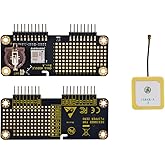
Flipper Zero Protoboards
|
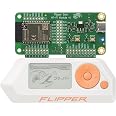
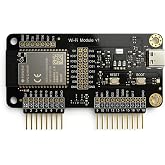
Wi-Fi Developer Board for Flipper Zero
|
Protective Silicone Case for Flipper Zero
|
Video Game Module for Flipper Zero
|
|
|---|---|---|---|---|---|---|
| Customer Reviews |
— |
4.4 out of 5 stars 112
|
5.0 out of 5 stars 2
|
4.5 out of 5 stars 1,756
|
4.7 out of 5 stars 484
|
5.0 out of 5 stars 4
|
| Price | — no data | — no data | — no data | $34.99$34.99 | $15.00$15.00 | — no data |
| Unit Count | Flipper Zero - 1 pack | Flipper Zero Screen Protector - 3 pack | Flipper Zero Protoboards - 3 pack | Wi-Fi Developer Board - 1 pack | Protective Silicone Case - 1 pack | Video Game Module - 1 pack |
| RAM Memory Installed | 32 GB |
|---|---|
| Memory Storage Capacity | 32 GB |
| Processor Speed | 240 MHz |
| Connectivity Technology | Wi-Fi |
| Operating System | Linux |
| Processor Brand | AMD |
| Wireless Compability | Bluetooth |
| Compatible Devices | Flipper Zero |
| RAM Memory Technology | LPDDR4 |
| Total Usb Ports | 1 |
| Item Dimensions L x W x H | 2.36"L x 1.18"W x 3.62"H |
|---|
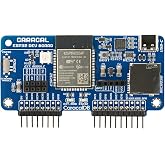
Wi-Fi Developer Board for Flipper Zero – ESP32-S2 Wireless Development Module with USB-C and GPIO
Share:
Found a lower price? Let us know. Although we can't match every price reported, we'll use your feedback to ensure that our prices remain competitive.
Fields with an asterisk * are required
| Brand | Flipper |
|---|---|
| Model Name | WiFi Devboard |
| Built-In Media | Manual, WiFi Devboard |
| UPC | 195893674879 |
| Global Trade Identification Number | 00195893674879 |
| Model Number | FLP-M-WIFI |
| Mfr Part Number | sm-944 |
| Manufacturer | Flipper Devices |
| Best Sellers Rank | |
| ASIN | B0BBWHS5R1 |
| Customer Reviews |
4.5 out of 5 stars |
Customer Reviews, including Product Star Ratings help customers to learn more about the product and decide whether it is the right product for them.
To calculate the overall star rating and percentage breakdown by star, we don’t use a simple average. Instead, our system considers things like how recent a review is and if the reviewer bought the item on Amazon. It also analyzed reviews to verify trustworthiness.
Learn more how customers reviews work on AmazonRating: ⭐️⭐️⭐️⭐️⭐️
Review:
The Flipper Zero WiFi Devboard has completely revolutionized the way I approach projects requiring wireless connectivity. This compact and powerful device has exceeded my expectations and opened up a whole new world of possibilities.
First and foremost, the build quality of the Flipper Zero Devboard is outstanding. It feels solid and well-crafted, giving me confidence in its durability. The compact size makes it incredibly portable, allowing me to take it with me wherever I go, ready to tackle any IoT or wireless project that comes my way.
Setting up the Flipper Zero Devboard was a breeze. The clear and concise documentation provided made the process seamless, even for someone with limited experience in working with development boards. I was up and running in no time, ready to explore the board's extensive features.
One of the standout features of the Flipper Zero Devboard is its integrated WiFi capabilities. The device effortlessly connects to wireless networks, enabling seamless communication and data exchange. This has been a game-changer for my IoT projects, as I can now remotely monitor and control devices with ease. The range and reliability of the WiFi connection are impressive, ensuring stable and uninterrupted data transfer.
The versatility of the Flipper Zero Devboard is truly impressive. Its compatibility with a wide range of platforms and programming languages, such as Arduino and MicroPython, allows developers of all backgrounds to harness its power. The comprehensive set of GPIO pins and sensors provide ample opportunities for customization and integration with various external devices.
Additionally, the onboard display and button interface of the Flipper Zero Devboard make it incredibly user-friendly. The intuitive menu system and responsive buttons enable quick and easy navigation, making prototyping and testing a breeze. The ability to display real-time data and receive user input directly on the device is a valuable asset for any project.
I also appreciate the dedicated community surrounding the Flipper Zero Devboard. The active online forums and resources provide a wealth of knowledge and support. It's great to see a passionate community coming together to share ideas, troubleshoot issues, and inspire one another.
Overall, the Flipper Zero WiFi Devboard has become an indispensable tool in my arsenal of development devices. Its reliability, versatility, and ease of use have made it my go-to choice for wireless projects. Whether you're a beginner or an experienced developer, the Flipper Zero Devboard is a must-have for anyone looking to dive into the exciting world of IoT and wireless connectivity.
Note: Always ensure that you have the necessary technical skills and knowledge to work with development boards and follow safety guidelines when using the Flipper Zero WiFi Devboard.
Works great and great build
Let’s keep it real: the Flipper Zero is already a Swiss Army knife for radio nerds, IR tinkerers, and security pros. But when you pair it with the ESP32-S2-based WiFi devboard? That’s when it goes wireless rogue mode.
The board slides right onto the GPIO pins like it was born there, powered directly from the Flipper itself—no extra wires, no fuss. Once installed and flashed (yes, RogueMaster or Marauder firmware will open doors—literally and figuratively), you’re in full WiFi attack and scan mode.
I was able to set this up with Marauder perfectly. It’s durable too. Zero issues and a smooth installation. I was also able to successfully run various tests with this. I was a little bit worried because it looked like someone returned the packaging previously but that’s probably just the way they seal the box. 10/10 a great dev board with no problems.
Adds great functionality to the Flipper Zero with solid build quality. Works well for tech-savvy users, but lacks setup guides—may be tricky for beginners.
Flipper zero WiFi dev boards can be flashed with updated firmware to execute wireless pen testing.
Wish it came with another flipper “hack the world” sticker though. Also, it needs the sd card slot on it for sure. You can save it to the flipper sd card but it causes problems and fails a lot. I’m running Momentum. I’ve had my flipper for a while now but I’ll likely wipe it and reinstall momentum on there fresh with the WiFi board to fix marauder from failing. Also, it only likes certain sd cards. Some are incompatible or not supported.
These items are shipped from China and you gonna wait 2+ weeks no matter what the vendor says shipping will be. Amazon covers and says it was their shipping issue but its the standard 2 weeks as usual and covers for them. Board is legit and works fine. Just need honest delivery date. Tracking doesn't start till it arrives in the US in California and thats even sketchy.
Facile à mettre en place, on trouve très facilement des tutoriel pour changer les programmation de la carte. Je conseille à tous les utilisateurs de Flipper d’acheter cette wi-fi dev board
È arrivata in una confezione che ha permesso al dispositivo di arrivare integro e perfettamente funzionante.
Sul dispositivo non dico nulla perché chi lo vuole acquistare sa esattamente come funziona.
Per mia tranquillità ho acquistato anche la custodia.
Easy to use quality product
There's not much to the Flipper until you get the modules- with the WIFI dev board being the staple necessity. I don't know what you are doing with your Flipper otherwise maybe you have a CC11 or NRF24 module... but, the WIFI Dev board opens up the Flipper zero that much more providing you with the ability to scan wireless signals around you, doing some neat tricks along the way. Because, it isn't just theWIFI Dev board... complimented with firmware like Rogue Master or Extreme and you get the whole meal deal. I even upgraded my Dev board with Don't Call Me KoKo's expansion pcb.adding antenna connections and GPS ...you need to be able t solder a bit... but outside of that..it is a small upgrade that adds alot of extra functionality. There are also a number of other antenna customizations you can do, but be careful, I damaged my first WifI dev board... I scratched off a little too much of the copper where the antenna connector is supposed to be soldered onto...while soldering it wasn't adhering so I ended up over heating components and making a mess of the thing. I guess that was my learning board. Flashing the appropriate firmware to the WIFI dev board is as easy as clicking a few links and making sure the SD card is formatted fat32..leave the SD card in the dev board to capture data...but you can set it up to do so either way on the Flipper of the SD card. I prefer to have the files saved to the SD card on the dev board. Get yourself a enclosure since it is a raw PCB which is open to the elements.. easily can be shorted, ruined....speaking of ..make sure that your Flipper is turned off when putting the Dev board in.. or when taking it out. Just a small precaution that can go a long way.. wouldn't want to ruin either the Flipper or the WiFi dev board because you couldn't take a minute to wait through a power cycle......oh I got my case also from Don't Call me KoKo's web store. There are lots on places like Etsy...about 10 to 30bucks...depending how fancy you want..or need...like I mentioned, I added GPS and some more functionality to my WiFi dev board o the case is a bit more than just your normal enclosure.
All in all, the WiFi Dev board is a crucial addition to the Flipper Zero...there is a bit of a Learning curve for those that never played around with such devices...but the learning curve flattens out quickly and once you learn how to set up a WiFi Development board then you know how to flash firmware on many other devices going forward. It's a good lesson to learn. It'll benefit you for the future.
Brilliant item
You wont be disappointed